

Wi-Fi 6 vs Wi-Fi 7 is the router question most homes face at upgrade time. Both standards move data across a home, but they organize that work in different ways. The difference matters in some homes and barely registers in others.
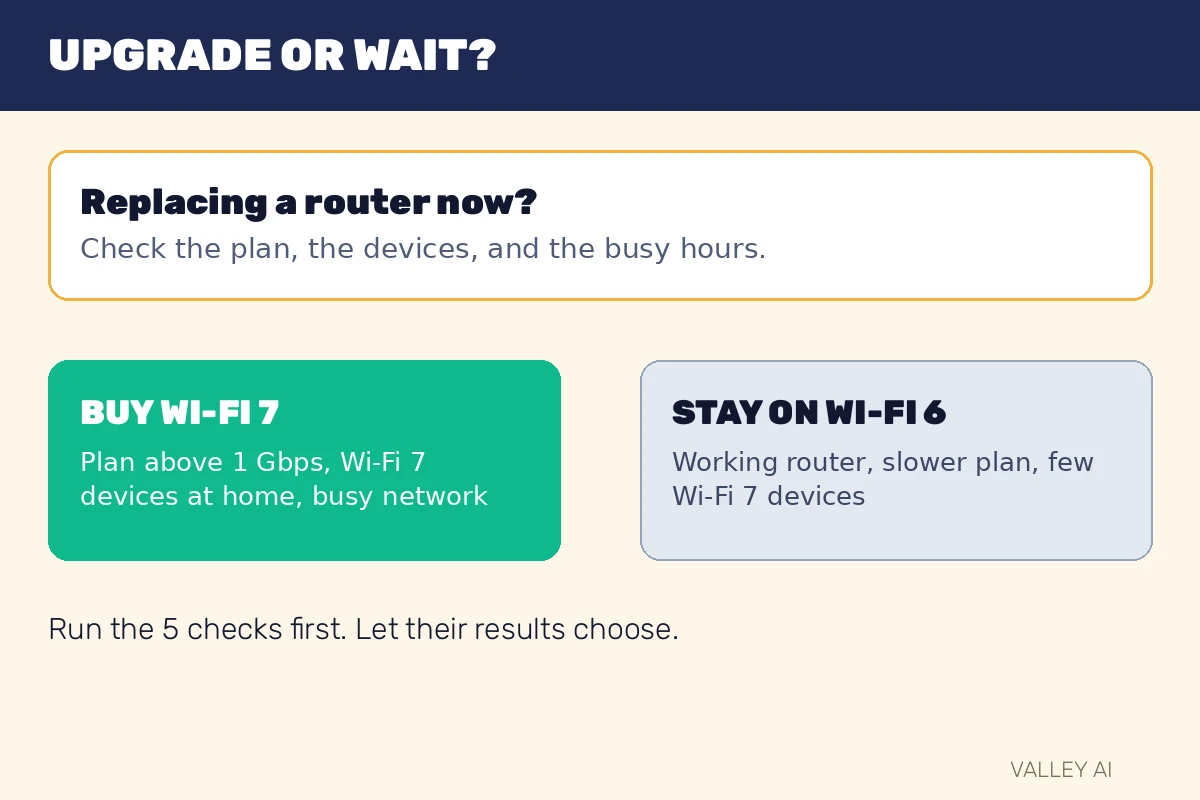
Buy Wi-Fi 7 when three conditions line up at once. They are a plan above 1 gigabit per second, several devices that already support Wi-Fi 7, and a busy home network. In every other case, a working Wi-Fi 6 router stays the sensible choice until the next router purchase.
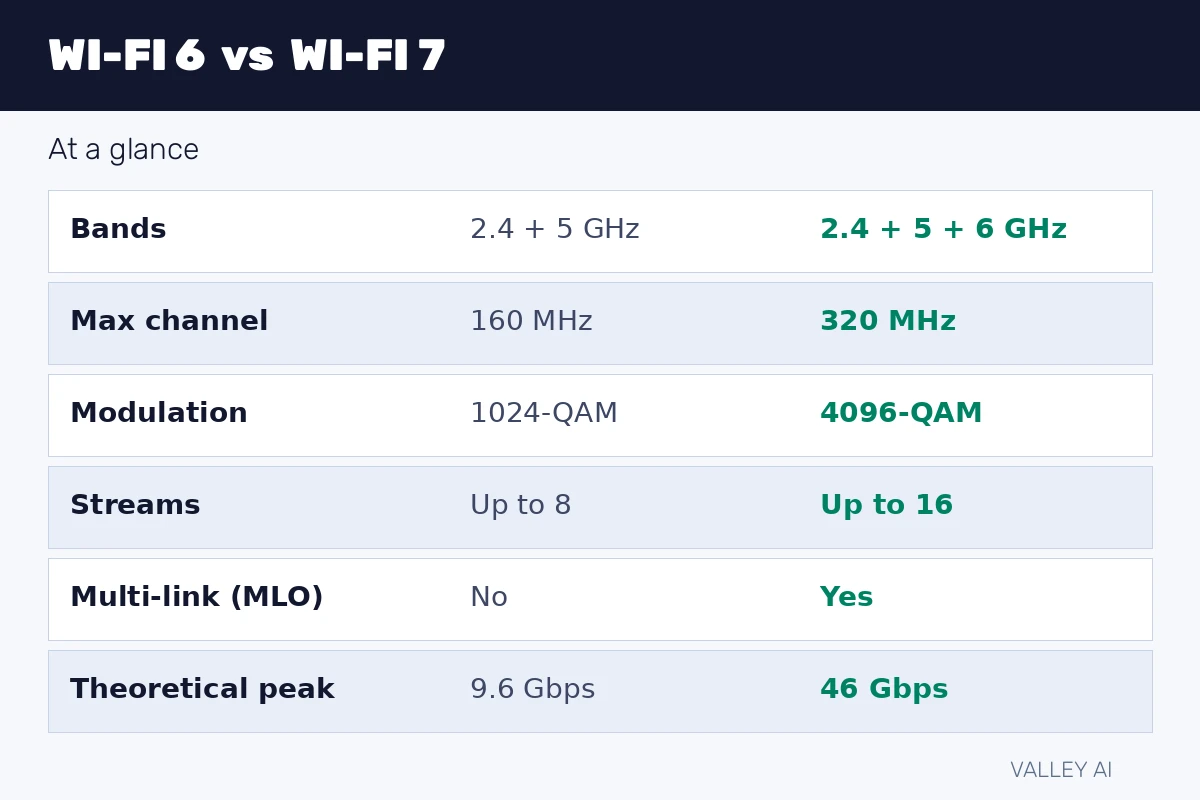
Wi-Fi 6 vs Wi-Fi 7 at a glance
The table sets the two standards side by side. Read each row as one attribute, from the standard name down to the theoretical peak.
| Attribute | Wi-Fi 6 | Wi-Fi 7 |
| IEEE standard | 802.11ax | 802.11be |
| Bands | 2.4 GHz and 5 GHz | 2.4 GHz, 5 GHz, and 6 GHz |
| Maximum channel width | 160 MHz | 320 MHz (6 GHz band only) |
| Modulation | 1024-QAM (10 bits per symbol) | 4096-QAM (12 bits per symbol) |
| Spatial streams | Up to 8 | Up to 16 |
| Multi-Link Operation | No | Yes |
| Theoretical peak | About 9.6 Gbps | About 46 Gbps |
What Wi-Fi 6 changed
Wi-Fi 6 carries the IEEE name 802.11ax and reached certification in 2019. It runs on 2.4 GHz and 5 GHz. Its main job was handling many devices at once, a problem that grew as phones, laptops, televisions, and smart speakers filled homes.
OFDMA divides one channel into small resource units and serves several devices inside a single transmission round. A channel is a slice of radio spectrum, measured in megahertz. One megahertz equals one million cycles per second, and a wider channel carries more data in the same time.
Modulation decides how much data each radio symbol carries. Wi-Fi 6 uses 1024-QAM, which packs 10 bits into each symbol, because 2 raised to the power of 10 equals 1024. Denser modulation lifts speed only while the signal stays clean.
MU-MIMO lets a router talk to several devices at the same time through separate spatial streams. Wi-Fi 6 supports up to 8 streams. A stream is one independent radio path between router and device. More streams let the router serve more devices without making each one wait as long.
Battery devices gain from Target Wake Time. The feature lets a sensor or doorbell radio agree on wake windows with the router. Between windows, the radio sleeps. It stays off the air for traffic that rarely arrives. The saving shows up in battery life. Speed does not change.
For a desktop that never moves, a cable gives the steadier link, since it removes the shared-air problem described in Wi-Fi vs Ethernet.
What Wi-Fi 7 adds
Wi-Fi 7 carries the IEEE name 802.11be and reached certification in 2024, when the Wi-Fi Alliance introduced its Wi-Fi Certified 7 program. It runs on 2.4 GHz, 5 GHz, and 6 GHz. Its defining change is Multi-Link Operation, shortened to MLO.
MLO lets one device hold links on two bands at the same time and move data across both. A Wi-Fi 6 link is one road between router and device. MLO opens a second road beside it and splits the load across both roads, so a slowdown on one band leaves the other carrying data.
A device on MLO can also shift traffic between bands without dropping the connection and rejoining the network. That shift matters most during video calls and online games, where a short gap shows up as frozen video or a lag spike.
Wi-Fi 7 widens the maximum channel to 320 MHz, but only in the 6 GHz band. That width equals twice the 160 MHz maximum of Wi-Fi 6. A wider channel carries more data, and it also needs cleaner spectrum, because interference anywhere inside it reduces the gain. TP-Link’s Wi-Fi 6 vs Wi-Fi 7 comparison lists the same 320 MHz maximum and the 46 Gbps ceiling.
The signal itself gets denser too. Wi-Fi 7 moves to 4096-QAM, which packs 12 bits into each symbol, because 2 raised to the power of 12 equals 4096. Spatial streams rise to 16. Both gains need a strong, clean signal, so they show up near the router far more often than at the far end of a house.
Preamble puncturing lets a Wi-Fi 7 router use the clean parts of a wide channel. When one part carries interference, the router keeps the rest, rather than abandoning the full width. The gain is steadier speed in crowded air.
The router decides how devices share airtime, and that job belongs to the router alone. The router vs modem distinction decides which box a buyer replaces when a new standard arrives.
Does a Wi-Fi 7 router speed up a Wi-Fi 6 phone? No. The link runs at the capability both ends share. A Wi-Fi 6 phone on a Wi-Fi 7 router gets Wi-Fi 6 behavior. The router’s newer features wait for a device that supports them.
Where Wi-Fi 6E fits
Wi-Fi 6E is Wi-Fi 6 with the 6 GHz band added. It brings cleaner spectrum and extra channels to homes where 5 GHz air is crowded. It does not bring MLO, 320 MHz channels, or 4096-QAM.
Can a firmware update turn a Wi-Fi 6E router into a Wi-Fi 7 router? No. Wi-Fi 7 features need different radio hardware, so an update cannot add MLO or 320 MHz channels to a 6E box.
That distinction sets the price logic for a buyer choosing between a discounted 6E router and a Wi-Fi 7 router. The 6E router buys calmer spectrum. The Wi-Fi 7 router buys calmer spectrum plus multi-band operation and wider channels.
Why headline speeds stay theoretical
An internet plan sets the ceiling for everything arriving from outside the home. A 500 Mbps plan cannot deliver more than 500 Mbps to any device, whatever the router standard. The router standard only decides how much of that plan reaches each device, and how steadily it arrives when many devices share it.
Traffic inside the home follows a different ceiling. A file moving from a laptop to a network drive never leaves the house, so the internet plan never touches it. The router standard and the link quality decide that transfer speed. A home with a slow plan can still move local files fast. A home with a fast plan can still crawl on a weak link.
Walls and floors shape real speed more than any spec row. The 6 GHz band carries the widest channels and the least crowded air, and it also travels the shortest distance through a house. A room two walls from the router may fall back to 5 GHz. Wi-Fi 7 still helps there through MLO. The 320 MHz gain stays behind.
Why does 6 GHz fade through walls sooner than 2.4 GHz? Higher frequencies carry shorter wavelengths. Shorter wavelengths lose more energy passing through solid material. A 6 GHz signal reaches fewer rooms than a 2.4 GHz signal from the same router.
Crowding decides how much of the new capacity a home feels. In a quiet home with few devices, the extra capacity sits unused for most of the day. In an apartment building, dozens of networks share the same air. Wider channels and multi-band links keep each device moving while neighbors compete for the same spectrum.
Latency for online gaming depends on every hop between device and server. Is satellite internet good for gaming shows a provider-side hop that dominates total delay for satellite homes.
Worked numbers
The calculations use labeled inputs, so each result can be checked by hand. Theoretical peaks come from the standards, and the download example uses a file size any reader can picture.
- Theoretical ceiling. Inputs: Wi-Fi 7 peak 46 Gbps, Wi-Fi 6 peak 9.6 Gbps. 46 divided by 9.6 equals about 4.8, so the Wi-Fi 7 ceiling sits about 4.8 times the Wi-Fi 6 ceiling on paper, before any real-world limit applies.
- Denser signal. Inputs: 4096-QAM at 12 bits per symbol, 1024-QAM at 10 bits per symbol. 12 divided by 10 equals 1.2, so each symbol carries 20% more data, before distance and interference reduce the gain.
- File download. Inputs: file size 10 gigabytes, counted as 10,000 megabytes; link A at 500 Mbps, equal to 62.5 megabytes per second; link B at 1 Gbps, equal to 125 megabytes per second. 10,000 divided by 62.5 equals 160 seconds. 10,000 divided by 125 equals 80 seconds. Doubling the link halves the wait, and the plan decides which link a home gets.
- Both-ends check. Inputs: router Wi-Fi 7, phone Wi-Fi 6. Shared capability: Wi-Fi 6. The link uses Wi-Fi 6 features, and the Wi-Fi 7 features stay unused until the phone changes.
Checks you can run before buying
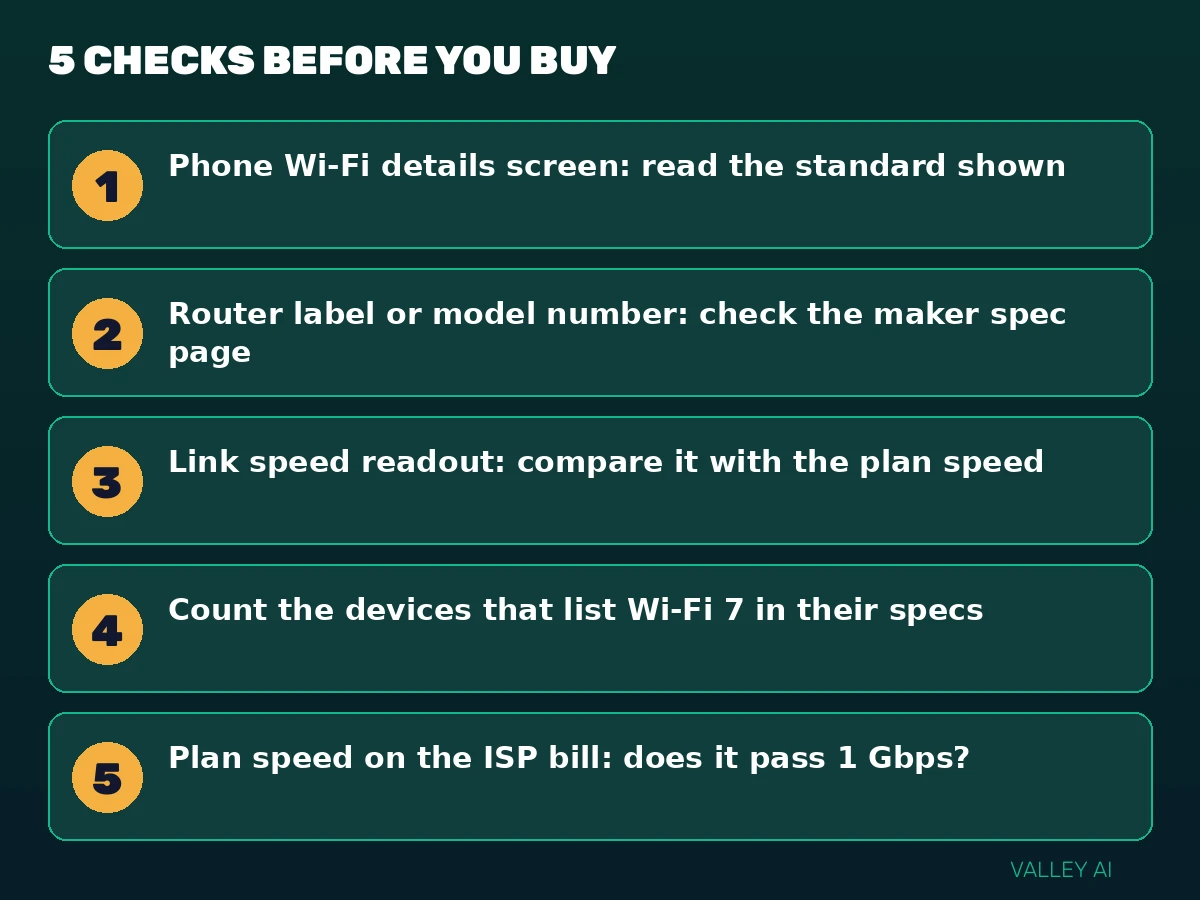
Five checks, run in order, give the answer for a specific home. Each check takes under a minute, and each one uses a screen or a label the reader already has.
- Open the phone Wi-Fi details screen and read the standard or protocol name shown for the current network.
- Read the router label or search the model number on the maker spec page, and note the standard it lists.
- Read the link speed shown in the device Wi-Fi details or the router app, and compare it with the plan speed.
- Count the devices in the home that list Wi-Fi 7 in their own specs.
- Read the plan speed from the ISP bill or account page, and note whether it passes 1 Gbps.
Who should upgrade, who should wait
Buy at a natural replacement moment: a failing router, a move, or a plan upgrade. Buying mid-cycle for a single device rarely pays, because the rest of the home stays on its old standard.
A buyer replacing a router this month faces a different choice from a buyer whose router works well. The replacement buyer gets years of use from the newer standard, while the working-router buyer pays for capacity the home cannot use yet.
An old router can stay useful after replacement. Set it up as an extra access point in a far room, or as a wired switch for devices near a desk. That reuse costs nothing beyond a cable, and it often fixes a dead zone better than any standard change.
Mesh and placement solve a different problem from the standard. A dead zone at the far end of a house needs a closer access point. A wired link for the device in that room works too. A newer standard alone leaves that room unchanged.
Conclusion
Run the five checks before spending anything, then let their results choose the router. Put any money the checks save toward placement, or toward a wired link for the one device that matters most.
Frequently asked questions
Should the 2.4 GHz, 5 GHz, and 6 GHz networks share one network name?
Merging the bands under one name lets the router steer each device to a band it judges suitable, which suits most homes. Separate names give manual control, so a reader tracing a problem can tell at once which band a device uses. Pick merged names for simplicity, and separate names only while diagnosing a stubborn device.
Does a Wi-Fi 7 router need a special cable to the modem?
The link between router and modem needs a port rated above 1 Gbps to pass multi-gig speeds to wired devices, such as a 2.5 Gbps Ethernet port. A standard 1 Gbps port caps wired throughput at 1 Gbps, whatever the wireless standard. Check the port rating on both boxes before paying for a multi-gig plan.
Can a neighbor’s Wi-Fi 7 router slow down a Wi-Fi 6 network?
Networks in one building share airtime on overlapping channels, so a busy neighbor network can delay any nearby transmission. BSS coloring in Wi-Fi 6 helps a router tell its own traffic apart from a neighbor’s traffic and transmit sooner in that situation. Picking a less crowded channel in the router settings also cuts the overlap.
Will older smart home devices connect to a Wi-Fi 7 router?
Most smart home devices use 2.4 GHz and older standards, and Wi-Fi 7 routers keep a 2.4 GHz radio for them. Keep the 2.4 GHz network enabled during setup, and check each device’s own requirements when a sensor refuses to join. A device that only lists 2.4 GHz will join that radio and work as before.
Should a buyer wait for Wi-Fi 8?
Early work on the next standard has begun, and consumer devices for it remain years away. A router bought now serves through several device upgrade cycles before that standard matters to a home. Waiting for a standard with no shipping hardware leaves a failing router in place for no gain.

Kaleem
Kaleem is a Computer Science graduate (Virtual University of Pakistan) and the founder and editor of Valley AI, where he publishes in-depth, tested guides on computer hardware, artificial intelligence, and how the internet works. Every guide is researched from primary sources, tested hands-on where possible, and updated when the facts change.