

Click a link and the page appears in under a second. A padlock sits in the address bar. Between the click and the page, your browser and the server ran a negotiation that decides whether anything you send stays private.
That negotiation is the TLS handshake. It runs before a single byte of the page moves, and it finishes in a handful of messages. The rest follows one real handshake, message by message, and solves the key exchange at its center with real numbers.
You have already used TLS thousands of times today. Every login, every payment, every message you sent through a browser rode on a handshake like this one. The mechanism is short enough to follow in full, and the padlock means nothing until you know what backs it.
Three promises before a single byte moves
TLS sits between two layers you already know. TCP moves the bytes; HTTP gives them meaning. TLS wraps the HTTP traffic in encryption, so the bytes travel over TCP and the meaning belongs to HTTP, but no one between the two ends can read or change them.
Every TLS connection makes three promises. Confidentiality keeps the data unreadable to anyone except the two ends. Authentication proves the server is the site it claims to be. Integrity proves no one changed the data on the way. If any one of the three fails, the connection fails with it.
The padlock marks the port, not the page. Plain HTTP uses port 80 and sends everything in the open. HTTPS runs the same HTTP through TLS on port 443. The S in HTTPS is the whole difference, and the handshake is what puts it there.
- Which TLS version the two sides will speak.
- Which cipher suite they will use.
- Whether the server is who it claims to be.
- Which session keys will encrypt the rest of the conversation.
DNS over HTTPS queries run inside a TLS session of their own, so the name lookup and the page load each get a handshake.
The handshake, message by message
I set up a local TLS server and client and measured the handshake between them. The server used a self-signed certificate made for the test, the client asked for TLS 1.3, and I recorded every message the two sides exchanged.
The client speaks first, the server answers with five messages in a single flight, and the client closes with one message of its own. Nothing else is needed before encrypted data can flow.
| Message | Direction | What it carries |
|---|---|---|
| ClientHello | Client to server | TLS versions offered, cipher suites, 32-byte client random, SNI hostname, key share guess (238 bytes) |
| ServerHello | Server to client | Chosen version TLS 1.3, chosen cipher TLS_AES_256_GCM_SHA384, server random, key share (122 bytes) |
| EncryptedExtensions | Server to client | Server settings that do not affect key exchange (6 bytes) |
| Certificate | Server to client | The server certificate, 794 bytes, encrypted |
| CertificateVerify | Server to client | Signature over the transcript so far, proving the server holds the private key (264 bytes) |
| Finished (server) | Server to client | HMAC over the transcript, confirming the keys match (52 bytes) |
| Finished (client) | Client to server | The same check from the client side (52 bytes) |
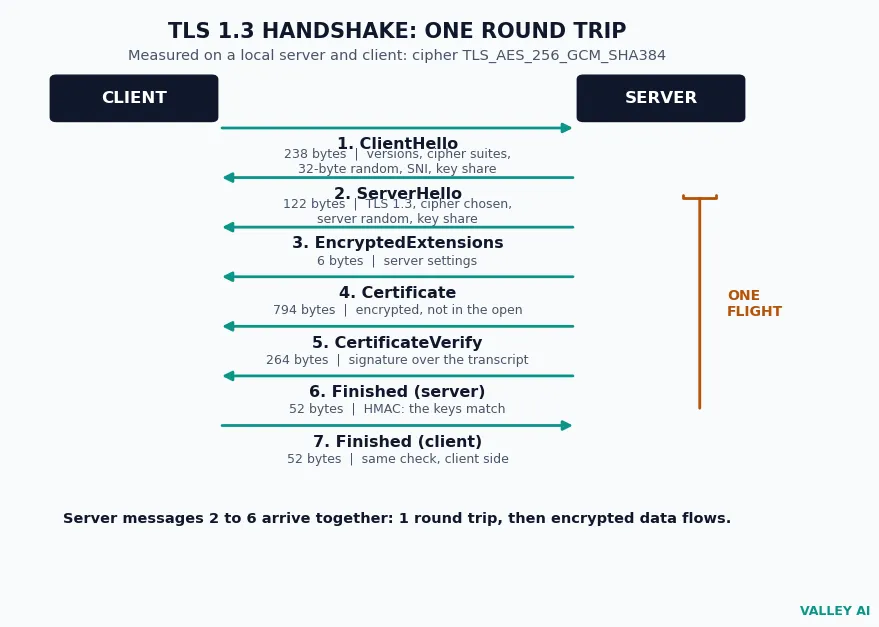
Two details in that table do the heavy lifting. The client guesses the server’s key-exchange group and sends its key share in the first message, so the server can answer without asking for another round. And everything after ServerHello travels encrypted, including the certificate itself, which older TLS versions sent in the open.
Count the flights. Seven messages sounds like a long negotiation, but five arrive in a single flight from the server, so the whole handshake costs one round trip. That single number is the reason TLS 1.3 feels instant on a fast connection and still costs a beat on a slow one.
The TCP handshake comes first. TCP opens the road; TLS decides who may drive on it and in what language. Before either handshake, DNS turned the domain name into an address.
The trick at the center: agreeing on a secret in public
How can two computers agree on a secret when anyone can listen in? They never send the secret. Each side sends a public value, and each side combines the value it receives with a secret it keeps. Both combinations land on the same number.
The method is Diffie-Hellman key exchange, and it runs on modular arithmetic. Pick a prime number and a generator both sides know. Each side picks a secret number, raises the generator to that secret, and sends the result. Each side then raises the number it received to its own secret. The two results match, and that match is the shared secret.
I picked p=23 and g=5 for the worked example so the arithmetic fits on one line. Alice picks secret 6 and sends 5 to the power 6 mod 23, which is 8. Bob picks secret 15 and sends 5 to the power 15 mod 23, which is 19. Alice computes 19 to the power 6 mod 23, Bob computes 8 to the power 15 mod 23, and both arrive at 2. The numbers 8 and 19 crossed the open channel. The secrets 6 and 15 and the result 2 never did.
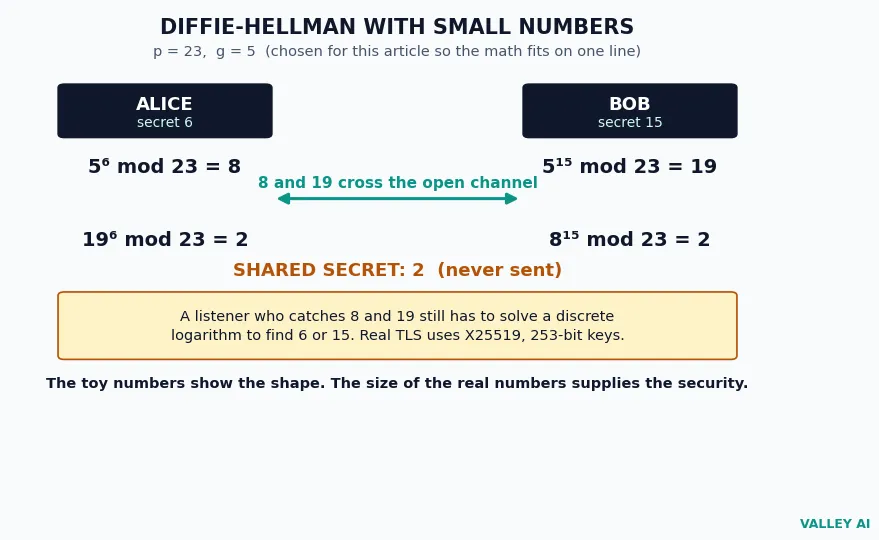
A listener who caught 8 and 19 faces a hard problem: working backward from those public values to the secrets means solving a discrete logarithm, and the numbers in real TLS make that problem hopeless. The handshake I measured used X25519, an elliptic-curve group with a 253-bit temporary key. The toy numbers show the shape of the exchange; the size of the real numbers supplies the security.
The shared secret is not the session key. Both sides feed it, plus the client random and the server random from the hello messages, through a key-derivation function called HKDF, and the output is the set of session keys. Change any one input and every key changes with it.
The certificate: how the browser knows who it is talking to
What does the browser check before it trusts a site? Three things: the certificate’s signature traces to a certificate authority the browser already trusts, the name on the certificate matches the site in the address bar, and the certificate is inside its valid dates. A failure on any one of the three stops the handshake.
The chain of trust is what makes the check possible. A certificate authority signs the site’s certificate, and the browser holds a list of root certificates it trusts. The server sends its own certificate plus the intermediates that link it to a root. The browser verifies each signature up the chain until it reaches a root it holds.
That design has one blunt consequence. The browser never checks the site itself; it checks the signature of an authority it already trusts. A certificate proves the site owns the name on the certificate and holds the matching private key (which never leaves the server). It says nothing about whether the site is trustworthy or its content is safe.
Your browser shows the same check. Click the padlock in the address bar, open the certificate viewer, and read three fields: issued to, issued by, and valid dates. If the name matches the site and the dates cover today, the browser’s check passed for the same reasons it passes in the handshake.
After the handshake: what the session keys do
Once the handshake finishes, the asymmetric keys retire. The two sides switch to symmetric encryption, where the same session key encrypts and decrypts. Asymmetric math costs far more per byte, so TLS spends it only on the short setup and lets the fast math carry the conversation. The Internet Society puts the gap at up to a thousand times.
The cipher the transcript shows does two jobs at once. AES-256 encrypts each record, and the GCM mode attaches an authentication tag that proves the record was not changed. One cipher, one pass, encryption and authentication together. That combination has a name: AEAD, authenticated encryption with associated data.
Session keys are temporary by design. Each session gets fresh keys, and the keys are discarded when the session ends. A key that encrypts one visit never encrypts the next.
TLS 1.2 vs TLS 1.3: what changed, and what it costs
TLS 1.3, published in 2018 as RFC 8446, kept the shape of the handshake and cut its cost. The version before it, TLS 1.2, needed two round trips and carried options from the 1990s that no longer belong in a handshake. The table below puts the changes side by side.
| Change | TLS 1.2 | TLS 1.3 |
|---|---|---|
| Round trips before data flows | 2 | 1 |
| RSA key transport | Supported | Removed |
| Forward secrecy | Optional | Mandatory |
| Handshake encryption | Mostly in the open | Mostly encrypted |
| Cipher suites | Broad list, including weak ones | Narrow list, strong ones only |
I measured five handshakes of each version on the local setup. TLS 1.3 took a median of 3.06 milliseconds; TLS 1.2 took 2.21. The older version came out faster, which surprised me, and the reason is plain: on a local link there is no network delay for the extra round trip to cost anything, so the timings measure CPU work alone. The one-round-trip claim rests on the transcript, where the message count is visible. The timings cannot prove it.
The RSA flow shows what 1.3 removed. In TLS 1.2 the client could encrypt a premaster secret with the server’s public key and send it across. Anyone who later stole the server’s private key could decrypt that secret and with it the whole recorded session. TLS 1.3 removed RSA key transport, so every 1.3 handshake uses ephemeral keys and past sessions stay sealed even if the private key leaks. That property is forward secrecy, and 1.3 makes it mandatory.
I teach the 1.3 handshake first and leave the RSA flow to this one passage, because the pages I read while researching the handshake teach the retired flow first and the current one second, and a reader who learns the old shape first has to unlearn it.
A returning client can go faster. TLS 1.3 session resumption, called 0-RTT, lets the client send encrypted data in its very first flight, reusing key material from an earlier session. The catch is replay: a captured first flight can be sent again, so servers restrict 0-RTT to requests that are safe to repeat, or switch it off entirely.
When the handshake fails: reading the error by its stage
Every failed handshake fails at one step, and the step names the cause. A version mismatch dies in the hello exchange: the two sides share no TLS version. A cipher mismatch dies in the same place: the lists overlap nowhere. An expired or wrong-name certificate dies at authentication: the chain does not check out. A wrong system clock can kill a valid certificate the same way, because the dates are read against the clock on the device.
What should you check first when a site shows a handshake error? The certificate dates and the TLS version the site offers. Both are visible without any tools: the browser error names the certificate problem, and the version shows in the security details. If both look right, the cause is usually a middlebox or firewall blocking the handshake itself.
You can reproduce the handshake yourself for any site with one command (replace example.com with the site you want to test): openssl s_client -connect example.com:443 -servername example.com. The output prints the negotiated protocol, the cipher, and the certificate chain, the same three things the handshake transcript shows.
For failures inside the browser, the net-internals page shows the handshake as the browser saw it, including the exact message where it stopped.
One warning belongs here. A handshake error on a site you have used for years calls for a second look before you click past it. The error may be a tired certificate or a clock that drifted, and both are harmless, but the same screen is also how an intercepted connection announces itself.
Check your own connection before you trust the padlock
Three checks take under a minute and use nothing you have to install. First, click the padlock on any site you log in to and read the certificate: issued to, issued by, valid dates. Second, run that openssl command against the same site and read the protocol and cipher lines. Third, confirm the site negotiates TLS 1.3; a site that still offers only 1.2 lags the current version.
If all three checks pass, the padlock means what it claims: a private, authenticated connection to the site named on the certificate. If any one fails, stop and find out why before you type a password. The handshake already did the hard work; these checks let you see that it did.
Once the checks pass, the connection is sound. The habits that keep accounts safe past the connection live in the site’s cybersecurity guide.
Frequently asked questions about TLS
Is TLS the same as SSL?
SSL was the original protocol, built by Netscape in the 1990s. TLS replaced it, and TLS 1.3 is the current version. The name SSL stuck around in product names, so an SSL certificate today is really a TLS certificate, and an SSL handshake today is really a TLS handshake.
Does TLS slow down a website?
The handshake adds a short delay before the first page byte. After it, symmetric encryption adds little time next to the page load itself, and session resumption shortens the handshake for returning visitors.
What is mutual TLS?
In mutual TLS, called mTLS, both sides present a certificate, so the server verifies the client as well as the other way around. It is used between services talking to each other, such as microservices inside one company, rather than between a browser and a public site.
Does a VPN replace TLS?
No. A VPN encrypts the tunnel between your device and the VPN server, and TLS encrypts the connection between your device and the site. The two stack: the VPN hides your traffic from the local network, and TLS hides it from everyone between the VPN server and the site.

Kaleem
Kaleem is a Computer Science graduate (Virtual University of Pakistan) and the founder and editor of Valley AI, where he publishes in-depth, tested guides on computer hardware, artificial intelligence, and how the internet works. Every guide is researched from primary sources, tested hands-on where possible, and updated when the facts change.