
A single ping number tells you almost nothing on its own. Read four numbers together, and the same test points at the fault.
Ping is the round-trip time for a small packet to travel to a host and back, measured in milliseconds. One millisecond is one thousandth of a second, so a 100 ms round trip takes one tenth of a second in total.
The rule for this whole topic: judge a connection by its average ping, its spread, and its loss, for one named host. A low average with wild swings feels worse than a slightly higher average that holds steady.
Read four numbers, never one
Start with the bands, then test your own connection against them. The host matters as much as the number: 40 ms to a server on another continent can be a good result, while 40 ms to your own router points at a home-network fault.
| Use | Comfortable ping | Trouble starts |
|---|---|---|
| Competitive games | Under 30 ms | Above 50 ms |
| Casual games and video calls | Under 60 ms | Above 150 ms |
| Browsing and streaming | Under 100 ms | Above 150 ms, or any packet loss |
Treat the bands as starting points for one named host, measured twice. A single reading catches a lucky moment or a bad one, and neither moment describes the connection.
Ping, latency, jitter, and packet loss
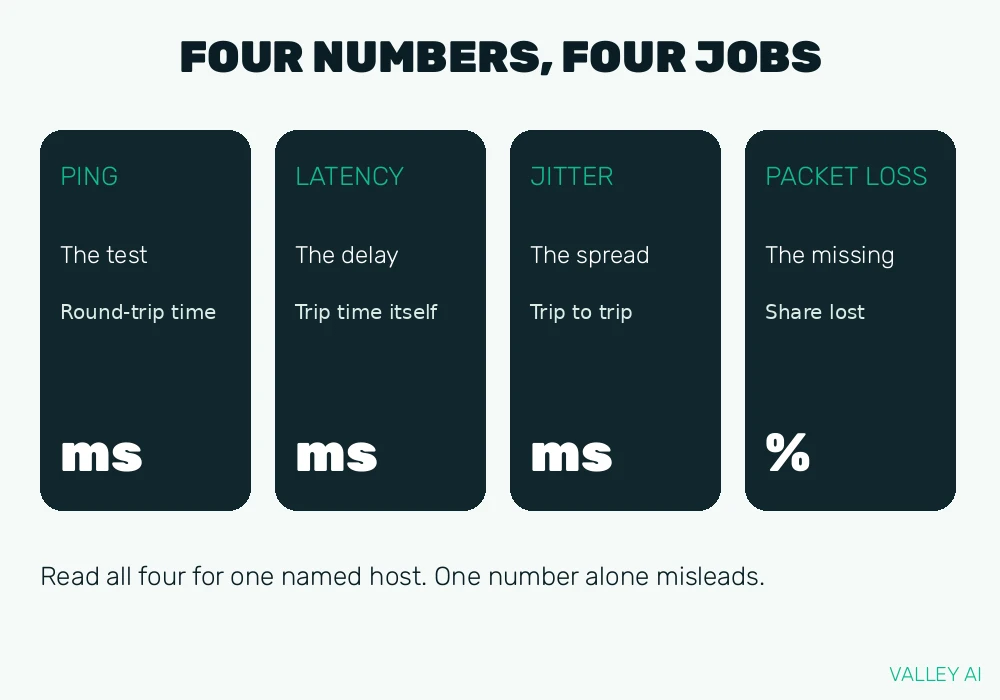
The ping test uses ICMP, the Internet Control Message Protocol. Your computer sends an ICMP echo request to a host, the host sends an echo reply, and the clock measures the round trip. That round-trip time, in milliseconds, is the number games and call apps display.
Ping names the test. Latency names the delay the test measures. People use the two words for the same number in everyday talk, and for a network test they match. The wider meaning of latency also covers delays outside the network trip, such as input handling and screen drawing, which a ping test never sees.
Jitter is the spread between the fastest and slowest replies in one test. A steady delay lets calls and games adjust their timing. Swings break that timing, which is why a connection that jumps between 25 ms and 120 ms feels worse than a connection that holds near 80 ms.
Packet loss is the share of sent packets that never return, reported as a percentage. Browsing hides small loss because the browser asks again for missing pieces. Calls and games have no time to ask again, so the same loss shows up as broken audio or teleporting characters.
Does a low ping mean fast downloads? No. Download speed is volume per second. Ping is response time. A 500 Mbps plan with 120 ms ping downloads a large file fast and still feels sluggish in a game, because each action waits 120 ms for its round trip.
Can ping ever be zero? No. Every trip takes time for signal travel, each router along the path, and the reply. A reading of 0 ms means the destination sits on the same machine or local network, never a trip across the internet.
Where the milliseconds go
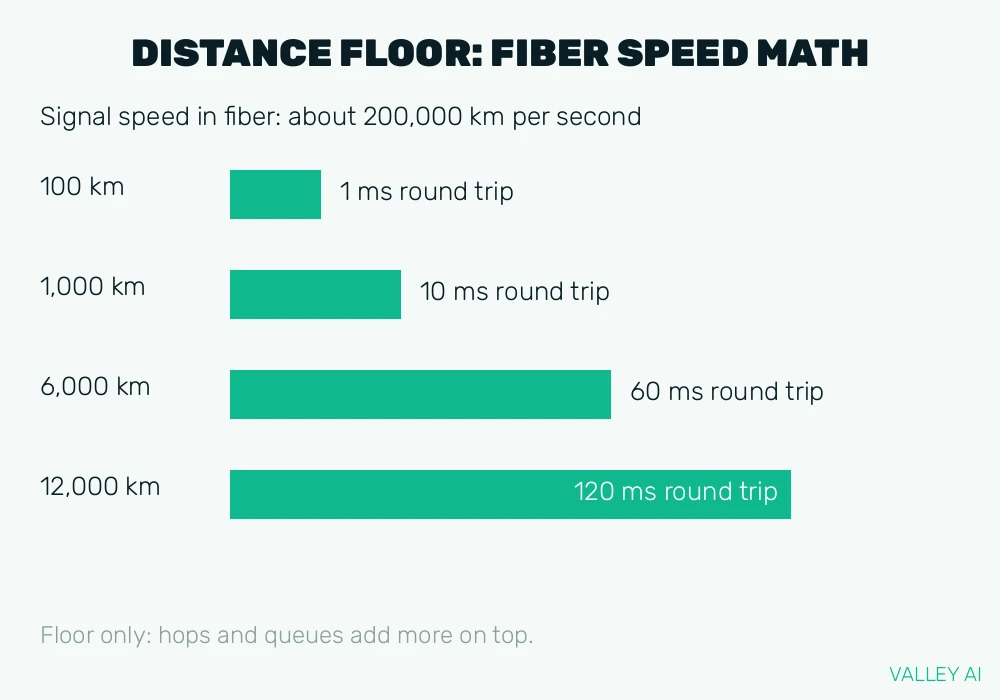
Distance sets a floor no plan can beat. Signals in fiber travel near 200,000 kilometers per second. Take a 6,000 kilometer cable path as the calculation input: it needs 30 ms one way and 60 ms round trip at that speed, before any router or queue adds time. A distant server cannot show 10 ms, whatever the plan promises.
Each router on the path adds its own processing time, so a longer route costs more milliseconds. The first hop is usually the home gateway, the box that joins the home network to the internet provider, described in the router versus modem guide. A slow first hop points at home equipment. Slow later hops point further out.
Queues add time when a link is busy. Packets wait their turn behind other traffic, and a large upload running during a call raises the ping for everything on that link. Testers call the under-load reading loaded latency, and routers that manage queues poorly show the worst form of it, called bufferbloat.
Radio links add spread. A Wi-Fi connection shares its channel with neighbors and other devices, and interference forces retransmissions that widen the spread between replies. A wired link avoids that whole class of variation.
What a ping test cannot tell you
A measurement is only trustworthy when its path is labeled. On the machine used for these tests, ICMP ping could not run at all: the sandbox denies raw sockets, and its ping group range is disabled, so no ICMP echo request could leave the machine. TCP connect timing ran in its place on 4 November 2026, 10 attempts per host. The averages came out at 0.3 ms for 8.8.8.8, 0.0 ms for 1.1.1.1, 0.6 ms for valleyai.net, and 0.2 ms for google.com. Those sub-millisecond connects measure a sandbox network that answers locally. They never describe a home connection, and quoting one as a home ping would mislead the reader. Always ask what path a number measured.
Page load time is a different measurement from ping. In the same session, fetching valleyai.net took 687 ms in total with 74 ms spent on TLS setup, and fetching google.com took 972 ms with 72 ms on TLS setup. Server work and content size dominate those totals. A web browser load includes DNS, TLS, server work, and rendering, so a slow page with a fast ping usually points at the server or the page itself.
Frames per second is a third, separate number. It counts frames drawn locally per second. Ping counts a network round trip. High ping can look like stutter when characters teleport, while the frame counter stays high, because the local machine draws smoothly and the network updates arrive late. Volume, response, and local rendering answer three different questions.
Why does the same connection show a different ping to each server? Distance, route, and server load differ per host. Compare readings only for the same host over time. Test the gateway first to separate a home fault from an internet fault, then test the host you care about.
Run the test and read the summary
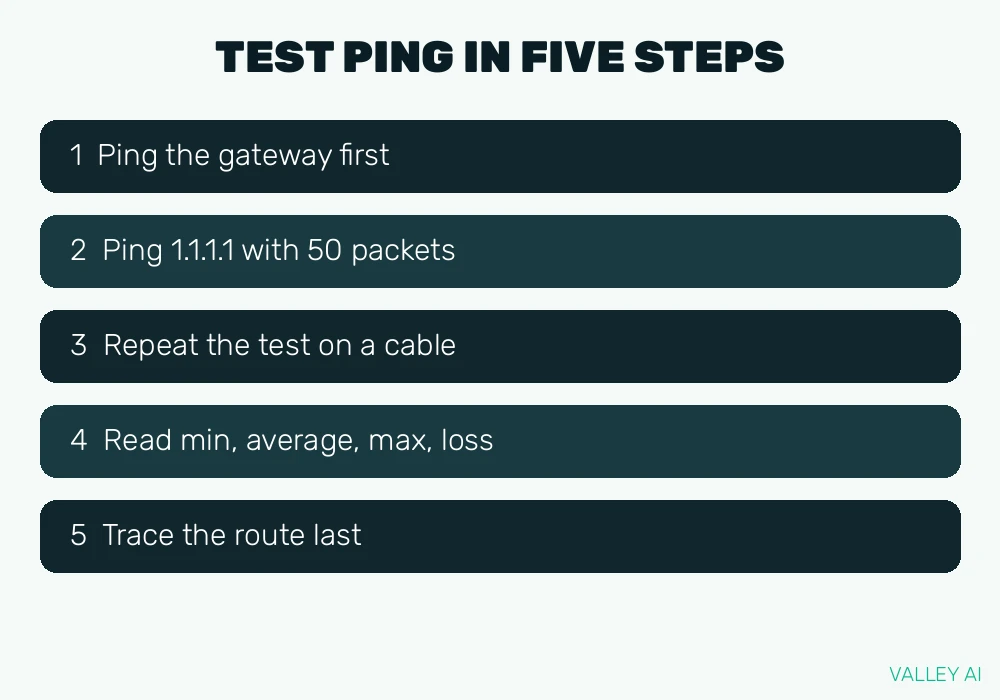
Run the test in an order that isolates each segment. Each step removes one suspect before you move on.
- Ping the gateway first. The gateway address is often 192.168.0.1 or 192.168.1.1, shown as the default gateway in ipconfig on Windows or ip route on Linux and macOS. A high or lossy gateway reading points at home equipment.
- Ping a public host by its IP address, such as 1.1.1.1, with 50 packets: ping -n 50 1.1.1.1 on Windows, ping -c 50 1.1.1.1 on macOS and Linux. Testing an IP address skips the name lookup step, which belongs to DNS and would add its own delay to a name test.
- Repeat the test on a cable when the first test ran on Wi-Fi. When loss and jitter vanish on the cable, the wireless link caused them, and the fix belongs to the wired connection or the wireless setup, never to the plan.
- Read the summary, never one line. Minimum shows the best trip, average shows the typical trip, maximum shows the worst trip, and loss shows the share that never returned. The gap between minimum and maximum is the jitter reading in practice.
- Add a route trace only after the first four steps. The hop where times jump marks the slow segment. Treat one slow-looking hop with care: some routers answer trace packets slowly while forwarding real traffic at full speed.
A result of 100% loss with working browsing usually means the host drops ICMP echo while serving web traffic normally. Test a second host and load a web page. Pages loading fine means ICMP policy explains the loss. Dead pages on every host point at the connection itself.
Fix a high or jumpy ping, in order
Work through the fixes in the same order as the test. Each fix matches one segment, so a fix that helps proves where the fault sat.
- Test on a cable first. A cable result that beats the Wi-Fi result by a wide margin ends the search: fix placement, channel crowding, or band choice on the wireless side.
- Stop background uploads and downloads during the test. A cloud backup or game update saturating the upload queue raises ping for every device on the link, and the reading recovers when the transfer ends.
- Restart the gateway when the gateway reading itself is bad. A restart clears stuck queues and stale states in home equipment, and a reading that stays bad after a restart points at hardware or the provider line.
- Pick a nearer server in the game or app settings. A server on another continent carries the distance floor from the earlier calculation, and no home fix removes it. A content delivery network edge server near the reader exists for exactly this reason.
- Ask the router for queue management when ping jumps only under load. Smart Queue Management, using FQ-CoDel or CAKE, keeps one heavy transfer from starving everything else. Not every home router offers it, so check the router settings before buying anything.
- Accept a server-side fault when every other segment tests clean. A distant or overloaded server keeps its ping whatever the home setup does, and the remaining choice is a different server region or a different time of day.
Conclusion
Run the gateway test and a 50-packet test to one public host, record the average, the spread, and the loss, and work the fixes in the order above. The number that matters is the four-part reading for the host you use, measured twice, with the path named.
Frequently asked questions
What is a good ping for video calls?
Calls stay comfortable when delay stays steady. Call apps hold a short buffer of audio so a late packet can still arrive in time. A steady reading with a narrow spread serves a call better than a lower average that jumps, because the buffer covers small variation and fails on large swings.
Does a VPN raise ping?
A VPN usually adds a few milliseconds to a few tens of milliseconds, because traffic travels to the VPN server first and the encryption step adds its own processing. Choosing a VPN server near the reader keeps the added distance small. On a congested provider route, a VPN path can occasionally test faster, so compare readings with the VPN on and off for the same host.
Why does my game show high ping while browsing feels fine?
Browsing tolerates delay because each page loads once and the reader waits a fraction of a second without noticing. Games need constant round trips, so the same delay shows up in every action. Game servers also sit in specific regions, so check the ping to that game server and its region setting instead of judging by browsing.
Why does ping fail with 100% loss while the internet works?
Many hosts and firewalls drop ICMP echo packets while serving web traffic normally. Ping tests ICMP only, so a dropped echo says nothing about web traffic. Load a web page and test a second host: pages loading fine means ICMP policy explains the loss.
Does upgrading my plan lower ping?
A plan upgrade raises the volume the line can carry per second. Ping follows distance, hops, and queue waits, which a bigger volume allowance leaves unchanged. An upgrade helps ping only when the current line is saturated and queue waits dominate the reading; otherwise the ping stays the same at higher speeds.

Kaleem
Kaleem is a Computer Science graduate (Virtual University of Pakistan) and the founder and editor of Valley AI, where he publishes in-depth, tested guides on computer hardware, artificial intelligence, and how the internet works. Every guide is researched from primary sources, tested hands-on where possible, and updated when the facts change.