
A mechanical keyboard is not automatically better than a membrane keyboard. The right choice depends on what you notice and value: key feel, noise, gaming features, price, portability, customization, or long-term repairability.
The category label is only the starting point. A well-built membrane keyboard can be a better tool than a rattly, unstable mechanical keyboard, while a good mechanical keyboard can transform typing for someone who enjoys clear feedback and replaceable parts.
Mechanical vs membrane keyboards at a glance
| Factor | Mechanical keyboard | Membrane keyboard |
|---|---|---|
| Key mechanism | Individual mechanical switch beneath each key | Conductive membrane, usually activated by a rubber dome |
| Feel | Varies widely: linear, tactile, clicky, or silent | Often softer and less distinct, though scissor designs feel sharper |
| Noise | Ranges from quiet to loud | Usually quieter, but keycap impact can still create noise |
| Gaming | Can offer consistent feedback and strong rollover, depending on model | Can perform well when rollover and latency are properly implemented |
| Typing | More choice in travel, force, and feedback | Often comfortable for users who prefer a softer press |
| Customization | Broad keycap, switch, firmware, and layout options | Usually limited |
| Repairability | Better when switches are hot-swappable or replaceable | Usually difficult to repair at component level |
| Price | Often higher, especially with enthusiast features | Commonly less expensive |
| Portability | Frequently heavier, though low-profile models are exceptions | Often lighter and thinner |
| Best fit | Customization, distinct feedback, long-term ownership | Quiet work, low cost, travel, and simple everyday use |
These are tendencies, not guarantees. Keyboard design, firmware, layout, stabilizers, keycaps, and quality control can change the result.
The keypress mechanism changes the experience
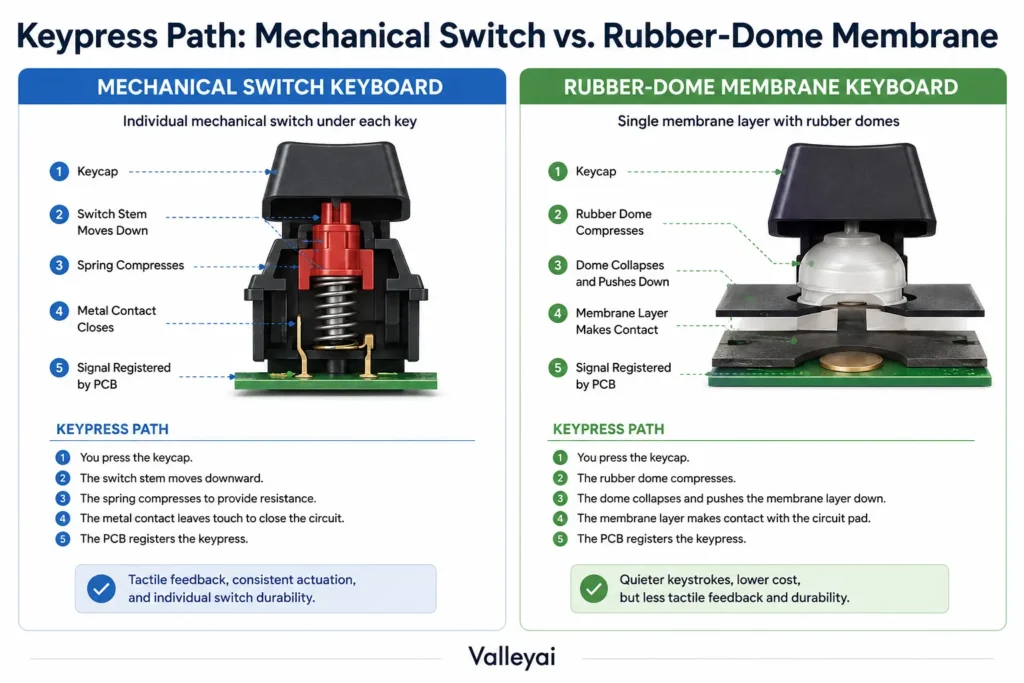
A mechanical keyboard uses a separate mechanical switch beneath each key. The switch moves through a defined travel path and sends a signal when the actuation point is reached. Switches can be linear, tactile, clicky, or designed for quieter operation. CHERRY’s official switch documentation illustrates how mechanical switches can differ in force, travel, and operating characteristics. (CHERRY MX switch information)
A conventional membrane keyboard generally places a rubber dome above conductive membrane layers. Pressing a key collapses the dome and brings the contact layers together. The mechanism is simpler and usually less modular than an individual-switch design.
A scissor-switch keyboard is a compact membrane design that uses a stabilizing scissor mechanism above the dome. Laptop keyboards and many thin office keyboards use this approach. Scissor switches are still membrane-based, but they often feel more stable and precise than inexpensive rubber-dome keyboards.
The practical difference is not simply “mechanical equals good, membrane equals cheap.” Mechanical switches provide more variables to tune. Membrane and scissor keyboards often prioritize simplicity, low height, low noise, and lower cost.
Typing feel: feedback matters more than the label
Typing feel is where the mechanical-versus-membrane debate becomes personal.
A tactile mechanical switch gives a noticeable bump during key travel. A linear switch moves more smoothly, while a clicky switch adds a deliberate audible click. A silent switch may reduce switch noise, but the keyboard can still produce sound when the keycap hits the top or bottom of its travel.
A rubber-dome membrane keyboard usually has a softer resistance curve. The key may feel light at first, then become heavier as the dome collapses. Some users describe that sensation as cushioned; others experience it as mushy because the actuation point is less distinct.
Neither description predicts typing accuracy for every person. A user who bottoms out every key may prefer a switch with clear feedback. Someone who types lightly may find a membrane keyboard perfectly controlled and less tiring.
Mechanical switches are not one typing experience
The phrase “mechanical keyboard feel” hides too much variation. Consider these broad categories:
- Linear switches: Smooth resistance with no tactile bump.
- Tactile switches: A noticeable bump indicates movement through the actuation point.
- Clicky switches: Tactile feedback combined with a distinct click mechanism.
- Silent switches: Mechanical switches designed to reduce switch and impact noise.
Key travel, actuation force, keycap shape, stabilizer quality, and keyboard mounting also affect the result. A large spacebar with poor stabilizers can feel and sound worse than the letter keys, regardless of switch type.
A short store test often creates a false impression. Ten seconds of tapping can make almost any keyboard seem comfortable; typing a familiar paragraph for several minutes reveals whether the layout, resistance, and bottom-out feel actually suit you.
Which is better for typing?
Mechanical keyboards are often better for typing when a user wants distinct feedback, a particular actuation force, or the ability to customize the feel. Membrane keyboards may be better for users who prefer softer presses, lower noise, a shallow profile, or a familiar laptop-like experience.
Typing speed is not guaranteed by either category. Accuracy, comfort, layout, and familiarity usually matter more than the mechanism alone.
For programming, the best choice often depends on the work environment. A mechanical keyboard can suit someone who spends hours typing and wants tactile confirmation. A quiet scissor-switch keyboard may be more practical in a shared office, especially when portability and low noise matter.
Noise comes from more than the switch
Mechanical keyboards can be louder, but “mechanical” does not mean “noisy.” Clicky switches are usually the obvious source of sound, yet they are only one part of the acoustic profile.
Keyboard noise can come from:
- The switch click mechanism
- Keycap impact at the top or bottom of travel
- Spring or stabilizer rattle
- Case resonance
- The desk surface
- Typing force and technique
A membrane keyboard is often quieter because the rubber dome dampens some movement and many membrane models use thin, low-profile keycaps. A poorly damped membrane keyboard can still produce sharp impact noise, while a quiet mechanical keyboard can be unobtrusive when paired with suitable switches and keycaps.
For a shared workspace, library, bedroom, or recording area, a membrane or scissor keyboard is usually the safer default. A quiet tactile or linear mechanical keyboard can also work, but the specific model matters.
A hard desk can make a keyboard sound much louder than expected. Before blaming the switch, try the same keyboard on a desk mat or softer surface. The case and desk may be amplifying bottom-out noise.
Gaming performance: separate feel from measurable speed
A mechanical keyboard can be an excellent gaming keyboard, but the switch category alone does not guarantee lower latency, faster reactions, or better competitive results.
Gaming performance involves several separate factors:
- Actuation feel: How the key feels as it registers.
- Actuation force and travel: How much pressure and movement the key requires.
- Key rollover: How many simultaneous presses the keyboard can register.
- Input latency: The delay between a physical press and the computer receiving the input.
- Consistency: Whether repeated presses behave predictably.
- Player technique: How the user moves, releases, and repeats keys.
Mechanical keyboards often appeal to gamers because switch options make it easier to choose a preferred force and feedback profile. A linear switch may feel smooth during rapid repeated inputs, while a tactile switch can provide confirmation without relying on an audible click.
That advantage is mainly about control and preference. It is not proof that every mechanical keyboard is faster than every membrane keyboard.
Do mechanical keyboards have lower input latency?
Not necessarily. Input latency depends on the complete keyboard implementation, including switch behavior, scan rate, firmware, debounce settings, connection method, and the computer’s input path. A well-designed membrane keyboard can have lower latency than a poorly implemented mechanical keyboard.
USB keyboards generally communicate with computers through the USB Human Interface Device class, which is documented by the USB Implementers Forum. The USB connection alone does not determine the total latency of a particular keyboard.
Specifications can help, but marketing terms such as “instant response” are not a substitute for independent measurements. If latency is a priority, look for model-specific testing rather than assuming the mechanical label settles the question.
What is key rollover?
Key rollover describes how many keys a keyboard can recognize as pressed at the same time. N-key rollover means the keyboard is designed to register multiple simultaneous key presses, although the exact implementation and behavior should be verified for the specific model.
Key rollover matters most when a game requires combinations such as movement, sprinting, crouching, and ability keys at the same time. A keyboard with limited rollover may ignore one input when several keys are held.
Mechanical keyboards often advertise strong rollover support, but membrane keyboards can also support useful rollover. The feature depends on the keyboard’s scan matrix and firmware, not simply on the type of switch beneath the key.
Can membrane keyboards be good for gaming?
Yes. A membrane keyboard can be good for gaming when it has reliable rollover, consistent keys, acceptable latency, and a layout that suits the player. Many casual and single-player games place little demand on simultaneous key registration.
A mechanical keyboard becomes more compelling when the player wants a specific switch feel, replaceable switches, extensive remapping, or a compact gaming layout. Competitive players should evaluate actual model performance and comfort rather than treating technology category as a shortcut.
Durability is about ownership, not just switch ratings
Mechanical switches often have published keystroke ratings, but a switch rating does not guarantee that the entire keyboard will last equally long. Keycaps, stabilizers, cables, controllers, solder joints, and firmware can fail independently.
Mechanical keyboards have one clear ownership advantage: repair and replacement can be easier. A keyboard with hot-swap sockets lets the owner replace compatible switches without soldering. A soldered mechanical keyboard can still be repaired, but switch replacement requires desoldering equipment and more technical skill.
Membrane keyboards are usually harder to repair at the individual-key level. When the membrane layer, controller, or rubber domes fail, replacement of the entire keyboard is often more practical than component repair.
That does not make every mechanical keyboard more durable. A heavy mechanical keyboard with poor stabilizers can develop chatter or rattle, while a simple membrane keyboard may work reliably for years in an office environment.
Customization and repairability favor mechanical keyboards
Mechanical keyboards generally offer more customization because the switch, keycap, firmware, and layout can be changed independently.
Possible upgrades include:
- Different mechanical switch types
- Replacement keycaps
- Silent switch installations
- Hot-swap switch replacement
- Stabilizer tuning
- Programmable layouts
- Alternate key mappings
- Compact or ergonomic layouts
Firmware such as QMK can support remapping and programmable keyboard functions when the keyboard hardware is compatible. Firmware capability is a model feature, not an automatic property of every mechanical keyboard.
Membrane keyboards usually provide fewer modification options. Keycaps may be proprietary or difficult to remove, and the membrane assembly is not designed for routine component replacement. Scissor keyboards are particularly compact, but their low-profile parts can be difficult to customize.
If you enjoy changing switches or building a keyboard around a specific layout, mechanical is the clear choice. If you want to connect a keyboard and use it without maintenance, membrane may be more sensible.
Quality beats category
This is the most useful way to compare mechanical and membrane keyboards:
Compare the keyboard you will actually buy, not an idealized version of its category.
A low-cost mechanical keyboard may have harsh stabilizers, inconsistent switches, rattling springs, poor keycaps, weak firmware, and an uncomfortable layout. A quality membrane or scissor keyboard may offer stable keys, clean legends, quiet operation, and reliable connectivity.
Use this quick quality check:
| Question | Why it matters |
|---|---|
| Are the keys stable? | Wobble can reduce comfort and make typing feel imprecise. |
| Does the layout suit your hands? | A perfect switch cannot fix awkward spacing or missing keys. |
| Does the model support required rollover? | Important for gaming and shortcut-heavy work. |
| Can the keyboard be cleaned? | Dust and debris affect long-term usability. |
| Are replacement parts available? | Determines whether small failures are repairable. |
| Is the noise acceptable in your room? | A technically excellent keyboard can still be unusable in shared space. |
| Does the return policy protect you? | Typing preference cannot be predicted from specifications alone. |
A stable membrane keyboard can feel more precise than a cheap mechanical keyboard. The word “mechanical” tells you how the switch works; it does not tell you whether the case, stabilizers, keycaps, and firmware were executed well.
When a membrane keyboard is the smarter buy
Choose a membrane or scissor-switch keyboard when several of these conditions apply:
- You need to keep the price low.
- You work near other people.
- You prefer shallow, soft, or laptop-like keys.
- You travel frequently.
- You want a lightweight keyboard.
- You do not plan to replace switches or keycaps.
- Your games do not require extensive simultaneous inputs.
- You want a simple keyboard with minimal maintenance.
- A specific membrane model has better layout, comfort, or connectivity than similarly priced mechanical options.
Spill resistance also requires caution. A keyboard should be considered spill-resistant only when the manufacturer documents that feature for the specific model. Membrane construction by itself does not guarantee protection from liquids.
For school, general home use, office work, and travel, a good membrane or scissor keyboard may deliver more practical value than an entry-level mechanical model.
When a mechanical keyboard justifies the premium
The extra cost is easier to justify when you will actually use the features that increase the price.
A mechanical keyboard may be worth paying more for when:
- You strongly prefer tactile, linear, or clicky feedback.
- You type or play for long periods and have found a comfortable switch profile.
- You want replaceable switches or keycaps.
- You need a programmable layout.
- You care about a particular compact form factor.
- You want to tune sound and feel.
- You expect to keep the keyboard for several years and value repairability.
- The keyboard provides verified rollover or connectivity features your work requires.
A premium price does not automatically buy comfort. If the switch is too heavy, the layout is cramped, or the keyboard is too loud for your environment, the added features may have little value.
A five-minute test before you choose
When possible, test the actual keyboard rather than relying on the category description.
- Type a familiar paragraph.
Use text you know well so you can notice errors instead of concentrating on unfamiliar words. - Try slow and fast presses.
Check whether the actuation point feels clear and whether keys return consistently. - Test common gaming combinations.
Hold movement keys while pressing modifiers or action keys. Watch for missed inputs or awkward key spacing. - Listen to the whole keyboard.
Notice switch clicks, bottom-out impact, spacebar rattle, and case resonance. - Check stability.
Press the edges of larger keys. Excessive wobble or rattle can become irritating quickly. - Use the real layout.
Confirm the position of Control, Escape, arrow keys, function keys, and the number pad if those keys matter to you. - Type long enough to notice fatigue.
A brief test cannot reveal how the keyboard feels after sustained use. - Review return and repair options.
A return period is especially valuable when buying a keyboard online. Specifications cannot fully predict personal comfort.
The goal is not to prove that one category wins. The goal is to identify which keyboard creates fewer compromises for your actual desk.
Quick answers to common questions
Are mechanical keyboards better for gaming?
Mechanical keyboards can offer more switch choices, clear feedback, and customization for gaming, but they do not guarantee better performance. A membrane keyboard with reliable rollover, suitable latency, and a comfortable layout can work very well, especially for casual gaming.
Are mechanical keyboards better for typing?
Mechanical keyboards are often better for users who want distinct tactile feedback or a specific switch feel. Membrane and scissor keyboards can be better for users who prefer soft, shallow, quiet keys. Typing speed and comfort depend heavily on the individual and the keyboard model.
Which keyboard type lasts longer?
Mechanical keyboards may offer better repairability, especially when they use hot-swap sockets or replaceable parts. Neither category guarantees a longer overall life. Electronics, stabilizers, keycaps, cables, spills, and manufacturing quality can determine when the complete keyboard needs replacement.
Are mechanical keyboards louder than membrane keyboards?
Mechanical keyboards are often louder, particularly with clicky switches, but noise also comes from keycap impact, stabilizers, case resonance, desk surfaces, and typing force. A quiet mechanical keyboard can be less disruptive than a poorly damped membrane keyboard.
Are membrane keyboards cheaper?
Membrane keyboards are commonly available at lower prices because their construction is simpler and they usually include fewer modular features. Price varies by layout, wireless capability, brand, and build quality, so an inexpensive mechanical keyboard may overlap with a premium membrane model.
Are mechanical keyboards worth the extra money?
A mechanical keyboard is worth the extra cost when you value its particular feel, customization, repairability, or layout. If you mainly need a quiet, portable, inexpensive keyboard, a membrane or scissor model may provide better value.
Which keyboard is better for programming?
Either type can work for programming. Mechanical keyboards appeal to programmers who want tactile feedback, programmable layouts, or a particular key arrangement. Membrane and scissor keyboards can be preferable in shared offices or for programmers who favor quiet, low-profile keys.
Are scissor switches membrane keyboards?
Yes. Scissor-switch keyboards use a scissor mechanism above a membrane or rubber-dome contact system. The scissor structure improves key stability and supports a thin design, but it does not make the keyboard mechanically switched in the enthusiast-keyboard sense.
Are mechanical keyboards easier to repair?
Mechanical keyboards are usually easier to repair when they have hot-swap sockets, standard keycaps, accessible components, and available replacement parts. Soldered mechanical keyboards require more skill. Membrane keyboards are generally less practical to repair at the individual-key level.
Is a mechanical keyboard automatically better?
No. Mechanical describes the switch mechanism, not the complete quality of the keyboard. Layout, stability, firmware, rollover, noise, comfort, price, and environment may matter more than whether the keyboard uses mechanical or membrane technology.
Where do optical, magnetic, and hybrid keyboards fit?
Optical and magnetic keyboards are alternative switch designs rather than ordinary membrane keyboards. Some hybrid products combine mechanical-style switches with membrane elements. These categories can offer specialized features, but they are separate buying decisions and should be evaluated by their actual implementation rather than by marketing labels.
Final Thoughts
The best choice is the keyboard that matches your hands, room, workload, games, and willingness to maintain or customize it. Choose the category that reduces the compromises you will notice every day not the one with the more impressive name.
For how keyboards sit alongside other input hardware, see the modern guide to computer input devices.

Kaleem
Kaleem is a Computer Science graduate and the founder of Valley AI (valleyai.net), where he publishes in-depth, tested guides on computers, AI, and internet technologies. Every guide is researched from primary sources and updated regularly.