

While theoretical computer science courses treat binary and hexadecimal as abstract mathematical concepts, real-world software engineering treats them as functional tools. Hardware operates entirely in binary bitstreams, but attempting to read millions of 1s and 0s during a low-level debugging session is impossible for the human brain.
We try bridges the semantic gap between hardware execution and human software design. Below, you will find the definitive visual cheat sheet for hexadecimal vs binary, step-by-step conversion methodologies, and practical developer workflows using IDEs, Wireshark, and Hex Editors.
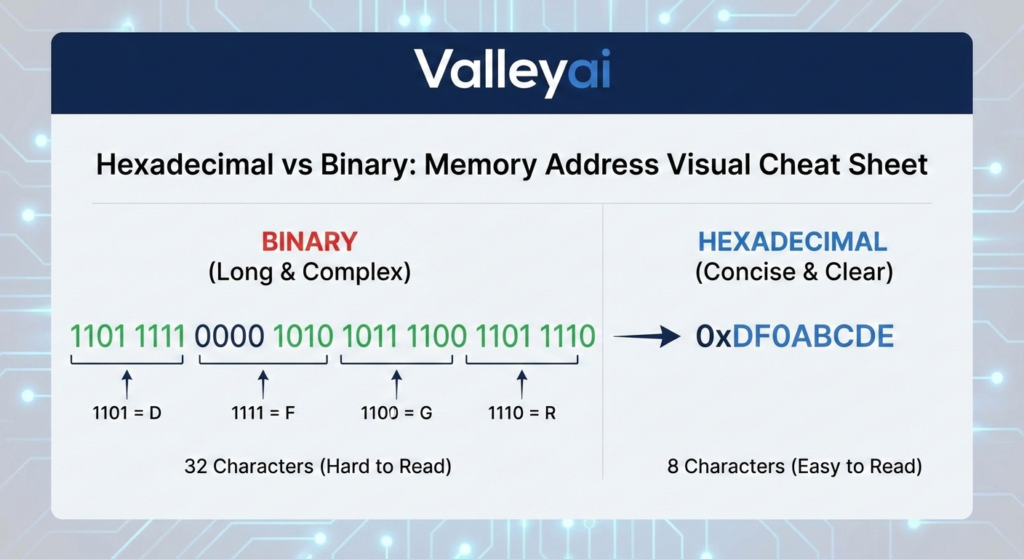
The Quick-Reference Conversion Cheat Sheet
Bookmark this section for rapid Base-2 to Base-16 lookups.
| Decimal (Base-10) | Binary (Base-2) | Hexadecimal (Base-16) | Notes (The Nibble) |
|---|---|---|---|
| 0 | 0000 | 0 | All bits off |
| 1 | 0001 | 1 | |
| 2 | 0010 | 2 | |
| 3 | 0011 | 3 | |
| 4 | 0100 | 4 | |
| 5 | 0101 | 5 | |
| 6 | 0110 | 6 | |
| 7 | 0111 | 7 | |
| 8 | 1000 | 8 | |
| 9 | 1001 | 9 | |
| 10 | 1010 | A | Start of alphabetical hex |
| 11 | 1011 | B | |
| 12 | 1100 | C | |
| 13 | 1101 | D | |
| 14 | 1110 | E | |
| 15 | 1111 | F | All bits on |
Definitions And Fundamentals
Binary (Base-2) is the fundamental machine-level numeral system used by a Central Processing Unit (CPU) and Random Access Memory (RAM), consisting entirely of 0s and 1s representing electrical states (off/on). Hexadecimal (Base-16) is a human-readable shorthand system that uses 16 symbols (0-9 and A-F) to concisely represent those binary values.
- Base 2 System (Binary): Driven by physical hardware gates. Each digit is a “bit”.
- Base 16 System (Hexadecimal): An abstraction layer used in Integrated Development Environments (IDEs) and memory dumps. Denoted by prefixes like
0xin programming (e.g.,0x1A).
What Is the Difference Between Hexadecimal and Binary?
The core difference between hexadecimal and binary is data density and readability. While binary (Base-2) consists of 0s and 1s representing hardware states, hexadecimal (Base-16) is a compact shorthand where one hex digit represents exactly four binary bits (a nibble).
Key Differences Comparison Table
Binary perfectly reflects hardware logic but results in incredibly long strings. Hexadecimal compresses binary data by a factor of four, making it drastically easier for developers to read, write, and debug code.
| Feature | Binary (Base-2) | Hexadecimal (Base-16) |
|---|---|---|
| Valid Digits | 0, 1 | 0-9, A-F |
| Data Density | Low (Long strings) | High (Compact strings) |
| Primary Consumer | Machine Hardware (CPU/ALU) | Human Developers / IDEs |
| String Example (Byte) | 11010111 | D7 |
| Code Prefix | 0b (e.g., 0b1101) | 0x (e.g., 0xD7) |
Relationship Why Hexadecimal?
Why is hex used instead of binary in programming?
Hexadecimal is preferred over binary because it serves as a perfect 1:1 abstraction for computing architecture. Unlike the decimal system (Base-10), which does not align with power-of-two computing increments, Base-16 aligns flawlessly with computer memory structures.
This alignment hinges on the Nibble (4-bit) concept.
Because $2^4 = 16$, exactly four binary bits can be represented by exactly one hexadecimal digit. An 8-bit byte (e.g., 1111 1111) neatly translates to two hex digits (FF). This seamless mathematical alignment prevents the rounding errors and complex math required to translate binary into decimal.
How to Convert Binary to Hexadecimal?
To convert binary to hexadecimal, group the binary digits into sets of four (nibbles) starting from the right, then map each 4-bit set to its corresponding hex character (0-9, A-F).
Conversion Methodology
Converting between binary and hexadecimal requires chunking data into 4-bit segments (nibbles). Because of the 1:1 relationship between a 4-bit binary sequence and a single hex digit, the conversion process is direct and does not require complex division or multiplication.
Step-by-Step: Converting Binary to Hexadecimal
How do you convert 4 bits to 1 hex digit?
- Pad the Binary String: Ensure your binary number is a multiple of 4 bits. Add leading zeros to the left if necessary. (e.g.,
110101becomes0011 0101). - Split into Nibbles: Break the string into 4-bit blocks. (
0011and0101). - Map to Hex: Use the cheat sheet above to translate each block independently.
0011= 30101= 5
- Combine: The resulting hexadecimal value is
0x35.
Step-by-Step: Converting Hexadecimal to Binary
- Separate the Digits: Take the hex value (e.g.,
0xC4) and isolate the characters:Cand4. - Convert Individually: Map each hex character back to its 4-bit binary equivalent.
C=11004=0100
- Concatenate: Join the bits together to get
11000100.
Developer Pro-Tip: When dealing with bitwise operations in Visual Studio Code or configuring I2C communication protocols, always convert your target bitmasks to hexadecimal. It reduces visual clutter and makes bitwise AND/OR logic dramatically easier to visually verify in your source code.
Practical Use Cases in Computing
The theoretical math of base conversion means little without understanding how you will encounter these systems in daily engineering workflows.
Understanding Hex Memory Dumps
When debugging software crashes on an x86 architecture, developers analyze a memory dump a snapshot of RAM at the time of the crash. Displaying this data in binary is illegible. Using a Hex Editor (like HxD), developers can view raw data in dense grids.
- Advantage in Memory Addressing: Memory addresses (like
0x7FFE) are much shorter and easier to track in hex than in binary (0111111111111110). Also, when reading memory dumps, engineers must be aware of Little Endian vs Big Endian byte ordering, and hexadecimal makes it vastly easier to spot reversed byte sequences.
Wireshark Network Analyzer Workflows
Why does Wireshark use hexadecimal? Wireshark captures raw network packets as they cross a network interface. A single packet contains hundreds of bytes. Wireshark displays the raw packet payload in a hexadecimal grid because it allows network engineers to visually identify specific ASCII/Unicode Encodings and file headers at a glance, directly correlating two hex digits to exactly one byte of network traffic.
Web Development and Color Hex Codes
In CSS, colors are defined using 24-bit RGB values. Writing color: #FF5733; is actually a hexadecimal representation of binary color data.
FF(Red) =1111111157(Green) =0101011133(Blue) =00110011
Using binary for CSS would require developers to typecolor: rgb(11111111, 01010111, 00110011), which is highly error-prone.
To fully appreciate why developers prefer the shorthand of hexadecimal, it is essential to first understand exactly how binary code works at the hardware level.
Performance and Efficiency Analysis
Is hexadecimal faster than binary for computers?
No, hexadecimal is not faster than binary. This is a common myth. Hexadecimal provides zero performance overhead or speed advantage during execution because the CPU ultimately compiles and processes all data, including hex code, as raw binary. Hexadecimal is strictly an efficiency tool for human developers, optimizing file sizes of source code and accelerating the low-level debugging workflow.
The machine reads base-2; the human engineer reads base-16.

Kaleem
My name is Kaleem and i am a computer science graduate with 5+ years of experience in Computer science, AI, tech, and web innovation. I founded ValleyAI.net to simplify AI, internet, and computer topics also focus on building useful utility tools. My clear, hands-on content is trusted by 5K+ monthly readers worldwide.