
An NPU and a GPU can both accelerate parallel workloads, but they are not interchangeable versions of the same processor. The better choice depends on what the system is doing: running local AI inference, training a model, rendering graphics, processing data in the cloud, or operating within a tight power budget.
The practical question is not “Which chip is faster?” It is “Which processor matches the workload, software, and system constraints?”
An NPU is generally suited to supported, power-conscious neural-network inference. A GPU is generally better for graphics, flexible parallel computation, AI training, and workloads that need broader software support or more memory. Many systems benefit from using both.
If the term is new to you, start with what an NPU is and what it does before weighing it against a graphics card.
Start with the workload, not the processor label
The same device may use its CPU, GPU, and NPU for different parts of one application. A processor’s name does not tell you whether a particular model or program can use it.
| Workload or requirement | More likely fit | Why |
|---|---|---|
| Local image enhancement, speech processing, or background effects | NPU | These tasks can benefit from specialized, low-power neural-network processing when software support exists. |
| Training or fine-tuning larger models | GPU | Training usually requires flexible parallel computation, substantial memory, and mature software support. |
| 3D rendering and gaming graphics | GPU | Graphics rendering depends on GPU capabilities rather than NPU presence. |
| AI processing performed on a remote server | Cloud accelerator or server GPU | A local NPU cannot accelerate a task that never runs on the local device. |
| Battery-sensitive, always-on AI features | NPU | A supported NPU may handle selected inference tasks without placing the same load on the CPU or GPU. |
| Mixed graphics and local AI workloads | GPU plus NPU | The GPU can render or compute while the NPU handles supported neural-network tasks. |
| Unsupported model operators or runtimes | GPU or CPU | If the NPU software path cannot execute the model, another processor must handle the unsupported work. |
The table describes typical workload fit, not a benchmark result. Actual behavior depends on the hardware design, model, precision, runtime, memory, drivers, and application.
A quick refresher on how a GPU works makes the contrast below much easier to follow.
Why both processors handle parallel work differently
NPUs and GPUs both use parallel computation, but they are optimized around different goals.
A GPU is a broad parallel processor. It was designed for graphics workloads, where many similar operations must be performed across pixels, vertices, and textures. That architecture also maps well to many machine-learning operations, including matrix calculations and other numerical workloads.
An NPU is a specialized neural-processing unit. Its design focuses on recurring operations used by supported neural networks, such as multiply-accumulate calculations. The goal is not to replace every function of a GPU. The goal is to execute selected AI workloads efficiently, often close to the data and within a limited power envelope.
That specialization creates a trade-off:
- GPU: broader flexibility, strong parallel compute, graphics capability, and a mature ecosystem for many AI workloads.
- NPU: narrower workload focus, potential efficiency advantages for supported inference tasks, and suitability for local or always-on AI features.
A specialized processor can be efficient without being universally faster. If a workload does not match the NPU’s supported operations, the NPU’s theoretical capability may have little practical value.
Training and inference are separate stages, and how models are trained explains why one needs far more raw compute than the other.
AI inference and training lead to different answers
The distinction between inference and training is one of the clearest ways to evaluate NPU versus GPU.
AI inference uses an already trained model to produce an output. Examples include classifying an image, transcribing speech, applying background blur, or generating a response from a deployed model.
AI training adjusts model parameters by learning from data. Training generally involves repeated forward and backward calculations, large datasets, substantial memory movement, and flexible software support.
For local inference, an NPU may be a strong fit when:
- The model uses operations supported by the NPU.
- The runtime can assign those operations to the NPU.
- The model fits within available memory.
- Low power use or quiet operation matters.
- The task needs to run on the device rather than in the cloud.
A GPU is usually the safer choice for training and broad experimentation because training workloads can vary significantly. Developers may need flexible operators, larger memory capacity, adjustable precision, and established tooling. The exact balance depends on the model and platform, but an NPU should not be assumed to replace a GPU for general model training.
Most mainstream generative AI tools still run in the cloud, which changes what your local hardware actually has to do.
Local, edge, and cloud AI are not the same workload
An NPU matters most when computation happens locally. Local AI can reduce the need to send data to a remote service, but an application must actually support local execution for the NPU to participate.
Edge AI follows a similar principle. An edge device may process camera, audio, or sensor data near its source instead of sending every input to a data center. In that setting, an NPU can be useful when the device needs repeated inference under power, thermal, bandwidth, or latency constraints.
Cloud AI changes the hardware decision. If a laptop application sends a request to a remote server, the local NPU does not accelerate the remote model. The server may use GPUs or other accelerators, but that processing occurs outside the user’s device.
The label “AI feature” therefore does not prove that an NPU is involved. Ask three questions:
- Does the feature run locally?
- Does the application support the device’s NPU?
- Can the NPU execute the model’s required operations?
If the answer to any of those questions is no, the workload may use the CPU, GPU, or a remote service instead.
What does an NPU do in a laptop?
A laptop NPU can execute supported AI inference tasks locally, such as selected image, audio, camera, or language features. The benefit depends on operating-system and application support, model compatibility, and whether the feature runs on the device. An NPU does not automatically accelerate every application marketed as AI-enabled.
For games the real decision is whether you need an integrated, discrete, or external GPU, not whether an NPU is present.
Gaming performance remains primarily a GPU question
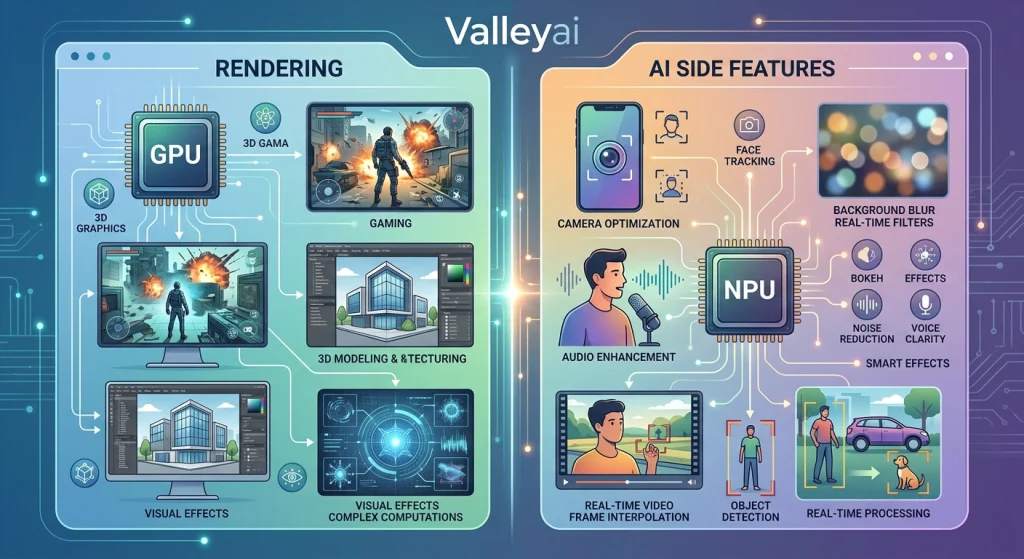
An NPU does not replace the GPU’s role in rendering game graphics. Rendering environments, lighting, textures, geometry, display output, and many visual effects remain GPU-oriented workloads.
An NPU may support AI-related features around a game or gaming system. For example, a device could use specialized hardware for noise processing, camera effects, or another supported local inference task. That does not mean the NPU renders the game or delivers the main graphics performance.
For gaming, evaluate the GPU first. Consider:
- Graphics rendering capability
- Available graphics memory
- Resolution and refresh-rate goals
- Game-engine support
- Ray-tracing or other required features
- Thermal and power limits
An NPU may add value to a gaming laptop or desktop for selected AI features, but its presence alone should not be treated as a gaming-performance upgrade.
Software support decides whether the NPU can help
Hardware capability is only one part of acceleration. The application, model, compiler, driver, and runtime must provide a path to the NPU.
A model may fail to use an NPU for several reasons:
- The model contains operators the NPU does not support.
- The application lacks an NPU execution provider.
- The runtime cannot convert the model into the required format.
- The model exceeds available local memory.
- The workload uses a precision format that the NPU does not handle efficiently.
- Unsupported portions are sent to the CPU or GPU.
- The feature is processed remotely instead of on the device.
A workload can also be divided across processors. One part of a model may run on the NPU while another part falls back to the CPU or GPU. That arrangement may still be useful, but the NPU’s advertised capability does not describe the performance of the complete application.
When evaluating a specific device, verify the complete software path rather than relying on an NPU specification:
| Compatibility question | What it reveals |
|---|---|
| Does the operating system expose the NPU to applications? | Whether software can access the hardware. |
| Does the application support local inference? | Whether the feature runs on the device at all. |
| Does the runtime support the model format? | Whether the model can be loaded and executed. |
| Are the required operators supported? | Whether the entire model can run without fallback. |
| Which precision formats are available? | How the model may be represented and processed. |
| What happens to unsupported operations? | Whether work moves to the CPU, GPU, or another execution path. |
| Does the model fit in local memory? | Whether the device can run the workload without excessive data movement. |
This is the practical reason that two systems with similarly named NPUs can behave differently with the same application.
Performance depends on memory, precision, latency, and power
Processor comparisons become unreliable when they reduce performance to one specification. A useful evaluation separates at least four factors.
A discrete GPU has its own VRAM, while an NPU usually shares system memory — and that single difference shapes most of the results.
Memory and data movement
AI workloads move model weights, inputs, and intermediate results through different levels of memory. A GPU may offer substantial graphics memory for large workloads, while a specialized accelerator may rely on on-chip memory and tightly controlled data movement.
The relevant question is not simply how much memory a processor has. It is whether the model and its working data can be moved efficiently through the available memory hierarchy.
Precision
Precision describes how numerical values are represented during computation. Lower-precision formats can reduce memory movement and computational cost for some models, but the supported format must match the model and the processor.
A comparison that ignores precision may compare different computational conditions without making that difference clear.
Latency and throughput
Latency is the time required to respond to an individual request. Throughput is the amount of work completed over a period of time.
A local voice feature may prioritize low latency for one response. A data-center service may prioritize throughput across many requests. The same processor can look attractive under one measure and less suitable under the other.
Power and thermal limits
An NPU may be attractive for repeated local inference on a battery-powered or thermally constrained device. A GPU may be the better fit when the system can supply more power and needs flexible, high-throughput computation.
“More efficient” should therefore be tied to a defined task. It can mean lower energy for one inference, lower heat during sustained use, longer battery life, or more work completed under a fixed power limit. Those are related, but they are not identical measurements.
Anything branch-heavy or strictly sequential still lands on the CPU, which is built for exactly that kind of work.
What an NPU cannot accelerate
An NPU cannot accelerate every task labeled “AI.” Its usefulness stops where local execution, software support, or model compatibility stops.
An NPU generally cannot help with:
- AI requests processed entirely on a remote cloud service
- Graphics rendering that requires GPU features
- Models containing unsupported operations
- Applications without an NPU execution path
- Workloads that exceed local memory constraints
- General-purpose computation unrelated to supported neural-network operations
- Training workflows that require software, memory, or flexibility unavailable on the device
That limitation is not a flaw. Specialization is the reason an NPU can be useful in the first place. A processor designed for a narrower class of operations can be efficient within that class while being unsuitable elsewhere.
The right comparison is therefore not “NPU versus GPU in every situation.” It is “Which processor can execute this workload completely, efficiently, and with the required software support?”
When using an NPU and GPU together makes sense
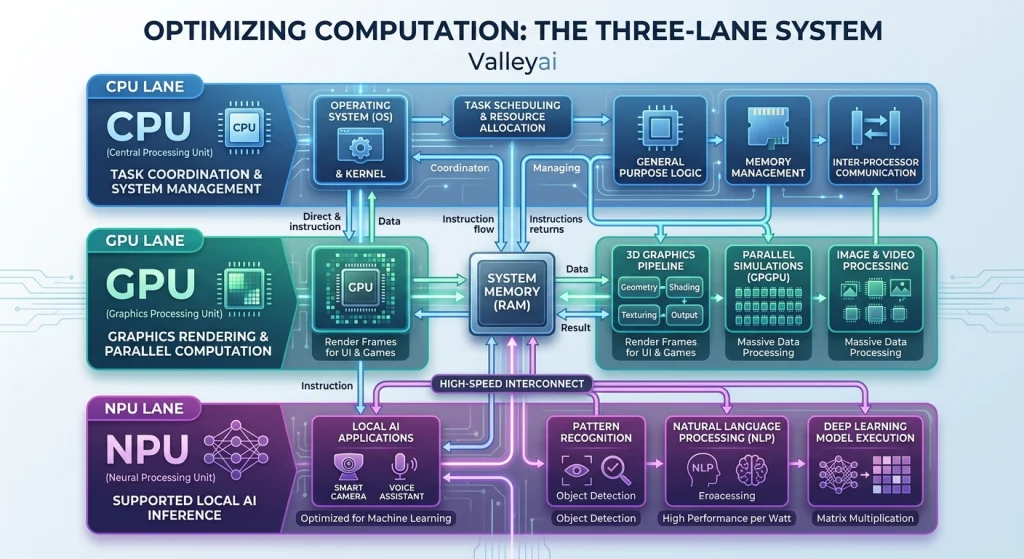
A system does not always need to choose one accelerator. The CPU can coordinate the application, the GPU can handle graphics or flexible parallel computation, and the NPU can run selected local inference tasks.
Consider a hypothetical video call:
- The CPU manages application logic and general system tasks.
- The GPU handles display composition or graphics-related processing.
- The NPU runs supported background-noise or image-enhancement inference.
- A cloud service handles an optional remote transcription or language feature.
The exact division depends on the application. The important point is that “AI acceleration” can involve several execution paths at once.
Using both an NPU and GPU can make sense when a system needs:
- Local AI features and strong graphics
- Battery-sensitive inference alongside demanding visual workloads
- Fast interactive processing plus larger offline computation
- Separate workloads running at the same time
- A fallback path for models the NPU cannot fully support
The NPU complements the GPU when the workloads are different enough to benefit from specialization. It adds less value when applications cannot access it or when the main workload is already graphics-heavy and GPU-bound.
The same framework works for the GPU-versus-CPU decision, so it is worth reading both before buying.
A practical NPU-versus-GPU decision framework
Use this sequence before choosing hardware or deciding which processor should run a model.
1. Identify where the workload runs
- On the device: Consider NPU, GPU, and CPU support.
- At the edge: Consider power, latency, connectivity, and local model execution.
- In the cloud: Focus on the remote accelerator; the local NPU may have no role.
2. Identify what the workload does
- Graphics rendering: Start with the GPU.
- Local neural-network inference: Check NPU support first, then GPU and CPU fallback.
- Training or broad experimentation: Favor the processor with the required memory, software ecosystem, and flexibility.
- General application work: The CPU remains part of the execution path.
3. Check whether the software path is complete
Confirm that the application, runtime, model format, operators, compiler, and drivers support the selected processor. Partial support can move work elsewhere and change the expected result.
4. Define the performance target
Decide whether the priority is:
- Fast response for one request
- High throughput across many requests
- Lower energy use
- Longer battery life
- Sustained performance under thermal limits
- Larger model capacity
- Graphics quality or frame rate
5. Choose one processor or a combination
- Choose an NPU when supported local inference and power efficiency are the main goals.
- Choose a GPU when graphics, training, flexible AI computation, or larger workloads dominate.
- Choose both when the system needs local AI and graphics or flexible compute at the same time.
- Keep the CPU in the plan for coordination, general-purpose processing, and unsupported operations.
This framework is more reliable than selecting hardware from a single TOPS, core-count, or marketing label. Those specifications may be useful, but only after the workload and software path are known.
Choose the processor that can finish the job
The NPU vs GPU decision becomes clearer when the question changes from “Which one is more powerful?” to “Which one can run this workload completely and efficiently?”
Use an NPU for supported local inference when power and latency matter. Use a GPU for graphics, training, and flexible parallel computation. Use both when the system needs specialized AI and broader compute at the same time.
A processor label starts the evaluation. Workload fit, software support, memory, and deployment context finish it.

Kaleem
My name is Kaleem and i am a computer science graduate with 5+ years of experience in Computer science, AI, tech, and web innovation. I founded ValleyAI.net to simplify AI, internet, and computer topics also focus on building useful utility tools. My clear, hands-on content is trusted by 5K+ monthly readers worldwide.