

The key you press is only the top layer. Underneath, a keyboard contains a mechanism that moves, an electrical contact system that detects movement, a controller that identifies the key, and wired or wireless electronics that send the event to your computer.
The exact parts depend on the design. A mechanical keyboard uses individual switches. A membrane keyboard uses flexible conductive layers. A laptop keyboard usually combines thin scissor mechanisms with an integrated contact circuit.
The Seven Functional Layers Inside a Keyboard
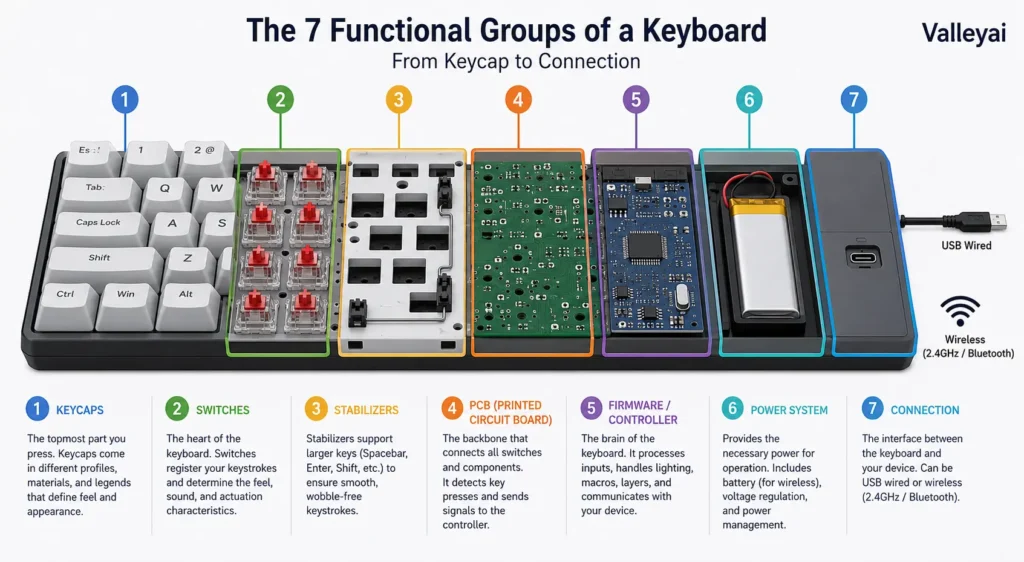
A typical keyboard contains seven functional groups:
- Keycaps or keys — the parts your fingers press.
- A switch or detection mechanism — detects key movement.
- A key matrix or contact layer — organizes the electrical circuit.
- A PCB or membrane circuit — carries electrical traces.
- A keyboard controller — scans the keys and processes input.
- A case, frame, or mounting structure — holds the components together.
- Cable or wireless electronics — communicates with the computer.
Not every keyboard contains these parts in the same physical form. A mechanical keyboard may have a separate switch and a rigid printed circuit board (PCB), while a low-cost membrane keyboard may use several flexible plastic sheets instead.
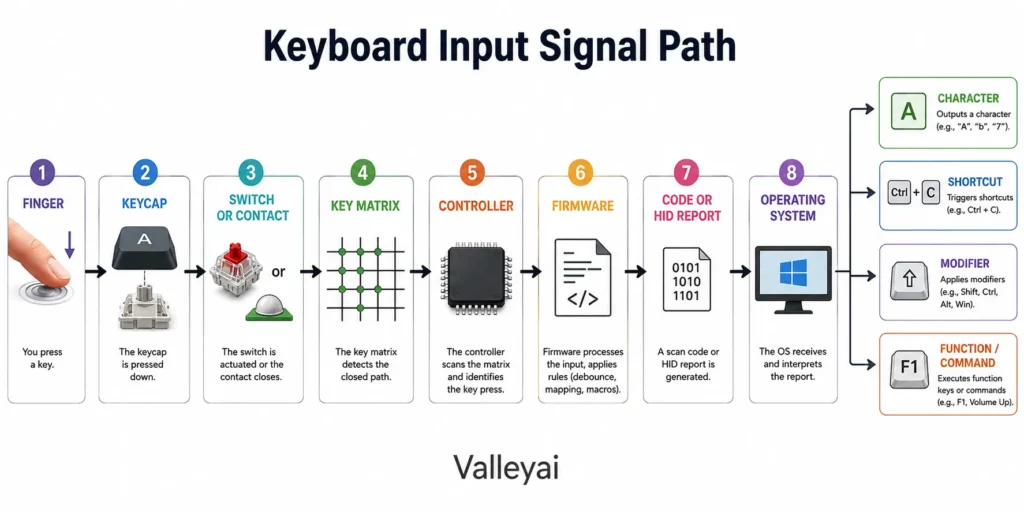
A keyboard does not usually send a finished letter directly to the computer. The keyboard detects a physical key event, converts that event into a code or report, and sends the information to the operating system. Software then decides whether the event becomes a letter, shortcut, command, or function.
The Physical Parts Beneath the Keys
A teardown becomes easier to understand when the visible key and the hidden mechanism are treated as separate parts.
Keycaps are the removable top layer
A keycap is the plastic piece printed or molded with a letter, number, symbol, or command. The keycap transfers finger pressure to the mechanism below it, but the keycap itself does not normally detect the key press.
On many mechanical keyboards, the keycap attaches to a stem on the switch. On membrane and laptop keyboards, the keycap may connect to a hinged or scissor-style mechanism that presses a rubber dome or contact point.
Long keys, including the spacebar, Enter key, and Shift key, often need stabilizers. A stabilizer supports both ends of a wide key so the key does not tilt when pressed off-center. A loose spacebar can therefore have a mechanical stabilizer problem even when its electrical switch still works.
Switches detect movement
A key switch is the component that changes when a key is pressed. The design varies considerably.
A mechanical switch normally contains a housing, stem, spring, and electrical contacts. Pressing the key moves the stem and changes the state of the contacts. Releasing the key allows the spring to return the stem to its original position.
Mechanical switches are not all identical. Some use different actuation forces, travel distances, contact arrangements, or sound-producing structures. Cherry’s official MX switch documentation, for example, describes switch families with different operating characteristics, but one manufacturer’s design should not be treated as the definition of every mechanical switch.
A membrane keyboard may not have a separate switch for every key. Instead, a rubber dome supplies the spring force. Pressing the dome pushes two conductive areas together within the membrane circuit.
Rubber domes provide spring force
A rubber dome is a small flexible cup beneath a key. The dome collapses when pressed and then returns to shape when released.
Rubber-dome keyboards often combine the dome with a membrane contact system. The dome gives the key its resistance and rebound; the membrane layers detect the electrical connection.
The dome is also why a membrane keyboard can feel inconsistent after years of use. A worn or damaged dome may feel soft, sticky, or slow to return even if the surrounding keys still operate normally.
Scissor mechanisms guide laptop keys
Laptop keyboards commonly use a scissor mechanism, a pair of interlocking plastic arms that guide a short key travel. The mechanism keeps the keycap stable while allowing the keyboard assembly to remain thin.
A scissor mechanism is mechanical support, not necessarily the electrical sensor. Beneath the mechanism, a rubber dome, membrane contact, or another detection system registers the press.
Some older or especially thin laptop keyboards use butterfly-style mechanisms. Their shape and serviceability differ from scissor mechanisms, but both designs are intended to stabilize a low-profile keycap.
The PCB or membrane circuit carries the electrical paths
A printed circuit board, or PCB, is a rigid board with conductive traces and mounted electronic components. In many mechanical keyboards, the PCB sits below the switches and connects the switch positions to the controller.
A keyboard PCB may also hold:
- Diodes
- LEDs or RGB lighting components
- Hot-swap sockets
- The controller chip
- USB or wireless circuitry
- Connectors for daughterboards or cables
A membrane keyboard may use flexible plastic sheets instead of a rigid PCB beneath the keys. These sheets contain printed conductive tracks. A spacer layer keeps the circuits apart until a rubber dome pushes the contact areas together.
A keyboard can also contain both types of circuit construction. For example, a device may use a flexible membrane for the key contacts and a small rigid PCB for the controller and USB connection.
The case, plate, and internal supports hold everything in position
The case or housing protects the keyboard’s internal parts. The case may include a top shell, bottom shell, frame, feet, mounting posts, and cable openings.
Some mechanical keyboards add a plate above the PCB. The plate holds switches in a fixed arrangement and can change the keyboard’s stiffness, sound, and feel. A plate may be made from steel, aluminum, polycarbonate, brass, or another material.
Some keyboards also include:
- Gaskets, which suspend or cushion part of the assembly
- Foam, which changes sound and can reduce vibration
- Screws and mounting hardware
- Stabilizer mounts
- Daughterboards, which move the USB connector away from the main PCB
Gaskets and foam are design-specific. They are not required for a keyboard to detect key presses.
LEDs provide lighting, not basic key detection
Many keyboards contain LEDs beneath or beside the keys. LEDs may illuminate legends, indicate status, or create RGB lighting effects.
Lighting is electrically separate from the basic actuation system in many designs. A keyboard can continue registering key presses when its backlight fails. Conversely, a keyboard may show working lights while its key contacts or controller have a fault.
How One Key Press Becomes a Computer Input
The journey from a finger to a displayed character involves several distinct steps.
1. The key mechanism moves
Your finger presses the keycap. The keycap transfers force to a mechanical switch, rubber dome, scissor mechanism, capacitive sensor target, optical interrupter, or another detection system.
The physical movement alone does not tell the computer which key was pressed. The keyboard still needs to detect and identify the event electronically.
2. The electrical state changes
In a traditional contact-based keyboard, pressing the key closes an electrical path. In a mechanical keyboard, metal contacts inside the switch change state. In a membrane keyboard, conductive areas on flexible layers meet.
Other designs detect movement differently. Optical keyboards detect a change in light, capacitive keyboards detect a change in capacitance, and Hall-effect keyboards detect a change in a magnetic field. These designs can avoid conventional metal contact behavior, although they still require a controller and an organized sensing system.
3. The key matrix identifies the position
A key matrix arranges keys into rows and columns. The controller scans combinations of rows and columns to determine which position has changed.
The matrix reduces the number of electrical connections needed. A keyboard with many keys does not necessarily need one dedicated wire for every key. Instead, the controller checks intersections within the row-and-column network.
Diodes may be added to individual key paths to reduce unwanted electrical interactions. Diodes can improve key rollover and help the controller distinguish simultaneous key presses. Without suitable isolation, certain combinations can cause ghosting, where the keyboard reports a key that was not pressed.
4. The controller scans and filters the signal
The keyboard controller is a small processor responsible for monitoring the matrix. It repeatedly scans the rows and columns, detects changes, and determines which key positions are active.
Mechanical contacts and membrane contacts do not always change state perfectly once. They can produce a brief unstable signal called bo
unce. Firmware uses debouncing to prevent one physical press from being interpreted as several presses.
The controller may also manage:
- Key rollover
- Backlighting
- Media keys
- Macro functions
- USB communication
- Bluetooth or radio communication
- Power management
Firmware is the software stored in the keyboard’s electronics. Firmware controls how the controller interprets the matrix and communicates with the computer.
5. The keyboard creates a code or input report
The controller generally produces a scan code, usage code, or other keyboard event representation. A USB keyboard commonly communicates through the USB Human Interface Device (HID) class. The USB Implementers Forum publishes HID resources and usage tables that define standardized device and input meanings.
A code represents an input event, not necessarily the final character shown on screen. The same physical key can produce different characters when the active keyboard layout, modifier keys, language settings, or application changes.
6. The computer interprets the event
The keyboard sends the event through a USB cable, Bluetooth connection, or wireless receiver. The operating system receives the event and applies its input rules. Microsoft’s keyboard-input documentation distinguishes keyboard events from the character or command that an application ultimately processes.
For example, pressing a physical key while holding Shift may produce an uppercase character. Pressing the same key with Ctrl or Alt may trigger a shortcut instead. The keyboard reports the key event; the operating system and application determine the resulting action.
Signal path:
finger → keycap → switch or contact → key matrix → controller → firmware → code or HID report → operating system → character or command
What Changes Inside Different Keyboard Designs?
A keyboard’s internal parts depend on how the design detects a key press.
| Keyboard design | Detection method | Typical internal construction | Common service issue |
|---|---|---|---|
| Mechanical | Individual switch contacts or sensors | Keycaps, switches, PCB, optional plate, controller | Failed switch, solder joint, socket, or trace |
| Rubber-dome membrane | Dome presses conductive membrane layers | Keycaps, rubber sheet, membrane layers, spacer, controller | Worn dome, dirty contact, damaged membrane |
| Scissor-switch | Short guided movement presses a contact | Low-profile keycap, scissor arms, dome or membrane circuit | Broken clips, damaged hinge, contact failure |
| Laptop keyboard | Usually thin scissor-style mechanism and integrated circuit | Key assembly, membrane or PCB, ribbon cable, controller | Liquid damage, torn cable, broken retainer |
| Optical | Light interruption or reflection changes | Optical switches, sensors, PCB, controller | Sensor contamination or switch failure |
| Capacitive or Hall-effect | Change in capacitance or magnetic field | Sensor assemblies, PCB, controller, firmware | Sensor, calibration, or controller fault |
Mechanical keyboards use separate switches
A mechanical keyboard usually has one discrete switch beneath each regular key. The switches mount to a PCB, plate, or both.
This construction makes individual switch replacement possible on some models, particularly when the PCB has hot-swap sockets. Soldered switches require desoldering equipment and more skill. Repairability still depends on the board, switch design, replacement parts, and available documentation.
Membrane keyboards use layered contacts
A typical membrane keyboard contains flexible layers with conductive traces and a separator between contact areas. Pressing a key moves the upper conductive layer toward the lower layer.
“Membrane keyboard” and “rubber-dome keyboard” are related but not identical terms. The membrane describes the circuit structure. The rubber dome describes the flexible actuator that presses the contact. Many inexpensive desktop keyboards use both.
Laptop keyboards prioritize thinness
Laptop keyboard assemblies are tightly integrated with the computer’s chassis. The key mechanism, membrane, frame, and ribbon connector may form one thin assembly.
That compact structure saves space but leaves less room for repair. A single broken keycap may be replaceable, while a damaged membrane or connector can require replacement of the whole keyboard assembly. Laptop models vary, so the manufacturer’s service documentation should take priority over a generic teardown.
Optical, capacitive, and Hall-effect keyboards sense without ordinary contacts
Not every modern keyboard depends on a simple metal contact closing. Optical switches use light-based sensing. Capacitive systems measure electrical capacitance. Hall-effect systems use magnetic sensing to detect movement and may measure the position of a key rather than only its pressed or released state.
These designs still need a physical key mechanism, sensing electronics, a matrix or sensor arrangement, a controller, and firmware. The detection method changes; the overall physical-to-digital chain remains recognizable.
Layout matters too when a key seems missing rather than broken, which is common with the Home and End keys on compact boards.
Which Internal Part Usually Causes the Problem?
A symptom can suggest the affected area, but it cannot prove the diagnosis without testing.
| Symptom | Likely internal areas | Why |
|---|---|---|
| One key produces no input | Switch, dome, contact pad, solder joint, or local trace | The fault is limited to one key position |
| Several keys in one row or column fail | Matrix trace, connector, diode, or controller | Shared electrical paths may affect multiple keys |
| One key repeats characters | Bounce, contamination, worn switch, or firmware | The controller may receive repeated state changes |
| Spacebar feels tilted or loose | Stabilizer, keycap mount, or broken clip | Wide keys need mechanical support beyond the center switch |
| Keys fail after a spill | Membrane, PCB traces, connector, or controller | Liquid can create contamination or short paths |
| Backlight works but keys do not | Switch contacts, matrix, controller, or firmware | Lighting and key detection can use separate circuits |
A single dead key often points to the local mechanism or contact. A complete row or column failure is more suggestive of a shared matrix path. That distinction saves time during troubleshooting: do not replace ten switches when one damaged trace could explain the pattern.
Before opening a wired keyboard, disconnect the cable. Do not clean or test a powered device after a spill. Laptop keyboards contain fragile clips, ribbon cables, and thin contact layers; opening one without the correct service instructions can cause additional damage.
Quick Answers About Keyboard Internals
Does every keyboard have a circuit board?
No. Many mechanical and electronic keyboards use a rigid PCB, but some membrane keyboards use flexible printed conductive layers for the key contacts. A keyboard may also combine a membrane circuit with a small PCB containing the controller and connection electronics.
Do membrane keyboards have switches?
Membrane keyboards have a method for detecting key presses, but they may not have separate mechanical switches beneath every key. A rubber dome commonly presses conductive areas on membrane layers. The dome acts as the spring and actuator while the membrane provides the electrical contact.
Is a keycap the same as a key switch?
No. A keycap is the removable top surface marked with a letter or symbol. A key switch or contact mechanism sits beneath the keycap and detects the press. Some laptop designs combine several parts into a compact assembly, but the keycap and detection mechanism still perform different jobs.
Does a keyboard send letters directly to the computer?
Usually, a keyboard sends key events represented by scan codes or standardized HID usage information. The operating system applies keyboard layouts, modifier keys, and software rules to turn the event into a character, shortcut, or command. The keyboard reports the physical input; software determines its final meaning.
What is inside a mechanical keyboard?
A typical mechanical keyboard contains keycaps, individual mechanical switches, a PCB, a controller, firmware, a case, and a cable or wireless module. Many models also include a plate, stabilizers, LEDs, foam, gaskets, or hot-swap sockets. Optional parts vary by model and mounting design.
What is inside a membrane keyboard?
A membrane keyboard commonly contains keycaps, rubber domes, flexible conductive layers, a spacer sheet, printed circuit traces, a controller, and a case. The conductive layers form the key matrix. Pressing a rubber dome brings contact areas together and changes the electrical state at that key position.
Why does one keyboard key stop working?
One failed key may have a worn switch, collapsed rubber dome, dirty contact, broken solder joint, damaged local trace, or damaged key mechanism. If the key feels normal but produces no input, inspect the electrical path first. If the key feels sticky or loose, inspect the mechanical parts as well.
Why does a keyboard type the same letter repeatedly?
Repeated characters can result from contact bounce, contamination, a worn switch, liquid residue, or firmware and operating-system behavior. Software repeat settings can also create repeated input when a key remains logically pressed. Testing the keyboard on another computer can help separate a hardware fault from a software setting.
Why do several keys in one row or column stop working?
Several failed keys that share a row or column may indicate a broken matrix trace, connector problem, diode issue, or controller fault. The pattern matters: keys failing together are less likely to have unrelated individual switch failures. A keyboard schematic or matrix-testing tool can help locate the shared path.
Why does a laptop keyboard have a different internal design?
Laptop keyboards are designed around limited thickness and tightly integrated chassis space. Scissor mechanisms provide stable, short key travel, while thin membrane layers and ribbon cables reduce height. The compact assembly saves space but often makes component-level repair more difficult than repair on a modular desktop keyboard.
Keyboards are one piece of a bigger picture, covered in the modern guide to computer input devices.

Kaleem
Kaleem is a Computer Science graduate and the founder of Valley AI (valleyai.net), where he publishes in-depth, tested guides on computers, AI, and internet technologies. Every guide is researched from primary sources and updated regularly.