

You are on the couch with flour on your hands, the television is on, and you say, “Alexa, set a timer for ten minutes.” The little cylinder across the room answers without being touched. It heard you over the television, picked your voice out of the room, and understood the words.
That is the problem a smart speaker solves. A microphone that hears everything cannot tell which sound matters. A speaker that plays music cannot hear you over its own output. The device has to find your voice in a noisy room, decide you spoke to it, and then work out what you want, all before it answers.
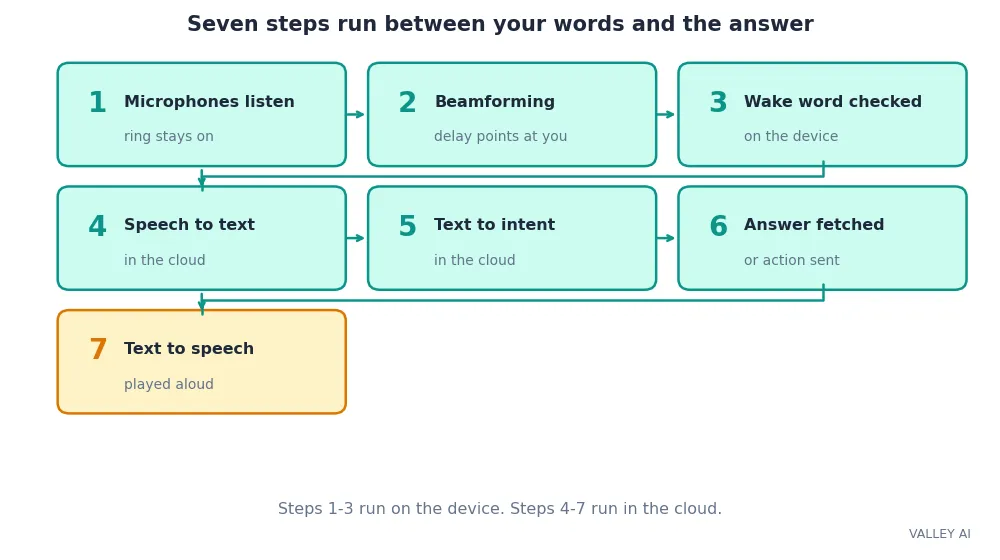
Judge a smart speaker by the microphones and the wake-word chip inside it. The loudspeaker matters less. The chain below shows why: seven steps run between your words and the answer, and the first two decide whether the rest ever starts.
The Seven-Step Chain, in Order
Every request runs the same chain. The microphones catch the sound. Beamforming finds the direction. The wake-word chip checks one word. The cloud turns speech into text, text into an intent, and the answer back into speech. The loudspeaker plays it.
- The microphones listen. A ring of far-field microphones stays on around the clock.
- Beamforming finds the direction. The delay between microphones points at the speaker.
- The wake-word chip checks one word. Nothing leaves the house until it hears “Alexa”, “Hey Google”, or “Hey Siri”.
- The cloud turns speech into text. Automatic speech recognition writes down what you said.
- Understanding turns text into an intent. The system works out what you want and which details it needs.
- The answer is fetched or the action is sent. A music request goes to a streaming service; a light command goes back to the house.
- Text becomes speech again. A voice synthesis system reads the answer aloud through the loudspeaker.
Each failure points at one link. A speaker that never wakes has a microphone problem. One that wakes and misunderstands has a recognition problem. One that understands and does nothing has an account or device problem. The rest of the article walks the chain link by link.
How the Microphones Hear You Across the Room
A smart speaker hears with several microphones, not one. The count varies by model, and it now sits on the spec sheet. The table below takes its counts from the makers’ own spec pages.
| Model | Microphones | Local chip |
|---|---|---|
| Amazon Echo (2014) | 7 | Not published |
| Amazon Echo (2nd gen) | 7 | Not published |
| Echo Dot, 5th gen (2022) | 3 | MediaTek |
| Echo Dot Max (2026) | 4 | AZ3 |
| Google Nest Audio | 3 | Quad-core A53, 1.8 GHz |
| Google Nest Mini, 2nd gen | 3 | Not published |
| Apple HomePod mini | 4 | Apple S5 |
More microphones mean a better fix on the direction. The ears stay the same. Each mic is a small MEMS unit, the same kind of microphone a phone carries. The array wins by comparing what each mic hears. A headset uses the same comparison to pick a voice out of background noise.
The comparison works like two ears judging where a sound came from by which ear hears it first. Sound reaches the nearer mic a fraction of a millisecond before the farther one. The gap between arrivals points at the voice, and the speaker turns its listening toward that direction while turning down sound from elsewhere.
Music makes the job harder. The speaker plays sound while it listens, so its own output lands on the microphones along with your voice. Acoustic echo cancellation subtracts a copy of the music from what the mics pick up, which leaves your voice standing out. The cancellation runs on the device, before anything goes to the cloud.
Can it hear you while music plays? Yes, within limits. Echo cancellation removes the speaker’s own music, and beamforming turns toward your voice. Shout from another room over loud music and the mics still lose the words. The cancellation removes the music. Distance wins.
Three checks tell you how well a speaker hears. Watch the light ring: on an Echo it points a brighter segment toward the person speaking, using direction data from the mic array. Count the microphones on the spec sheet before buying: three is the current entry level, and four and up buy a tighter fix. Press the microphone-off button and watch the ring turn red. That is the physical proof the mics stopped.
Beamforming, Worked With Real Numbers
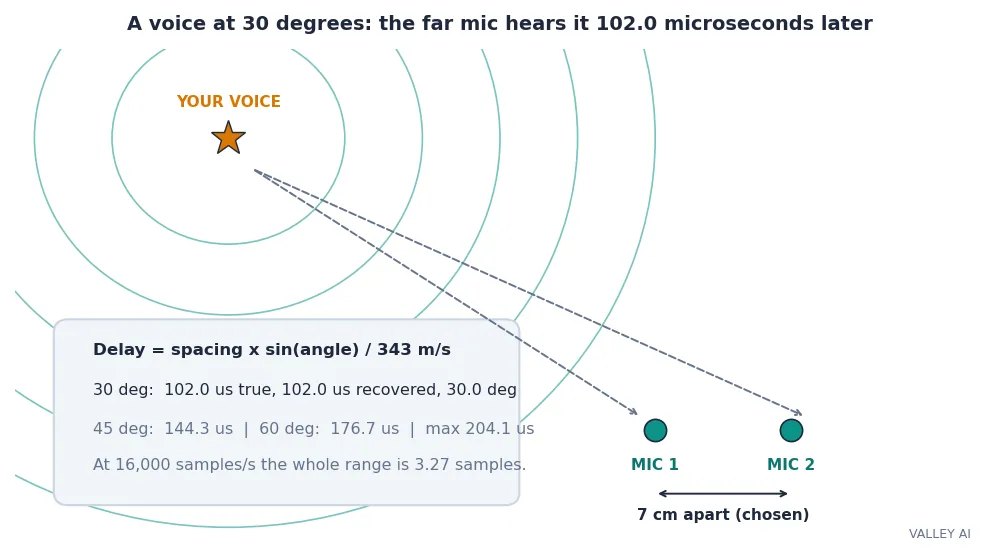
Beamforming sounds abstract until the delay is worked out. Sound moves at 343 metres per second in air at about 20 degrees. Two microphones 7 centimetres apart hear the same voice at different times, and the gap depends on the angle.
The rule fits on one line. Delay equals spacing times the sine of the angle, divided by the speed of sound. Straight ahead, the angle is zero, the sine is zero, and both mics hear the voice at the same instant. Off to the side, the far mic lags.
I checked that rule with a simulation of my own. Two microphones, 7 cm apart (a chosen spacing; real smart speakers space their mics a few centimetres apart across a body about 10 cm wide). A 1 kHz burst played from four directions, and cross-correlation recovered the delay from the two recordings.
| Direction | True delay | Recovered delay | Recovered direction |
|---|---|---|---|
| 0 degrees | 0.0 microseconds | 0.9 microseconds | 0.3 degrees |
| 30 degrees | 102.0 microseconds | 102.0 microseconds | 30.0 degrees |
| 45 degrees | 144.3 microseconds | 143.1 microseconds | 44.5 degrees |
| 60 degrees | 176.7 microseconds | 175.8 microseconds | 59.5 degrees |
The recovered directions land within half a degree of the true ones. The largest delay in the test is 176.7 microseconds, under the 204.1-microsecond limit set by the spacing: no sound can take longer than the spacing divided by the speed of sound to cross from one mic to the other.
At 16,000 samples per second, one sample lasts 62.5 microseconds, so the whole 204.1-microsecond range spans only 3.27 samples. The simulation recovered the angle because cross-correlation with parabolic interpolation reads between samples. A real speaker samples faster and uses more mics, which is how it keeps the fix tight.
A delay past the limit gives the model away. A correlation peak at 300 microseconds would need the sine of the angle to equal 1.47, and no angle has a sine above 1. The estimate is rejected as noise. The same limit catches a second weakness: a source at 30 degrees and a source at 150 degrees both give a 102.0-microsecond delay, so one pair of mics hears a cone of possible directions. It cannot pick one direction out of that cone. A ring of mics breaks the tie by adding more delays to compare.
Read the model for what it is. One pair of mics in free air, one clean tone, no walls. A real room adds reflections, so each mic hears the voice several times over, and echo cancellation plus a ring of 3 to 7 mics sits on top of this direction estimate. The simulation proves the delay-to-angle rule works. It says nothing about how well any real speaker hears in a noisy kitchen.
The Wake Word Chip: Listening Without Recording
The microphones never switch off, but the speaker is not recording everything. A small neural network runs on the device around the clock and listens for one word. Until it hears that word, the audio stays in a short rolling buffer on the device and is overwritten as new sound arrives.
Only after the wake word does the speaker start sending audio. The recording it sends includes a fraction of a second of sound from just before the word, so the start of your sentence is not cut off. The light ring shows the change. Cyan means it is listening. The brighter segment points toward you.
The chip that runs this check has a name on Amazon’s speakers. The AZ1 Neural Edge processor handled wake-word detection and speech recognition on the device in the 4th-generation Echo. The AZ2, in the Echo Show 15, runs speech locally like AZ1 and adds computer-vision work in parallel, at 22 times the operations per second of AZ1, per reports of Amazon’s own announcement. The newest Echo Dot Max carries the AZ3. Each generation moves more of the work onto the device, which cuts the wait and keeps more audio at home.
False wakes happen. A similar-sounding word on television can trip the check, and a study of Echo Dots found 30 to 38 percent of spurious recordings were human conversations. The speaker had caught ordinary talk and treated it as a command.
The mute button is the hard stop. On an Echo it cuts power to the microphones electrically. Software alone cannot undo that, and the light ring turns red. Press it and the device cannot hear the wake word at all. Voice history adds the second control: the companion app lists what the speaker sent and lets you delete it.
Does it record everything you say? No. The microphones listen around the clock, but the rolling buffer is overwritten until the wake word lands. Audio leaves the house only after that word, plus the fraction of a second before it. The mute button stops even that.
Listening around the clock costs little power. An Echo idles at about 2 to 3 watts while it waits for the word, which is why the device can stay plugged in and listening all day.
From Sound to Answer: the Cloud Round Trip
Once the wake word lands, the recording travels. It rides the home Wi-Fi to the router, out through the modem, and up to the maker’s servers. A weak signal where the speaker sits slows every request, so check the signal before blaming the speaker.
On the server, speech recognition turns the audio into text. The recogniser guesses: when two words sound alike, it picks the most likely one from context, which is why a request can occasionally be misunderstood. Modern systems train on millions of hours of speech, so they cope with accents and background noise far better than the voice software of ten years ago.
Knowing the words is not enough. The system must work out what you want. “Turn off the bedroom light” is an intent (switch something off) plus details (which device, which room). A music request goes to a streaming service. A weather question goes to a forecast provider. A smart-home command goes back down to the house, to the bulb or plug.
For questions, the answer comes back as text and a voice synthesis system reads it aloud. Modern synthetic voices are built from recordings of real human speech, stitched and smoothed by software, and the voice is generated on the server and streamed back as audio.
| Stage | Where it runs | What sets its speed |
|---|---|---|
| Wake-word check | On the device | The local neural chip |
| Upload and speech recognition | In the cloud | Wi-Fi signal and server load |
| Intent and action | In the cloud | The service behind the request |
| Voice synthesis and download | In the cloud, then the device | The length of the answer |
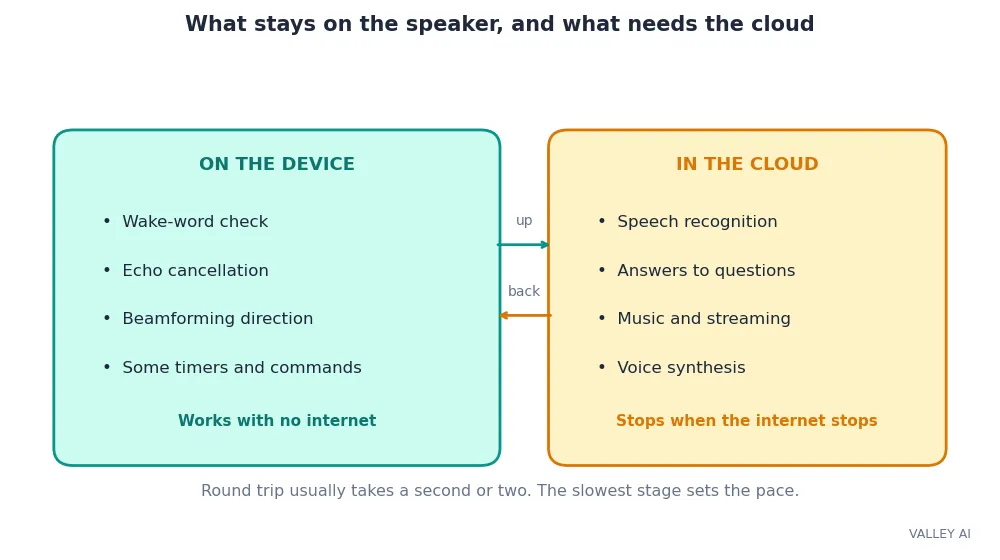
The whole round trip usually takes a second or two. The table is a labelled stage budget. No maker publishes per-stage timings, and the only figure the field agrees on is that one-to-two-second total. When an answer takes far longer, the slow link is usually the Wi-Fi signal or the service behind the request. The speaker rarely sets the pace.
Why does it sometimes answer slowly? The round trip has four stages and the slowest sets the pace. A weak Wi-Fi signal stretches the upload, a busy music service stretches the answer, and a long reply stretches the download. The speaker itself adds almost nothing to the wait.
Some of the work never leaves the house. On newer chips, common requests such as timers and smart-home commands can run on the device, and Matter control can run locally too. The rest still needs the cloud: speech recognition, answers to questions, and music all travel up and back. A dead internet connection kills the cloud half and leaves only the local half standing.
What a Smart Speaker Can and Cannot Do
NPR and Edison Research counted 91 million Americans owning a smart speaker in 2022, about 35 percent of adults. The draw is the range of jobs one small cylinder takes on: music and podcasts, timers and alarms, weather and news, reminders, and shopping lists.
The smart-home job is the one that grows. Many Echo models double as hubs, with a Zigbee radio built in, and newer models support Matter and work as Thread border routers, which bridges low-power mesh devices onto the home network. Routines tie the jobs together: one phrase can switch off the lights, lock the door, and lower the thermostat. Setup runs over a short Bluetooth link: the companion app passes the Wi-Fi password to the speaker over it.
Limits sit beside the jobs. A smart speaker needs mains power and has no battery, so it stops when the power stops. Most answers need the internet, so a dead connection leaves only local timers and local smart-home commands. It mishears names and similar-sounding words, and it wakes by mistake when the television says the wrong word. It hears everyone in the room, so a visitor can ask it questions and get answers meant for you.
None of that makes the speaker a bad buy. It makes the buying check short: count the microphones on the spec sheet, check the mute switch is physical, and stay inside the ecosystem whose services you already pay for. An Echo suits a household that lives on Alexa skills. A Nest suits one that lives on Google services. A HomePod suits one that lives on Apple hardware.
Set it up in the room where you talk most, in a spot chosen for sound. Test it the way you will use it: speak from the couch over the television, ask for the timer you set every morning, and switch off the light you switch off every night. If it answers cleanly from that chair, the chain works. If it misses, move it a metre from the television and away from the corner before blaming the software, since the microphones hear the room before the cloud hears you.
Frequently asked questions
Do you need a subscription to use a smart speaker?
No subscription is needed. The basic functions cost nothing beyond the speaker and the internet connection you already pay for. Music services, audiobooks, and some advanced assistant features charge separately. Amazon lists its newest Alexa+ features as free with a Prime membership or $19.99 a month for others after early access.
Can a smart speaker play FM radio?
No, because smart speakers carry no FM tuner. Ask for a station by name and the speaker streams it over the internet through a radio service instead.
Can you change the wake word?
On an Echo, yes. Alexa, Amazon, Computer, Echo, and Ziggy are all available as wake words, and the change sits in the Alexa app. Google’s wake word cannot be changed, and Siri answers to Hey Siri.
Can more than one person use the same smart speaker?
Yes. Voice profiles let the speaker tell household members apart by voice and pull each person’s calendar, music, and reminders. Set up one profile per person in the companion app, and check whose account a purchase or message would use before asking for one.
Can a smart speaker make phone calls?
Yes, but only within limits. Echo speakers can call other Echo devices and, in some regions, phone numbers through the Alexa app. Google and Apple speakers handle calls through their own services and the phone they pair with. The speaker works as a hands-free handset. It does not replace a phone.
How do you stop a smart speaker waking up by accident?
Move the speaker away from the television and lower the television volume, since similar-sounding words on screen are the usual trigger. Then open the voice-history page in the companion app and check what the speaker thought it heard. The entry shows the exact words that tripped it.

Kaleem
Kaleem is a Computer Science graduate (Virtual University of Pakistan) and the founder and editor of Valley AI, where he publishes in-depth, tested guides on computer hardware, artificial intelligence, and how the internet works. Every guide is researched from primary sources, tested hands-on where possible, and updated when the facts change.