

A white spot on your LCD screen is almost never a sign that the display is electronically failing. That bright patch staring back at you from a laptop or monitor is usually a physical crease in a plastic film layer, not a dead circuit. Most people panic and price out a new panel immediately. They shouldn’t.
When you’re inspecting a second-hand laptop under a reseller’s dim showroom lights, a 2mm white spot is easy to miss but in direct sunlight that same spot blooms into a distracting glare patch. I’ve seen buyers reject perfectly good machines over a cosmetic scar while ignoring the early battery swell that actually matters.
Why Pressure Bends Light Instead of Burning Out Pixels
The LCD panel houses a Backlight Unit (BLU) (LG Display panel technology), and inside that BLU sits the diffuser sheet the component that pressure damage creases to produce a visible white spot on the LCD screen. External force from a backpack, a closed lid with a pen underneath, or a drop does not usually kill the liquid crystal cells themselves.
The diffuser sheet is a polymer optical film designed to scatter LED light evenly across the LCD panel. When mechanical stress folds this film, the crease acts like a tiny lens, concentrating backlight into a bright zone. This is why pressure creates a white spot instead of a black dead-pixel area: the light source still works, but the light path is physically distorted.
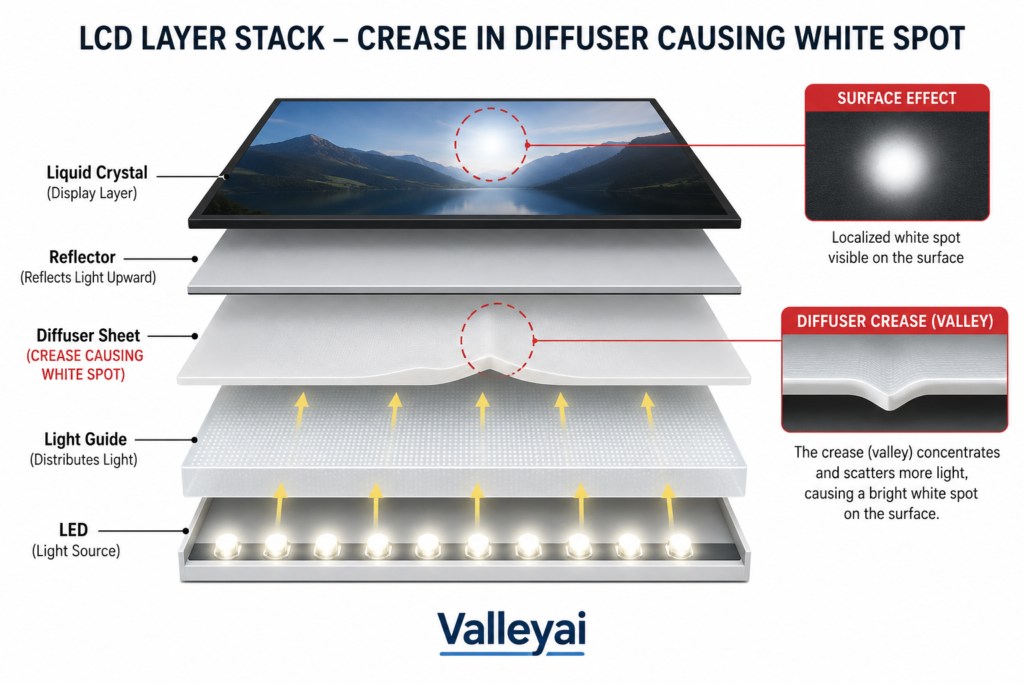
Modern thin-and-light laptop chassis tolerate less external pressure before internal optical-layer deformation occurs. On a Dell XPS panel I opened after a backpack-pressure claim, the diffuser sheet had a sharp crease line matching the laptop’s hinge ridge the liquid crystal itself was untouched.
White Spots vs Dead Pixels: The Diagnostic Split That Protects Your Wallet
Confusing a pressure mark with a dead pixel leads to wasted repair quotes. The two defects originate from completely different failure modes within the LCD panel architecture.
| Defect Type | Root Cause | Visual Signature | Reversibility |
|---|---|---|---|
| White Spot (Pressure) | Diffuser sheet crease in Backlight Unit | Soft, cloudy bright patch, shifts with angle | Permanent film damage |
| Dead Pixel | Failed liquid crystal subpixel | Sharp black dot, fixed location | Usually permanent silicon fault |
| Stuck Pixel | Frozen subpixel voltage | Fixed red/green/blue dot | Sometimes fixable via software |
| Hot Pixel | Always-on subpixel | Constant white pinpoint dot | Hardware fault |
Backlight bleeding and pressure marks are frequently confused by consumers because both produce bright zones. The key differentiator: backlight bleed appears uniformly along panel edges under dark scenes, while a pressure white spot shows as a localized island anywhere on the screen.
The 30-Day Stability Test: Mapping Whether Your Spot Will Spread
Reddit threads are full of users asking if their white spot will grow. The answer depends entirely on the cause. A one-time impact crease will not spread. A swelling battery will.
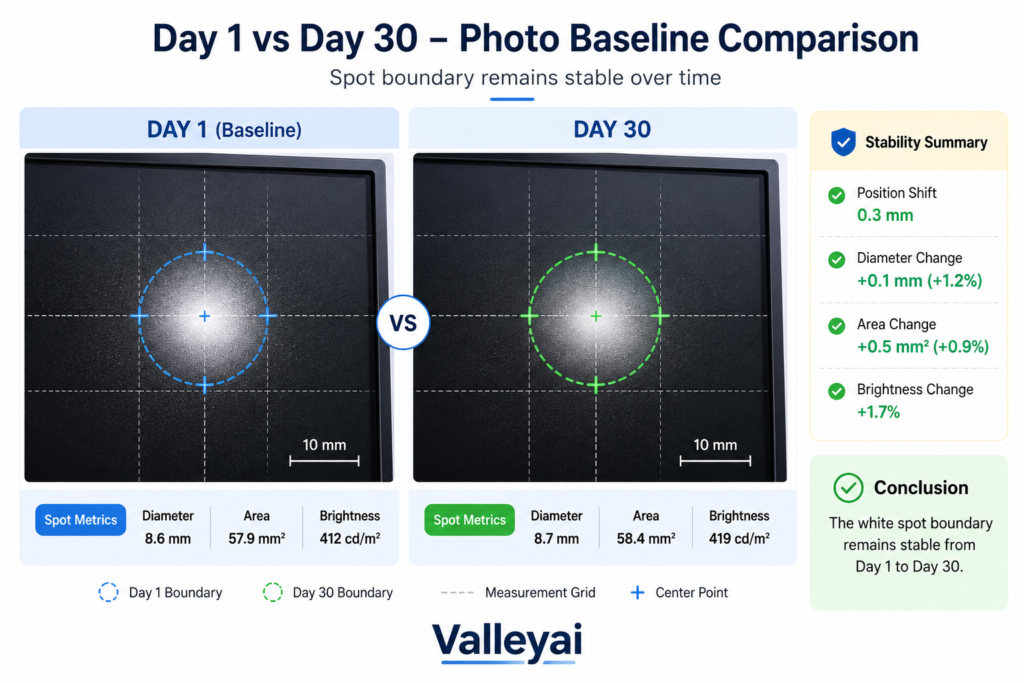
Run this photo-baseline workflow to know which camp you’re in:
- Place the device on a flat surface and display a pure white image at max brightness.
- Use a ruler for scale and photograph the spot with a smartphone macro lens. Note the date.
- Repeat the exact same shot setup on day 15 and day 30.
- Compare pixel-to-pixel boundaries of the spot. If the cloudy area expands, mechanical progression is happening.
In obserbation of my computer screen, I’ve seen spots caused by a one-time impact stay pixel-stable for three years, while a slowly swelling battery produced a spot that grew 4mm in six weeks. If your day-30 photo matches day-1, the white spot on your LCD screen is a stable cosmetic artifact. Live with it.
Pressure Scar or Battery Bulge? The Safety Line You Cannot Cross
Safety Disclaimer: If your device shows screen bowing, a localized hot spot, or a sweet-chemical odor, stop using it immediately and consult a licensed repair technician or the manufacturer’s safety program. A swollen lithium-ion cell is a fire hazard, not a cosmetic defect.
A white spot from pressure is benign. A white spot from battery swelling is a ticking clock. Lithium-ion cell swelling can exert enough pressure to deform device enclosures and internal components (UL battery safety standard). The Backlight Unit diffuser sheet creases under that force, mimicking a harmless pressure mark.
Check the device chassis. If the laptop deck near the trackpad is rising, or the phone screen is lifting from the frame, the white spot on the white spot on the display is the smaller problem the deformed cell underneath is the one that needs immediate professional attention. Do not attempt to press the bulge flat, puncture the casing, or “wait it out.” A swelling lithium-ion cell can vent or ignite under continued pressure, and no cosmetic screen fix is worth that risk.
Is a White Spot a Sign of Battery Damage?
A white spot alone rarely signals battery damage. The overlap only matters when the spot appears suddenly, grows within days rather than months, or shows up alongside physical case changes a trackpad deck that no longer sits flush, a lid that won’t close evenly, or a screen visibly lifting from its bezel. A static spot that has looked the same for months is almost always simple pressure damage, not a battery warning sign.
Can Pressure Marks Be Removed?
No, and any guide that promises an at-home fix for a creased diffuser sheet is overstating what’s possible. Once the polymer film inside the Backlight Unit folds, it stays folded; these films don’t relax back to flat the way a wrinkled shirt might. The only way to “remove” a pressure-based white spot is to replace the internal optical stack or the panel itself, not to treat the glass surface. Screen protectors, pressure, or heat applied from outside do nothing to a crease sitting several layers beneath the glass.
Cosmetic, Annoying, or Worth Replacing? A Severity Matrix
Not every white spot deserves a repair bill. Whether it’s worth fixing depends on the device, the spot’s location, and how it was caused:
| Severity | Typical Sign | Recommended Action |
|---|---|---|
| Cosmetic | Small, static spot away from center of screen | Ignore no functional impact |
| Annoying | Spot sits in primary reading/viewing zone, worsens in bright light | Repair only if resale value or daily use justifies cost |
| Safety Hazard | Chassis bowing, deck lifting, chemical odor, rapid growth | Stop using immediately; professional inspection required |
I’ve seen many peoples live with a single cosmetic spot rather than spend $300 on a panel swap the math only favors repair when the spot sits dead-center in the primary reading column, or when the device is being resold and the defect will tank the sale price more than the repair costs.
For phones and tablets, panel replacement is usually the only fix and is often comparable to a new-device down payment, so weigh it against upgrade timing. For monitors and TVs, a single stable white spot rarely justifies replacement unless it sits in the exact center of the viewing area. For laptops, factor in whether the spot coincides with any hinge or chassis flex point that combination is worth a second inspection even if the spot itself looks minor.
A white spot on your LCD screen, in the vast majority of cases, is a permanent but harmless scar from a moment of pressure not a sign your device is failing. Run the 30-day stability test, rule out chassis swelling, and you’ll know within a month whether you’re looking at a cosmetic mark to live with or a hazard to act on.
Frequently Asked Questions
What’s the difference between a white spot and a dead pixel?
A white spot is a soft, cloudy patch caused by a physical crease in the backlight’s diffuser sheet, and it shifts slightly with viewing angle. A dead pixel is a sharp, fixed black dot caused by a failed liquid crystal subpixel, and it looks identical from every angle. They come from different parts of the panel and require different fixes.

Kaleem
Kaleem is a Computer Science graduate (Virtual University of Pakistan) and the founder and editor of Valley AI, where he publishes in-depth, tested guides on computer hardware, artificial intelligence, and how the internet works. Every guide is researched from primary sources, tested hands-on where possible, and updated when the facts change.