
The Central Processing Unit (CPU) is often called the brain of the computer, but this analogy is slightly incomplete. If the CPU is the brain, the Arithmetic Logic Unit (ALU) is the specific region of the cortex responsible for doing the actual math and decision-making. Every single calculation, from rendering a video game frame to calculating a spreadsheet sum, relies on the ALU processing binary data at lightning speeds.
While most definitions simply state that the ALU performs math, the reality of how it interacts with the Control Unit and the Accumulator Register is far more fascinating and critical to understanding CPU architecture.
This blog explores the inner workings of the ALU, moving beyond simple definitions to explain the complex data paths, control signals, and logic gates that power modern computing.
The Arithmetic Logic Unit (ALU) is a fundamental combinational digital circuit within the CPU responsible for performing integer arithmetic (like addition and subtraction) and bitwise logic operations (like AND, OR, and XOR). It acts as the execution core, processing binary data directed by the Control Unit and storing results in the Accumulator Register.
Read a detail guide about: where the processor holds data during operations
The Core Role of the ALU in Von Neumann Architecture
In the classic Von Neumann Architecture, which defines the structure of almost all modern computers, the CPU consists of three primary components:
- Memory (Registers/Cache): Short-term storage for data.
- Control Unit (CU): The manager that decodes instructions.
- Arithmetic Logic Unit (ALU): The worker that executes instructions.
While the Control Unit fetches instructions and memory stores data, the ALU is the only component that actually changes data. Without an ALU, a computer is simply a storage device capable of moving data around but incapable of processing it.
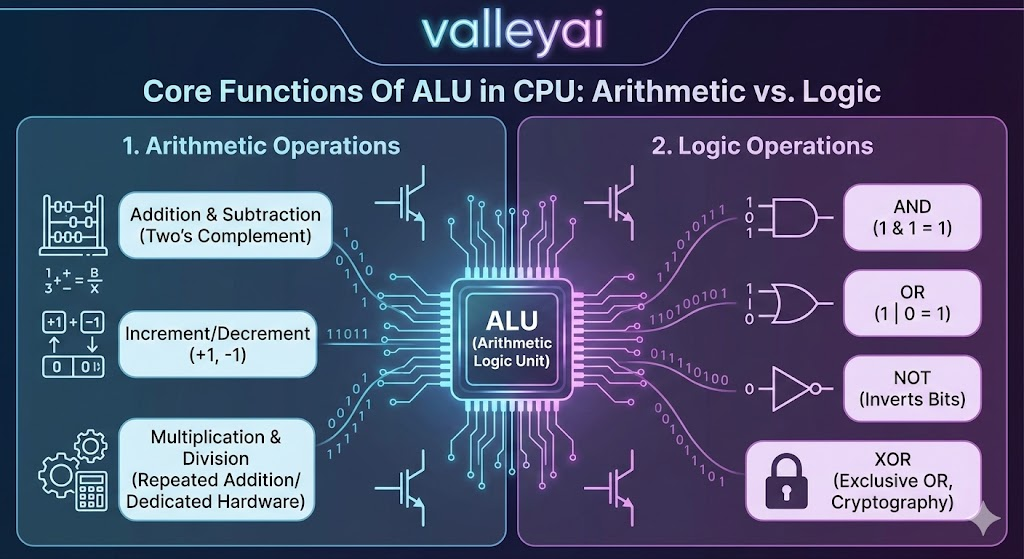
Core Functions Of ALU in CPU: Arithmetic vs. Logic
The ALU derives its name from the two primary types of operations it performs. These operations are executed using logic gates microscopic transistors arranged to manipulate binary 1s and 0s.
1. Arithmetic Operations
These are mathematical calculations performed on binary numbers. The ALU handles:
- Addition & Subtraction: The most frequent operations. Subtraction is often performed using two complement addition.
- Increment/Decrement: Adding or subtracting 1 from a value (essential for loops in programming).
- Multiplication & Division: In simpler ALUs, these are done via repeated addition/subtraction. Modern, complex ALUs have dedicated hardware multipliers for speed.
2. Logic Operations
Logic operations allow the computer to make decisions and compare values. These bitwise operations include:
- AND: Outputs 1 only if both inputs are 1.
- OR: Outputs 1 if at least one input is 1.
- NOT: Inverts the bits (0 becomes 1, 1 becomes 0).
- XOR (Exclusive OR): Used frequently in cryptography and error checking.
The ALU Architecture: How It Connects
To understand the ALU deeply, we must look at its neighbors. The ALU does not operate in isolation; it is sandwiched between the Control Unit and the Accumulator Register.
The Relationship Between the ALU and the Control Unit
A common question in computer architecture is: What is the difference between the ALU and the Control Unit?
Think of the CPU as a symphony orchestra.
- The Control Unit (CU) is the Conductor. It reads the sheet music (instructions), interprets what needs to be done, and signals the instruments when to play.
- The ALU is the Musician. It does not decide what to play; it waits for the conductor’s signal to produce the sound (calculate the result).
The Technical Handshake:
- The CU fetches an instruction from memory (e.g.,
ADD 5, 3). - The CU decodes the Opcode (Operation Code). The Opcode tells the CU that this is an addition task.
- The CU sends specific electrical Control Signals to the ALU, activating the specific circuitry required for addition.
- The ALU performs the addition and outputs the result.
The Critical Role of the Accumulator Register
Most generic articles overlook the importance of the Accumulator Register (AC), but it is vital to the ALU’s operation. The ALU does not typically write directly to main memory (RAM), as RAM is too slow to keep up with the processor.
Instead, the ALU uses a specialized, ultra-fast register called the Accumulator.
The Cycle of Interaction:
- Input: The ALU receives two inputs (Operands). Often, one operand comes from a general register, and the other comes directly from the Accumulator.
- Processing: The ALU processes the data (e.g., adds them together).
- Output: The result is written back into the Accumulator, overwriting the previous value.
This is why it is called an Accumulator it accumulates the running total of arithmetic operations.
Status Flags: How the ALU Communicates Decisions
The ALU doesn’t just output raw numbers; it also outputs status flags. These are single bits stored in a Status Register that tell the Control Unit context about the last operation. This is how computers perform IF/THEN logic.
- Zero Flag (Z): Set to 1 if the result of an operation is zero. (Used to check if two numbers are equal).
- Carry Flag (C): Set to 1 if an arithmetic operation resulted in a carry-out (e.g., adding two large numbers that exceed the register size).
- Sign Flag (S): Indicates if the result is negative.
- Overflow Flag (V): Indicates that the result is too large for the system to represent in signed binary.
Example: If you subtract A - B and the Zero Flag turns on, the computer knows that A and B were equal. This allows the software to branch to a different part of the code.
The Fetch-Decode-Execute Cycle
The ALU is the star of the execute phase in the standard machine cycle:
- Fetch: The CPU gets the instruction from RAM.
- Decode: The Control Unit interprets the Opcode.
- Execute: The ALU wakes up. It accepts the Operands, performs the Binary Arithmetic or logic function, and sets the Status Flags.
- Store: The result is written to the Accumulator or memory.
Advanced ALU Concepts: Bit-Slicing and Complexity
While early ALUs could only handle 4 or 8 bits at a time, modern 64-bit processors use ALUs capable of handling massive integers. However, the fundamental design relies on the same Logic Gates.
- Bit-Slicing: A technique used to build ALUs of higher bit-widths (e.g., 32-bit) by combining multiple smaller ALU modules (e.g., four 8-bit ALUs).
- Multiple ALUs: Modern superscalar processors often contain multiple ALUs within a single CPU core, allowing them to calculate several instructions simultaneously (parallelism).
Frequently Asked Questions (FAQ)
What is the main difference between the ALU and the Control Unit?
The Control Unit directs the flow of data and decodes instructions (the manager), while the ALU performs the actual mathematical and logical processing of the data (the worker).
Why is the Accumulator register important to the ALU?
The Accumulator acts as the primary temporary storage for the ALU. It holds one of the operands before the operation and stores the result immediately after, enabling efficient Read-Modify-Write cycles without accessing slow main memory.
Does the ALU interact directly with memory (RAM)?
Generally, no. In most architectures (like Load/Store architectures), data is first moved from RAM to CPU registers. The ALU interacts with these registers. Accessing RAM directly for every calculation would severely slow down the processing speed.
What are the three main types of operations performed by the ALU?
The ALU primarily performs:
Arithmetic Operations: Addition, subtraction, increment, decrement.
Logical Operations: AND, OR, NOT, XOR, and comparisons.
Bit-Shifting Operations: Moving bits left or right (often used for fast multiplication/division).
Conclusion
The Arithmetic Logic Unit (ALU) is the engine of computation. While the Control Unit provides the instructions and Memory provides the raw material, the ALU is where the transformation happens. By manipulating binary data through complex arrangements of logic gates and communicating via the Accumulator and Status Flags, the ALU enables everything from simple calculator apps to complex artificial intelligence algorithms. Understanding the ALU is the first step in mastering CPU Architecture and computer science fundamentals.

Kaleem
My name is Kaleem and i am a computer science graduate with 5+ years of experience in Computer science, AI, tech, and web innovation. I founded ValleyAI.net to simplify AI, internet, and computer topics also focus on building useful utility tools. My clear, hands-on content is trusted by 5K+ monthly readers worldwide.