

A printer turns a file into marks on paper. It does that work dot by dot, in a fixed order, no matter which type sits on the desk.
Two types dominate home and small office desks. Inkjet printers fire liquid droplets. Laser printers fuse dry powder with heat.
From file to page in four steps
Every print job passes through the same pipeline. The steps hold for inkjet and laser machines alike. The final marking step differs between the two types.
- The driver rasterizes the file and converts text and shapes into a dot map at the printer resolution.
- The spooler queues the job and sends it over USB, Wi-Fi, or Ethernet.
- The printer reads the dot map row by row and marks each row of dots on the sheet.
- The marks are fixed on the page, so the sheet leaves the printer dry and ready to handle.
Rasterization decides quality before any ink moves. A low resolution dot map stays coarse on a fine printer. The driver setting matters as much as the hardware.
A print job can sit in the queue while the printer finishes an earlier job. The spooler holds the dot map until the printer calls for it. Large photo files take longer to rasterize than text pages, so the first page of a photo job appears later.
Printers belong to the output devices family, the hardware group that turns computer data into a physical result. A speaker belongs to that family and turns an electrical signal into sound.
TopTenReviews describes that pipeline, starting with rasterization and ending with the finished page.
Inkjet droplets fired one at a time
An inkjet print head carries hundreds of tiny nozzles. Each nozzle fires one droplet at a time. The head sweeps across the sheet while rollers advance the paper one swath at a time.
Thermal heads heat a resistor for a microsecond. The heat flashes a small amount of ink to vapor. The vapor bubble pushes a droplet out of the nozzle. The bubble then collapses and the chamber refills.
Piezo heads work without heat. A crystal flexes under voltage and squeezes a droplet out. The ink never boils. That difference matters for ink chemistry, since heat limits which inks a thermal head can use.
Color comes from four inks, cyan, magenta, yellow, and black. Droplets land in overlapping patterns. The eye reads those patterns as full color. Photo models add light cyan, light magenta, and gray for smoother tones.
Some inkjet heads sit fixed in the printer body. Others ride on the cartridge and leave with it when the cartridge runs out. A fixed head lasts longer but costs more to replace. A cartridge head gives the printer a fresh head with each cartridge change.
Why does an inkjet print head clog when it sits unused? Ink dries at the nozzle opening and blocks the droplet path. The blockage stays local to the affected nozzles, so the rest of the head prints normally.
Laser charge, light, toner, and heat
A laser printer builds a page in seven steps. The drum sits at the center of the process. Each step prepares the next one.
- Charge. A charge roller gives the drum a uniform negative charge.
- Expose. A laser or LED array discharges the drum wherever the image goes. The discharged areas form the charge pattern.
- Develop. Toner powder sticks to the discharged areas and leaves the rest bare.
- Transfer. A transfer roller moves the toner from the drum onto the paper.
- Fuse. A fuser roller heats the sheet to about 180 to 200 C and melts the toner into the fibers.
- Clean. A blade wipes leftover toner off the drum.
- Erase. A lamp clears any charge left on the drum, so the next page starts from a clean state.
Why does a laser page come out warm? The fuser roller heats the sheet during the final fixing step. The warmth fades within seconds. A page that stays hot or smells of burning points to a fuser fault. That heat level sits outside normal operation.
Toner is dry plastic powder. It contains no liquid ink. It carries a charge that matches the drum pattern. That dry process gives laser text its sharp edge.
LED arrays replace the laser beam with a row of tiny lights. Each light discharges one dot position on the drum. The rest of the cycle stays identical, from development to fusing.
Inkjet vs laser compared directly
Inkjet and laser machines suit different workloads. The diagram sets the two mechanisms side by side.
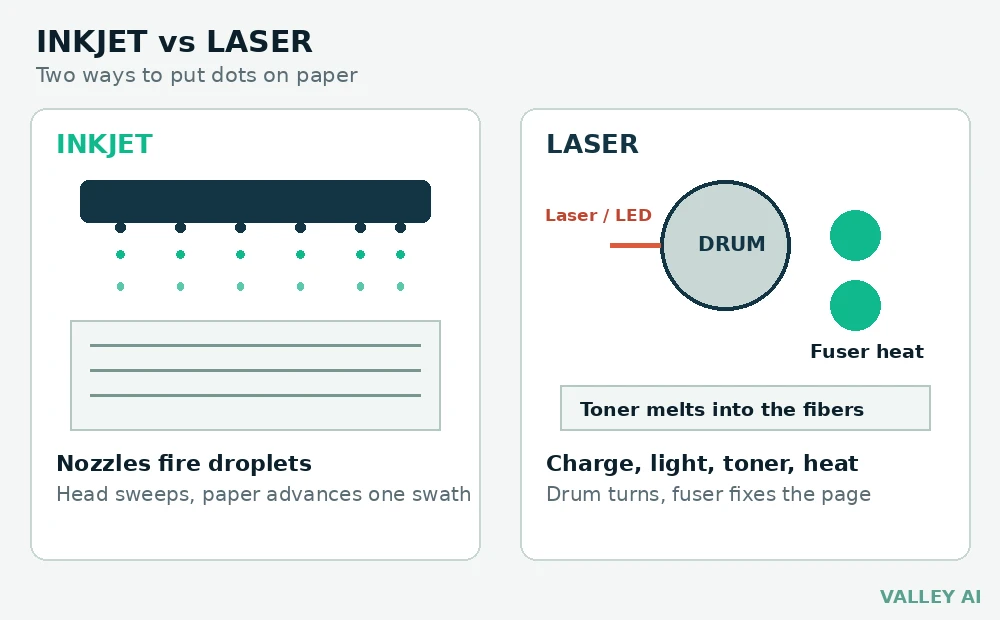
The table sets the main differences side by side.
| Feature | Inkjet | Laser |
|---|---|---|
| How it marks paper | Liquid droplets from nozzles | Dry toner fused with heat |
| Text quality | Good, with softer edges at small sizes | Sharp edges, strong for small text |
| Photo quality | Strong, with smooth color blends | Weaker color blends on plain paper |
| Speed | Slower, since the head sweeps each swath | Faster on multi-page text jobs |
| Running cost | Higher per page on standard cartridges | Lower per page on toner |
| Upkeep | Nozzle clogs need cleaning cycles | Toner and drum need periodic replacement |
HP frames the choice around volume. Heavy text printing favors laser, and occasional photo printing favors inkjet.
Tank models refill from bottles and cut ink cost. The droplet mechanism does not change under the tank system.
Paper path design affects jams more than print quality. A straight path handles thick card better than a curved path. Rear feed slots suit envelopes and heavy stock. Front trays suit everyday plain paper.
DPI, droplet size, and ppm on the spec sheet
DPI counts dot positions across one inch. It does not count ink volume. Two printers can share a DPI rating and differ in detail.
Does a higher DPI always mean a sharper photo? No. Droplet size decides how fine each dot is. A printer with smaller droplets renders finer detail at an equal DPI rating. Paper and source resolution set the final limit.
Droplet size is rated in picoliters. Smaller droplets make smoother blends and finer lines. Photo printers use small droplets for smooth skin tones and sky gradients.
Pages per minute is measured on plain text pages at default settings. Photo pages print far slower than the headline number. Judge speed from text page tests, and judge photo speed from photo tests.
Canon Europe pairs droplet size with DPI in its photo printer guidance.
Driver resolution settings trade speed against detail. Draft mode lays down fewer dots and finishes pages faster. High quality mode lays down more dots and slows the job. Match the setting to the page purpose.
What a page costs, worked out with real numbers
Cartridge price alone says little. Yield decides the real cost. The formula is simple. Price divided by rated yield equals cost per page.
The calculation below uses named inputs.
- Black ink costs $30 for a 300 page cartridge, which equals $0.10 per page.
- Color ink costs $48 for a 300 page cartridge set, which equals $0.16 per page.
- Black toner costs $72 for a 1,500 page cartridge, which equals $0.048 per page, or 4.8 cents.
- 500 black ink pages cost $50.00, while those 500 pages on toner cost $24.00.
- 500 color ink pages cost $80.00.
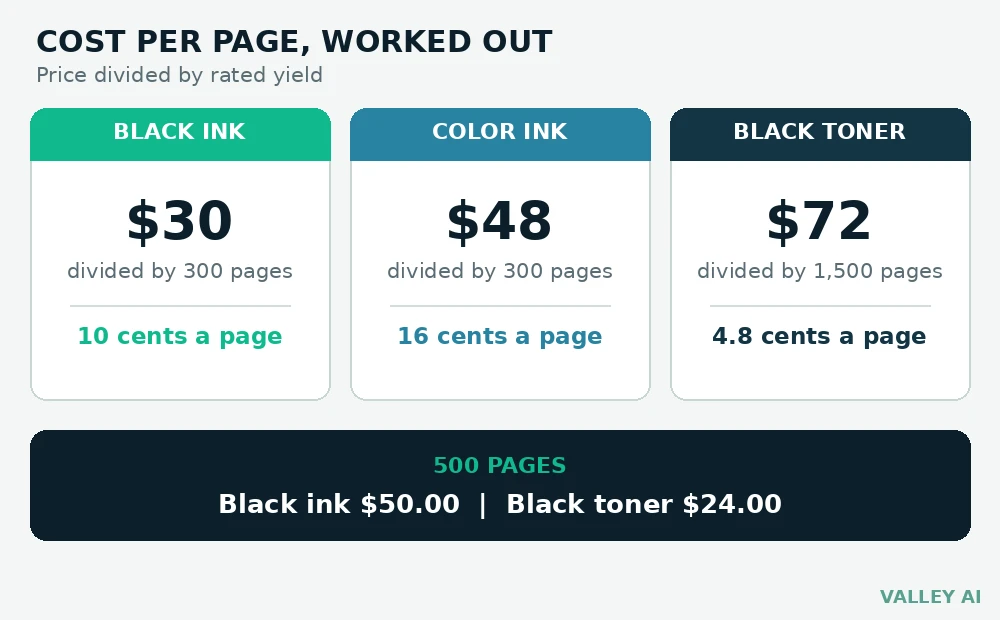
Rated yield assumes standard coverage. Heavy photos cost more per page than the rated figure. Change any input and the result changes with it.
High yield cartridges hold more ink at a lower price per page. The cartridge costs more upfront. The saving appears across the full yield. Low volume printing stretches one cartridge across many months.
When prints go wrong and how to read the fault
A multifunction machine pairs a printer with a scanner. A fault that shows on both prints and copies points to the print engine. A fault on copies alone points to the scan path.
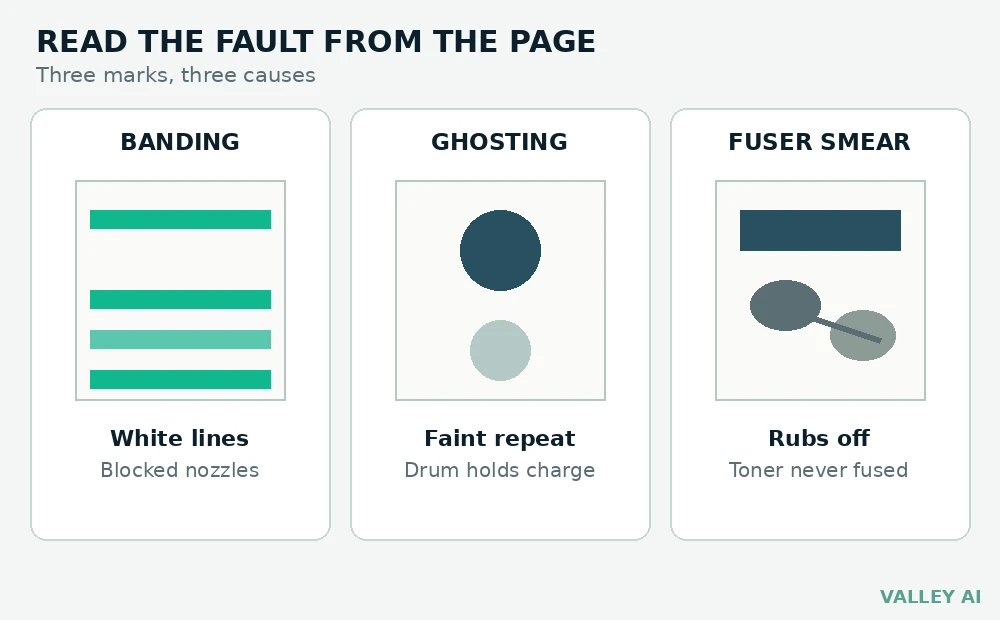
Faults leave clues on the sheet itself. Each fault below has a distinct mark.
Banding shows as straight white lines across a print. Count the lines on a nozzle check pattern. Missing lines point to blocked nozzles. Run one cleaning cycle, then print the pattern again.
A faint repeat of an image further down the page signals ghosting. The drum or roller holds a leftover charge pattern. The repeat distance matches the drum circumference. A drum fault needs a drum replacement. A cleaning cycle will not clear it.
Fuser smear rubs off when touched. Hold the page to light. Toner that failed to fuse sits on the surface and catches the light. Smear after a paper jam often traces back to toner left on the fuser roller.
Dark streaks down the page point to toner on a roller or a damaged drum surface. Print five blank pages. Streaks that fade with each blank page point to loose toner. Streaks that stay sharp point to roller or drum damage.
Misfeeds pull two sheets at once or stop halfway through the path. Damp paper sticks together and feeds as a pair. Fan the stack before loading and store paper flat in a dry place.
Final Thoughts
Count text pages and photo pages for one month. Run both counts through the cost formula. Buy the type with the lower total for that mix.
The nozzle check pattern from the first week makes a useful baseline. Compare later patterns against it when a fault appears.
Keep one spare black cartridge on hand. A spare removes the wait when the installed cartridge runs out mid-job.
Frequently asked questions
How long does printer ink last when the printer sits unused?
An installed cartridge can dry out within weeks of disuse in a warm room. Sealed cartridges last far longer, often past a year. Store spares sealed, upright, and away from heat. Check the install date on the cartridge box before buying a spare.
Can a printer work from a phone without a computer?
Yes, most current printers accept jobs over Wi-Fi from a phone. The phone app sends the file straight to the printer. A USB flash drive works on models with a USB port for direct printing. Check the spec sheet for Wi-Fi Direct or mobile printing support.
Why does color ink drop during black page printing?
Printers run short maintenance cycles that push a small amount of color ink through the nozzles. Those cycles keep the nozzles clear between jobs. A printer that sits idle runs them more often. The color level drops even when no color page leaves the tray.
What does duplex mean on a printer spec sheet?
Duplex means the printer prints on both sides of a sheet. Automatic duplex flips the sheet inside the machine. Manual duplex asks the user to turn the stack over and feed it again. Automatic duplex saves paper on long documents.

Kaleem
Kaleem is a Computer Science graduate (Virtual University of Pakistan) and the founder and editor of Valley AI, where he publishes in-depth, tested guides on computer hardware, artificial intelligence, and how the internet works. Every guide is researched from primary sources, tested hands-on where possible, and updated when the facts change.