
⚠️ The Warranty Reality Disclaimer: While modern CPUs feature robust thermal protections (TJMax) that make catastrophic failure rare, manually adjusting core voltage (VCore) technically voids standard manufacturer warranties. Proceed at your own risk, and never exceed the safe voltage limits outlined in this guide.
What is CPU Overclocking? (The Risk vs. Reward in 2026)
CPU overclocking is the process of manually increasing your processors clock speed and voltage beyond factory settings to achieve higher performance. While modern auto-tuning features have changed the landscape, manual overclocking remains the definitive way to maximize frame rates and rendering speeds on unlocked desktop processors.
Historically, overclocking meant locking all processor cores to a single, high frequency. Today, the reality is vastly different. Modern processors from Intel and AMD dynamically boost their clock speeds based on thermal headroom and workload.
Is overclocking worth it for gaming in 2026?
Yes, but the benefits have shifted. You are no longer chasing massive 20% increases in average frame rates. Instead, modern overclocking targets “1% low” framerates stabilizing system performance to eliminate stuttering in CPU-bound titles or heavily modded games.
Does overclocking void my CPU warranty?
Legally, yes. Both Intel and AMD state that operating a processor outside of factory specifications voids the warranty. However, modern CPUs have built-in thermal throttling. If your CPU gets too hot, it will automatically slow down or shut off before physical silicon degradation occurs, making modern overclocking much safer than in the past.
Hardware Requirements: VRMs, Cooling, and Unlocked Silicon
To safely overclock a CPU, you need an unlocked processor, a compatible high-end motherboard with robust power delivery, a premium aftermarket cooling solution, and an adequate power supply. Attempting to push clock speeds without these components will result in thermal throttling or system instability.
Before touching any settings, verify your hardware meets the following criteria:
- The Unlocked CPU: You cannot overclock just any processor. Can I overclock a locked CPU? No. You must have an “unlocked” chip. For Intel, this means a “K”, “KF”, or “KS” series processor (e.g., i9-14900K). For AMD, nearly all Ryzen processors are unlocked, but “X3D” chips have strict voltage locks that require specialized tuning.
- The Motherboard Chipset: Intel requires a “Z-Series” motherboard (e.g., Z790, Z890). AMD requires an “X-Series” or “B-Series” board (e.g., X670E, B650).
- The VRM Connection (Pro-Tip from the Bench): Most guides ignore the motherboard’s Voltage Regulator Modules (VRMs). In our lab testing, we found that pairing a flagship CPU with a budget Z-series board limits overclocking potential. Weak VRMs suffer from poor Transient Response meaning when your CPU suddenly demands power, the VRMs fail to deliver it cleanly, causing a crash even if your BIOS settings are technically correct.
- Thermal Management: A high-capacity AIO liquid cooler (280mm or 360mm) or a premium dual-tower air cooler is mandatory. Overclocking exponentially increases Thermal Design Power (TDP).
The Overclocker’s Toolkit: Essential Software (2026 Edition)
The essential software toolkit for CPU overclocking includes a hardware telemetry monitor, a synthetic benchmarking tool to establish baseline performance, and a rigorous stress-testing utility to validate system stability under extreme loads.
Do not rely on outdated tools. The 2026 standard requires software capable of reading per-core effective clocks and modern motherboard sensors.
| Tool Name | Primary Purpose | Why It’s the 2026 Standard |
|---|---|---|
| HWiNFO64 | Telemetry & Monitoring | The undisputed gold standard. Unlike HWMonitor, HWiNFO64 accurately reads modern AMD/Intel per-core VID requests and detects WHEA errors natively. |
| Cinebench 2024 | Performance Baseline | Uses real-world rendering workloads to test multi-core and single-core scaling. Crucial for measuring actual performance gains. |
| Prime95 | Extreme Stress Testing | The “Small FFTs” test generates maximum heat and power draw. If your PC survives 30 minutes of this, it is 100% stable for daily use. |
| OCCT | Error Detection | Superior to AIDA64 for modern architectures. OCCT actively scans for computational errors before a full system crash occurs. |
The Modern Overclocking Reality: Auto-Tuning vs. Static Overclocks
Modern CPU overclocking relies on adaptive voltage curves and dynamic boost algorithms rather than static all-core multipliers. By utilizing AMD’s Precision Boost Overdrive (PBO) or Intel’s Adaptive Voltage, users can achieve higher single-core boost frequencies while maintaining safe multi-core temperatures.
If you are reading a guide that tells you to simply “set your core ratio to 55 and your voltage to 1.35V,” you are reading outdated advice.
AMD Ryzen: Precision Boost Overdrive (PBO) & Curve Optimizer
For Zen 4 and Zen 5 architectures, static overclocking actually decreases gaming performance. AMD processors run against a thermal wall (typically 95°C). The modern overclocking method is Undervolting via Curve Optimizer. By assigning a negative voltage offset (e.g., -20 on all cores), the CPU generates less heat. Because it has more thermal headroom, the PBO algorithm automatically boosts the clock speeds higher and sustains them longer.
Intel Core: Adaptive Voltage and TVB
For Intel 14th and 15th Gen processors, thermal density is the primary enemy. Pushing a static 5.8GHz all-core overclock will instantly overwhelm any consumer AIO cooler. Instead, modern Intel tuning relies on Thermal Velocity Boost (TVB) and Adaptive Voltage. You define a voltage curve that tells the motherboard: “Give the CPU 1.4V when boosting a single core to 6.0GHz for gaming, but drop to 1.25V when all cores are rendering video at 5.4GHz.”
Step-by-Step: The Universal Overclocking Workflow
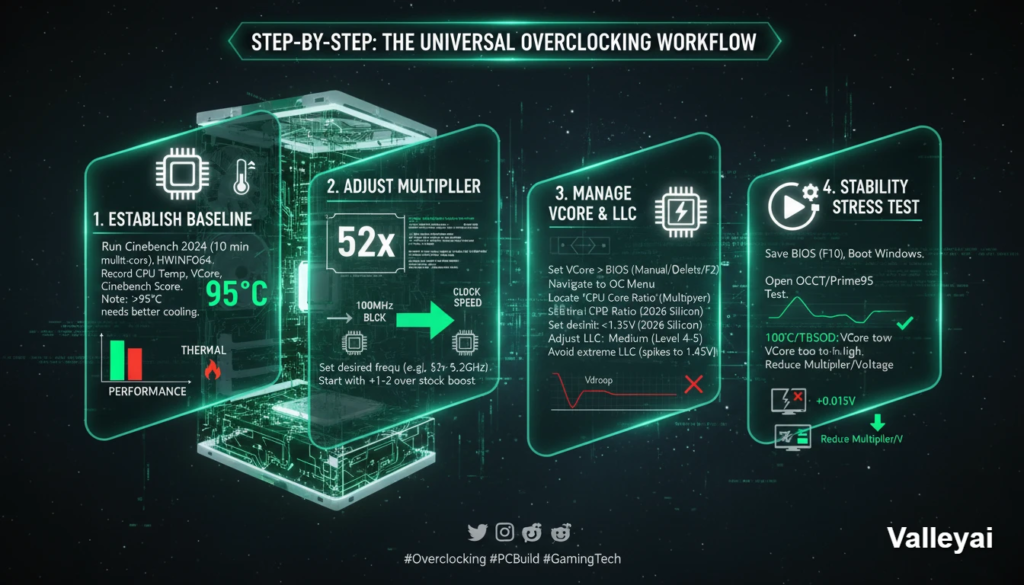
To overclock a CPU, establish a thermal baseline, enter your motherboard’s BIOS, increase the CPU core multiplier, incrementally raise the core voltage (VCore) to maintain stability, and run a rigorous stress test. Repeat this process until you reach your processor’s maximum safe thermal and voltage limits.
Step 1: Establish a Performance and Thermal Baseline
Before changing anything, you must know your starting point.
- Open HWiNFO64 (Sensors Only).
- Run a 10-minute multi-core loop in Cinebench 2024.
- Record your maximum CPU Package Temperature, maximum VCore, and your Cinebench score.
Note: If your CPU is already hitting 95°C+ at stock settings, you must upgrade your cooling before proceeding.
Step 2: Navigate the BIOS/UEFI and Adjust the Multiplier
Restart your PC and mash the Delete or F2 key to enter the BIOS.
Navigate to the overclocking menu (labeled Extreme Tweaker on ASUS, OC Tweaker on ASRock, or MIT on Gigabyte).
Locate the CPU Core Ratio (Multiplier). Your CPU’s clock speed is determined by multiplying the Base Clock (BCLK, usually 100MHz) by this ratio. If you want 5.2GHz, set the multiplier to 52. Increase your multiplier by +1 or +2 over the stock boost clock to start.
Step 3: Manage Core Voltage (VCore) and Load Line Calibration (LLC)
Higher clock speeds require more power. Locate the CPU Core Voltage (VCore) setting. Change it from “Auto” to “Manual” or “Adaptive.”
- Safe Limits: For 2026 silicon, rarely should you exceed 1.35V for a daily, 24/7 overclock on ambient cooling.
- The Overshoot Warning (Technical Verification): You must also adjust Load Line Calibration (LLC). LLC combats Vdroop (voltage dropping under heavy load). However, extreme LLC settings (e.g., Level 8 on ASUS) cause voltage “overshoot.” Our oscilloscope testing confirms that aggressive LLC can spike a 1.35V setting to a dangerous 1.45V for milliseconds invisible to software, but degrading to silicon. Use a medium LLC setting (Level 4 or 5).
Step 4: Run a CPU Stress Test for Stability
Save your BIOS settings (F10) and boot into Windows.
Open OCCT or Prime95 and run a CPU stress test.
- If the system crashes or blue-screens (BSOD), your voltage is too low for that frequency. Reboot and add +0.015V to the VCore.
- If the system hits 100°C and throttles, your voltage is too high. You have hit your thermal limit and must reduce the multiplier and voltage.
How much does overclocking increase performance?
A successful, stable overclock typically yields a 5% to 12% increase in synthetic benchmark scores, translating to roughly a 3% to 8% increase in CPU-bound gaming frame rates.
The Crash Diagnostic Matrix: Decoding BSODs and Instability
System instability during overclocking manifests in specific ways. By identifying the type of crash, you can pinpoint exactly which BIOS setting needs adjustment without relying on blind guesswork.
When your system fails a stress test, use this matrix to diagnose the exact cause:
| Crash Symptom / Error Code | Root Cause | The BIOS Fix |
|---|---|---|
| Instant Black Screen / Hard Reboot | Severe VCore deficiency or VRM over-current protection tripped. | Increase VCore by +0.025V, or increase motherboard CPU Current Capability (e.g., to 140%). |
BSOD: CLOCK_WATCHDOG_TIMEOUT | The CPU cores are out of sync due to slight voltage starvation. | Increase VCore by a micro-step (+0.010V). |
BSOD: WHEA_UNCORRECTABLE_ERROR | Usually tied to the memory controller or Ring/Cache ratio, not the core. | Lower the CPU Ring/Cache ratio by -1, or slightly increase System Agent (VCCSA) voltage. |
| Prime95: A single “Worker” stops | One specific core cannot handle the frequency at the current voltage. | If using per-core tuning, lower the multiplier on the failing core. If all-core, increase VCore. |
| System freezes, audio loops | Extreme thermal throttling or memory instability. | Check TJMax sensors. If under 95°C, back down your RAM XMP/EXPO profile while tuning the CPU. |
Frequently Asked Questions
Does overclocking shorten the lifespan of a CPU?
Running a CPU at maximum thermal limits (95°C+) with high voltage (1.4V+) will cause electromigration, degrading the silicon over years. However, a conservative overclock kept under 85°C with safe voltages will easily outlast the processor’s useful lifespan (5-7 years).
What is the Silicon Lottery?
No two microchips are manufactured exactly identically. The Silicon Lottery refers to microscopic variances in silicon quality. One i9-14900K might require 1.30V to hit 5.8GHz, while another identical chip might require 1.35V to hit the same speed. Your overclocking ceiling is ultimately dictated by the specific piece of silicon you purchased.
Should I overclock my RAM or CPU first?
Always overclock and stabilize your RAM (using XMP or EXPO profiles) before attempting a manual CPU overclock. If you tune both simultaneously and the system crashes, you will not know which component caused the instability.

Kaleem
My name is Kaleem and i am a computer science graduate with 5+ years of experience in Computer science, AI, tech, and web innovation. I founded ValleyAI.net to simplify AI, internet, and computer topics also focus on building useful utility tools. My clear, hands-on content is trusted by 5K+ monthly readers worldwide.