
The Von Neumann bottleneck and the need for speed. In the world of high-performance computing, raw clock speed is no longer the sole dictator of performance. The true bottleneck is often latency. While modern CPUs operate in the gigahertz range (billions of cycles per second), system RAM (DRAM) is comparatively sluggish.
If a CPU had to wait for system RAM for every single instruction, a 5.0 GHz processor would spend most of its life idling. This phenomenon is known as the Von Neumann Bottleneck.
CPU Cache is the hardware solution to this latency gap. It is a small, ultra-fast block of memory located directly on or near the processor die, utilizing SRAM (Static Random Access Memory). Unlike DRAM, which requires constant refreshing and uses capacitors, SRAM uses flip-flop circuits to hold data, making it significantly faster but more expensive and less dense.
Read also: internal CPU storage mechanisms
The goal of the cache hierarchy is simple: Keep the execution units fed.
The Workshop Analogy:
Imagine a carpenter (the CPU Core) working in a workshop.
- L1 Cache: The toolbelt around their waist. Immediate access, but holds very little.
- L2 Cache: The tool chest on the workbench. Arms-reach access, holds more tools.
- L3 Cache: The supply closet in the hallway. Shared by all carpenters in the building, holds bulk materials.
- RAM: The warehouse across town. Getting anything from here stops work completely (high latency).
Technical Breakdown: Layer 1 (L1 Cache)
The Hot Zone
The Level 1 (L1) Cache is the first line of defense against latency. It is physically embedded inside the CPU core, making it the fastest memory in the entire computer system.
Split Architecture: L1i and L1d
In almost all modern architectures (including AMD Zen 5 and Intel Raptor Lake), the L1 cache is split:
- L1 Instruction Cache (L1i): Stores the actual opcodes (instructions) the CPU needs to execute next.
- L1 Data Cache (L1d): Stores the data those instructions will manipulate.
This split is critical for instruction pipelining, allowing the CPU to fetch instructions and data simultaneously (Harvard Architecture modification).
Key Characteristics (2024-2025 Standards):
- Size: Typically very small (32KB to 64KB per core). Increasing L1 size increases latency, so architects keep it tight.
- Latency: Instantaneous. Usually 3-4 clock cycles (approx. 0.7 – 0.9 nanoseconds on a 5GHz chip).
- Associativity: Highly associative (often 8-way or 12-way), meaning data can be stored in multiple valid locations to reduce conflict misses.
Technical Breakdown: Layer 2 (L2 Cache)
The Bridge Between Core and System
The Level 2 (L2) Cache acts as the primary buffer for the L1. While early CPUs (like the Pentium II) had L2 on the motherboard or a separate daughter card, modern L2 is strictly on-die.
The Capacity Expansion
In recent generations (Zen 5 and Raptor Lake), we have seen a massive ballooning of L2 sizes. Why? Because the penalty for missing the L2 and going to L3 (or RAM) has become too costly for modern, complex workloads like AI inference and high-refresh-rate gaming.
- Intel Raptor Lake: Moved to 2MB per core on Performance Cores.
- AMD Zen 5: Maintains 1MB per core, prioritizing lower latency over raw size, utilizing a different victim-cache topology.
Architecture Nuance:
The L2 is generally unified (storing both instructions and data) and is usually private to each core. However, Intel’s Efficient Cores (E-Cores) share clusters of L2 cache to save die space.
Technical Breakdown: Layer 3 (L3 Cache) & 3D V-Cache
The Shared Last Level Cache (LLC)
The Level 3 (L3) Cache, often called the Last Level Cache (LLC), is the final stop before the CPU must request data from system RAM. Unlike L1 and L2, the L3 is generally shared across all cores.
Interconnects and Coherence
Because L3 is shared, the CPU uses complex interconnects (like Intel’s Ring Bus or AMD Infinity Fabric) to manage data flow. This introduces the challenge of Cache Coherence ensuring that if Core 1 modifies data in the L3, Core 2 doesn’t read an outdated version. Protocols like MESI (Modified, Exclusive, Shared, Invalid) manage this.
The Innovation: AMD 3D V-Cache
One of the most significant hardware shifts in the 2020s is vertical cache stacking. Standard L3 cache is laid out horizontally on the silicon (2D).
- The Technology: AMD 3D V-Cache uses TSMC’s hybrid bonding to stack an additional slice of SRAM directly on top of the existing L3 cache region.
- The Impact: This triples the L3 capacity (e.g., from 32MB to 96MB) without changing the motherboard footprint.
- Why it Matters: In gaming, main threads often wait for geometry or physics data. A massive L3 prevents the CPU from accessing slow RAM, resulting in significant improvements in 1% Low FPS and overall smoothness.
Comparative Data Table: Nanoseconds vs. Cycles
The following table benchmarks typical latencies for current-generation architectures (Architecture Year 2024/2025).
| Hierarchy Level | Memory Type | Typical Size (Per Core/Shared) | Latency (Cycles) | Latency (Time @ 5GHz) | Primary Purpose |
|---|---|---|---|---|---|
| L1 Cache | SRAM (Split) | 32KB – 48KB (Private) | 3 – 5 cycles | 0.6 – 1.0 ns | Immediate execution instructions & hot data variables. |
| L2 Cache | SRAM (Unified) | 1MB – 2MB (Private) | 12 – 16 cycles | 2.4 – 3.2 ns | Buffering L1 evictions; preventing pipeline stalls. |
| L3 Cache | SRAM (Shared) | 32MB – 96MB+ (Shared) | 40 – 80 cycles | 10 – 16 ns | Data synchronization between cores; large dataset working sets. |
| System RAM | DDR5 DRAM | 16GB – 64GB (System) | 250 – 400+ cycles | 60 – 90 ns | Bulk storage of active applications and OS kernel. |
Engineers Note: Notice the jump from L3 to RAM. Going from 16ns to 80ns is a cache miss penalty that devastates performance. This is why 3D V-Cache is effective it keeps more data in the 16ns zone.
Process Workflow: The Cache Miss and Hit Hierarchy
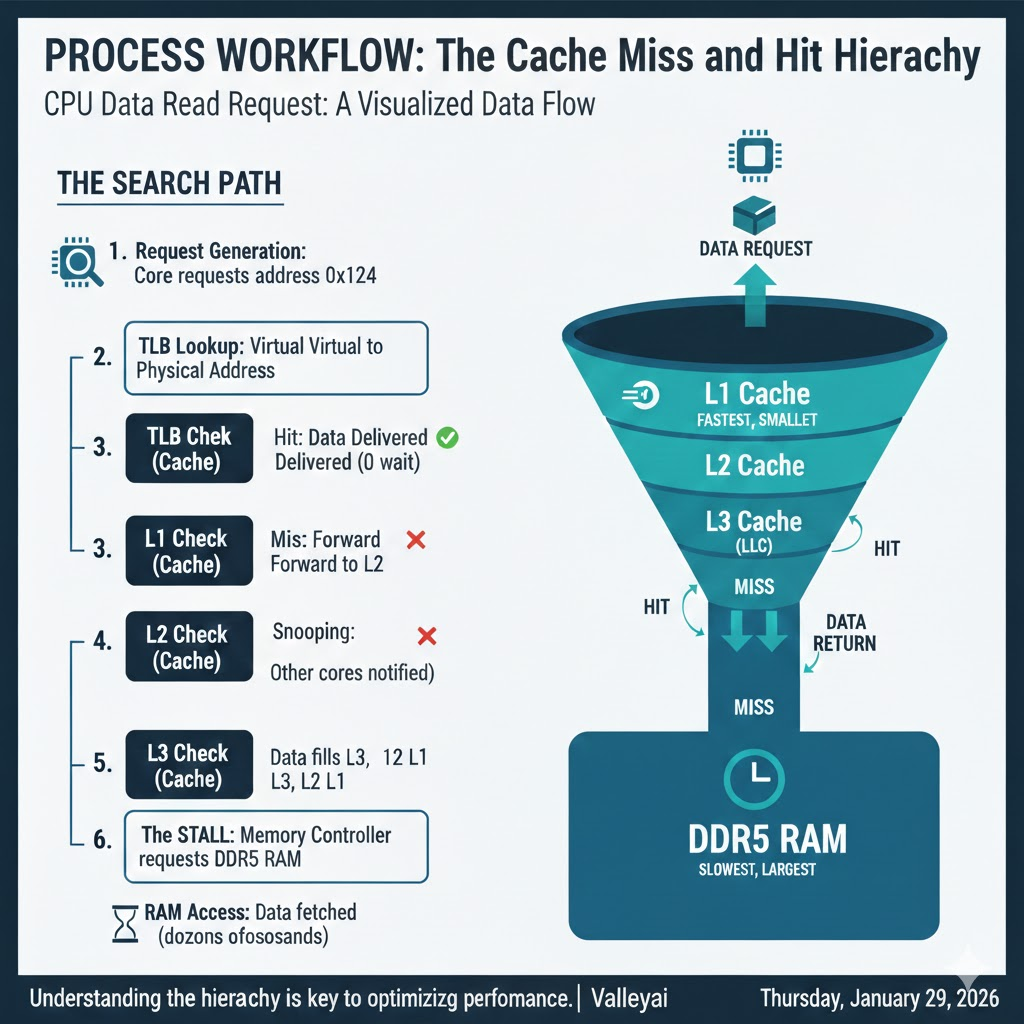
When a CPU needs to perform an operation (e.g., calculate physics for a bullet in a game), it follows a strict lookup hierarchy. Here is the visualized data flow of a read request:
The Search Path
- Request Generation: The Core requests data address
0x1234. - TLB Lookup: The translation lookaside buffer converts the virtual address to a physical address.
- L1 Check:
- Hit: Data delivered immediately (0 wait).
- Miss: Request forwarded to L2.
- L2 Check:
- Hit: Line copied to L1, data delivered.
- Miss: Request forwarded to L3.
- L3 Check (LLC):
- Hit: Line copied to L2 and L1. Snooping ensures other cores know this data is being touched.
- Miss: The stall. The Memory Controller requests data from DDR5 RAM.
- RAM Access: The CPU waits dozens of nanoseconds. Data is fetched, filling L3, L2, and L1 lines on its way back to the core.
Visualizing the Hierarchy
Imagine a funnel. The top (L1) is narrow but fast. The bottom (RAM) is wide but slow. Data must flow up the funnel to reach the CPU.
Developers Corner: Optimizing for Cache Locality
For software developers, understanding cache is the difference between code that runs and code that flies. You cannot manually manage cache (the hardware handles that), but you can write cache-friendly code.
1. Spatial Locality (The Neighbor Rule)
The CPU rarely fetches a single byte; it fetches a cache line (usually 64 bytes). If you request byte 0, the CPU fetches bytes 0-63.
- Optimization: Use contiguous memory arrays.
- Pattern: Structure of Arrays (SoA) often outperforms Array of Structures (AoS).
- Bad (AoS):
Array[1000] of {x, y, z, r, g, b, hp, name}. Looping through justxloads unnecessary data (hp,name) into the cache, wasting space. - Good (SoA):
Array_X[1000],Array_Y[1000]. Looping throughxfills the cache line only with relevantxvalues.
- Bad (AoS):
2. Temporal Locality (The Reuse Rule)
If you use a variable, you are likely to use it again soon.
- Optimization: Complete all operations on a specific dataset block before moving to the next.
- Technique: Loop tiling (blocking). Instead of iterating over a massive matrix row by row (which evicts the start of the row from L1 before you return), break the matrix into small tiles that fit entirely inside L1 cache.
// Example: Cache Unfriendly (Row-major traversal vs Col-major storage)
for (int j = 0; j < N; j++) {
    for (int i = 0; i < N; i++) {
        data[i][j] = data[i][j] * 2; // Jumping memory locations causes L1 misses
    }
}

// Example: Cache Friendly (Linear access)
for (int i = 0; i < N; i++) {
    for (int j = 0; j < N; j++) {
        data[i][j] = data[i][j] * 2; // Sequential access maximizes Spatial Locality
    }
}
FAQ: Common Questions on Cache Architecture
How does 3D V-Cache improve gaming performance?
Games depend heavily on random access to data (physics, AI, draw calls) that is hard to predict. By having a massive L3 cache (96MB+), the CPU can keep the entire world state on the die. This reduces the number of times the CPU has to wait for slow system RAM, smoothing out frame times.
Is more L3 cache always better?
Not always. For pure number-crunching tasks (like video rendering or Cinebench), the dataset is so large/linear that it streams predictably from RAM. In these cases, clock speed is king. However, for latency-sensitive tasks (Gaming, Database queries), Cache is king.
What is the difference between Inclusive and Exclusive Cache?
Inclusive (Intel): Data in L1 is also guaranteed to be in L2 and L3. This wastes some space but makes handling cache coherency (multicore syncing) faster.
Exclusive/Non-Inclusive (AMD): Data in L1 is removed from L3. This maximizes total usable capacity effectively but requires complex tracking to find data when a core misses.
Does RAM speed matter if I have a large CPU Cache?
Yes. When a cache miss inevitably happens, you hit the RAM. Faster DDR5 RAM (e.g., 6000MHz vs 4800MHz) reduces the penalty of that miss. High-speed RAM complements high-capacity cache; it does not replace it.
Sources & Further Reading and Learning
- Intel 64 and IA-32 Architectures Software Developer Manuals (Vol 3A)
- Hennessy & Patterson, “Computer Architecture: A Quantitative Approach”
- AMD Zen 5 Microarchitecture Whitepapers (2024)
- Chips and Cheese: Microarchitecture Deep Dives

Kaleem
My name is Kaleem and i am a computer science graduate with 5+ years of experience in Computer science, AI, tech, and web innovation. I founded ValleyAI.net to simplify AI, internet, and computer topics also focus on building useful utility tools. My clear, hands-on content is trusted by 5K+ monthly readers worldwide.