

A photo of a page holds nothing a computer can search. It holds pixels in rows (brightness values, not characters), with no record of which pixels form a letter and which form a gap. OCR closes that gap. It finds the text inside the picture, reads each character, and hands back text that software can search, copy, and edit without anyone retyping a word.
The work splits into two jobs. Detection draws boxes around the words. Recognition reads the characters inside each box. A dictionary and a language model clean up the stragglers, and a confidence score marks every word the engine felt unsure about.
Follow one letter through both jobs, then measure how often the pipeline gets a character wrong. The letter is A, the engine is Tesseract, and the numbers come from a run on a real passage.
What OCR hands you
OCR stands for optical character recognition. Feed it an image that holds text, a scan, a phone photo, a PDF page, and it returns those words as machine-readable text. The output is Unicode text. It’s the kind of text you type, so a search box can find a word inside it and an editor can change it. A page that starts life as pixels comes back as characters a computer can search.
Watch the letter A. On the page it is ink: two diagonal strokes and a bar across the middle. In the photo it is pixels: dark squares on a light grid. OCR has to turn the second shape into the first meaning, the character A, and it does that in stages, each one narrowing the gap between pixels and text.
Does OCR understand what the words mean?
No. It reads shapes and returns characters. Meaning arrives later, when other software searches or analyzes the text. A perfect OCR pass on a nonsense sentence returns nonsense, spelled right.
OCR is one job inside machine vision, which also covers finding objects and judging scenes. Printed letters differ from machine codes: how a QR code works is a matter of finder patterns and error correction, while reading print is a matter of character shapes.
One character through the five stages
The pipeline has five stages. Acquisition captures the page as pixels. Preprocessing cleans the image. Detection finds the words. Recognition reads them. Post-processing fixes what it can. A travels through all five, and each stage hands its output to the next.
Acquisition is the camera or the scanner. A scanner or a phone camera records the page as pixels, and the quality of that capture sets the ceiling for everything after it, because no later stage can recover detail the capture never recorded. The hardware side, flatbed against sheetfed and the sensor types, belongs to how a scanner works.
Preprocessing cleans the image before any reading starts. Binarization turns grey into black and white. Every pixel holds a grey value from 0 to 255, and a threshold rule turns pixels above it white and pixels below it black. Deskew straightens a tilted page, denoise drops stray specks, and a contrast lift helps pale print stand out from the paper.
Detection draws the boxes. A detector such as EAST or CRAFT scans the cleaned image and marks each word or line with a box, or a polygon when the text curves. EAST, from a 2017 paper by Zhou and others, scores an F-score of 0.7820 on the ICDAR 2015 set. It runs 13.2 frames per second at 720p resolution. CRAFT scores regions inside each character and links them, which is why it holds up on curved text where a straight box would cut the word. DBNet is a third detector in the same family.
Recognition reads inside the boxes, one region at a time. The letter A arrives here as a small patch of black and white pixels, and the recognizer has to decide which character those pixels spell.
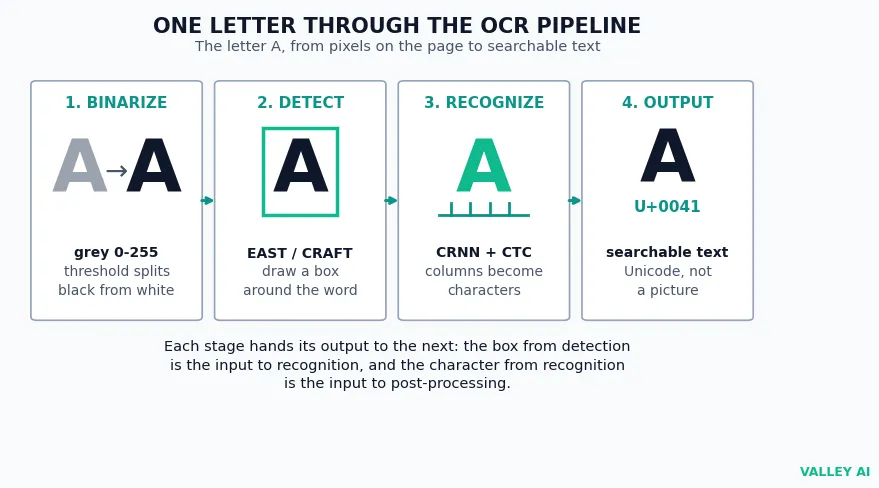
Post-processing checks the result. A dictionary catches spellings no word list holds. An expected format checks fields such as dates and codes, and a language model weighs which reading fits the sentence around it.
Scene text is the hard case for detection. A street sign or a shop board sits at an angle, in uneven light, against a busy background. The detector has to find the words before any reading can start. MaskOCR scores 93.8 percent on English scene text benchmarks, according to Viso.ai. The gap between that figure and clean print shows how much the hard case costs.
How the recognizer reads a character
The modern recognizer is a CRNN: a convolutional network, a bidirectional LSTM (it reads both ways), and a CTC layer working in order. The convolutional layers sweep the patch of pixels in columns. Each column becomes features: the shape of a stroke, or the gap between strokes. The LSTM reads those columns left to right and right to left, so each column is judged with its neighbours in view. CTC then lines the column predictions up with characters, without anyone labeling where one character ends and the next begins.
Run A through that chain. The columns over the left diagonal read as rising strokes, and the columns over the bar read as a horizontal line. CTC settles the sequence on a single character, A. That chain reads a whole word by settling a sequence of characters, one column at a time.
A Transformer recognizer drops the column sweep and reads the whole patch at once. TrOCR pairs a pre-trained image Transformer with a pre-trained text Transformer. It generates the text wordpiece by wordpiece, after pre-training on large synthetic data and fine-tuning on human-labeled pages. The TrOCR paper reports results ahead of the state of the art at the time on printed, handwritten, and scene text.
The older methods matched shapes directly. Pattern matching held a template of A and scored the overlap. Feature detection counted the strokes, two diagonals and a bar, and matched the count. Both break the moment a font changes shape. That’s why the neural recognizer is the default now and the older methods are history.
Both designs are machine learning based recognition: the recognizer learns letter shapes from labeled examples, and its accuracy follows the training data.
Reading characters is one recognition task among others: face recognition identifies a person from a photo, while OCR reads the characters in one. The two share the pattern of learning from labeled examples, and they part at the output, where one returns a name and the other returns a character.
Those labeled examples come from image annotation, the work of marking characters and boxes on training pages so a detector learns where text sits.
OCR splits into four types by input. Simple OCR reads printed text. OMR reads marked boxes and bubbles on forms, exam sheets and surveys. ICR reads handwriting. IWR reads whole words at once, the way a person reads a familiar word without sounding out its letters.
How good is it, measured
Accuracy in OCR is measured by edit distance. Character error rate, CER, counts the insertions, deletions, and substitutions needed to turn the output into the correct text, then divides by the length of the correct text. Word error rate, WER, does the same count over words. A CER of 2 percent means 2 characters in every 100 need fixing.
For this run, Tesseract 5.3.4 read one 343-character passage twice. The first input was a clean scan; the second was tilted 6 degrees, with contrast cut to 0.55 and a light blur. The engine ran with page segmentation mode 6 and the English language data.
| Input | CER | WER | Words wrong |
|---|---|---|---|
| Clean scan | 0.00% | 0.00% | 0 of 58 |
| Tilted photo | 2.04% | 6.90% | 4 of 58 |
Across 343 characters, the tilted run needed 7 edits, and the errors sat in the first two lines while the rest of the page read clean.
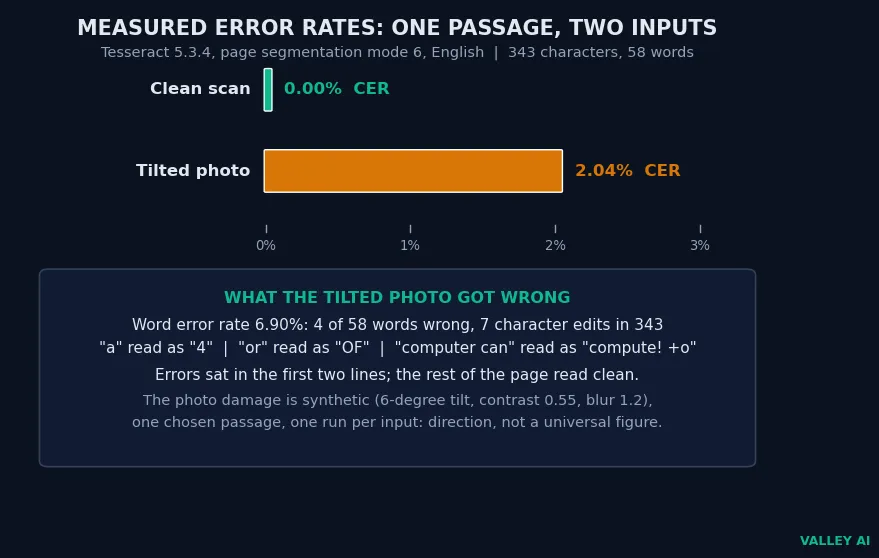
The clean scan surprised me: 343 characters in, 343 right, zero edits. That result says more about the input than about the engine. A clean render with even light and straight lines is the easiest case OCR ever meets, and a zero there is a baseline for easy input.
Both numbers need their limits stated beside them. The photo’s degradation is synthetic: a chosen rotation, contrast, and blur applied to the clean render. The passage is one chosen paragraph, run once per input. One passage went through both inputs, so the gap between the two rows traces to the input. No extra check ran, no rotation-only variant and no lower-resolution variant, so the numbers show direction only.
How do you know if an OCR result is trustworthy?
Read the confidence column. Tesseract writes a TSV file with one row per word and a confidence value beside each one, and words below 0.5 need a second look. The command is tesseract page.png out –psm 6 tsv, and the conf column is the one to read. Ultralytics drops strings below 0.5 in its own demo, and that line works as a reader rule.
Where it fails and what fixes it
Handwriting breaks the assumptions print relies on. Printed letters sit on a baseline, keep their spacing, and repeat their shapes. Handwriting drifts, joins letters, and changes shape from one writer to the next, so the recognizer meets shapes its training data never showed it.
Why does OCR fail on handwriting?
Because the shapes vary. Print gives the recognizer an identical A every time; handwriting gives it a new A from every writer, sometimes joined to the next letter. ICR systems train on handwriting specifically, which is why handwriting gets its own type.
Rotation is the cheapest failure to fix. A page tilted a few degrees still reads, and a deskew step in preprocessing straightens the page before detection starts. Tilt past that and the detector starts drawing boxes across lines instead of along them.
Low contrast starves binarization. Pale print on tinted paper leaves too little difference between ink and background for the threshold rule to split, since the rule needs a clear gap to choose its cut. The detector starts missing words instead of misreading them. Low resolution does the same damage from the other side: a small letter holds too few pixels to carry its strokes.
The tilted run’s errors show the pattern.
- “a” read as “4”
- “or” read as “OF”
- “computer can” read as “compute! +o””
Short words broke first. That pattern is the part I trust most from this run. A one-letter word carries almost no context to correct it, so the dictionary has nothing to work with.
Fixes follow the failure. Straighten the page for rotation, raise the contrast or rescan for pale print, and feed the recognizer a larger image for small text. When none of that helps, the confidence column says so, and the flagged words go to a human reader.
Which engine fits which input
No single engine wins every input. The choice follows the input: clean print, phone photo, handwriting, or scene text. Pick by that, and the engine’s strengths line up with the job.
| Engine | Best input | Why it fits |
|---|---|---|
| Tesseract | Clean printed pages | Open-source LSTM engine; 100+ languages; ships TSV confidence output |
| EasyOCR | Phone photos of print | CRAFT detection plus CRNN recognition; 80+ languages; installs with pip install easyocr |
| TrOCR | Handwriting and scene text | Transformer recognizer; best accuracy on handwriting in the paper’s own tests |
| Azure AI Vision | Mixed documents at volume | Managed service; handles layout and handwriting |
ABBYY FineReader is the commercial desktop option for that job.
For a clean printed page, Tesseract is the sensible first try. The measurement ran on it, and the clean scan read perfectly.
Try your own page before you commit to an engine. Run one page through two engines and compare the confidence columns; the engine with fewer flagged words wins for your input.
Where OCR shows up
Receipts are the everyday case. A phone photo of a receipt becomes searchable text, so an expense app can pull the total and the date without anyone typing them.
At a toll gate, cameras read license plates as cars pass, matching each plate against a list.
Libraries scan old books and newspapers so the text inside them can be searched.
For readers who cannot see print, OCR reads the page aloud, and it turns a photo of a sign into text a screen reader can speak.
Post-processing earns its keep in logistics. A shipping container code runs 11 characters. The last one is a check digit computed from the first 10, so most misreads get rejected before they reach a database.
Vision language models are the new direction. Systems such as GPT-4o and Gemini 2.5 Pro read a page image and answer questions about it without a separate OCR step. PaddleOCR 3.0 and Mistral OCR 3 fold language models into the pipeline. The classic pipeline still matters: it runs offline, and its confidence column shows its work.
Try it on one page before you trust it
Install Tesseract, pick one page from your own documents, and run it with the TSV output turned on. Read the confidence column before the text: the words the engine doubted are the words to check by eye.
Distrust words below 0.5 until you have seen them read right on your own pages. One page tells you what your scanner, your lighting, and your fonts do to the result. That’s the number that matters for the next hundred pages.
Frequently asked questions
What is the difference between OCR and a PDF text layer?
A PDF with a text layer already holds the characters, so a search box can find words in it without any recognition step. OCR is needed when the page is only an image, a scan or a photo, with no characters stored inside the file. If you can select the words in the PDF with your cursor, the text layer is already there.
Can OCR read text in a video?
Yes, frame by frame. Software pulls still frames from the video and runs OCR on each one, so subtitles and on-screen text become searchable. It takes longer than a single page, because a minute of video holds hundreds of frames to read.
Is Tesseract free to use?
Yes. Tesseract is open-source software, free to download and free to use, including for commercial work. Its code and language data live on GitHub, and the engine runs on your own computer with no account and no per-page charge.
Why do two OCR tools give different results on the same page?
They detect and recognize differently. One tool may find a word the other misses, one recognizer may read a smudged character that the other guesses wrong, and each engine trained on different data.
Does OCR send my document to a server?
It depends on the engine you pick. Desktop tools process the image on your own computer and nothing leaves it. Cloud OCR sends the image to the provider’s servers for processing, so a private document belongs on a local engine unless you have agreed to the upload.

Kaleem
Kaleem is a Computer Science graduate (Virtual University of Pakistan) and the founder and editor of Valley AI, where he publishes in-depth, tested guides on computer hardware, artificial intelligence, and how the internet works. Every guide is researched from primary sources, tested hands-on where possible, and updated when the facts change.