
Which Second Factor for Which Account
For the accounts that hold your money or your email, use an authenticator app or a hardware key. Use SMS only where the service offers nothing better. That rule covers almost every login you will ever set up.
A password proves one thing: you know a secret. A second factor proves a different thing: you hold a device, or you are a particular person. The two proofs fail in different ways, and that split is what makes the pair work. A leaked password database hands an attacker the first proof and nothing else.
The table sorts the choice by account. Money and email sit at the top because a lost inbox resets every other account, and a lost bank login moves real money.
| Account | Use this | If that is missing |
|---|---|---|
| Email (Gmail, Outlook, iCloud) | Authenticator app or hardware key | Push approval |
| Bank and payment apps | Hardware key or authenticator app | SMS |
| Password manager | Hardware key | Authenticator app |
| Social media | Authenticator app or push approval | SMS |
| Work and cloud admin | Hardware key | Authenticator app |
That order holds for every account: hardware key first, authenticator app second, SMS last.
A VPN and 2FA guard different doors. how a VPN works encrypts the connection between your device and the internet. Two-factor authentication guards the login at the far end.
What Counts as a Second Factor
Three classes of proof exist, and a login counts as two-factor only when its two proofs come from two different classes.
| Factor class | What it means | Examples |
|---|---|---|
| Something you know | A secret in your memory | Password, PIN |
| Something you have | An object in your hand | Phone, authenticator app, hardware key |
| Something you are | A trait of your body | Fingerprint, face |
Two proofs from the same class do not count. A password plus a security question is still one factor, because both are things you know. A password plus a code from an authenticator app counts, because the code comes from a device you hold. The test is simple. Steal one class and the other still stands.
Biometrics sit in the third class. A fingerprint sensor reads the ridges of a finger, and a face scan maps the shape of a face. Both stay on the device: the phone checks the trait and tells the service only that the check passed. No fingerprint or face image travels to the server.
Do I need my phone every time I log in? No. Most services remember a device after the first check, so the second factor appears on a new device, a new browser, or a sensitive action such as changing the password. The phone stays in your pocket for ordinary logins and comes out when the risk rises.
How an Authenticator App Makes Its Code
Setup happens once. The service creates a random secret, usually 160 bits, and shows it as a QR code on the screen. The app scans the code and stores the secret. From that moment, both sides hold the same secret, and neither side needs to contact the other to make a code.
The QR code carries more than the secret. It encodes a short address that names the service, the account, and the settings: the algorithm, six digits, and a 30-second step. The code is a QR code with a job to do, and anyone who photographs it can generate your codes. Keep setup screens off shared screenshots and out of photo backups.
Every 30 seconds, the app runs the same calculation. The counter comes from the clock: the app divides the current Unix time, the seconds since 1 January 1970, by 30 and drops the remainder. That whole number feeds into a keyed hash called HMAC-SHA1, together with the secret. The last byte of the hash picks an offset. Four bytes from that spot, with the top bit dropped, leave a large number. Dividing that number by 1,000,000 and keeping the remainder gives the six-digit code on the screen. The server runs the same steps with the same secret and the same clock, so the two codes match.
The secret and the clock work like the two dials of a combination lock. Both sides turn the same dials, so both sides read the same number. When the clock dial moves, the number changes, and the old number stops working.
Every number in the table was run on 12 November 2026. The test secret comes from the standard itself: the text string 12345678901234567890, published in RFC 6238. The standard lists the expected code for each test time, so each value can be checked against it.
| Step | Value |
|---|---|
| Secret | 12345678901234567890 (RFC 6238 test secret) |
| Time | 59 seconds after the Unix epoch |
| Counter | 59 / 30 = 1 |
| HMAC-SHA1 | 75a48a19d4cbe100644e8ac1397eea747a2d33ab |
| Last byte | 0xab, so the offset is 11 |
| Four bytes at offset 11 | c1397eea, value 1,094,287,082 |
| Code | 1,094,287,082 mod 100,000,000 = 94287082 |
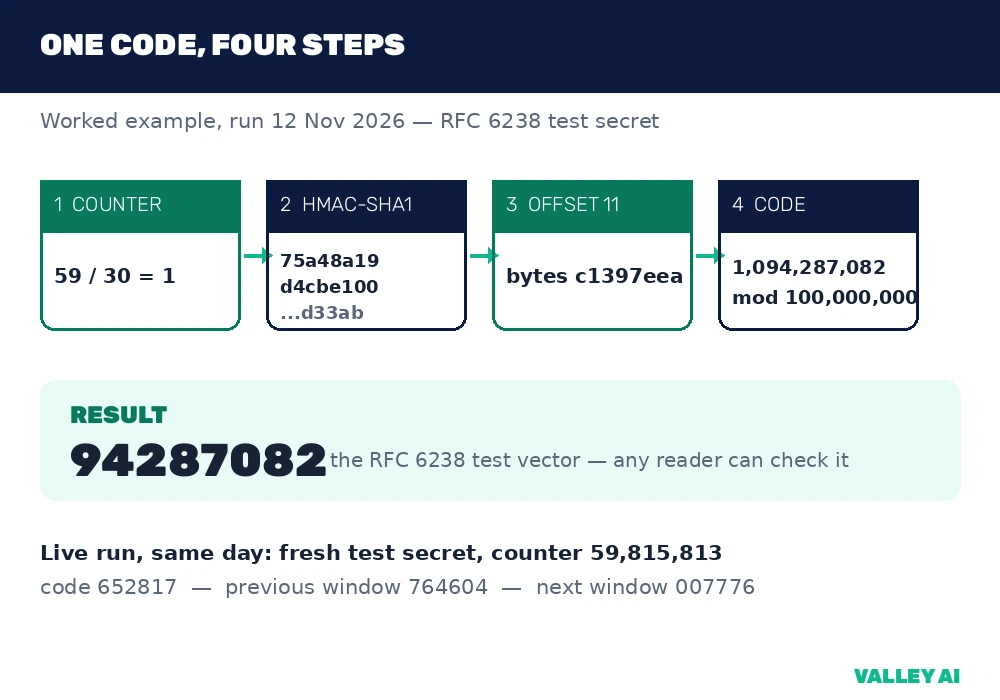
Eight digits appear in the standard, and six on a phone app. The steps are identical, and only the final division changes. The second test time in the standard, 1111111109 seconds, gives counter 37,037,036 and code 07081804, leading zero included. With a division by 1,000,000, the same steps give 081804.
A second run used a fresh secret that belongs to no account. At Unix time 1794474408 the counter was 59,815,813 and the code was 652817. The previous window gave 764604 and the next gave 007776. Three windows, three different codes.
Can someone guess a six-digit code? Six digits hold 1,000,000 combinations, about 20 bits of guessing room, and the code changes every 30 seconds. A service locks the account after a few wrong tries, so an attacker cannot work through a million values inside one window. The code changes 2,880 times a day, and each change closes the last window.
Three limits sit beside the headline numbers. First, the standard prints eight digits and a phone app prints six, so the codes in the table look longer than the ones on your screen. Second, a code from the previous window fails against the current one: 764604 does not open a login that expects 652817. Third, servers accept the current window plus one step either side for clock drift, so a code stays usable for roughly 90 seconds. The window is short, and the tolerance is narrow by design.
Watch it happen. Open an authenticator app and wait for the countdown ring to empty. The code changes the instant the ring closes, and the old code stops working at once. Type the old code into a login and the service rejects it. The check takes a minute and shows the mechanism working.
SMS Codes: The Code That Travels
An SMS code travels. The service sends it through the mobile network to your number, and your phone displays it as a text. The journey is the weakness. The code sits in a message that crosses systems the service does not control, and it stays valid for five to ten minutes after it arrives.
The SIM swap is the attack that uses that journey. An attacker calls your carrier, pretends to be you, and gets your number moved to their SIM card. From that moment, every text meant for you goes to them. The phone gives the first warning: it loses signal without moving, because its number now lives on another card. A second attack needs no call at all: flaws in SS7, the signalling system that routes texts between carriers, let an attacker intercept a message in transit.
NIST treats SMS codes as a restricted authenticator. Its digital identity guideline, SP 800-63B, says the use of the phone network for out-of-band verification is restricted, and it requires services to offer an alternative that is not restricted. The FBI and CISA warn against SMS codes in the same terms.
Is SMS 2FA better than no 2FA? Yes. Most account theft runs on automated scripts trying leaked passwords, and a texted code blocks those scripts. A SIM swap needs a human attacker who picked you out by name, and most attackers never get that far. SMS is the weakest second factor, and it still beats a password alone. Upgrade to an app or a key when the service offers one.
Some banks offer SMS only. That is acceptable there, because banks add fraud monitoring and liability cover behind the login. The code is one layer among several, and the bank watches the transaction itself.
Push Approvals, Passkeys, and Hardware Keys
A push approval skips the code entirely. The service sends a prompt to your phone: approve or deny this login. Tap approve and the door opens. The convenience carries a trap. An attacker with your password can hammer the phone with approval requests, dozens in a row, usually at night, hoping you tap approve to make them stop. That is MFA fatigue. An approval you did not ask for is a warning: deny it, change the password, and check the account.
Passkeys drop the password and the code at once. The device creates a key pair: a private key that never leaves the device and a public key stored on the server. At login, the server sends a challenge, and the device signs it with the private key after you confirm with a fingerprint, a face scan, or a PIN. The signed challenge proves you hold the device, and the signature is bound to the exact domain name. A fake site cannot reuse it, because the signature names the real site.
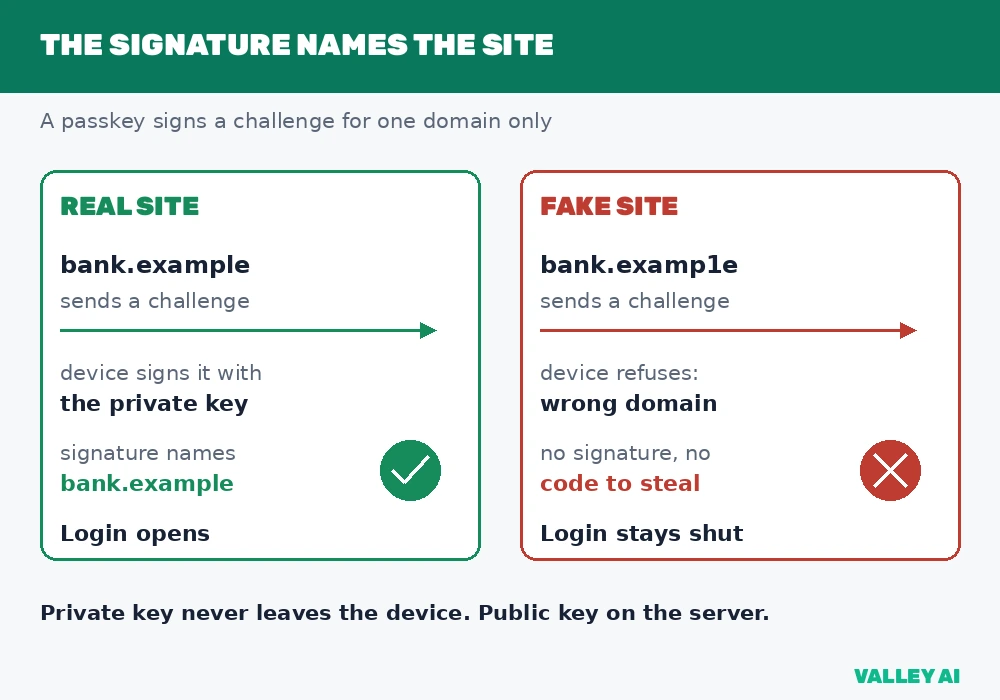
The standard behind passkeys is FIDO2, published by the FIDO Alliance. Passkeys are phishing-resistant by design, and they need no shared secret on the server. A 2024 survey commissioned by the FIDO Alliance found 53 percent of people had enabled passkeys on at least one account. A passkey can live on one device or sync across devices through the provider’s encrypted store; the synced form trades a little control for recovery when a phone is lost.
A hardware key is a small device, usually a USB stick with a button, that performs the same signed challenge as a passkey. Plug it in or tap it against the phone, press the button, and the login completes. The key costs money, and not every service supports one yet. Buy two: one on the key ring and one in a drawer, so a lost key is an inconvenience and not a lockout.
What Breaks 2FA Anyway
Fake login pages defeat codes and push approvals alike. You type your password into the imitation, and the attacker types it into the real site in the same second. The real site sends a code, the fake site asks you for it, and you hand it over. The attacker logs in while your session fails. The relay works because the code is a string anyone can copy, and it stays live for the whole window.
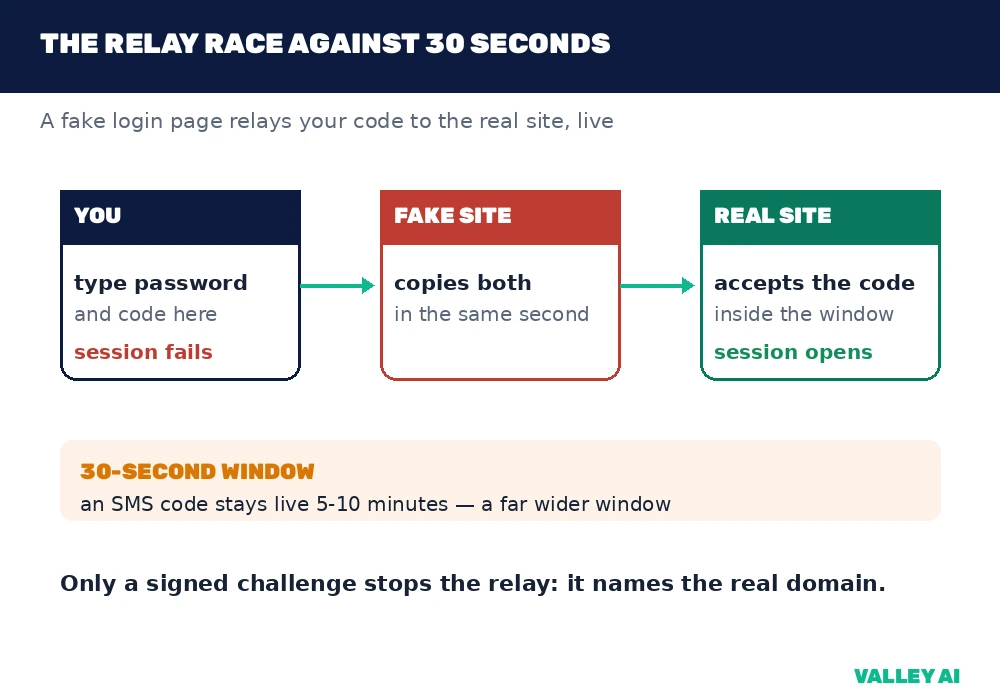
Only the signed challenge stops the relay. A hardware key or a passkey signs for the real domain, so the fake site receives nothing it can use. The defence sits at a different layer from a firewall: how a firewall works blocks hostile network traffic, while the signed challenge blocks a stolen login. Both layers matter, and neither replaces the other.
Malware on the phone is a second hole. ESET’s researchers have documented malware that reads authenticator codes through accessibility services, and malware that forwards incoming SMS messages to the attacker. A phone with a compromised app store or sideloaded software can leak the code before you type it. Keep the operating system updated, install apps from the official store only, and treat a phone that behaves strangely as a device to reset before it holds your logins again.
A server breach is a third hole, and it sits on the other side. A password database stores hashes, which an attacker must crack before use. A TOTP secret database stores the secrets themselves, because the server needs the original secret to compute codes. A breach of that database hands the attacker every second factor at once. The risk is a reason to prefer hardware keys for the accounts that matter most: a key’s private half never sits on a server.
When the Code Does Not Work
Ordinary reasons break a code before hostile ones do. The most common is the clock. TOTP runs on time, and a phone whose clock sits minutes off produces codes the server rejects. The fix is automatic time in the phone settings, which syncs the clock over the network. Servers accept the current window plus one step either side, so a clock a few seconds out still works. A clock minutes out does not.
A lost phone is the second ordinary failure, and it is the one people fear most. Recovery codes are the first tool: the service hands you a list of single-use codes when you enable 2FA, and each code works once. A second authenticator app on a second device is another tool. A recovery email that is itself protected by 2FA is a third.
If the recovery codes are gone and the phone is gone, the account recovery process takes over. The service verifies you through the recovery email or phone number on file, which is why those details must stay current. The process takes days at some services, and it takes identity documents at others. The delay is deliberate. A fast recovery path is also a fast theft path.
The Setup That Survives a Lost Phone
Print the recovery codes or store them in a password manager, and keep them away from the phone that holds the authenticator app. A code list on the same phone dies with the phone. A list in a drawer or a vault survives it.
Add a second device where the service allows it. A tablet or an old phone with the same authenticator app holds the same secrets, so the loss of one device leaves the other working. Turn on the recovery email and protect that inbox with 2FA as well, because every reset link in your life travels through it. how email works follows that path from send to inbox.
Never photograph the setup QR code. The code carries the secret in plain sight, and a photo in a cloud backup is a copy of the secret in a place you do not control. Scan it once, then close the screen.
Protect Three Accounts First
Start with the inbox: it is the key to every other account, so it goes first. Then the bank, then the password manager if you use one. Each setup takes minutes. Do the inbox today and the other two this week.
Frequently asked questions
What is the difference between 2FA and MFA?
Two-factor authentication uses exactly two factors, usually a password and a code or a key. Multi-factor authentication is the wider term: any login that uses two or more factors. Every 2FA login is an MFA login, and an MFA login can use three factors, such as a password, a code, and a fingerprint. Services use the terms loosely, so the count matters less than the method: check which factors a service asks for.
Can I use 2FA without a smartphone?
Yes, a hardware security key plugs into a computer and needs no phone at all. Some services print backup codes you can keep on paper, and a few still offer codes by email or by voice call. A desktop authenticator app is another option, though it keeps both factors on the same machine, which weakens the split. A hardware key is the strongest phone-free choice.
Can I use one authenticator app for every account?
Yes, an authenticator app holds a separate secret for each service, so one app covers your email, your bank, and your social accounts, each with its own six-digit code. The secrets stay separate: losing one service’s secret does not expose the others. Keep the app’s own backup turned on if it offers one, because the app holds every second factor in one place.
Do passkeys replace 2FA?
Use passkeys where a service offers them, and keep 2FA everywhere else. A passkey removes the password and the code in one move, while 2FA keeps the password and adds the code. Services adopt passkeys at different speeds, so the two will live side by side for years.
Can I turn 2FA off after enabling it?
Yes, in the service’s security settings, usually next to the option that turned it on. The account returns to password-only logins, so only do it when you are switching to a stronger method, such as moving from SMS codes to a hardware key. If a service offers no way to turn 2FA off, that is a deliberate choice: the service decided the extra step is not optional.
Is 2FA enough on its own?
No, two-factor authentication guards the login, and it guards nothing else. A unique password still matters, because the same password on ten sites means one breach opens ten doors. A password manager holds those unique passwords, and 2FA guards the manager. The two tools cover different failures, and together they close the common paths in.

Kaleem
Kaleem is a Computer Science graduate (Virtual University of Pakistan) and the founder and editor of Valley AI, where he publishes in-depth, tested guides on computer hardware, artificial intelligence, and how the internet works. Every guide is researched from primary sources, tested hands-on where possible, and updated when the facts change.