
Bluetooth works best when you match the connection to the job first. That matching is how Bluetooth works in practice. A pair of headphones needs a steady audio stream. A wireless mouse needs tiny bursts of input data, sent the moment a button moves. A heart rate sensor needs short updates on a small battery. Pick the profile and the radio conditions for that job, and the version number on the box matters far less than most buyers assume.
That rule shapes the explanation that follows. Radio, timing, pairing, profiles, versions, and audio codecs each get their own part. The closing part turns the diagnosis steps into a short checklist.
Match the job first: Classic, Low Energy, or audio
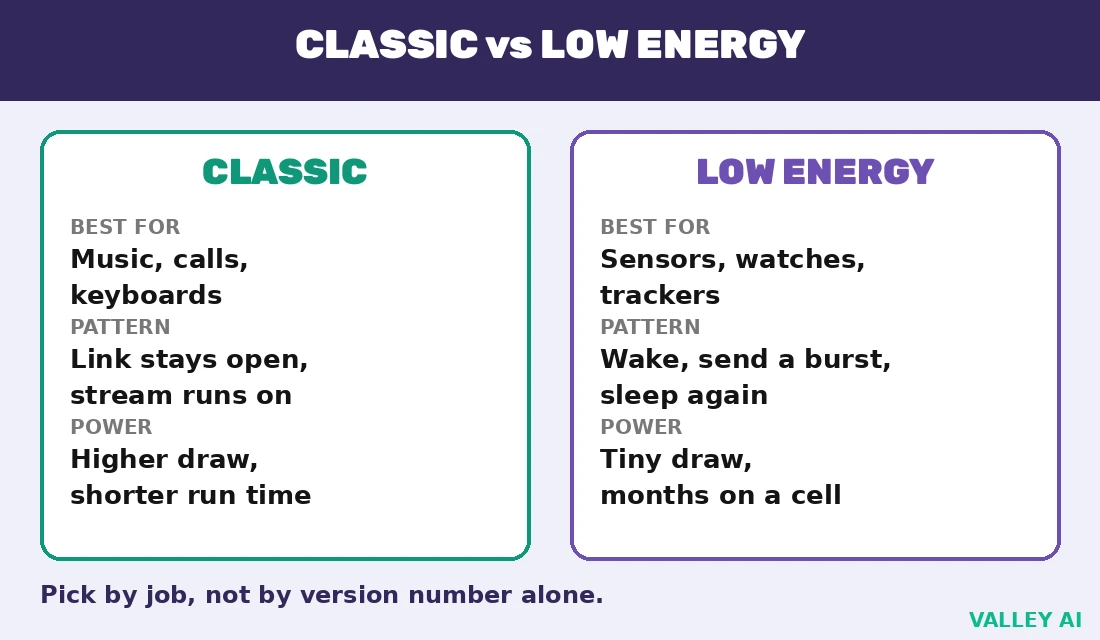
Two branches of Bluetooth share the name, and the job decides which branch fits. Classic Bluetooth holds a link open for a continuous stream. Bluetooth Low Energy wakes, sends a short burst, and sleeps again. Audio sits on Classic in most headphones today, while newer gear moves audio onto the Low Energy branch.
| Job | Link type | Why it fits | Watch for |
|---|---|---|---|
| Music to headphones | Classic audio (A2DP) | Steady stream with both ends awake | Battery drain beats sensor links for run time |
| Wireless mouse or keyboard | Classic HID or Low Energy HID | Short bursts, instant wake on input | Sleep settings can delay the first keystroke |
| Fitness or health sensor | Low Energy (GATT) | Short updates, long battery life | Update rate is set by the sensor maker |
| Car hands-free calls | Classic hands-free (HFP) | Two-way voice with mic and speaker | Voice bandwidth runs narrower than music |
A worked calculation shows what a Classic rate means in practice. Inputs: a file of 10 megabytes, a Classic link rate of 2 megabits per second. Ten megabytes equal 80 megabits, and 80 divided by 2 gives 40 seconds before overhead. A real transfer runs longer, because packet headers, retransmissions, and link management consume part of the rate. The calculation gives a useful anchor. A 10 megabyte file is a sub-minute job on a healthy Classic link. Anything far slower points at the radio conditions or a crowded band.
One phone can hold a watch link while music plays to headphones, because each link carries its own profile and its own timing. The limit is the set of active links the hardware supports. It shows up as a second device refusing to connect while the first link still runs.
The radio: one crowded band, jumped across constantly
Bluetooth radios transmit in the 2.4 GHz ISM band, from 2.402 to 2.480 GHz. The band needs no license, so it also carries Wi-Fi, microwave ovens, cordless phones, and the radio noise of USB 3 ports. Sharing a free band keeps costs down, and it forces Bluetooth to defend its link with movement.
Classic Bluetooth jumps across its channels in a pseudo-random order set by the master device. The jump pattern works like a conversation that keeps changing rooms along a corridor, so a noisy room never ruins the whole talk. A receiver that misses a packet on one channel tries again on a later channel. A channel that stays noisy gets marked bad and skipped for a time.
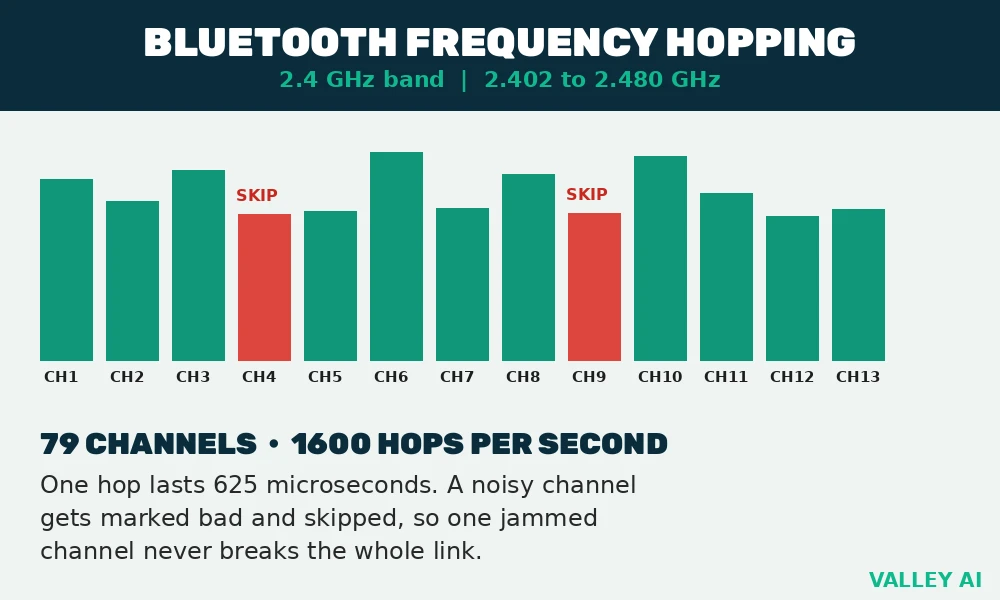
Inputs for the hop timing: 79 Classic channels, 1600 hops per second. One hop lasts 1 divided by 1600 seconds, which equals 0.000625 seconds, or 625 microseconds. Low Energy uses 40 channels spaced 2 MHz apart, with 3 channels reserved for advertising and 37 channels for data. Short hops and wide channel choice give the link many chances to dodge a single noisy channel.
Range follows power class and obstacles. Walls, furniture, and a human body absorb 2.4 GHz energy, so a link that holds across an open room can stutter through two walls. SparkFun Bluetooth Basics explains the power classes and the master and slave roles behind that behavior.
One master, up to seven active devices: the piconet
Devices in a Bluetooth link form a piconet. One device acts as master and sets the hop timing, and up to seven slaves stay active on that timing at once. Adding the master gives eight active devices in one piconet. Extra devices can stay parked, holding their place without an active slot, until the master wakes them.
A device can also belong to more than one piconet at once. It acts as a slave in one and a master in another. That links piconets into a scatternet. Scatternets stay rare in consumer gear, because each extra link adds timing complexity and battery cost. Most homes meet piconets only: a phone as master, with headphones, a watch, and a speaker as slaves.
Pairing and bonding in four steps
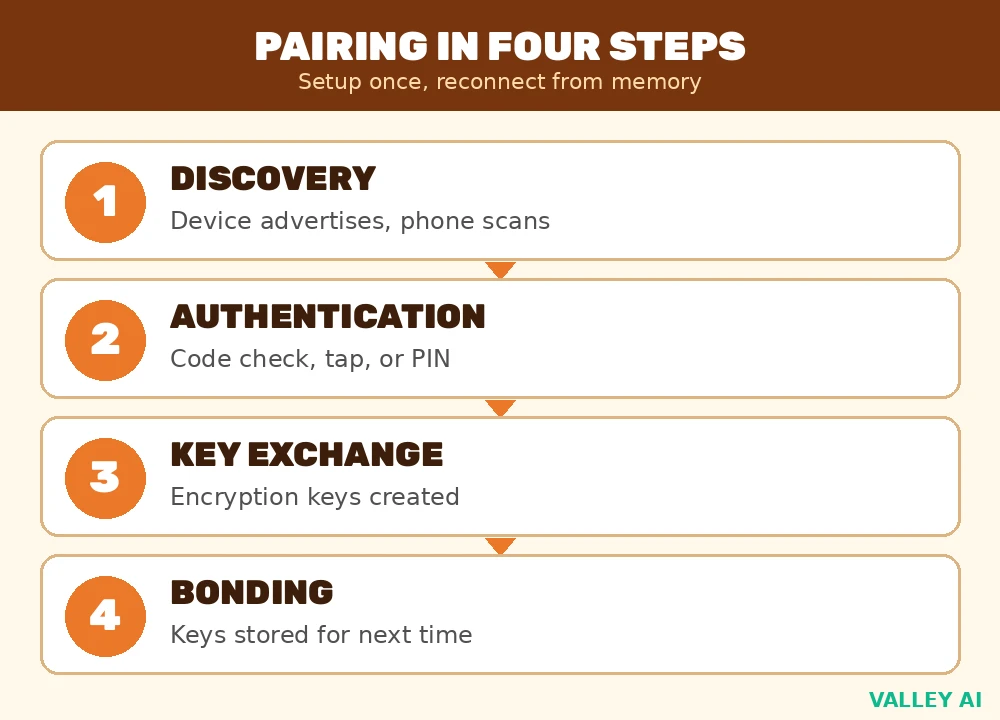
Pairing is the one-time setup that lets two devices trust each other. Bonding is the stored result: addresses, names, profiles, and a shared secret key kept in memory, so later connections start without a fresh setup. A paired device that still asks for setup has usually lost its bond, through a reset, a firmware update, or a cleared pairing list.
- Discovery. One device enters pairing mode and advertises itself, while the other scans for nearby advertisers. Low Energy advertising runs on its 3 advertising channels, which keeps discovery fast and cheap on battery.
- Authentication. The method follows what each device can show or accept. Devices with a screen compare a six-digit code, devices with one button use a single confirmation, and older Classic gear asks for a PIN.
- Key exchange. The pair creates encryption keys with an Elliptic Curve Diffie-Hellman exchange on modern gear, and both ends store the keys for later sessions.
- Bonding. Both devices store the bond, so a later meeting reconnects from memory. A bond stored on one end only still forces a fresh pairing, which explains a link that pairs cleanly and then forgets itself.
Many devices close pairing mode after a short window, so a scan that finds nothing often means the window already closed. Restarting pairing mode on the peripheral, then scanning again from the phone or computer, fixes more failed pairings than any settings change.
Profiles decide what the link can do
A radio link alone carries packets, and packets alone carry no meaning. A profile gives the link its job: it names the data, the commands, and the expected behavior for one kind of device. Two devices that share a radio but share no profile stay mute, which is why a speaker can pair with a phone yet fail to appear as an audio output when the audio profile mismatches.
Advanced Audio Distribution Profile, or A2DP, carries stereo audio from a source to a sink. The source encodes audio, the sink decodes it, and the two ends agree on a codec before playback starts. Hands-Free Profile, or HFP, carries two-way voice for calls. It provides a microphone path and a speaker path, plus call controls such as answer and hang up.
Human Interface Device Profile, or HID, carries keystrokes, mouse movement, and controller input with low delay. A keyboard that pairs over HID works with any host that speaks HID. One keyboard can therefore move between a laptop, a tablet, and a TV box without new software. The guide to modern computer input devices shows how those hosts differ in what they do with the input once it arrives.
Generic Attribute Profile, or GATT, structures Low Energy data as services and characteristics. A heart rate service exposes a heart rate characteristic, and a phone reads that characteristic on a schedule the sensor allows. GATT keeps sensor links simple: a client reads a value, writes a setting, or subscribes to updates, and the sensor sleeps between events.
Does a higher version number mean better sound? Sound quality follows the profile and the codec overlap between the two ends, and the version number adds radio features such as range and advertising. A version 5.3 headphone on a mismatched codec still sounds like its fallback codec. A version 4.2 headphone on a shared high-quality codec sounds better than its age suggests.
Versions in plain terms: 4.0 through 6.0
Version numbers describe the radio specification both ends support, and the older end sets the ceiling for shared features. A phone on a newer version paired with an older headphone runs at the older feature set for that link. Ampheo’s version comparison, built from Bluetooth SIG specification history, dates 5.4 to 2023 and 6.0 to 2024.
- 4.0 (2010). Low Energy arrives beside Classic, opening the sensor and wearable market on coin-cell power.
- 5.0 (2016). Low Energy gains a faster 2 Mbps mode, a coded long-range mode, and larger advertising packets.
- 5.1 (2019). Direction finding arrives, letting a receiver estimate the angle a signal comes from.
- 5.2 (2019). Isochronous channels lay the groundwork for LE Audio, with synchronized streams to multiple sinks.
- 5.3 (2021). Connection subrating and channel classification cut power use and improve reliability on busy bands.
- 5.4 (2023). Periodic advertising with responses and encrypted advertising data serve large fleets of low-power devices.
- 6.0 (2024). Channel Sounding measures distance between two devices with far finer accuracy than signal strength alone, which serves digital keys and lost-device finding.
Buyers gain little from chasing the highest number alone. A version 5.2 device with LE Audio support beats a version 6.0 device without it for a listener who wants broadcast audio. The named feature decides the experience. The number only frames it.
Audio codecs and latency
A codec compresses audio for the link and decodes it at the sink, and the pair runs only a codec both ends list. Bitrate sets the data budget. Latency sets the delay between a video frame and its sound. Link stability decides whether a high bitrate holds or falls back. Two ceilings bind a music link: the radio rate and the codec both ends share. Raising one ceiling alone leaves the other in place.
| Codec | Max bitrate | Typical latency | Best use |
|---|---|---|---|
| SBC | About 328 kbps | 150 to 220 ms | Universal fallback on every audio device |
| AAC | 256 to 320 kbps | 120 to 200 ms | Apple devices and many car systems |
| aptX | 352 kbps | 100 to 150 ms | Android music headphones |
| LDAC | 990 kbps | Over 100 ms | High-resolution Android listening |
| LC3 | 160 to 345 kbps for music | Under 50 ms possible | LE Audio earbuds and hearing aids |
SBC stays mandatory, so every Bluetooth audio device accepts it. That guarantee makes SBC the fallback when two ends share nothing better. It explains why a premium headphone can sound ordinary on a source that lists only SBC. AAC performs best on Apple hardware. aptX covers much of Android. LDAC needs a stable link to hold its top mode. LC3 trades a lower bitrate for solid quality at low delay in LE Audio gear.
Why does music sound fine on one phone and flat on another with the same headphones? Each phone offers a different codec set, and the link picks the best overlap it finds. A phone that offers LDAC to an LDAC headphone plays at that codec. A phone that offers only SBC to the same headphone plays at the fallback. The headphones stay identical, and the source decides the sound.
Why connections drop, and what fixes each cause
Shared spectrum causes the most drops. Wi-Fi routers, neighboring Bluetooth links, and cordless phones all transmit in the same 2.4 GHz band. A crowded band forces retransmissions until audio stutters or the link times out. Moving the router a few meters from the listening spot often restores such a link. Moving the listener closer to the source does the same. The comparison of Wi-Fi 6 with Wi-Fi 7 shows how newer Wi-Fi manages that shared band, and the Wi-Fi against Ethernet comparison shows when a wired run removes the contention entirely.
USB 3 ports add a quieter culprit. A USB 3 drive or hub radiates noise across the 2.4 GHz band, and a Bluetooth dongle plugged beside it sits inside that noise. A short USB extension cable moves the dongle clear of the port, and the change costs less than any replacement dongle. Port standards decide what else shares a socket, and the comparison of USB-C with Thunderbolt explains why one socket can carry data, video, and power at once.
Why does music stop when the microwave runs? A running microwave floods a wide slice of spectrum centered near 2.45 GHz, and hopping runs out of clean channels while the oven runs. Moving the speaker a few meters from the oven, or waiting out a short heating cycle, restores the link without touching any setting.
Distance and obstacles form the next cause. Class 2 radios, the class in most consumer gear, hold about 10 meters in open air. Each wall or body between the ends shrinks that figure. A link that drops when the phone goes into a pocket points at absorption. It returns when the phone comes out. A link that drops at a fixed spot in a room points at a dead zone. Walk the room to map it.
Power management and stale software form the last common causes. An operating system can switch a Bluetooth radio off to save power. A battery saver can throttle background radio work. A low battery on either end weakens transmission. Updating the firmware on the peripheral closes mismatches that look like interference. Updating the host operating system does the same. A fixed pairing routine survives a crowded band better than a buggy one.
Checks you can run before buying or replacing anything
Diagnosis works best as isolation, with one variable changed at a time. Each check below separates the source from the peripheral and the environment from the hardware, so the result points at the guilty part.
- One-meter line-of-sight test. Place the source and the peripheral one meter apart with nothing between them and play audio for two minutes. Clean playback at one meter clears the codec and the pairing, and points the investigation at distance or interference.
- Microwave-off test. Run the same audio with the microwave off, then again while it runs. A drop that tracks the oven cycle names the interferer without any doubt.
- USB-unplug test. Unplug USB 3 drives and hubs near the dongle, then test again. Clean playback after unplugging names the port noise, and an extension cable becomes the fix.
- Second-source test. Pair the same headphones or speaker with a different phone or laptop. Clean playback on the second source clears the peripheral and points at the first source, while identical drops on both sources point at the peripheral.
Conclusion
Choose by job, then confirm the profile and codec overlap before paying. For music, confirm the codec both ends list. For input devices, confirm HID support and wake behavior. For sensors, confirm GATT services and battery expectations. Run the one-meter test at home during the return window, and keep the device that passes it. That check shows how Bluetooth works on the device you own.
Frequently asked questions
Where does the name Bluetooth come from?
The name honours Harald Bluetooth, a tenth-century king remembered for uniting Danish and Norwegian tribes. The logo merges the runic initials H and B, a nod to that unification story and to the goal of joining devices from different makers.
Can one pair of headphones stay connected to two phones at once?
Multipoint support varies by model, and the feature appears in the headphone specification when present. A multipoint pair holds two source links and switches audio to whichever source plays, while a pair without the feature holds one source link at a time.
Does Bluetooth use mobile data or Wi-Fi?
The link itself carries its own data between the two devices, and a phone data plan stays untouched by the transfer. A streaming app still needs its own internet path for the song or video it fetches, so the app data and the Bluetooth transfer remain separate jobs.
Why does a device vanish from the available list after a restart?
Many peripherals advertise only during a short pairing window after power-on, then go quiet to save battery. Waking the device and holding its pairing control reopens the window, and the phone scan finds it again.
What should you check first when a brand-new device will not pair at all?
Charge both ends, confirm the peripheral shows its pairing signal, and confirm no other source already holds its single link. A fresh charge plus a reopened pairing window resolves most first-pair failures, and a different source isolates a faulty unit fast.

Kaleem
Kaleem is a Computer Science graduate (Virtual University of Pakistan) and the founder and editor of Valley AI, where he publishes in-depth, tested guides on computer hardware, artificial intelligence, and how the internet works. Every guide is researched from primary sources, tested hands-on where possible, and updated when the facts change.