

If a signature checks out against the signer’s public key, trust the document: it came from the named signer, and no byte changed after signing. If the check fails, trust nothing in the file, whatever it claims. That single rule decides every case below, from a signed contract to a software update, because verification answers two questions at once, who signed and whether the bytes stayed intact, and a failed check leaves both unanswered.
What a digital signature is
A digital signature is a value computed from a document and a private key, and anyone with the matching public key can check it. The check proves three separate properties. Authenticity ties the signature to the holder of the private key. Integrity shows the document matches the signed bytes byte for byte. Non-repudiation stops the signer from denying the signature later, since only the private key could have produced it.
Each property rules out a different failure. A forged sender fails authenticity, because the check needs the real private key. A changed byte fails integrity, because the fresh hash will not match the signed one. A later denial fails non-repudiation, because the signature stands as evidence the key was used.
An electronic signature is a legal concept: any mark made with intent to sign, from a typed name to a drawn squiggle. A digital signature is the cryptographic mechanism that can sit underneath it, and it is the only form that proves the bytes stayed unchanged. Law caught up in stages. The ESIGN Act of 2000 gave electronic signatures legal standing in the United States. The European eIDAS rules grade signatures into tiers, with qualified signatures carrying the strongest legal weight.
Digital signatures are one of the core protections that keep online activity safe, and they show up wherever trust has to travel with a file. Signed software updates, signed PDFs, and the certificates behind secure browsing all rely on them. The mechanism stays unchanged in every case.
Every signature scheme runs three operations. Key generation creates the pair. Signing takes the digest and the private key and outputs the signature value. Verification takes the document, the signature, and the public key and returns a yes or no.
The key pair splits the work in two. The private key signs and stays secret, ideally on hardware the owner controls. The public key verifies and travels freely, inside a certificate or beside the signature.
Three steps, one real signature
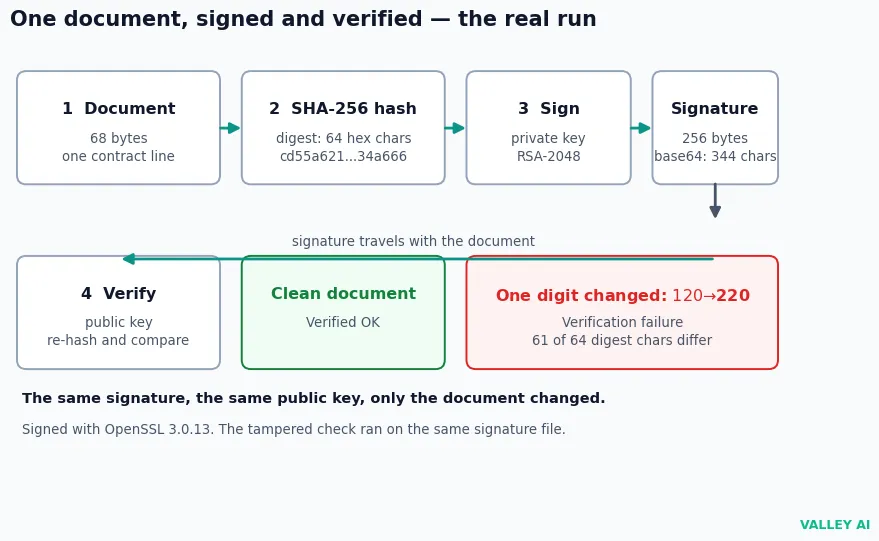
This run starts with a document chosen for the test: “I, Alice, agree to sell the bicycle to Bob for $120. Signed, Alice.” Sixty-eight bytes, plain text, nothing hidden. Three steps turn it into a signed document: hash it, sign the hash, then verify the result against the public key.
Step one hashes the document with SHA-256, the standard defined in NIST FIPS 180-4. The output is a fixed 32-byte digest, whatever the input size: cd55a621dced9903aa795f9791f1422f392309578a22341baf9fa13a8834a666. Change one byte and the digest changes beyond recognition, which is the property the scheme rests on. The digest reveals nothing about the input behind it.
Signing, the second step, takes that digest and a fresh RSA-2048 key pair, generated for the run. The private key file held 1,704 bytes, the public key file 451. The signature came out at 256 bytes, and in base64 it runs 344 characters. The first 64 of those characters read: qLo1OSAKgGeqrhP+AgCYW761lF6t09ak7x8NJjCf5l8T7IeGVmeg4nZ2MJXTlgQp. That is 64 of 344 characters.
Verification, the third step, checks the signature against the public key with the openssl dgst command, documented in the OpenSSL manual. OpenSSL answered “Verified OK”. The document, the digest, and the signature all agree, so the check passes.
I signed the document three ways with OpenSSL 3.0.13, then built a three-level demo certificate chain with the same tool and checked every link in it. The document was chosen for the run, so the numbers prove the mechanism on one input only.
One digit breaks it. Changing $120 to $220 in the copy produced a new digest, fa9cb355250f290ff26e7dd4d8ebda70f57b6cb0a324a27725a07a06a3880cae, which differs from the original in 61 of its 64 hex characters. Verification answered “Verification failure”. The run keeps the failed check beside the pass on purpose: one document proves the mechanism, and the tampered copy proves the check catches a change.
The other two algorithms signed that document too. Ed25519 produced a 64-byte signature and answered “Signature Verified Successfully”, and its tampered copy answered “Signature Verification Failure”. ECDSA P-256 produced a 71-byte DER signature and answered “Verified OK”.
Why the hash comes first
Feeding every byte through the private-key operation would mean signing the document itself. Signing the hash means feeding 32 bytes, whatever the document holds. A contract, a software installer, and a video file all reduce to one fixed size before the key touches them.
The hash works like a receipt for a sealed box. Signing the receipt covers every item inside the box without opening it or listing each item. Break the seal by changing one item, and the receipt no longer matches the contents.
Measurement backs the saving. A 10 MB file generated for the run hashed in 11.4 ms, and the digest still came out at 32 bytes. Hashing scales with the file; signing stays fixed at the digest size. That split is why a signature scheme can cover a multi-gigabyte installer with one small value.
One signing routine serves every input size, because the routine only ever sees a 32-byte digest. The verifier repeats the hash on the received document and compares digests. Any change, however small, breaks the match, and the worked run showed how sharp that break is.
Compatibility is the second reason. A signing routine written for 32-byte digests works with SHA-256 today and with a future hash of equal size tomorrow, without changes to the key handling. The document format never reaches the signing code at all.
Integrity is the third reason, and it costs nothing extra. Tampering is caught by the verification itself, so no separate integrity check is needed, and no extra data travels with the signature beyond the signature itself.
RSA, ECDSA, or Ed25519 by the numbers
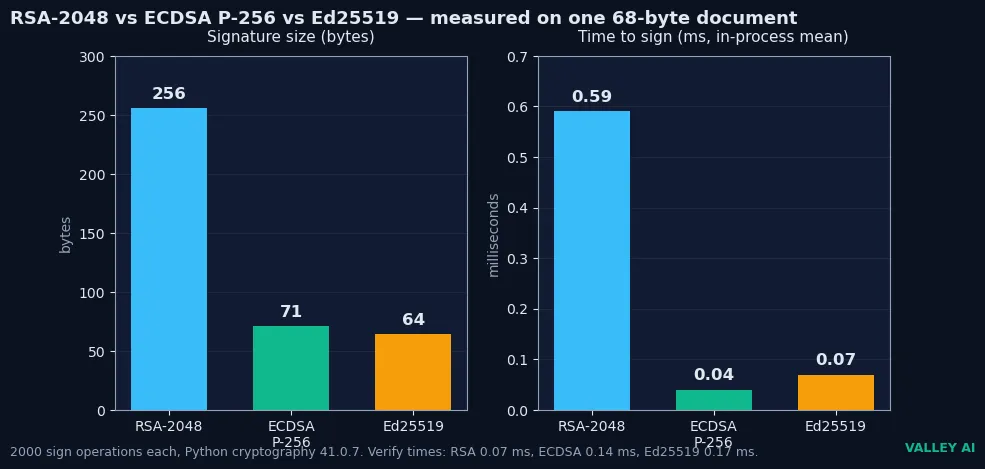
Three signature algorithms dominate real signing, and they differ on size and speed while the core idea stays fixed. RSA signs with a private-key operation on the digest. ECDSA computes a pair of numbers from the digest and the key. Ed25519 signs the message directly, with SHA-512 running inside the algorithm and no separate pre-hash step, as defined in RFC 8032. The Digital Signature Standard, NIST FIPS 186-5, covers RSA, ECDSA, and EdDSA.
The measured values sit in the table. Times are rounded to two decimals, and they are in-process means over 2,000 iterations. Exact times vary by machine, so the comparison measures the algorithms, not process startup. The command-line runs took between 6.5 and 8.7 ms each, most of it startup, and they say nothing about which algorithm is faster.
| Algorithm | Signature size | Sign | Verify | Used for |
|---|---|---|---|---|
| RSA-2048 | 256 bytes | 0.59 ms | 0.07 ms | Certificates and signed software |
| ECDSA P-256 | 70 to 72 bytes | 0.04 ms | 0.14 ms | Bitcoin transactions |
| Ed25519 | 64 bytes | 0.07 ms | 0.17 ms | Software that signs often |
For this run, the surprise came from Ed25519: the openssl dgst command refused to sign with it, reporting “Key type not supported for this operation”. The run signed with pkeyutl instead, using the -rawin flag, because the digest command could not take that key. That refusal is itself the point: the algorithm leaves the digest command with nothing to hash.
Is signing the same as encrypting? No. Signing proves origin; encryption hides content. RSA’s private-key operation looks like encryption, which is where the confusion starts, and the shorthand “encrypt the hash with the private key” describes RSA only. ECDSA and Ed25519 encrypt nothing. The ECDSA signature is a pair of numbers, (r, s), computed from the digest and the key. The run’s asn1parse output lists r as a 32-byte INTEGER and s as a 33-byte INTEGER. A password manager encrypts stored secrets so only the owner can read them, while a signature leaves the document readable and proves who signed it.
0:d=0  hl=2 l=  69 cons: SEQUENCE
    2:d=1  hl=2 l=  32 prim: INTEGER           :706BF5D40ACC52A7F94B4313C1AE1DF24F4F90D531155CA5562BDABB82A59C3B
   36:d=1  hl=2 l=  33 prim: INTEGER           :E6019CA66B0212EF58503BC56EE07A516B02A774CE393C0A67B708946F5CA9C4
Bitcoin’s transaction signing has long relied on ECDSA, and the blockchain relies on the same mechanism to prove who moved funds.
The choice follows the constraint. RSA fits where certificates and old systems dominate, because the ecosystem already speaks it. A transaction ledger wants ECDSA, where signatures must stay small. Ed25519 suits work that signs often, since it signs in 0.07 ms with a 64-byte output.
Who vouches for the public key
A public key on its own proves nothing about identity. Anyone can generate a key pair and claim any name. A certificate fixes that gap by binding a public key to a name, signed by an authority the verifier trusts, under the X.509 rules in RFC 5280.
The demo chain built for the run has three levels: a root certificate authority, an intermediate authority, and a leaf certificate for alice.example. All three use sha256WithRSAEncryption as their signature algorithm. Verification against the root answered OK for the leaf certificate.
Trust breaks cleanly when the root is wrong. Verifying that leaf against a different root certificate failed with error 20, “unable to get local issuer certificate”. The chain check stops there: no trusted root means no trust in the leaf, whatever the leaf claims. The wrong-root failure gave the run its clearest result. A chain is only as trusted as its root, and the verifier says so in one line.
A verifier works through four checks in order: the chain reaches a trusted root, the certificates sit inside their validity dates, the name matches the expected identity, and no certificate on the chain stands revoked. The S in HTTPS rests on this machinery: the browser checks the site’s certificate chain before it trusts the connection. Learning how TLS works shows the idea at network scale: the handshake uses signatures to authenticate the server before any data moves. You can run that chain check on any certificate with openssl verify.
The demo ended by signing the document with the leaf key, and verification against the leaf public key answered “Verified OK”. A certificate chain turns a bare public key into a named identity, and the signature turns that identity into proof about one document.
Expiry breaks a chain like a wrong root does. A leaf certificate valid for 365 days stops verifying the day after it lapses, even when the signature on the document still checks out. Verifiers treat an expired certificate as untrusted, and the signer must issue a fresh one.
What a valid signature does not prove
Limits start where the proof ends. A signature answers two questions and stays silent on the rest, and three limits catch readers who expect more.
First, a signature cannot show the signer read the document. A key signs bytes, and bytes carry no record of attention. Second, a signature cannot show the key stayed secret. A stolen key signs exactly like a kept one, which is why revocation exists. Third, a signature carries no time of its own. Without a trusted timestamp, nothing in the signature says when it was made.
Two more gaps sit outside the signature itself. A valid signature can be replayed: copied onto a second request, it still verifies, because verification checks the bytes and ignores the occasion. Some signature schemes allow malleability, where a valid signature can be reshaped into a different valid signature over those bytes without the key. Systems that accept signatures must guard the context around them as well as the math.
Timestamping answers the when question. A trusted timestamp authority signs the signature plus the current time, so a verifier can tell the signature predates a key revocation or a certificate expiry. Without that extra signature, a revoked key casts doubt on every signature it ever made, and the verifier cannot tell which came first.
Does a signature prove the signer read the document? No. It proves the key signed those bytes, and a signer can sign without reading. Software that signs updates on a schedule never reads each file first, and a person can sign a contract without reading it. The signature answers who and whether, never how carefully.
You can check a signature yourself with two commands, once you hold a key pair. The first signs a file, the second verifies it.
openssl dgst -sha256 -sign private.pem -out doc.sig document.txt
openssl dgst -sha256 -verify public.pem -signature doc.sig document.txt
A “Verified OK” answer means the file matches the signature. A failure means the file changed, the key differs, or the signature belongs to another document.
Frequently asked questions
Can a digital signature be forged?
Forging one means signing without the private key. The signature schemes in the comparison resist that attack as long as the key stays secret, so the real forgery path is theft: a stolen private key produces signatures that verify perfectly. A compromised key must be revoked and replaced, because the math cannot tell a thief from the owner.
Does a digital signature keep a document secret?
No. The signature travels beside the document, and anyone holding the file can read it. Signing proves origin and integrity; hiding content needs encryption as a separate step. A signed contract stays readable to every party who receives it.
How long does a digital signature stay valid?
The mathematics never expires: a signature that verifies today will verify in ten years, given that key and those bytes. The certificate around it carries its own end date, and a trusted timestamp can preserve the proof past that date.
Do I need a certificate to use a digital signature?
No. A key pair alone is enough to sign and verify: the signer keeps the private key, shares the public key, and anyone can run the check. A certificate adds identity to that check, tying the public key to a name a verifier can trust. Personal signing between parties who already trust each other’s keys needs no certificate at all.
What happens if I lose my private key?
Signing stops. Nothing can recover a lost private key. The loss ends signing; the danger sits with a stolen key, which still signs. The fix is a fresh key pair and a new certificate, with the old public key revoked so verifiers stop trusting it.

Kaleem
Kaleem is a Computer Science graduate (Virtual University of Pakistan) and the founder and editor of Valley AI, where he publishes in-depth, tested guides on computer hardware, artificial intelligence, and how the internet works. Every guide is researched from primary sources, tested hands-on where possible, and updated when the facts change.