
Data transmission modes define the direction of data flow between two devices on a network. Operating primarily at the OSI Physical and Data Link layers, these modes simplex, half-duplex, and full-duplex dictate whether communication is unidirectional, alternating bidirectional, or simultaneously bidirectional across the transmission medium.
While legacy networking classes rely on archaic examples like keyboards and walkie-talkies to explain these concepts, modern network engineers face a different reality. Today, transmission modes dictate how we handle fiber optic SFP transceivers, troubleshoot duplex mismatches causing VoIP packet loss, and optimize wireless spectrum using technologies like Wi-Fi 6 MU-MIMO.
This guide abandons pure theory to explore how these data flow directions impact modern enterprise networks.
Simplex Mode Unidirectional Data Flow
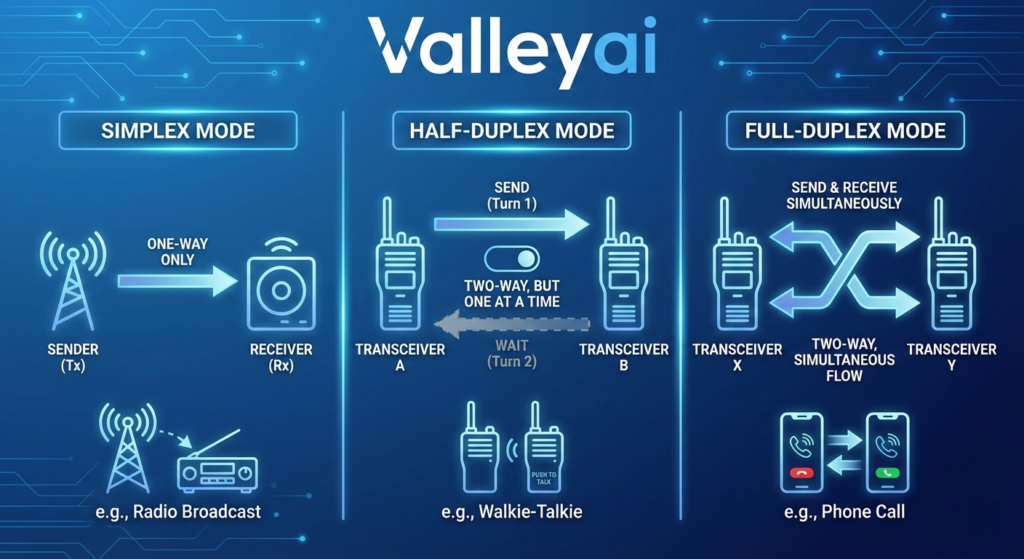
Simplex mode is a unidirectional communication method where data travels in only one direction from sender to receiver. The transmitting device cannot receive data, and the receiving device cannot transmit, making the entire channel capacity dedicated to a single data stream.
Technical Characteristics Table
| Metric | Simplex Mode Specification |
|---|---|
| Directionality | One-way only (A → B) |
| Bandwidth Utilization | 100% of channel capacity dedicated to transmission |
| OSI Layer Operation | Layer 1 (Physical) |
| Collision Domain | None (no return traffic to collide with) |
Modern Network Context Fiber Optics and Telemetry
In modern infrastructure, simplex communication is frequently utilized in specialized broadcast topologies and telemetry data collection. For example, IoT sensors positioned in hazardous industrial environments may use simplex radio telemetry to continuously broadcast data without requiring acknowledgment.
What is the difference between simplex and duplex fiber?
In fiber optics, simplex fiber cables consist of a single strand of glass or plastic used for one-way data transfer commonly used in unidirectional security camera feeds or sensor relays. Duplex fiber uses two strands (one for TX, one for RX) to achieve simultaneous two-way communication. Modern network engineers also use Bi-directional (BiDi) SFP modules, which achieve full-duplex communication over a single simplex fiber strand by multiplexing different light wavelengths (e.g., 1310nm for TX and 1490nm for RX).
Half-Duplex Mode Alternating Bidirectional Flow
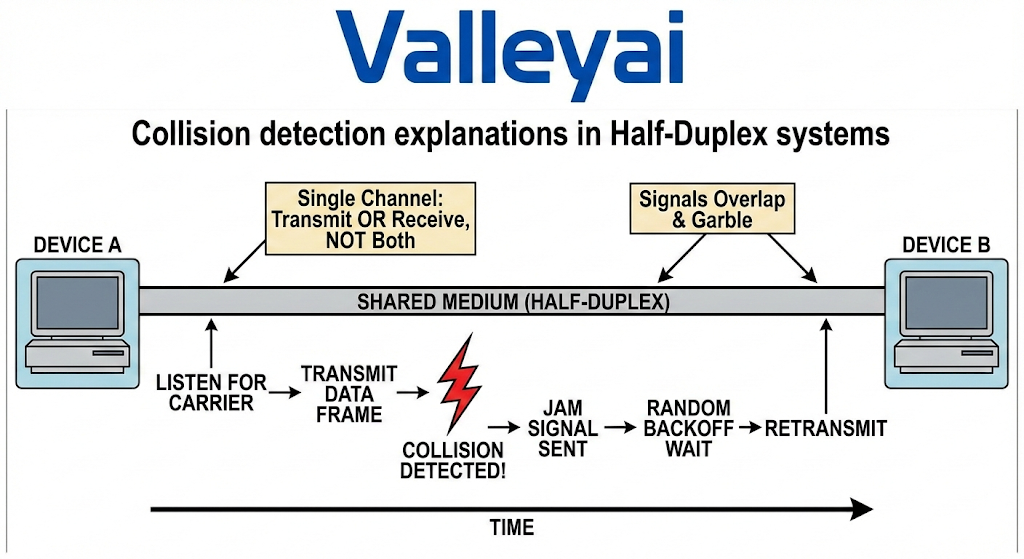
Half-duplex mode allows bidirectional communication, but not simultaneously. Devices on a half-duplex link must take turns transmitting and receiving data, utilizing access methods like CSMA/CD or CSMA/CA to manage shared collision domains and prevent data packet collisions.
Technical Characteristics Table
| Metric | Half-Duplex Mode Specification |
|---|---|
| Directionality | Two-way, alternating (A ↔ B, one at a time) |
| Bandwidth Utilization | 50% effective theoretical efficiency |
| Access Control | Carrier-Sense Multiple Access (CSMA/CD or CSMA/CA) |
| Collision Domain | Shared (collisions are possible and must be managed) |
Modern Network Context: WiFi 6 and Gaming Impact
While hardwired half-duplex Ethernet (using legacy hubs) is effectively extinct in the enterprise, half-duplex concepts are highly relevant in wireless networking.
Is WiFi 6 truly full duplex?
No. Despite massive improvements in bandwidth aggregation and efficiency, Wi-Fi 6 (802.11ax) remains a half-duplex medium at the physical layer. However, technologies like MU-MIMO (Multi-User, Multiple Input, Multiple Output) and OFDMA (Orthogonal Frequency-Division Multiple Access) allow an access point to communicate with multiple devices concurrently within the same transmission window. This simulates full-duplex efficiency, though individual radio channels are still transmitting or receiving, never both simultaneously on the exact same frequency.
Does half duplex affect gaming latency?
Yes. In a half-duplex environment (like a congested Wi-Fi network), devices must wait for the channel to be clear before sending data. If a collision occurs, a backoff timer forces the device to wait a random interval before retransmitting. This inherent wait time introduces jitter and increases latencyboth of which cause lag spikes in real-time UDP applications like online gaming.
Full-Duplex Mode Simultaneous Bidirectional Flow
Full-duplex mode enables simultaneous bidirectional communication, allowing network devices to send and receive data concurrently. By utilizing dedicated transmit and receive paths, full-duplex eliminates collision domains, functionally doubling the effective theoretical bandwidth of the network connection.
Technical Characteristics Table
| Metric | Full-Duplex Mode Specification |
|---|---|
| Directionality | Two-way, simultaneous (A ⇆ B) |
| Bandwidth Utilization | 200% aggregate (e.g., 1Gbps link = 1Gbps TX + 1Gbps RX) |
| Access Control | Dedicated Micro-segmentation |
| Collision Domain | Eliminated entirely |
Modern Network Context Enterprise Switching and VoIP
Today’s wired Ethernet is built on full-duplex operations via the IEEE 802.3 standards. Modern switches provide micro-segmentation, allocating a dedicated Network Interface Controller (NIC) port to every device, instantly neutralizing collision domains.
Why does VoIP audio cut out during duplex mismatch?
A duplex mismatch occurs when one end of a link operates in full-duplex while the other is stuck in half-duplex (often due to failed auto-negotiation falling back to 100/Half).
- The full-duplex device sends and receives simultaneously.
- The half-duplex device receives data while trying to send, interprets it as a “collision,” and drops the packet.
- Because Voice over IP (VoIP) relies on UDP (which has no retransmission mechanism), these dropped packets result directly in clipped audio, one-way audio, or dropped calls.
Comparative Analysis & Practical Configuration
The primary difference between simplex, half-duplex, and full-duplex lies in data flow directionality and simultaneity. Full-duplex offers the highest performance by enabling concurrent two-way traffic, half-duplex permits alternating two-way traffic, and simplex restricts flow to a single direction.
Transmission Modes Comparison Matrix
| Feature | Simplex | Half-Duplex | Full-Duplex |
|---|---|---|---|
| Data Flow | Unidirectional | Bidirectional (Alternating) | Bidirectional (Simultaneous) |
| Performance | Low/Application-Specific | Medium | High |
| Collision Risk | Zero | High | Zero |
| Cable Utilization | One-way path | Shared path | Independent TX/RX paths |
| Enterprise Use Case | Fiber telemetry, PA systems | Wireless Networks (WLAN) | LAN Switches, Fiber backbones |
Real-World Configuration Guide for Network Engineers
Troubleshooting and configuring duplex settings manually is a common task when auto-negotiation fails between legacy equipment and modern switches.
1. How to check and set network duplex settings in Linux CLI
Using the ethtool utility, network engineers can verify the current operational state of a NIC.
Check current duplex setting:
sudo ethtool eth0 | grep -i duplex
# Output: Duplex: Full
Force a specific duplex setting (disabling auto-negotiation):
sudo ethtool -s eth0 speed 1000 duplex full autoneg off2. How to fix a duplex mismatch on a Cisco switch?
In Cisco Systems hardware, a mismatch often throws CDP (Cisco Discovery Protocol) logs like %CDP-4-DUPLEX_MISMATCH. To resolve this, log into the Cisco CLI and ensure both ends of the link are explicitly set.
Step-by-step Cisco CLI Fix:
Switch# configure terminal
Switch(config)# interface GigabitEthernet0/1
Switch(config-if)# speed 1000
Switch(config-if)# duplex full
Switch(config-if)# end
Switch# write memory
Note: Always ensure the remote device (router, server, or firewall) is statically configured to match these settings to prevent the port from dropping entirely.
Summary FAQs
How to check network duplex settings in Linux CLI?
Use the ethtool <interface_name> command to view physical layer properties, including speed and duplex state.
Why does VoIP audio cut out during duplex mismatch?
Mismatched links cause late collisions on the half-duplex side, resulting in dropped UDP voice packets that are not retransmitted.
How to fix a duplex mismatch on a Cisco switch?
Access interface configuration mode (conf t -> int g0/1) and manually declare speed and duplex full, ensuring the connecting device is configured identically.
Does half duplex affect gaming latency?
Yes, the collision avoidance wait times inherent to half-duplex wireless networks increase packet jitter and latency, causing lag.
This guide is aligned with IEEE 802.3 Ethernet Standards and features real-world CLI configuration and troubleshooting for modern enterprise networks.

Kaleem
My name is Kaleem and i am a computer science graduate with 5+ years of experience in Computer science, AI, tech, and web innovation. I founded ValleyAI.net to simplify AI, internet, and computer topics also focus on building useful utility tools. My clear, hands-on content is trusted by 5K+ monthly readers worldwide.