
The cable is only half the story
Your port claims a gigabit. The computer reports 100 Mbps.
A replacement cable changes nothing in that setup. The fault sits somewhere else in the link, and guessing at parts wastes money.
Speed on a wired link comes from a chain. Every element in that chain sets a ceiling. One slow element caps the result for the whole link.
NordVPN defines Ethernet as a wired way to join a device to a local network.
Broadcom places Ethernet under IEEE 802.3, the standard that defines the frame and the signaling rules for wired local networks.
Cable categories and their ceilings
Copper twisted pair carries most home Ethernet. Pairs of copper wires twist together to reduce interference from nearby wires.
Each cable jacket prints a category. That print names the ceiling for speed and distance.
Fiber serves longer runs between buildings and across campuses.
| Cable | 1 Gbps reach | 10 Gbps reach |
|---|---|---|
| Cat5e | 100 m | Not rated |
| Cat6 | 100 m | 55 m |
| Cat6a | 100 m | 100 m |
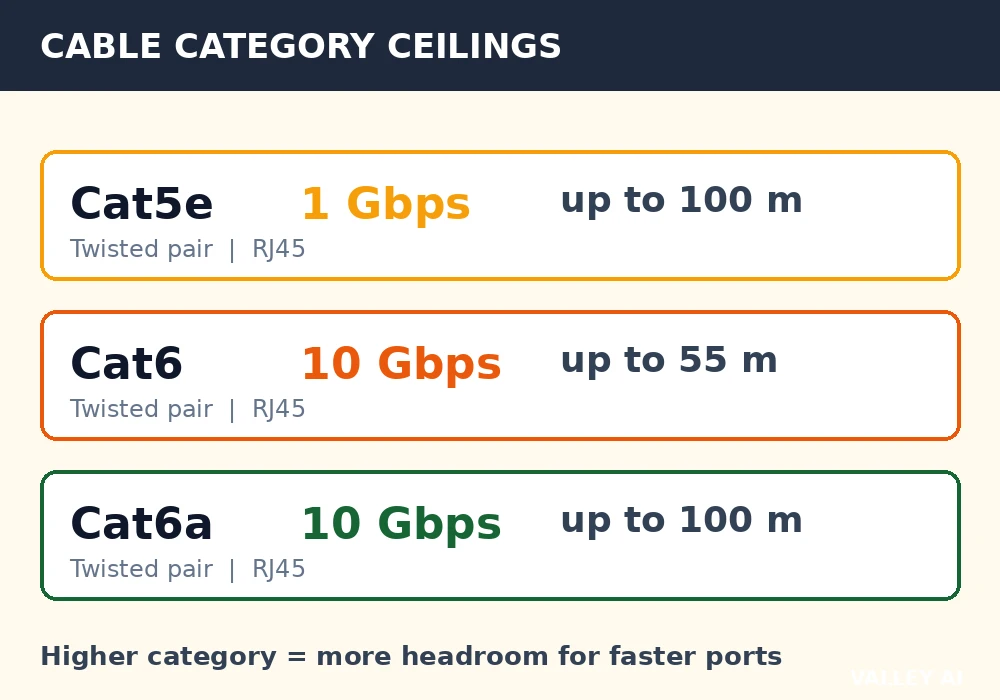
A higher category buys headroom for faster ports. It adds no speed to a port capped at a lower rate.
Laptops that move between rooms face a different trade. The choice shifts to when wireless wins on convenience, since a cable stays fixed at one desk.
Inside a frame
Data travels in frames. A frame wraps a chunk of payload with addressing and a check value.
- Preamble: 7 bytes, helps the receiver lock onto the signal
- Start frame delimiter: 1 byte, marks the start of the frame
- Destination MAC address: 6 bytes
- Source MAC address: 6 bytes
- EtherType: 2 bytes, identifies the protocol inside the payload
- Payload: 46 to 1500 bytes
- Frame check sequence: 4 bytes, a cyclic check value
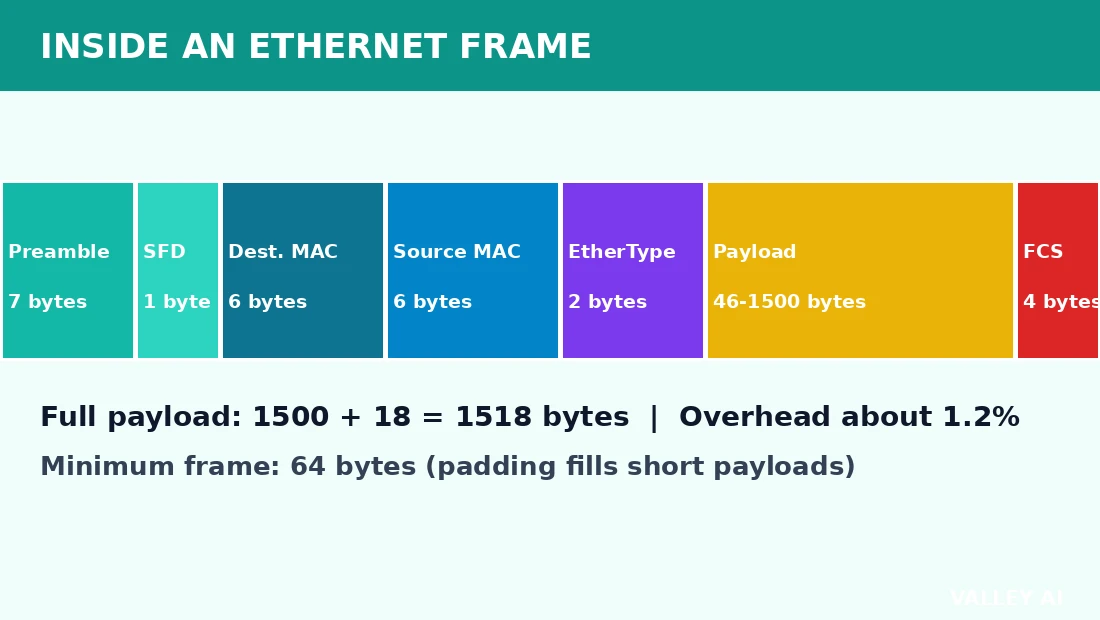
Overhead stays small at full size. A 1500 byte payload plus 18 bytes of header and trailer gives a 1518 byte frame. The overhead share equals 18 divided by 1518, about 1.2 percent.
A short payload gets padding to a 64 byte minimum frame. Padding keeps tiny frames long enough for the signaling rules to work.
Why does a frame need both a MAC address and an IP address? A frame needs both for two jobs. Delivery on the local link works because each interface carries a factory-set MAC address. Routing across networks works because the IP address picks the destination network.
The frame check sequence guards the frame in transit. A receiver runs the same cyclic calculation over the received bits. A mismatch means the frame gets dropped. Recovery sits with an upper layer, and TCP retransmits the lost data.
How a switch moves a frame
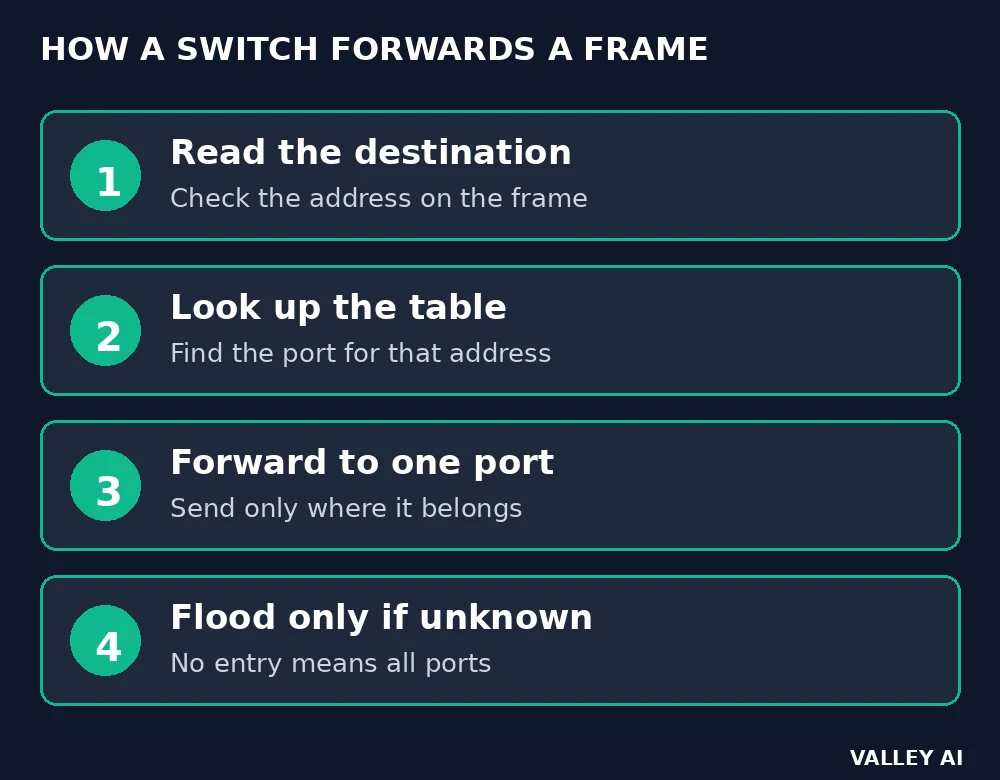
A switch reads the destination address on each arriving frame.
Forwarding starts with the source address. The switch records that address against the arrival port, in the process described as how a switch learns which port a device sits on.
The switch then checks its table for the destination. A match sends the frame out one port only. An unknown destination floods to all ports, since the table holds no entry yet.
A frame bound for another network moves onward when the router hands the frame to the next network.
Some switches deliver power over the same cable. Source budgets run 15.4 watts under 802.3af, 30 watts under 802.3at, and 90 watts under 802.3bt.
Why collisions disappeared
Early shared networks put every device on one wire. Early hubs repeated every frame to every port. Two devices could transmit at once, and their signals collided. That shared medium ran half-duplex, with one direction at a time.
Shared media used carrier sense multiple access with collision detection. A sender listened before transmitting, then backed off and retried after a collision. Retransmission delays grew as more devices shared the wire.
Why did collisions disappear from home networks? Collisions faded for a simple reason. A modern switch gives each port its own collision domain. Each port runs full-duplex, so two directions travel at once without sharing a wire.
Most switches hold a frame briefly before forwarding, which smooths short bursts from a fast sender.
Speed math: what the link speed really buys
Link speed names the ceiling for one port, in bits per second. Auto-negotiation picks the highest speed both ends support, and the operating system shows that result as the link speed.
Transfer time follows simple division. One gigabyte equals 8000 megabits in the calculation used here. At 1 gigabit per second, that file takes about 8.0 seconds in ideal conditions. At 100 megabits per second, the same file takes about 80 seconds. The gap between the two rates is tenfold. Real transfers run slower, since protocol overhead and disk speed also shape the result.
A 10 gigabit port paired with Cat5e cable will not reach 10 gigabits per second, since Cat5e carries no 10 gigabit rating. The link settles at a lower rate both ends support.
Why does a gigabit port sometimes show 100 Mbps? A gigabit port shows 100 Mbps when the weakest element in the chain caps the link. The cap can sit in a damaged pair or a 100 megabit switch port.
Checks you can run without instruments
Start with the link speed reading in the operating system network settings. Compare that reading with the port rating on the device.
Read the category printed on the cable jacket. Match that print against the category table.
Swap the cable for a known good cable, then test again. Move the cable to a different switch port for a second test.
Push each connector until it clicks, then retest. A loose connector breaks the link without any visible damage.
Check the port lights while traffic flows. Lights that stay dark point to a seating or cable fault.
Conclusion
Fix the first cap you find, then retest before changing another element. One change at a time keeps the cause clear. Stop when the reading matches the port rating.
Frequently asked questions
What does the EtherType field do?
EtherType carries a numeric tag that identifies the protocol inside the payload. The value 0x0800 marks IPv4, and 0x86DD marks IPv6. The receiver reads that tag and passes the payload to the handler for that protocol.
Can two devices on one switch share one MAC address?
Sharing one address confuses the switch table, since the table maps each address to a single port. Frames can land on the wrong port, and the entry can flap between ports. Restoring the factory address on one device clears the conflict.
Can you join two short cables with a coupler to reach a far room?
A coupler joins two cables into one longer channel, and the total channel must stay within the rated limit. Each extra connection point adds a possible fault point. A coupler rated for the target speed keeps the join from becoming the cap.
Why does a port have two small lights?
One light shows a live link, and the other blinks with traffic. Colors and blink patterns vary by vendor, so the device manual gives the exact meaning for that model. A steady link light with no traffic blink points to an idle link, while rapid blinking shows active data flow.
Does a longer cable add noticeable delay for gaming?
Signals in copper travel at roughly two thirds of light speed. A 100 meter run adds about 0.5 microseconds of one way delay. That delay sits far below the delays from routing, server response, and frame processing, so cable length at home distances stays out of the way for gaming.
Can Ethernet carry a connection without internet access?
A local network runs without an upstream internet connection. Devices on one switch can share files and printers through local addresses. Internet access arrives only when an upstream link joins that local network to wider networks.

Kaleem
Kaleem is a Computer Science graduate (Virtual University of Pakistan) and the founder and editor of Valley AI, where he publishes in-depth, tested guides on computer hardware, artificial intelligence, and how the internet works. Every guide is researched from primary sources, tested hands-on where possible, and updated when the facts change.