
A Wi-Fi radio turns bits into radio waves, then turns radio waves back into bits.
That conversion happens twice on every trip across a room.
A phone or laptop feeds ones and zeros to a small radio chip.
The chip shapes a radio wave to carry them.
An access point on the other side reads the wave and rebuilds the ones and zeros.
Radio waves carrying bits
A Wi-Fi radio sends its signal on unlicensed bands around 2.4, 5, and 6 gigahertz.
One gigahertz equals one billion cycles per second, so a 2.4 gigahertz wave completes 2.4 billion cycles each second.
Wi-Fi standards carry the name IEEE 802.11, and each generation under that name adds faster modulation or wider channels.
TechXplore, writing with an electrical engineer, describes Wi-Fi as radio communication between a device and an access point.
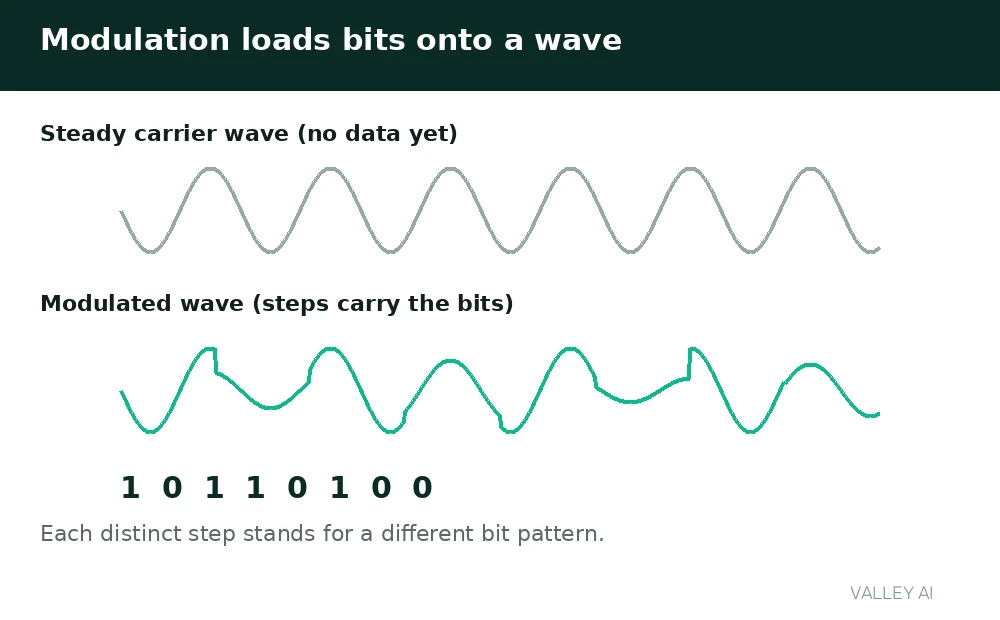
How does a wave hold data? Modulation changes the wave in steps the receiver recognizes, and each recognized step delivers its bits to the receiving device.
Early Wi-Fi changed one property at a time.
Modern Wi-Fi changes amplitude and phase together, a method called quadrature amplitude modulation, or QAM.
With 1024-QAM, each symbol carries 10 bits, because 2 raised to the 10th power equals 1024.
Modulation resembles a lighthouse keeper changing flash timing to send a message, with each distinct timing standing for a different bit pattern.
The join sequence
A device joins a network in a fixed order.
Each step must finish before data flows.
- Scan. The device listens for beacon frames that announce a network name and band.
- Authenticate. The device proves it belongs on the network under the security rules in force.
- Associate. The access point records the device and agrees on connection settings for the session.
- Address. The device receives a local address from the network through the Dynamic Host Configuration Protocol (DHCP), so packets can find it.
- Exchange. The device and the access point swap data frames on the agreed channel.
The network name in a beacon is the SSID.
A device that already knows the network can send a probe and skip waiting for the next beacon.
How-To Geek calls the router the central point that home devices connect to.
The access point in a combined home box sits beside a modem, and how routers and modems divide their jobs sets which part talks to the line outside the home.
Bands and channels
A band is a range of frequencies set aside for Wi-Fi.
Each channel takes a slice of that band with a set width.
| Band | Channel width | Channel notes |
|---|---|---|
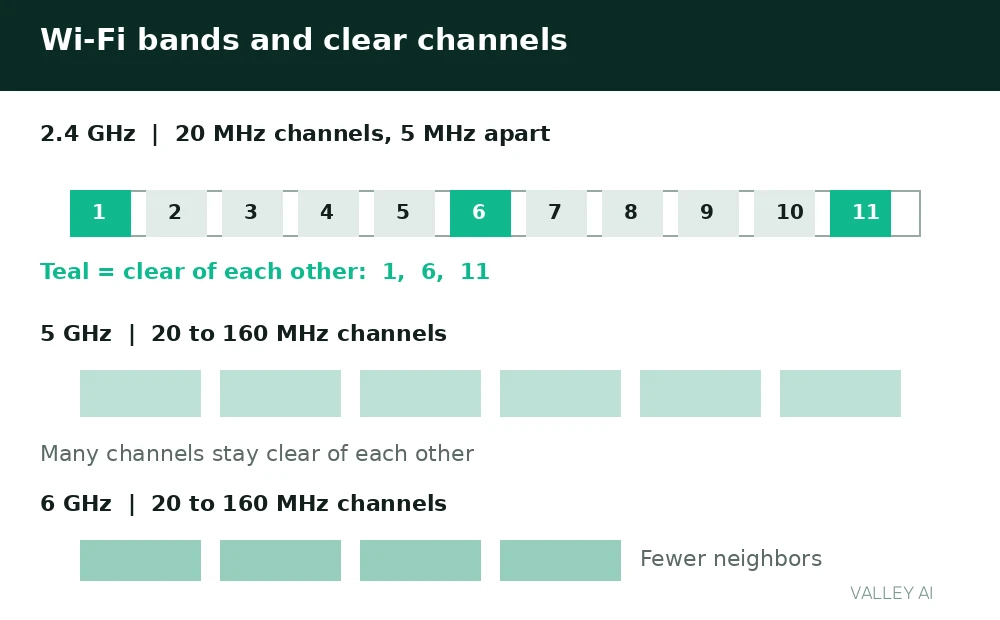
| 2.4 GHz | 20 MHz typical | Channels 1 to 11 in the United States; 1, 6, and 11 keep clear of each other |
| 5 GHz | 20, 40, 80, or 160 MHz | Many channels keep clear of each other |
| 6 GHz | 20, 40, 80, or 160 MHz | Fewer neighboring networks use it |
Channel arithmetic decides which 2.4 gigahertz channels stay clear of each other at 20 megahertz.
Spacing on that band is 5 megahertz between neighboring channels.
At 20 megahertz, channel 1 centers on 2412 megahertz and channel 6 centers on 2437 megahertz, a gap of 25 megahertz.
That gap exceeds a 20 megahertz channel width, so the two channels keep clear of each other.
Channel 2, by contrast, centers only 5 megahertz above channel 1, so its width overlaps channel 1 heavily.
Running the same spacing across the band leaves channels 1, 6, and 11 as the ones that keep clear of each other.
Wider channels carry more data per second and leave fewer clear channels beside them.
In a dense building, a router set to 160 megahertz on 5 gigahertz may find no fully clear channel and fall back to a narrower width.
Sharing one channel
A Wi-Fi channel carries traffic in one direction at a time.
That half-duplex limit shapes sharing on the channel.
Before sending, a device listens.
If the channel sounds busy, the device waits for a random backoff interval, then listens again.
A receiver confirms each frame with a short acknowledgment.
The method has a name, carrier sense multiple access with collision avoidance, shortened to CSMA/CA.
Why does one slow device slow every device on its channel? Airtime is shared. A slow device needs more airtime to move the same data. Faster devices then wait longer for a turn.
A calculation makes the drag concrete.
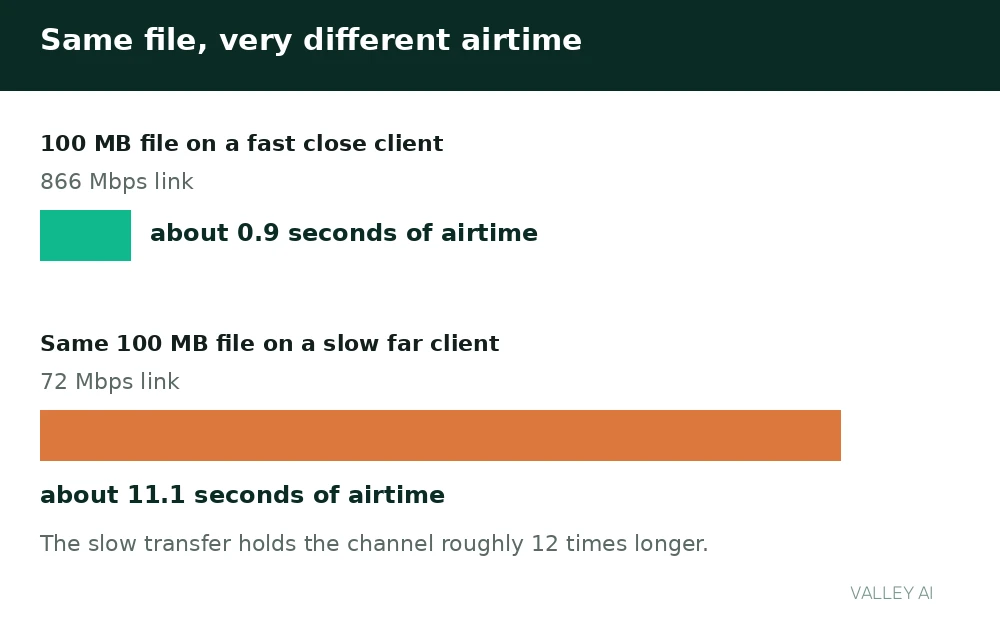
Take a 100 megabyte file, equal to 800 megabits.
Close to the access point, a device with an 866 megabit per second link moves it in about 0.9 seconds of airtime.
A far device with a 72 megabit per second link needs about 11.1 seconds of airtime for the same file.
The slow transfer holds the channel roughly 12 times longer for identical data.
Neighboring traffic adds to the wait, and Bluetooth gear shares the same 2.4 GHz band, so nearby wireless audio and peripherals draw on the same airtime.
A running microwave oven leaks energy near 2.45 gigahertz.
Link speed versus real speed
The link speed on a device is a ceiling for that radio link.
Real transfers run below it.
Why does a speed test show less than the link speed? Frames carry headers. Acknowledgments consume airtime. Retransmissions repeat lost data. Part of the link serves overhead.
A calculation puts numbers on the gap.
Start with a 1200 megabit per second link.
Assume 70 percent survives as usable throughput after overhead.
Usable throughput is 840 megabits per second.
A 1 gigabyte file holds 8000 megabits.
Moving it takes about 9.5 seconds at 840 megabits per second.
Two ceilings bind different traffic.
Traffic that leaves the home answers to the internet plan cap.
A local link cap binds traffic that stays inside the home.
Internet downloads under a 100 megabit per second plan cap at that rate.
A file moved between two home devices runs toward the local link.
The ceiling keeps rising with newer Wi-Fi generations, which also cut waiting time with scheduled access for many devices at once.
The security handshake, in brief
After association, the device and the access point run a security handshake.
Under WPA2, that handshake exchanges messages that prove knowledge of the password and derive fresh session keys.
WPA3 replaces the password proof with a method called Simultaneous Authentication of Equals, which resists offline guessing of weak passwords.
Session keys then encrypt traffic for each device separately, so two devices on one network cannot read each other’s frames from the air.
An open network skips the password proof, and traffic on it lacks per-device encryption.
Why signal fades
Radio energy spreads as it travels, so a receiver farther away collects less of it.
Doubling the distance in open air cuts received power to roughly one quarter.
Walls absorb part of the wave.
Dense material absorbs more than a thin partition.
Higher frequencies lose more energy passing through solid material.
Moving the access point to open air, clear of thick walls, raises the signal a distant room receives.
Read the link speed in the device Wi-Fi settings. Read the band and channel in the router app or the device connection details. Count neighboring networks in a scan list to judge crowding.
Those checks need no instruments, and each one points at a different cause of a slow connection.
When Wi-Fi is not the bottleneck
A cable test separates a local problem from a plan problem.
Run the same download over a wired connection.
If the wired result reaches the plan rate while wireless lags, the wireless link limits the transfer.
When the wired result lags too, the limit sits beyond the home network.
A wired test shows when a cable beats wireless for a machine that never moves.
Check the band the device uses before buying new hardware.
A device stuck on a crowded 2.4 gigahertz channel may gain speed on a clearer 5 gigahertz channel.
Conclusion
Start with the two readings that cost nothing: the link speed and the band in use.
Move closer to the access point or switch to a clearer band, then run the wired test before contacting the provider.
Frequently asked questions
Do radio stations and Wi-Fi use the same kind of waves?
Both use electromagnetic waves, but broadcast stations transmit on licensed lower frequencies with high power and tall antennas, while home Wi-Fi uses unlicensed bands near 2.4 gigahertz and above at low power.
Do I need new hardware to use the 6 GHz band?
Yes, both the router and the device need radios built for that band, and older devices keep working on the bands they already support.
Why does a phone show full bars yet load pages slowly?
Bars report signal strength, while page loads wait for airtime, so a strong signal on a crowded channel still queues behind neighboring traffic.
Can Wi-Fi work without an internet connection?
Yes, devices on one home network can still share files, print, and cast media locally, because the local link and local addresses keep working while the outside connection is down.
Why does restarting a router sometimes fix a slow connection?
A restart clears stuck states, drops stale associations, and lets the router pick a clearer channel on boot, which can relieve a crowded channel.

Kaleem
Kaleem is a Computer Science graduate (Virtual University of Pakistan) and the founder and editor of Valley AI, where he publishes in-depth, tested guides on computer hardware, artificial intelligence, and how the internet works. Every guide is researched from primary sources, tested hands-on where possible, and updated when the facts change.