

The rule every packet meets
A packet passes only when a rule allows it or an existing connection state covers it.
That single rule explains most firewall behavior.
A firewall sits at a trust boundary. One side holds a home network. The other side holds the internet. Traffic crossing that boundary meets the rule list. Traffic matching no allow meets the default action at the end of the list.
DigitalOcean’s firewall policy tutorial recommends default deny because an allow-by-default list must anticipate every unwanted flow.
Zones mark different trust levels inside one site. A home network trusts its own devices more than outside hosts. A guest network trusts visitors less than the main network. Each zone boundary can carry its own rule list.
A router picks the path a packet takes across networks. A firewall decides whether that packet may cross at all. The jobs differ, and how routers and modems divide their jobs shows the routing side of the pair.
The five fields a rule reads
Five fields come from packet headers in every rule. The fields are source address, source port, destination address, destination port, and protocol. Together they form the 5-tuple. A rule can match one field, several fields, or the full set.
Port numbers name the service waiting at the destination. Port 443 names encrypted web traffic. Port 53 names DNS lookups. Port 22 names remote login sessions. A rule allowing port 443 says nothing about port 22.
Protocol narrows the match further. TCP carries ordered, checked delivery. UDP carries fast delivery without that checking. A rule for TCP port 53 does not match UDP port 53.
Does a firewall read the contents of every packet? A packet filter reads headers only. It never opens the payload. Deeper inspection reads packet contents past the headers, a method named deep packet inspection.
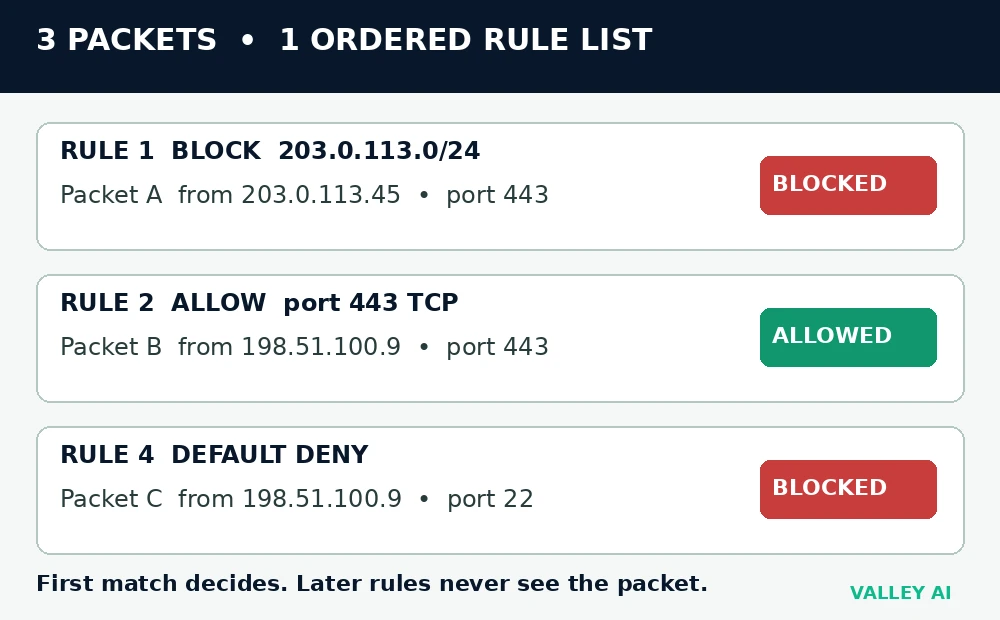
Rules evaluate from the top of the list down. The first matching rule decides the packet. Later rules never see that packet. Order matters as much as wording.
Three packets, one ordered rule list
Order changes an outcome in the list below. Start with an allow for port 443 placed above a block for one address range. A packet from that range to port 443 passes under that order. The policy intent was to block that range completely. Moving the block above the allow fixes the outcome. No rule wording changed.
The corrected list reads in this order. Rule 1 blocks source range 203.0.113.0/24. Rule 2 allows destination port 443 over TCP. Rule 3 allows destination port 53 over UDP. Rule 4 denies everything else.
| Packet | Source to destination | First matching rule | Verdict |
|---|---|---|---|
| Packet A | 203.0.113.45 to a web server, port 443, TCP | Rule 1: block 203.0.113.0/24 | Blocked |
| Packet B | 198.51.100.9 to a web server, port 443, TCP | Rule 2: allow port 443, TCP | Allowed |
| Packet C | 198.51.100.9 to a web server, port 22, TCP | Rule 4: default deny | Blocked |
Count the outcomes under a home list with four allows and one default deny. Five named attempts face that list. A web request matches an allow. A DNS lookup matches an allow. A stranger probing a file-sharing port finds no allow. A stranger probing a remote-login port meets the default deny. A stranger probing a printer port falls to the final deny. Two attempts pass. Three attempts fail. The default deny decides the three failures.
How a state table remembers a connection
A state table works like a guest list kept at a door. A name written at entry lets the same guest pass back through during the visit. A stranger with no entry waits outside.
Take one outbound web request as the worked walkthrough. The laptop address is 192.168.1.20 with source port 51234. The destination is 93.184.216.34 on port 443 over TCP. The opening SYN packet creates a state entry. The entry records the full 5-tuple plus a state label. The label moves from opening to established after the handshake completes.
A reply packet carries the reversed 5-tuple. Source and destination swap places. Port numbers swap places. The firewall matches the reply to the entry. The reply passes on the strength of that entry. The entry closes when the connection ends or its timer expires.
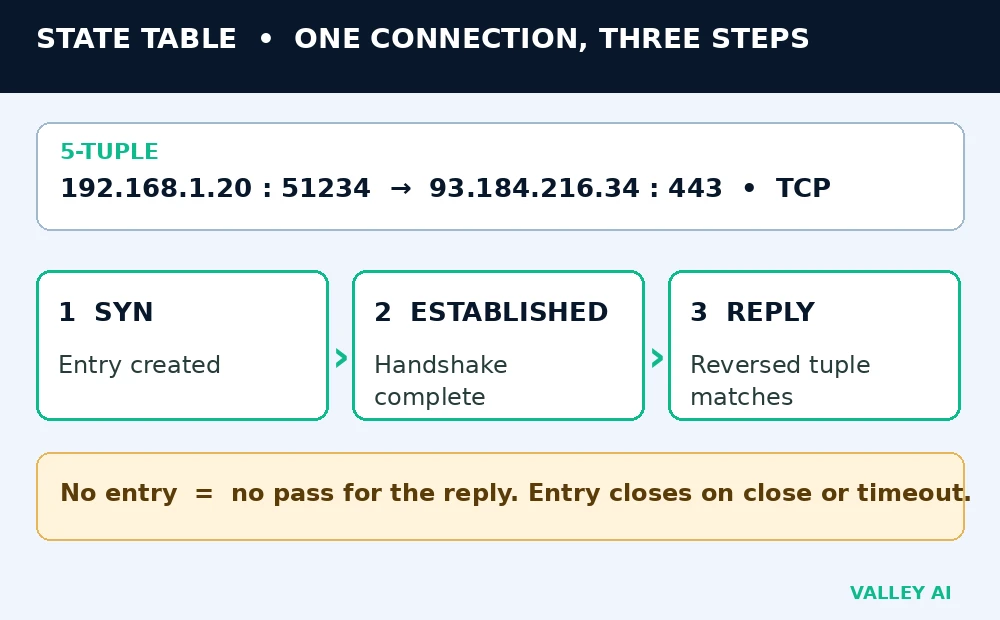
Why does a reply get back in when inbound traffic is blocked? The reply matches a state entry created by the outbound request. The firewall treats that reply as part of an existing connection. No separate inbound allow is needed.
A stateless filter keeps no entry of this kind. An inbound port 80 allow passes every inbound port 80 packet. The filter cannot tell a reply from an unsolicited knock. Home firewalls keep state to close that gap.
Five firewall types, side by side
Pandromeda’s firewall guide lists packet filtering, stateful inspection, proxy service, deep packet inspection, and next-generation firewalls as the main firewall types. The table below compares five types by what each one inspects.
| Type | What it inspects | Key behavior |
|---|---|---|
| Packet filtering | Packet headers only | Judges each packet alone, with no memory of earlier packets |
| Stateful inspection | Headers plus connection state | Admits replies tied to an existing entry |
| Proxy firewall | Full application traffic through a middleman | Terminates the client connection and opens a fresh one onward |
| Next-generation firewall | Stateful inspection plus application awareness and intrusion prevention | Enforces policy by application, with deeper checks |
| Web application firewall | Web requests to one web application | Screens web traffic for attack patterns aimed at that app |
Placement splits firewalls a second way. A hardware firewall guards a whole network from one box. A host firewall guards one device with its own rules. A laptop keeps its host firewall active after it leaves home.
A web application firewall works at the application layer for web apps only. Intrusion prevention sits beside it inside some next-generation products. That feature blocks traffic matching known attack patterns after detection.
Strong passwords, timely updates, and careful downloads belong with filtering among cybersecurity basics.
Drop and reject: two different answers
A blocked packet can meet silence or an answer. Drop discards the packet and sends nothing back. The sender waits until its timer expires. Reject sends an error back at once.
CoreSentinel’s drop-versus-reject comparison states that a rejected TCP attempt returns a reset packet at once. A rejected UDP attempt returns an ICMP port-unreachable message. A dropped attempt returns neither signal.
Silence slows casual scanning. A scanner facing drop must wait out each timeout. A scanner facing reject learns the port state at once. Home firewalls usually drop unsolicited inbound traffic.
Does a reject mean the service behind the firewall is gone? A reject says the firewall answered the attempt. The service may still run behind a different rule. A timeout says no answer came back at all.
Home checks and the next step
Four checks need no instruments. Each check uses a setting, a prompt, or a visible error. Run them in order on a home network.
- Open the router settings page. Confirm the router firewall setting shows on. Leave every other router setting untouched.
- Launch an app that needs network access for the first time. Read the allow prompt. Approve only an app name you recognize.
- Open a blocked app and watch its error. Open a browser beside it. A page loading in the browser while the app fails points to an app rule.
- Open the device firewall panel. Confirm the panel shows on. Remove any allowed entry with a name you do not recognize.
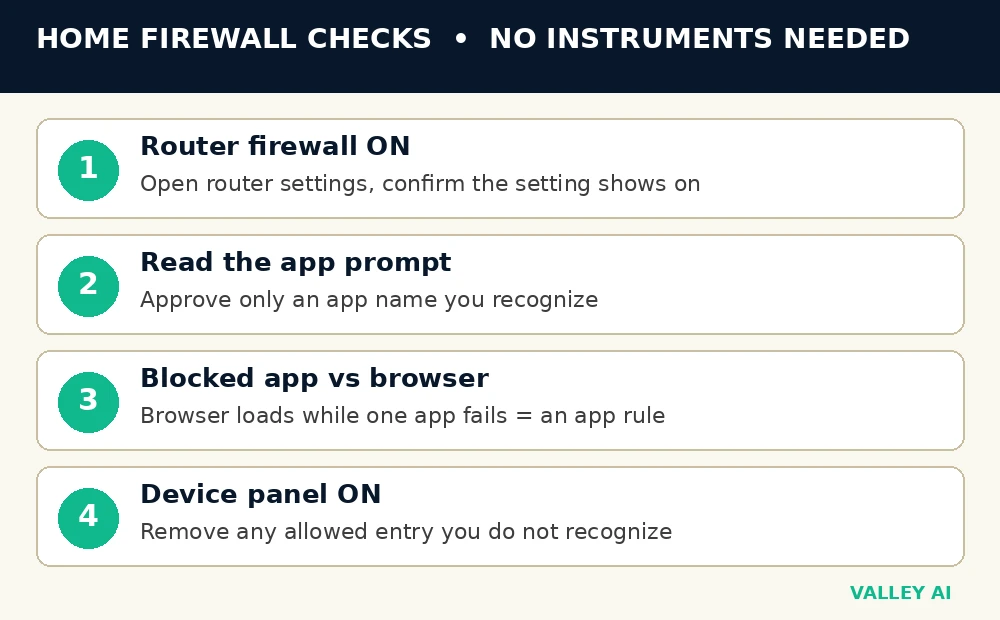
Start tonight with the router setting. Answer the next app prompt after reading the app name. Remove one unrecognized allowed entry when you spot one.
Frequently asked questions
Does a firewall replace antivirus software?
Antivirus software scans files and programs already on a device. A firewall controls network passage at a boundary. The two jobs differ, so a device benefits from both layers.
Can a firewall slow down a connection?
Inspection adds processing time to each packet. Home hardware handles that load with no perceptible delay in most cases. A slow connection more often traces to a congested link or a slow server.
Should two software firewalls run on one computer?
Two software firewalls can issue duplicate prompts for one connection. One firewall can block traffic the other one manages. A single host firewall plus the router firewall gives layered coverage without that conflict.
Does a firewall protect a laptop on public Wi-Fi?
The host firewall still filters inbound traffic on an unfamiliar network. It does not encrypt traffic leaving the laptop. Public Wi-Fi safety still needs encrypted connections and caution with sensitive sign-ins.
What happens when a rule lists the wrong port number?
Traffic aimed at the intended port misses the allow. That traffic falls to the default deny at the end of the list. Fix the digits in that one rule, then test the intended service again.
What is a firewall log, and when should I read it?
A log records blocked attempts with time, address, and port. Read it after a service keeps failing for no clear reason. Repeated blocks from one address point to a rule worth reviewing.

Kaleem
Kaleem is a Computer Science graduate (Virtual University of Pakistan) and the founder and editor of Valley AI, where he publishes in-depth, tested guides on computer hardware, artificial intelligence, and how the internet works. Every guide is researched from primary sources, tested hands-on where possible, and updated when the facts change.