

TCP and UDP are the two transport protocols that carry almost everything you send and receive online. Every web page, video call, game session, and file download rides on one of them. They sit one layer above IP: IP handles the addressing that gets packets to the right machine, while TCP and UDP decide how that data is actually delivered once it is on its way. TCP is the careful one. It checks in before sending, numbers every byte, and resends anything that goes missing. UDP is the fast one. It fires each packet off immediately and never looks back. Which one a given app uses comes down to a single question: is a late packet still useful?
What Are TCP and UDP?
TCP (Transmission Control Protocol) and UDP (User Datagram Protocol) both live at the transport layer of the network stack, the layer whose job is moving data between applications on different devices. Think of them as two different postal services sharing the same roads.
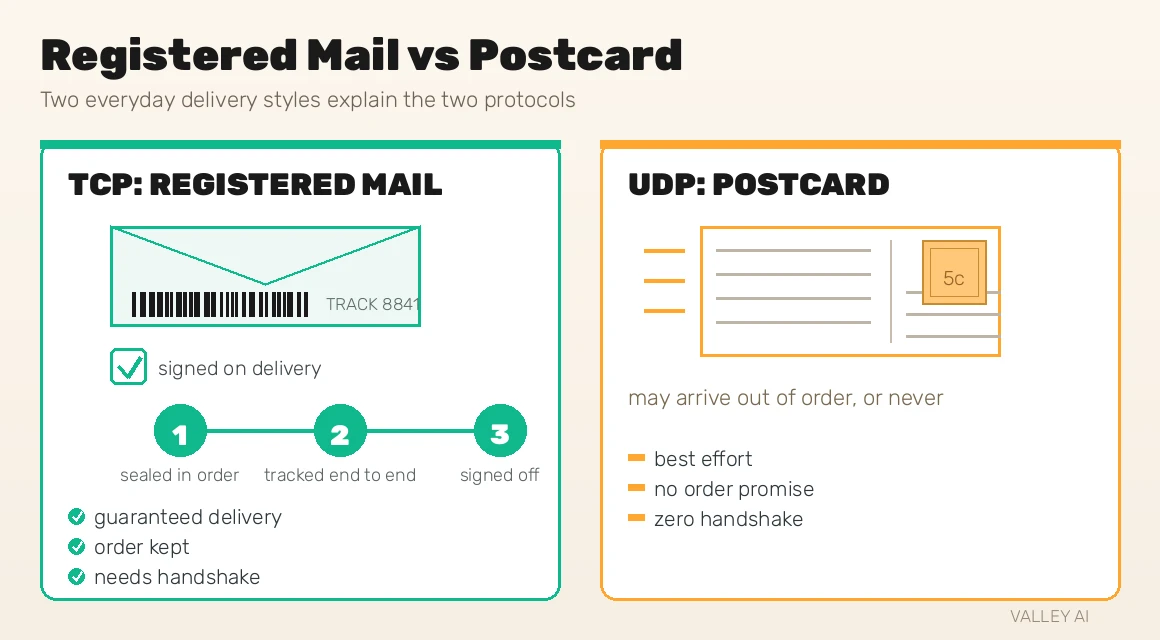
TCP is registered mail. Before anything ships, sender and receiver confirm the arrangement. Every parcel gets a tracking number, the recipient signs for each one, and anything lost in transit is resent until the full set arrives complete and in order. It costs more and takes longer, but nothing goes missing silently.
UDP is a postcard. You address it, drop it in the box, and move on with your day. It usually arrives, sometimes it does not, and nobody tells you either way. There is no tracking number and no signature. What you get in return is speed: no setup, no waiting, no overhead.
Neither is better. They solve different problems, and most of your apps use both at different moments. The rest of this guide walks through exactly how each one works, where you meet them in daily life, and how to watch them working on your own computer.
How TCP Works: The Careful Delivery Service
TCP is connection-oriented and reliable. Before a single byte of your data moves, the two sides formally agree to talk. From then on, every byte is numbered, every chunk is confirmed, and anything that goes missing is sent again. That is why your downloads arrive bit-perfect even over shaky connections. The full specification is RFC 793, and it has defined TCP since 1981.
The Three-Way Handshake
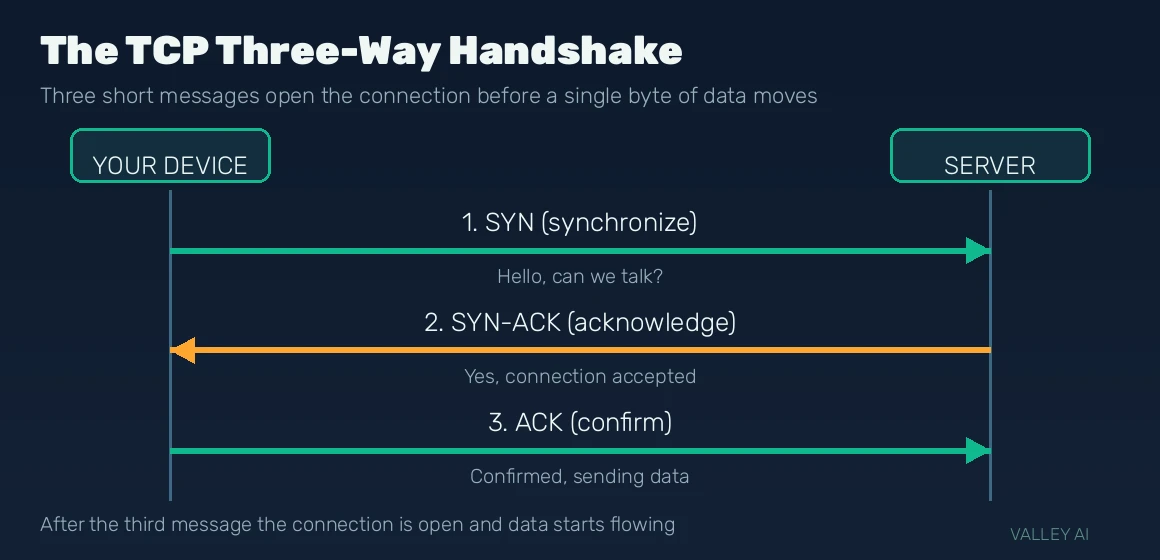
Every TCP connection opens with a three-step greeting called the three-way handshake:
- 1. SYN. Your device sends a segment with the SYN flag set, essentially saying hello and sharing the sequence number its own numbering will start from.
- 2. SYN-ACK. The server answers with SYN and ACK flags together: it acknowledges your number and offers its own starting number in return.
- 3. ACK. Your device confirms the server’s number. The connection is now established, and only now does real data start flowing.
That handshake costs at least one full round trip before the first byte of data moves. On a local network that is under a millisecond; across continents it can be well over 100 milliseconds of pure setup time. For a long file download that cost is trivial. For a quick request, it is noticeable, and it is one reason the web keeps looking for faster ways to start connections.
Once the handshake completes, TCP’s reliability machinery takes over. Every byte sent gets a sequence number, and the receiver sends back acknowledgments confirming what arrived. If the sender hears nothing back about a segment within its timeout window, it simply sends that segment again. Corrupted segments are caught by a checksum and retransmitted too.
TCP also guarantees order. Packets can take different routes and arrive scrambled, so the receiver uses the sequence numbers to reassemble everything in exact send order before handing it to the application. The price of that guarantee is head-of-line blocking: if one segment goes missing, everything behind it waits, even segments that arrived fine. One lost packet can stall the whole stream while TCP fetches the replacement.
Two more mechanisms keep TCP polite on a shared network. The sliding window lets the receiver tell the sender how much unacknowledged data it can currently buffer, so a fast sender never overwhelms a slow receiver. Slow start begins each connection cautiously and ramps the sending rate up as acknowledgments come back, probing for available bandwidth instead of flooding the path. All of this bookkeeping is why a TCP header is at least 20 bytes (and can stretch to 60 with options), and why acknowledgment traffic flows in both directions.
One place all of this becomes visible is your own router. It keeps a NAT table tracking every TCP and UDP session passing through your network, which is what your router actually does with those sessions behind the scenes.
How UDP Works: Fire and Forget
UDP skips everything TCP does. There is no handshake, no session, no acknowledgment, no retransmission, and no ordering. The application wraps its data in a datagram, hands it to UDP, and the datagram goes out immediately. The whole specification is RFC 768, famously one of the shortest RFCs ever written, which tells you how little machinery UDP carries.
That minimalism shows in the header: a fixed 8 bytes holding only source port, destination port, length, and a checksum. The checksum can detect a corrupted datagram, but UDP does nothing about it. A damaged datagram is silently discarded, and the sender never knows. There is no flow control and no congestion control either; UDP sends at whatever rate the application asks, with no awareness of what the network can handle.
Here is the key insight most explainers rush past: that unreliability is a feature, not a bug. In a voice call, a packet carrying audio from two seconds ago is garbage the moment it arrives late. Resending it wastes bandwidth on sound you have already moved past. In a game, a player position from 300 milliseconds ago is stale data; the fresh update matters, the old one does not. For these jobs, waiting for perfection is worse than accepting a small loss.
UDP also natively supports multicast, where one stream reaches many receivers at once instead of sending a separate copy to each. That is how services like IPTV distribute live channels efficiently. And when an application on UDP does need some reliability, it builds exactly what it needs itself: a game might send movement updates unreliably but require confirmation for a match result, and DNS simply retries a query if no answer comes back.
TCP vs UDP: Side by Side
| Feature | TCP | UDP |
| Connection | Connection-oriented: three-way handshake first | Connectionless: sends immediately |
| Reliability | Guaranteed: acknowledgments plus retransmission | Best effort: no guarantee at all |
| Ordering | Bytes delivered in exact send order | Datagrams arrive in whatever order they arrive |
| Speed | Slower: handshake and acknowledgments add latency | Faster: zero setup, minimal waiting |
| Header size | 20 bytes minimum, up to 60 with options | Fixed 8 bytes |
| Flow control | Yes: sliding window adapts to the receiver | None |
| Congestion control | Yes: slow start and rate backoff | None: sends at the application’s pace |
| Port space | Own separate 16-bit port range | Own separate 16-bit port range |
| Analogy | Registered mail with tracking | Postcard dropped in the box |
| Best for | Web, email, file transfers, logins | DNS, gaming, calls, live streaming |
One row deserves a second look: TCP and UDP each get their own separate 16-bit port space. That means TCP port 443 and UDP port 443 are two completely different doors. A port number alone never tells you which protocol is knocking.
What Actually Uses TCP
Any application where a missing or scrambled byte would corrupt the result rides on TCP. The web is the biggest one: HTTP/1.1 and HTTP/2 run over TCP, because a single damaged character in a JavaScript file can break a page and a corrupted byte in a download ruins the file. When your browser loads a site, it is a TCP connection doing the quiet work of making sure every byte arrives intact and in order.
- Web browsing: HTTP/HTTPS over TCP ports 80 and 443; every byte of the page must be exact.
- Email: SMTP and IMAP; a dropped chunk of a message is not acceptable.
- File transfers: FTP and every download manager; the file must be bit-perfect.
- SSH: remote terminal sessions; scrambled commands would be chaos.
- Messaging apps: core text delivery in apps like WhatsApp runs over TCP, since an out-of-order message thread is a bad experience.
The rule of thumb is simple: if losing data would corrupt the result, the application wants TCP’s guarantees, and it gladly pays the handshake and acknowledgment cost to get them.
What Actually Uses UDP
Applications that value timing over perfection choose UDP. The most relatable one happens dozens of times a day without you noticing: DNS. Every time you type a website address, your device fires a single UDP query at port 53 and gets a single answer back. No handshake, no session, just question and answer. If you want to know what those lookups are actually doing behind the scenes, our DNS guide explains what those lookups actually do step by step.
- DNS lookups: one UDP query, one answer, on port 53; speed matters more than ceremony.
- DHCP: the protocol that hands your device its IP address when it joins a network.
- Online gaming: position and movement updates sent 20 to 60 times per second; a stale update is useless, so games send fresh state and confirm only critical events themselves.
- Voice and video calls: VoIP and video chat protocols where a late audio packet is worse than a dropped one.
- Live streaming: low-latency broadcasts where the viewer needs now, not a perfect replay of two seconds ago.
Gaming makes the trade-off concrete. Competitive shooters start feeling unfair around 100 milliseconds of delay, and past 150 milliseconds hit registration and movement feel broken even when the server is fine. TCP’s retransmission stalls would add exactly that kind of delay, so games take UDP’s raw speed and handle the important confirmations in the game code itself.
One honest caveat: UDP cannot fix a bad connection. If your Wi-Fi is laggy, game packets still arrive late or not at all, and no protocol choice repairs that. Check which connection each device should use before blaming the protocol for your ping.
The Interesting Middle: QUIC and HTTP/3
Here is where the story gets interesting. The modern web is rebuilding TCP-style reliability on top of UDP. QUIC, the protocol behind HTTP/3, takes UDP’s fast, handshake-free base and layers on its own reliability: acknowledgments, retransmission, ordering, and congestion control, all implemented above UDP instead of inside the operating system’s TCP stack.
Why bother? Because a classic secure connection is slow to start. TCP’s handshake plus the TLS security handshake can cost several round trips before the first byte of your page moves. QUIC folds the security handshake into its own setup, and on repeat visits it can often resume with zero round trips. It also kills head-of-line blocking across streams: a lost packet stalls only its own stream instead of the whole connection, which is exactly the weakness TCP cannot fix.
QUIC has one more trick TCP lacks: the connection is not tied to your IP address. Switch your phone from Wi-Fi to mobile data mid-scroll and a QUIC session survives the handover far more gracefully than a TCP connection, which sees a new IP as a stranger. You can watch this live: open chrome://net-internals and look for the QUIC sessions while you browse; many big sites already serve you over UDP without you ever knowing.
See TCP and UDP on Your Own PC
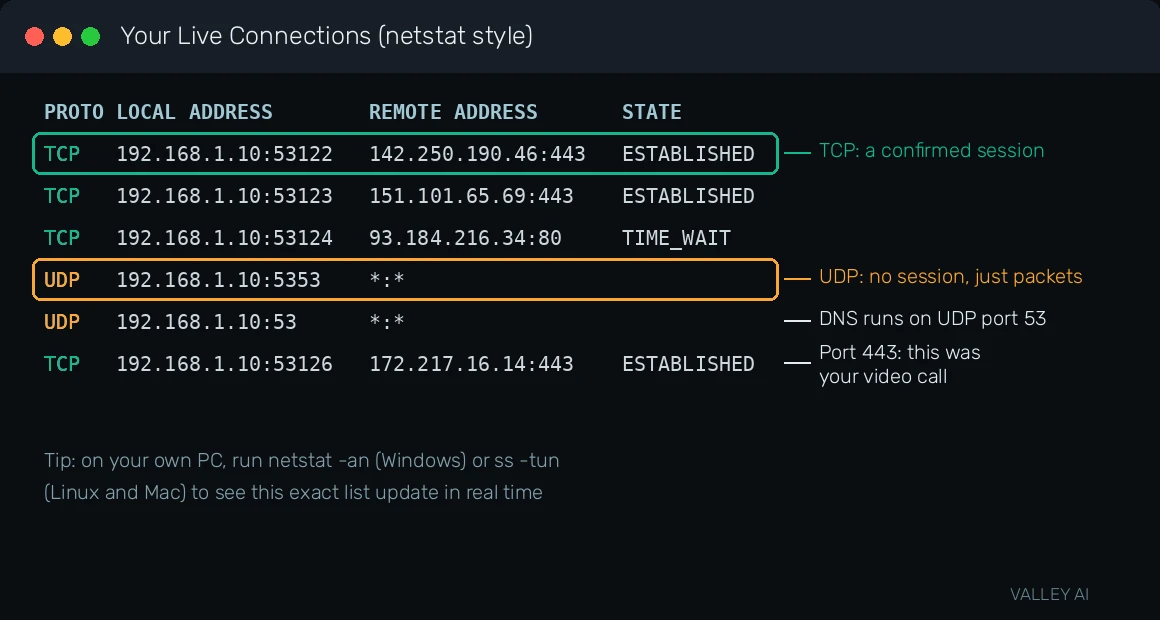
You do not have to take any of this on faith. Your computer is running both protocols right now, and you can look at them directly. On Windows, open Command Prompt and run netstat -an. You will see a live list of connections: rows starting with TCP show a state like ESTABLISHED, while rows starting with UDP show no state at all, because there is no session to be in a state of. That difference is the whole article in one screen.
For a friendlier view, open Resource Monitor (search for it in the Start menu), go to the Network tab, and expand TCP Connections. You will see your browser’s connections to web servers on port 443, each one a confirmed TCP session. The UDP rows nearby, often on port 53, are your DNS queries blinking in and out: question asked, answer received, no handshake anywhere.
Chrome users get an even better window. Type chrome://net-internals into the address bar and open the Sockets view to see live TCP sockets, then check the QUIC section to catch UDP-based HTTP/3 sessions in action. If this sparks your curiosity about watching individual packets, a packet sniffer lets you capture live traffic and see TCP handshakes and UDP datagrams packet by packet.
FAQ
What is the main difference between TCP and UDP?
TCP is connection-oriented and reliable: it opens every conversation with a three-way handshake, then numbers each byte, confirms receipt, and resends anything lost, delivering data in exact order. UDP is connectionless and best effort: it sends each datagram immediately with no handshake and no confirmation, so packets can be lost or arrive out of order. TCP suits jobs where every byte must be perfect; UDP suits jobs where speed matters more than perfection.
Is UDP faster than TCP?
UDP has lower latency because it skips the handshake and sends no acknowledgments, and its header is a fixed 8 bytes versus TCP’s 20-plus. But raw throughput on a healthy connection is similar for both; TCP’s speed cost shows up mainly as extra round trips at connection start and stalls when packets are lost. UDP is faster to start, not magically faster at moving bulk data.
Why do online games use UDP instead of TCP?
Game state goes stale almost instantly: a player position from 300 milliseconds ago is useless, while the next update is what matters. TCP would stall everything behind a lost packet to resend old data the game no longer needs, creating visible stutter. UDP lets fresh updates keep flowing, and the game code adds confirmation only for critical events like match results.
Does DNS use TCP or UDP?
DNS primarily uses UDP on port 53: a lookup is one quick query and one answer, and the handshake overhead of TCP would be wasteful for something that small. If a DNS response is too large to fit in a single UDP datagram, the client retries over TCP. Our DNS guide walks through what those lookups actually do.
What is QUIC, and how does it relate to TCP and UDP?
QUIC is a modern transport protocol that rebuilds TCP-style reliability (acknowledgments, retransmission, ordering, congestion control) on top of UDP’s fast base. HTTP/3 runs on QUIC. It starts connections faster than TCP plus TLS, avoids head-of-line blocking across streams, and survives network switches like Wi-Fi to mobile data. Many large sites already serve you over QUIC without you noticing.
Can I see TCP and UDP connections on my own computer?
Yes. On Windows, run netstat -an in Command Prompt: TCP rows show a session state like ESTABLISHED, while UDP rows show no state because UDP keeps no sessions. Resource Monitor’s Network tab gives a friendlier live view, and chrome://net-internals shows your browser’s TCP sockets and QUIC sessions. A packet sniffer goes deeper, capturing individual handshakes and datagrams.

Kaleem
Kaleem is a Computer Science graduate (Virtual University of Pakistan) and the founder and editor of Valley AI, where he publishes in-depth, tested guides on computer hardware, artificial intelligence, and how the internet works. Every guide is researched from primary sources, tested hands-on where possible, and updated when the facts change.