

One server takes every request while two identical servers sit idle beside it. The page slows as traffic grows, and adding a faster server changes nothing, because the traffic never reaches it. Requests queue on the busy machine while the idle ones wait.
The fix is a doorkeeper in front of the pool. It takes each request at one address and hands it to a server with room to answer, so the load spreads and a dead server stops getting work. That doorkeeper is a load balancer.
What a load balancer does
A load balancer is a program or a device that sits in front of a pool of servers and assigns each incoming request to one of them. Clients talk to the balancer address. They never talk to a server directly.
Follow one request through the setup. A browser asks for a product page. The request reaches the balancer at its public address. The balancer picks a server from the pool and forwards the request. The server builds the page and sends it back through the balancer. The browser sees one address the whole time. It never learns how many servers sit behind it.
Is a load balancer the same as a reverse proxy? No. Start from what a proxy server is: a middle box that stands between clients and servers and can cache, filter, and balance traffic. A load balancer does one job: it picks a server for each request. One box can do both jobs at once, which is why the names blur.
Layer 4 vs Layer 7: what each one sees
Balancers work at two layers of the network stack, and the layer decides what the balancer can see. A Layer 4 balancer reads the IP address and the port. It forwards packets without reading the request inside them. A Layer 7 balancer reads the request itself: the URL, the headers, and the cookies. That extra sight lets it route on content.
Take one checkout request and run it through both kinds. At Layer 4, the balancer sees a TCP connection to port 443 and picks a server by the connection count. It never learns that the request is a checkout. At Layer 7, the balancer reads the path, sees /checkout, and sends the request to the payment pool, while an image request at that address goes to the image pool. That one request gets a different answer from each kind, because each kind sees a different amount of it.
Layer 4 balancing rides on TCP connections. The TCP vs UDP split decides what a Layer 4 balancer can track. A TCP connection stays open and countable. A UDP flow has no connection to hold.
Encryption work also sits at Layer 7. The balancer ends the TLS session, reads the request in plain form, and opens a fresh session to the chosen server. That job is called TLS offloading, and it frees the backends from the cost of decryption. A Layer 4 balancer can’t do it, because it never reads the request.
| Layer | What it sees | What it can decide | Cost |
|---|---|---|---|
| Layer 4 | IP address and port | Which server takes the connection, by count or address hash | Low: it moves packets without reading them |
| Layer 7 | URL, headers, and cookies | Which pool takes the request, by path, host, or cookie | Higher: it reads and parses each request |
The trade is speed against sight. Layer 4 moves packets fast because it reads almost nothing. Layer 7 reads more and decides more, and the reading costs time on every request. Pick Layer 4 when the traffic is one protocol and the servers are alike. Choose Layer 7 when the request content should choose the server.
How it picks a server: the algorithms
An algorithm is the rule the balancer uses to pick a server. Four rules cover most setups. Round robin deals requests out in strict rotation. Least connections sends each request to the server with the fewest requests in flight. Weighted distribution gives a stronger server a larger share. IP hash pins one client to one server every time.
| Algorithm | A (5 ms) | B (50 ms) | C (200 ms) | Mean | p95 | Wall time |
|---|---|---|---|---|---|---|
| Round robin | 20 requests | 20 requests | 20 requests | 86.2 ms | 201.6 ms | 1.23 s |
| Least connections | 48 requests | 8 requests | 4 requests | 26.8 ms | 201.5 ms | 0.22 s |
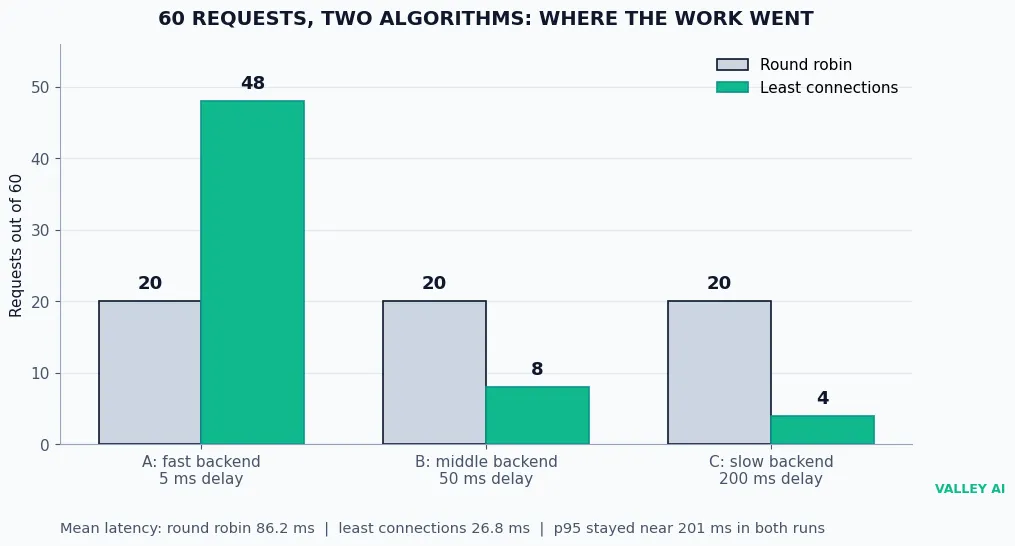
On review of the two runs, the setup was a small Python balancer on localhost. Three backends carried delays of 5, 50, and 200 ms (fast, middle, slow). Each algorithm faced 60 requests, 12 workers at a time. Health checks ran every second, and 2 failures marked a server down. Each algorithm ran once, and the numbers below are its recorded output.
Round robin split the 60 requests evenly: 20 to each backend, whatever the backend speed. The fast backend answered in 6.2 ms on average. The slow backend answered in 201.1 ms. The overall mean came to 86.2 ms, and the wall time for all 60 requests was 1.23 s. Even splits look fair. They waste the fast server and queue behind the slow one.
Under least connections, the split changed: 48 requests to the fast backend, 8 to the middle backend, and 4 to the slow one. The mean fell to 26.8 ms, and the wall time fell to 0.22 s. The fast backend answered in 7.6 ms on average. The slow backend took 202.0 ms on average for its 4 requests.
The tail didn’t move. The p95 stayed near 201 ms in both runs: 201.6 ms under round robin, 201.5 ms under least connections. Four requests reached the slow server under least connections, and those four set the tail. A better mean is not a better worst case. The slow server sets the ceiling for the slowest requests.
I rate least connections the default when request costs vary: the fast backend took 48 of 60 requests and the slow one took 4, so the work went where the speed was. Round robin is the pick when the backends match and the requests cost the same.
Does a load balancer make a single request faster? No. One request still waits on one server. The measured wall times prove the point: 60 requests took 1.23 s under round robin and 0.22 s under least connections. One slow request took about 201 ms either way. The gain sits across many requests. It never sits inside one.
Weighted distribution fits servers of different sizes. Give the strong server a weight of 3 and the weak one a weight of 1, and the strong server takes three requests for each one the weak server takes. IP hash fits sessions: one client address always lands on its own server, so a login stays put. Least response time watches past answers and favors the server that answered fastest, which helps when a backend slows down without dying.
Health checks: how a dead server leaves the pool
A balancer can’t trust a server to report its own death. It polls each backend on a schedule and drops any server that fails the check. The poll asks for a small answer, often a 200 status from a /health path (a small endpoint that answers ok), and the threshold decides how many failures count as down.
The kill test ran on those three backends. The slow backend was killed mid-stream. The balancer detected the death in 0.71 s. In that window, 19 requests failed. Three requests reached the dead backend after the kill, picked before the detection landed. Traffic after detection split across the two survivors: 19 requests to the fast backend and 20 to the middle backend.
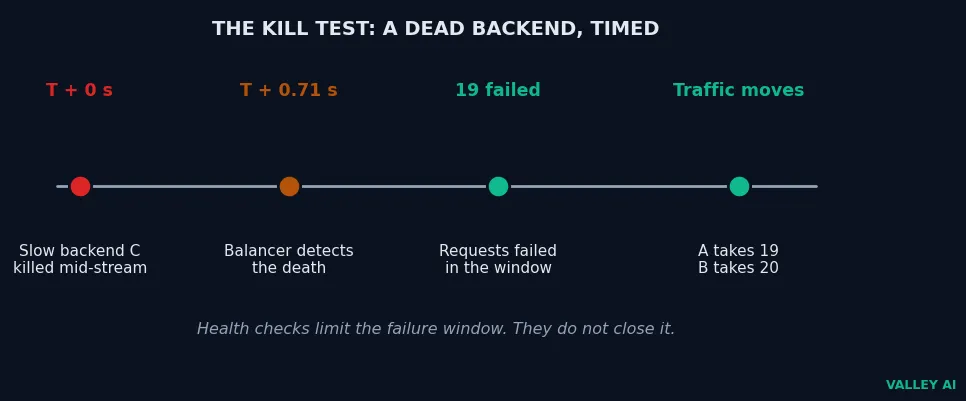
Detection at 0.71 s beat the 2-second schedule the checks alone imply. The poll ran every second, and 2 failures marked a server down, which suggests a wait near 2 seconds. Failed forwarded requests counted toward that 2-failure threshold, so the kill surfaced faster than the poll schedule alone would allow. Health checks limit the failure window. They don’t close it.
The 19 failed requests changed how I think about health checks. A check schedule is a promise about detection speed, and the promise holds only until real traffic fails faster than the poll. I would size the failure budget from the failed-request count. The poll interval alone says less.
A recovered server rejoins the pool once it passes the check again. A careful setup brings it back slowly, with a few requests first, so a flood of new traffic doesn’t knock the server down again before it has warmed up. The balancer watches the first answers before it trusts the server with a full share. That slow return is called a slow start.
Sticky sessions: when the same server has to answer twice
Some requests belong together. A login sets a session on one server. The next request from that client must reach that server again, or the session is gone. A shopping cart depends on one server too. The items sit in memory on one backend, and a different backend has no record of them.
Two mechanisms hold a client to one server. IP hash pins one client address to one backend every time. A cookie does the same job with more control: the balancer sets a cookie on the first answer, and the browser sends it back with each request. The cookie route survives address changes. The hash route doesn’t.
A sticky server that dies takes its sessions with it, unless the session state lives somewhere shared. A shared store, such as Redis, lets any backend pick up the session, so the balancer can send the next request to a survivor without asking the user to log in again. Without that store, the user logs in again. The hash route carries a second risk. One office behind one NAT address hashes to one server, so a hundred users can land on a single backend while its twins sit idle.
The three kinds of load balancer
Load balancers come in three kinds, and the kind decides who runs the machine. A hardware appliance is a box built for the job, with its own chips for encryption and packet work, and it suits sites with steady high traffic. Software runs on a server you own: NGINX and HAProxy are the two names that appear in nearly every guide. A cloud balancer is a managed service: AWS Application Load Balancer runs it for you, and you pay for the traffic it moves.
Pick by the traffic you have. A growing site that you run yourself fits the software route: install NGINX, point it at two backends, and learn the config on a machine you control. A site that must stay up through traffic spikes fits the managed route, where the provider handles the second balancer and the failover for you.
A CDN sits in front of the balancer at the edge. How a CDN works is a separate mechanism: it caches copies close to readers, while the balancer picks a live origin server behind it.
For a first build, the software route fits learning best: the config is a file you can read, the backends are machines you can watch, and the failure modes show up in logs you own. The managed route fits production best, because the provider absorbs the balancer-failure risk.
What breaks when the balancer itself fails
One balancer is one point of failure. If it dies, the pool behind it goes dark, however healthy the servers are. Every request hits the dead address, and no backend can answer.
A second balancer stands by. Two balancers share one public address, and the standby takes over when the active one fails. DNS hands the client the balancer address in the first place, and that lookup follows how the internet finds a website. When the active balancer dies, the address moves to the standby, and the pool answers again.
Redundancy has a price. The second balancer costs a second machine, or a second managed bill, and the failover setup needs testing before it is trusted. A standby that never took over in a drill is untested. Test the switch, confirm the traffic moves, and check the pool answers on the standby before you rely on it.
Picking the balancer your traffic needs
Start from the traffic you have. One server and light traffic needs no balancer: add one when a second server joins the pool. Two servers of equal size and requests that cost the same take round robin. Requests with uneven costs take least connections, and the measured run backs that choice: the mean fell from 86.2 ms to 26.8 ms when the algorithm changed.
Choose the layer next. One protocol and servers that match take Layer 4. Requests that should choose their own pool take Layer 7. Then choose the kind: software when you run the servers yourself, managed when the site must stay up through a spike. Set the health check, watch the first failures, and let the numbers tell you when the setup needs a second balancer.
Frequently asked questions
How do I know my site has outgrown one server?
Watch three signs at peak hours. Pages slow down when traffic rises, even though the server hardware has room. The server CPU stays near its limit during busy periods. A deploy or a restart takes the site offline, because there is no second server to take the traffic. One sign on its own is a warning. Two together mean a second server, and a balancer to feed it, is due.
Can a load balancer replace a CDN?
No. A CDN cuts the distance a repeat visit travels, so the request never reaches your servers. A load balancer cuts the load on one origin server by dividing the requests that do reach them. A request that hits the cache never reaches the balancer, and a request that misses the cache still needs a server picked for it. The two stack, and neither replaces the other.
How many servers can one load balancer handle?
There is no fixed cap in the design. The practical limit is the balancer itself: its CPU, its memory, its connection table, and the health-check traffic it sends to every backend. Large sites pass that limit by running more than one balancer, or by splitting the pool by region, so no single balancer carries the whole fleet.
Does a load balancer add delay to every request?
Yes, a small one. Each request passes through the balancer before it reaches a server, and a Layer 7 balancer reads the request as well. The cost shows in the measured run: the fast backend answered in 6.2 ms on average in the round-robin run and 7.6 ms when it carried most of the requests, against its 5 ms delay, so the hop adds roughly 1 to 3 ms. The delay stays small beside the wait on a slow backend, which ran past 200 ms.
Can one load balancer serve more than one website?
Yes. A Layer 7 balancer reads the host header on each request, so it can send one site to one pool and a second site to another. Each site keeps its own pool of servers, and one balancer address serves both. A Layer 4 balancer cannot do this, because it never reads the host name.
What is the difference between a load balancer and DNS round robin?
DNS round robin hands out a different server address for each lookup, and the client then talks to that server directly. It never checks whether the server is alive, and resolvers cache the answer, so a dead server keeps receiving traffic until the cache expires. A load balancer checks health on a schedule and picks a live server for each request. DNS spreads the first step. The balancer controls every step after it.

Kaleem
Kaleem is a Computer Science graduate (Virtual University of Pakistan) and the founder and editor of Valley AI, where he publishes in-depth, tested guides on computer hardware, artificial intelligence, and how the internet works. Every guide is researched from primary sources, tested hands-on where possible, and updated when the facts change.