

Match the doorbell to your wiring and your Wi-Fi before you match it to its spec sheet. A doorbell with a 3K camera still misses the visitor if its battery sleeps through the first two seconds. A wired model stutters if the router sits three walls away. The chain is short. The sensor notices a person, the camera wakes, the clip travels to your phone, and the recording lands somewhere you can find it later.
Wired or battery: the choice that shapes everything
A wired doorbell draws continuous power from the low-voltage wires already in the wall. Those wires usually carry 16 to 24 volts AC from a small transformer near the breaker panel or the chime box. That steady supply is what buys continuous recording, instant alerts, and pre-roll video. A battery doorbell carries its own power in a rechargeable lithium pack. The eufy C31 pack holds 6,500 milliamp-hours. That freedom comes with a trade: the camera rests between events and wakes only when the sensor calls it.
Makers quote two to six months per charge for battery models. That span hides the variable that decides it: the number of events at your door. Charging takes one to two hours over USB-C. The door stays unwatched while the pack is on the charger, unless a spare pack is kept charged.
| Wired | Battery | |
|---|---|---|
| Power | 16 to 24 V AC transformer, continuous | Rechargeable pack, 6,500 mAh on the eufy C31 |
| Installation | Needs existing doorbell wiring; breaker off, wires to terminals | Screws or adhesive; no wiring |
| Recording | Continuous 24/7 on many models | Event clips only |
| First alert | Near-instant; camera always on | 1 to 3 seconds; camera wakes from sleep |
| Pre-roll | Up to 5 seconds before the trigger | Rarely available |
| Upkeep | None after install | Recharge every few weeks to months |
| Best for | Homes with wiring, busy doors | Renters, doors without wiring |
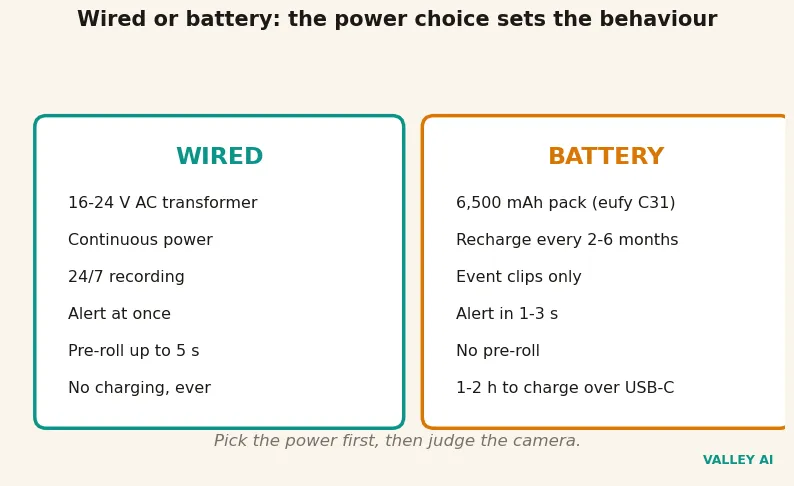
The choice reaches past installation. It sets how fast the first alert arrives, whether the seconds before the trigger survive, and how often the door goes unwatched. Pick the power first, then judge the camera.
The wake chain: what happens between motion and your phone
A battery doorbell works like a night guard who sleeps between rounds and wakes only when the sensor taps a shoulder. The PIR sensor stays awake on microwatts while the camera, the processor, and the radio sleep. A warm body crossing the path trips the sensor, and the chain starts.
- The PIR sensor trips, or a visitor presses the button.
- The processor boots and the camera starts, about eight tenths of a second.
- The camera records and encodes the first frames.
- The clip travels over Wi-Fi to the maker server.
- The server pushes an alert to the phone.
- Opening the alert starts live view.
- Two-way audio opens, and the conversation runs over the same Wi-Fi link.
| Stage | Typical time |
|---|---|
| PIR trips, processor wakes | 0.1 s |
| Processor boots, camera starts | 0.8 s |
| Wi-Fi radio wakes and sends | 0.4 s |
| First frames encode, upload starts | 0.3 s |
| Cloud relay and push to the phone | 0.8 s |
| Total | 2.4 s |
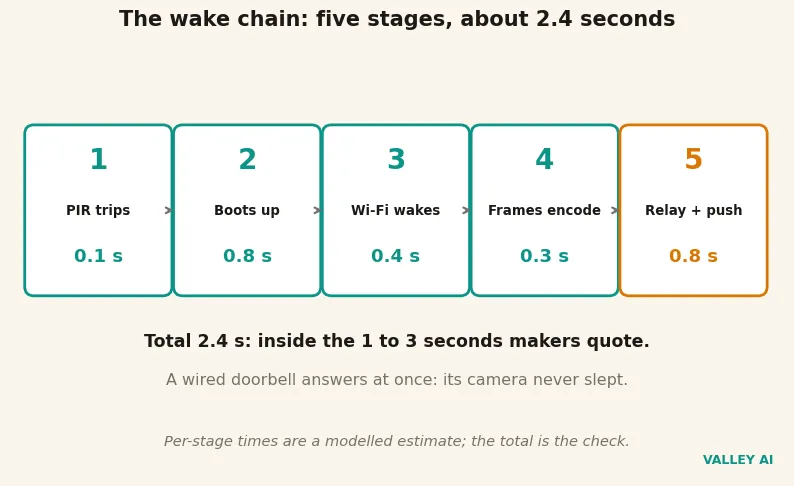
The total, 2.4 seconds, sits inside the one to three seconds makers quote, and the split shows where the time goes. No maker publishes per-stage timings. Treat the split as a modelled estimate and the total as the check. A battery doorbell answers in seconds. A wired one answers at once, because its camera never slept.
Does a video doorbell record all the time? A wired model can, because the transformer feeds it without pause. A battery model records event clips only. Continuous recording would drain the pack in hours and fill storage with empty porch footage, so the camera sleeps and the sensor stands watch.
Why does the alert arrive after the visitor has already left? The wake takes about two and a half seconds, and a courier drops a parcel and turns away in less time than that. Pre-roll on a wired model recovers the seconds before the trigger, so the clip shows the approach.
Two-way audio runs full-duplex on better models, both sides talking at once, the same arrangement a headset uses for a call. Cheaper models run half-duplex, one side at a time like a walkie-talkie, with echo cancellation keeping your own voice out of the visitor’s ear. The alert can also sound through a smart speaker in the kitchen, so the chime reaches rooms the indoor chime never covered.
How the camera notices a visitor: PIR, radar, and pixels
Three sensing methods watch the door, and most 2026 models combine two of them. A PIR sensor reads changes in infrared heat, so a warm person walking into view trips it while a passing car usually does not. Radar sends out radio waves and reads the reflection. It catches movement through light rain and at longer range, but it also catches cars and swaying branches. Pixel detection compares video frames for change, and it needs the camera running all day, so it belongs to wired models.
Zones and sensitivity turn raw detection into useful alerts. Draw a zone over the path and the doorstep, and leave the street and the sidewalk out of it. The doorbell then stops paging you about every car on the road. Start sensitivity in the middle and live with it for a few days. Raise it if events slip past. Lower it if the alerts never stop.
Pre-roll is where the power choice shows up again. A wired camera records into a rolling buffer of the last few seconds, so the saved clip starts before the trigger. A battery camera cannot keep that buffer. The buffer needs the sensor and the encoder running all day, and a running encoder is exactly what the battery cannot afford. The seconds before the trigger survive only on wired power.
Walk the path yourself after install and watch when the alert fires. If the phone buzzes only after you reach the door, widen the zone or raise the sensitivity a notch and walk it again.
What the battery buys: the events-per-day maths
I modelled the pack myself, against the event counts a busy door sees. The pack is the eufy C31 unit at 6,500 milliamp-hours and 3.7 volts. That multiplies out to 24 watt-hours, with 21.6 watt-hours usable after the protection cutoff. Each event costs the boot plus the clip. The wake takes two seconds at one watt. Recording and upload take twenty seconds at two watts. That works out to about 0.012 watt-hours per event. Sleep costs 0.12 watt-hours a day, the PIR and the always-on processor sipping five milliwatts around the clock.
| Events a day | Days per charge, 20 s clips | Days per charge, 60 s clips |
|---|---|---|
| 5 | 121 | 75 |
| 10 | 92 | 47 |
| 20 | 61 | 27 |
| 40 | 37 | 15 |
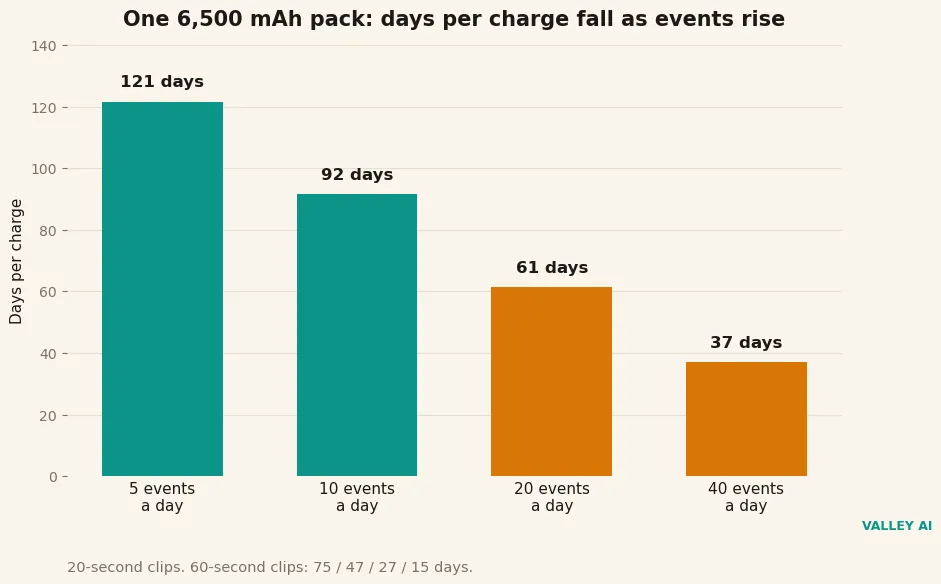
Five events a day stretches the pack to 121 days, and forty events a day leaves 37 days. Longer clips cut the numbers hard. Sixty-second clips at ten events a day leave 47 days, and at forty events a day they leave 15. The published two to six months holds for quiet doors with short clips. It assumes five to ten events a day, and a door like that. A busy door at forty events a day gets about five weeks. A cold snap trims a fifth off the usable capacity. That door at zero degrees gets about 97 days from the pack at five events a day.
Chosen values drive the model: two watts active, five milliwatts asleep, ninety percent usable. No physical doorbell sat in this session, and one brand’s pack stands in for the class. Wi-Fi retries add drain on a weak signal, and real packs vary with temperature and age. The model proves the rule, that days fall as events rise, and it does not prove any one doorbell’s exact battery life. What it settles is the question the vendors leave open: how many events a day the months claim assumes.
Power from the wall: the transformer and the chime
Beside the breaker panel or the chime sits a small box, the transformer. It steps household voltage down to the 16 volts the doorbell runs on. Its rating is printed in volt-amps. Volt-amps divide by volts to give amps. A 16 volt, 10 volt-amp transformer offers 0.62 amps. A 16 volt, 30 volt-amp unit offers 1.88 amps.
Two loads draw on it at once. The doorbell draws about 0.40 amps while it works, and the chime draws about 0.30 amps while it rings, 0.70 amps together.
| Transformer | Current available | Doorbell + chime | Result |
|---|---|---|---|
| 16 V / 10 VA | 0.62 A | 0.70 A | Shortfall; camera browns out when the chime rings |
| 16 V / 30 VA | 1.88 A | 0.70 A | Comfortable margin |
A shortfall shows itself plainly. The doorbell reboots, or its video freezes, at the exact moment the chime rings, because the chime takes the current the camera was using. If a wired doorbell misbehaves only when rung, the transformer is the first suspect, not the camera.
Inside the chime box, fit the small adapter the maker supplies with the doorbell. A mechanical chime is a striker hitting a tone bar, and a digital chime plays a recorded tone. The adapter keeps the digital chime from humming or buzzing while the doorbell draws its trickle current, and it lets the doorbell ring either kind. Read the transformer label before buying, and check the rating against both loads.
Where the clip goes: Wi-Fi, the cloud, and local storage
Every clip crosses the home Wi-Fi on its way to the maker server. The doorbell is only as reliable as its link to a router two walls away. Most doorbells use the 2.4 gigahertz band, because it travels further through thick exterior walls than the faster 5 gigahertz band. A weak signal at the door shows up as choppy video, late alerts, and clips that never arrive.
Does the doorbell need your phone nearby to work? No. The clip travels from the doorbell to the Wi-Fi to the maker server. The server reaches the phone wherever it sits, in the next room or in another city. The doorbell needs the home Wi-Fi. The phone can sit anywhere.
Live view is video streaming at doorbell scale: the same encode-and-deliver chain, compressed for a phone screen. A dash cam records in a loop and overwrites the oldest footage. A doorbell saves event clips and lets each one age out on its own schedule.
| Clip | Size per 20 s clip | 20 events a day | 8 GB holds |
|---|---|---|---|
| 1080p at 4 Mbps | 10 MB | 0.20 GB a day | 41 days |
| 2K at 8 Mbps | 20 MB | 0.39 GB a day | 20 days |
Continuous recording changes the picture completely. A wired doorbell recording around the clock at 1080p writes about 42 gigabytes a day. A 128 gigabyte card holds three days at that rate. At 2K it holds a day and a half. That is the arithmetic behind the several-days-to-a-few-weeks figure quoted for big cards: it assumes the camera never sleeps. Event clips stretch that card for weeks or months.
Cloud storage starts near $2.99 a month. It buys two things local storage cannot: a copy that survives a stolen doorbell, and history longer than the card holds. Local storage costs nothing monthly and stores the footage in the house, but a stolen unit takes its clips with it. The sturdiest setup runs both: local for everything, cloud for the events that matter. Read what stops working without a plan before paying for one.
The picture at the door: resolution, field of view, and night vision
1080p is the practical floor: faces stay readable and parcel labels stay legible at doorbell distance. 2K keeps more detail when the footage is cropped or the visitor stands further back. 4K adds little at these distances, while doubling the file size and the bandwidth. The sensor is a small CMOS chip, the same class of sensor a webcam uses, tuned for a doorway instead of a desk.
Field of view decides what the frame holds. A 150 degree lens covers most porches; a 180 degree lens takes in the path and the driveway as well. The vertical angle matters as much as the horizontal one. A camera that cannot see the ground will never show the parcel it was bought to watch. Very wide lenses bend faces at the edges, so the widest view is not always the clearest one.
Night vision comes in two kinds. Infrared shows shapes in black and white. Color night vision uses a built-in light or the ambient light to keep color after dark. The eufy E340 sees about five metres in color after dark. Color preserves clothing and vehicle details that black and white loses. It is the difference between a useful clip and a grey shape at midnight.
Four checks at your own door settle the choice better than any spec sheet. Stand at the door with your phone and look at the Wi-Fi signal there. If video stutters on the phone, it will stutter on the doorbell. Read the transformer label and check the rating against the doorbell and the chime. Mount the unit about four feet high and step back. Confirm the view covers the ground where parcels land. A wedge of 15 to 30 degrees helps if the doorbell sits beside the door instead of facing it.
Finally, read what the subscription covers before paying, and what stops working without it. Those four checks take fifteen minutes. They tell you whether the doorbell fits the door it will watch.
Frequently asked questions
Can a video doorbell work without Wi-Fi?
Some models keep recording locally to a card or a home hub when the Wi-Fi drops, but remote alerts, live view, and cloud clips stop until the connection returns. A wired chime keeps ringing, because the chime runs on the transformer and needs no network. Check the model’s offline behaviour before counting on it.
Do I need a monthly subscription?
No for live view on most models, and no for local storage where the model offers it. Cloud history and some smart detection sit behind a plan, from about $2.99 a month. Check the plan’s fine print before you pay, because the headline price often buys less history than buyers expect.
Will it work with my existing chime?
A wired model needs a chime it can drive plus the maker’s adapter, and the transformer must carry both loads at once, 16 volts at 30 volt-amps is the usual recommendation. Mechanical and digital chimes behave differently, so check the chime type and the transformer rating before ordering. Battery models skip the chime question entirely.
Can someone steal the doorbell and take my footage?
Clips stored only on the unit go with it, so a stolen doorbell takes its local recordings. Clips already uploaded to the cloud survive, which is the strongest reason to keep a cloud copy of anything that matters. Mount the unit with the security screws the maker supplies, and keep the app account behind a strong password with two-factor sign-in.

Kaleem
Kaleem is a Computer Science graduate (Virtual University of Pakistan) and the founder and editor of Valley AI, where he publishes in-depth, tested guides on computer hardware, artificial intelligence, and how the internet works. Every guide is researched from primary sources, tested hands-on where possible, and updated when the facts change.