
The copy bar crawls. A 4 GB video moves onto a stick at a pace that feels broken, and the stick grows warm in your hand. You pull it out, plug it back in, and the same slow copy starts again.
Then the small mysteries pile up. A file you deleted last week turns up in a recovery scan. A 64 GB stick shows 57 GB free before you store a single photo. A cheap stick that held your files for a year now drops them. A stick that copied fine in January crawls by November, and nothing on the box explains why.
Judge a drive by its NAND type and its write budget. The USB version printed on the shell says little about either. Those two facts decide how fast it copies, how long it lasts, and whether a deleted file is truly gone. The rest of the mechanism sits inside three small parts.
Three Parts in a Stick
A flash drive holds three parts. A NAND flash chip stores the data. A controller chip runs the drive. A USB connector joins the two to your computer.
The port supplies the power. USB gives the drive 5 volts, so the stick needs no battery and no switch. Plug it in and the controller wakes. Pull it out and the trapped charge in the cells keeps every file in place.
Inside the shell, the controller does the thinking. It speaks the USB protocol on one side and the flash protocol on the other. It decides where each file lands, which blocks rest, and which bits need a second look. A flash drive is a solid-state drive shrunk to pocket size, and the controller is what makes the shrink work.
The shell hides all of this. Some sticks carry a metal case that doubles as a heat spreader. Some carry a small LED that blinks while the controller writes. None of that changes the mechanism. The mechanism is the controller plus the cells.
How One Bit Is Stored
Each bit lives in a floating-gate transistor. The transistor has two gates. The control gate sits on top. The floating gate sits below it, wrapped in an insulating oxide layer.
Writing a bit pushes electrons onto the floating gate. The electrons pass through the oxide by tunneling, then stay trapped there. The trapped charge shifts the voltage the transistor needs to switch on. Reading applies a fixed voltage and watches whether current flows. Charge present means one value. Charge absent means the other.
One cell can hold more than one bit. The controller sets the trapped charge to one of several levels, and each level stands for a different bit pattern. Two levels hold one bit. Four levels hold two bits. Eight levels hold three bits. Sixteen levels hold four bits.
More bits per cell means cheaper storage and a harder job. The voltage gaps between levels shrink, so the controller must place the charge with finer control and correct more read errors. That trade sits at the heart of every drive choice. The same cell types sit inside desktop drives, and an NVMe drive hides them behind a faster interface.
| NAND type | Bits per cell | Voltage levels | Program/erase cycles | Typical use |
|---|---|---|---|---|
| SLC | 1 | 2 | About 100,000 | Industrial gear and cache |
| MLC | 2 | 4 | About 10,000 | Older consumer drives |
| TLC | 3 | 8 | 1,000 to 3,000 | Mainstream drives |
| QLC | 4 | 16 | 100 to 1,000 | Read-heavy bulk storage |
The cycle figures are typical ratings. A given chip can land above or below its type’s range, so the datasheet of the exact part is the only firm reference.
Why You Cannot Overwrite a File in Place
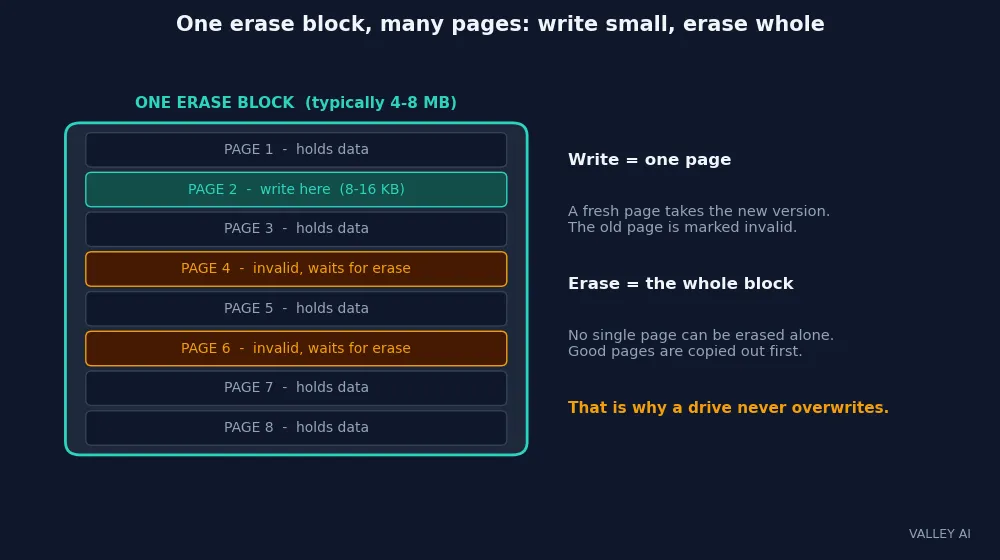
Flash writes in pages and erases in blocks. A page is the smallest unit the drive can write, typically 8 to 16 kilobytes. A block is the smallest unit the drive can erase, typically 4 to 8 megabytes. A block holds hundreds of pages.
A written page cannot be written again until its block is erased. Erasing clears every page in the block at once, good pages included. So a drive never overwrites. It writes the new version on a fresh page and marks the old page invalid.
The block works like a whiteboard that can only be wiped whole. Small boxes fill one at a time, but no single box can be rubbed out. To change one box, the drive copies the boxes worth keeping onto a fresh board, then wipes the old board clean.
This mismatch shapes everything the controller does. Small edits leave invalid pages scattered through blocks. The controller must track them, gather them, and clear them in the background. The next sections follow that work.
The Controller’s Translation Map
Your computer never sees pages or blocks. It asks for data by logical address, a simple numbered list of sectors. The controller keeps a map from those logical addresses to physical pages. That map is the flash translation layer, or FTL.
A write lands on a fresh page. The controller records the new location in the map and marks the old page invalid. The old bytes stay on the flash until garbage collection clears them. The computer sees a clean overwrite. The flash sees a new write plus a stale page.
The map itself lives in the controller’s RAM while the drive runs, with a copy kept on the flash so the drive remembers its layout after unplugging.
Spare blocks stay off the map, ready to take the place of blocks that wear out. The capacity on the box counts the mapped space.
Wear Leveling, Measured
Every erase wears the oxide a little. A cell that has been erased thousands of times holds its charge less firmly and needs stronger correction. So the controller spreads erases across the whole array instead of hammering the same blocks.
Dynamic leveling steers each new write to a block with a low erase count. Static leveling goes further: it moves cold data, files that never change, onto heavily used blocks, so the fresh blocks underneath can take new writes. Together they keep every block near the same age.
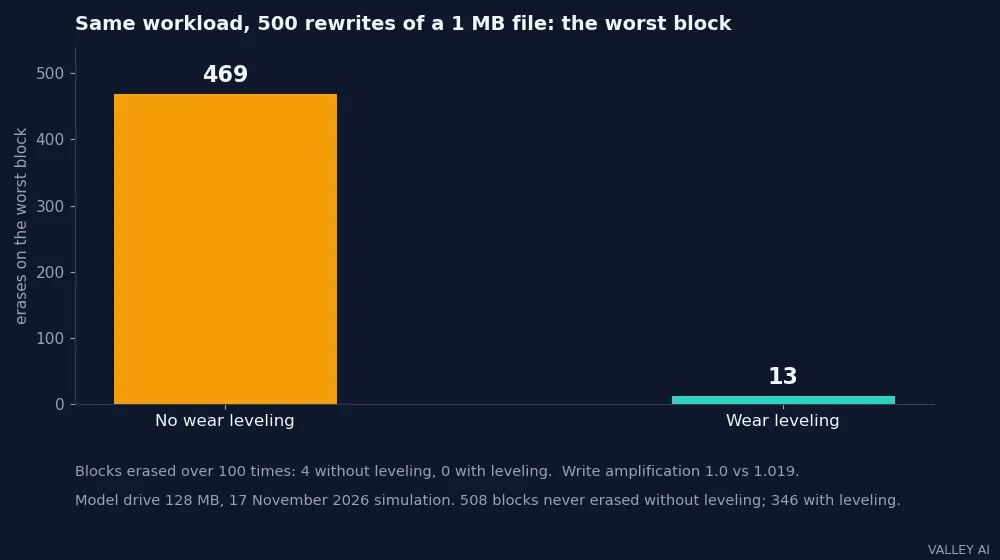
I ran that idea through a simulation on 17 November 2026. The model drive held 512 blocks of 64 pages, 4 kilobytes per page, 128 megabytes in total. Cold data filled 384 blocks and never moved. One 1-megabyte file was rewritten at the same address 500 times, 501 megabytes of host writes in all.
Without leveling, the worst block was erased 469 times while 508 blocks were never erased at all. Four blocks passed 100 erases each. With leveling, the worst block was erased 13 times and no block passed 100. The cost was small: write amplification rose from 1.0 to 1.019, and the controller moved cold data 38 times.
| Policy | Worst-block erases | Blocks over 100 erases | Blocks never erased | Write amplification |
|---|---|---|---|---|
| No wear leveling | 469 | 4 | 508 | 1.0 |
| Wear leveling | 13 | 0 | 346 | 1.019 |
Read the numbers for what they are. The drive is a scaled 128-megabyte model. A real controller adds a cache, spare blocks, and background collection, so its write amplification runs higher, typically 1.1 to 4 times. The 1.0 in the no-leveling run belongs to this workload alone: every reclaimed block held zero valid pages, so nothing needed copying. The simulation measures how the leveling rule behaves, not how long any real drive lasts.
What does wear leveling actually buy you? Time, spread evenly. It cannot add erase cycles to the drive. The total budget stays fixed. It stops the busiest blocks from dying years before the rest, so the drive wears out as one array instead of failing at its hottest corner.
Error Correction and Bad Blocks
Bits flip as cells age. Heat, time, and erase counts all nudge trapped charge out of place. The controller expects this. Each page carries spare bytes beside the data, and the controller uses them to check and correct what it reads.
The method is error-correcting code, or ECC. It can fix a small number of flipped bits in a page on the fly. When the flips in a page pass what the code can fix, the controller copies the page elsewhere if it still can, then retires the block.
Retired blocks go on a bad-block table. The controller stops writing to them and draws on its spare blocks instead. A drive with a growing bad-block count is a drive near the end of its budget, even if it still copies files today.
This is why a drive can fail without warning and also why it often does not. The controller hides the first failures. By the time files go missing, the spare pool and the correction margin are both spent.
Garbage Collection and Write Amplification
Invalid pages pile up as files change. Garbage collection clears them. The controller picks a block with mostly invalid pages, copies its surviving valid pages to a fresh block, then erases the old block.
Those copies are extra writes the host never asked for. Write amplification is the ratio of NAND writes to host writes. A value of 2 means the drive wrote twice as much flash as the computer sent.
A nearly full drive amplifies more. With few empty blocks, the collector finds no block that is mostly invalid, so it copies more valid pages per erase. Small random writes amplify the most, because each one invalidates a page in a different block. Large sequential writes amplify the least.
The same logic explains why a drive slows as it fills. The collector works harder for every erase, and the host waits while it copies. Keeping a drive partly empty gives the collector room to work. A hard disk drive writes over old data in place, so it never pays this collection tax.
USB Speed: Signalling Rate vs Real Transfer
Printed on the shell, the USB version is a signalling rate. USB 2.0 signals at 480 megabits per second. USB 3.0 signals at 5 gigabits per second. USB 3.2 reaches 10 or 20 gigabits per second, depending on the generation. The USB Implementers Forum sets those rates.
Signalling is not transfer. USB 3.0 encodes each 8 data bits as 10 line bits, so 5 gigabits of signalling carries at most 500 megabytes of data per second. Protocol overhead takes another cut. Then the controller and the NAND set their own pace, and the slowest of the three decides the copy speed.
A USB-C connector says nothing about any of this. It is a plug shape. A USB-C port can carry USB 2.0 speeds, and a USB-A port can carry USB 3.0 speeds. The shape and the speed are separate facts, and the shell rarely prints the speed.
The gap shows up in copy times. A 1-gigabyte file, 1,024 megabytes, takes about 29 seconds at a real USB 2.0 speed of 35 megabytes per second, and about 2.6 seconds at a real USB 3.0 speed of 400 megabytes per second. Both figures are arithmetic on the stated speeds.
| Link | Signalling rate | Real speed used | 1 GB file |
|---|---|---|---|
| USB 2.0 | 480 Mbps | About 35 MB/s | About 29 seconds |
| USB 3.0 | 5 Gbps | About 400 MB/s | About 2.6 seconds |
Why does a USB 3.0 drive copy slower than 5 gigabits per second promises? Because 5 gigabits is the signalling rate. Encoding and protocol take their cut first, then the controller and the NAND take theirs. A drive that copies at 400 megabytes per second is already using most of what the link can carry.
Time a 1-gigabyte copy yourself. The clock gives you the real speed of your drive, your port, and your cable together. If the number lands far below the table, try a different port before blaming the stick.
File Systems and Safe Ejection
The drive needs a file system to organise its clusters. Most sticks ship formatted FAT32 or exFAT. FAT32 works everywhere and caps a single file at 4 gigabytes. exFAT drops that cap and suits large video files. NTFS belongs to Windows; it journals every change, which adds write traffic a flash drive does not need.
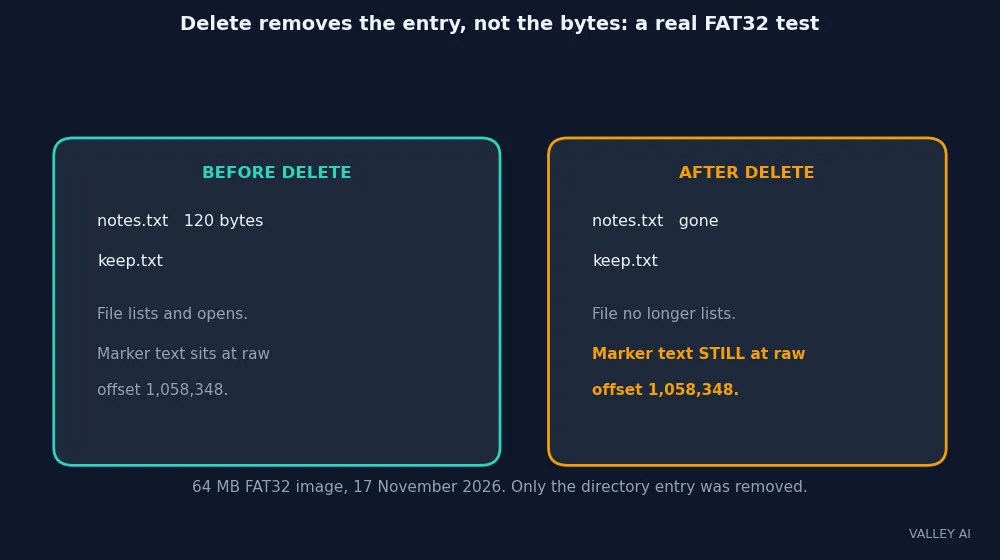
What matters more is the delete rule. Deleting a file removes its directory entry. The bytes stay on the flash until new writes claim those pages. Recovery software reads the raw bytes the entry used to point at.
I tested that on 17 November 2026 with a real FAT32 image of 64 megabytes. I wrote a 120-byte file, deleted it through the file system, and confirmed it no longer listed and no longer opened. Then I read the raw image bytes. The file’s marker text sat intact at offset 1,058,348.
Overwriting the file would not have erased those bytes either. A rewrite lands on fresh pages, and the old pages keep their stale copy until garbage collection erases their block. Secure deletion on a flash drive means erasing whole blocks or encrypting the drive first. Deleting files and emptying the trash does neither.
Ejection guards the other direction. The operating system buffers writes and flushes them in its own time. Pulling the drive early can strand a write between the buffer and the flash, or leave the translation map one step behind the data. Ejecting tells the system to flush everything and park the map before the power drops.
Can a deleted file be recovered from a flash drive? Often yes, until new writes overwrite its pages. The experiment above found the marker text after deletion with a plain byte search. Recovery stops working only when garbage collection has erased the block, and no file manager shows you when that happens.
How Long a Drive Lasts, and When to Retire It
The budget math is simple. Lifetime host writes equal capacity times rated program/erase cycles, divided by write amplification. The inputs are the drive’s size, its NAND type, and how much extra writing the controller does. Manufacturers print the same budget as a TBW rating, terabytes written, on the spec sheet.
Take a 64-gigabyte TLC drive. At the low end of the TLC range, 1,000 cycles, with write amplification of 2, the budget is 64 times 1,000 divided by 2, or 32 terabytes of host writes. At 5 gigabytes a day, a heavy load, that lasts about 17 years. At 3,000 cycles the same drive reaches 96 terabytes, about 52 years. The amplification of 2 and the 5 gigabytes a day are chosen inputs, picked from the typical ranges.
Retention runs on a different clock. Trapped charge leaks slowly, and the leak speeds up as erase counts rise. A drive written once and shelved can hold its files for years, but the exact span depends on the cell type and the temperature of the shelf. Plugging the drive in once a year and copying the files off and back on rewrites the charge and resets that clock.
Put the simulation’s numbers to work. The worst block took 469 erases without leveling and 13 with it, so leveling is what makes a small drive survive daily rewrites. Buy TLC or better for a drive you rewrite every day. Keep QLC for files you write once and read often. Keep the drive under four fifths full so the collector has room to work. At 5 gigabytes a day, a 64-gigabyte TLC drive carries a 17-year budget. Retire a daily-use stick when its connector loosens or its files start needing second reads.
Frequently asked questions
Can a USB flash drive wear out from normal use?
Yes, but everyday use wears it slowly. Copying documents and photos a few times a week uses a tiny slice of the erase budget, and a drive treated that way can serve for many years. Daily rewrites of large files are different: they burn through the budget far faster, and that is the workload where the NAND type and the write budget matter.
Can I boot a computer from a USB flash drive?
Yes, if the computer’s firmware lists USB as a boot option. Installers for Windows and Linux are commonly written to a stick for this purpose, and the computer then starts from the stick instead of its internal drive. The stick needs a bootable image written to it. Files copied onto it will not boot the computer, and the firmware boot order must put USB before the internal drive.
Does a bigger flash drive last longer?
Yes, when the workload stays the same. A bigger drive spreads the same host writes over more blocks, so each block is erased less often. A 128-gigabyte drive handling 5 gigabytes a day lasts roughly twice as long as a 64-gigabyte drive handling the same 5 gigabytes, because the daily writes are shared across twice as many cells.
Why does a 64 GB drive show only about 57 GB free?
The two sides count with different rulers. The box counts in decimal gigabytes, so 64 GB means 64 billion bytes. The computer counts in binary gibibytes, and 64 billion bytes comes to 59.6 gibibytes. The gap between 64 and 59.6 comes from that difference in rulers. The small remainder goes to the file system structures on the drive.
Should I keep a backup of what is on my flash drive?
Yes. A flash drive carries files conveniently. A stick is easy to lose, easy to snap, and easy to leave in a pocket through a wash cycle, and any of those ends the files with it. Keep irreplaceable files in a second place, on a computer or a cloud account, and treat the stick as the copy that travels.
Why is my flash drive slower than the one my friend bought?
Two sticks with the same USB version can hide very different parts, and the box rarely names them. One may carry fast TLC cells and a controller with a large cache, while the other carries slow QLC cells and a basic controller. Reading reviews that time a real file copy tells you more than the version number on the shell.
Why does my drive get hot during large copies?
The controller and the NAND cells turn part of the transfer energy into heat, and a small stick has little metal to carry that heat away. Warmth during a long copy is normal, and the drive slows itself if the temperature climbs too far. A stick that stays hot long after the copy ends, or grows hotter the longer it sits idle, has a fault and belongs at a recycling point.
Do flash drives work with phones and tablets?
Many do, with the right adapter. Android phones and tablets with USB-C usually read a stick directly through an adapter or a USB-C stick, using the phone’s file manager. iPhones and iPads need a compatible stick or adapter and the Files app. The file system matters too: a phone reads FAT32 and exFAT, while an NTFS stick may not mount at all.

Kaleem
Kaleem is a Computer Science graduate (Virtual University of Pakistan) and the founder and editor of Valley AI, where he publishes in-depth, tested guides on computer hardware, artificial intelligence, and how the internet works. Every guide is researched from primary sources, tested hands-on where possible, and updated when the facts change.