
The defining characteristic of Mixed Reality (MR) is not the quality of the graphics, but the device’s understanding of the physical world.
In simple Augmented Reality (AR), like a phone filter, graphics are often just overlaid on a 2D video feed. If you move the camera too fast, the digital object slips or floats awkwardly. In true Mixed Reality, digital objects abide by the laws of physics. They can sit on a real table. They can disappear behind a real sofa. That hiding is occlusion. They stay in the exact same spot even if you leave the room and come back an hour later.
To achieve this, an MR headset must solve one hard problem in computer vision. It must work out exactly where it is in 3D space, in real time. It must draw a map of that space at the same time.
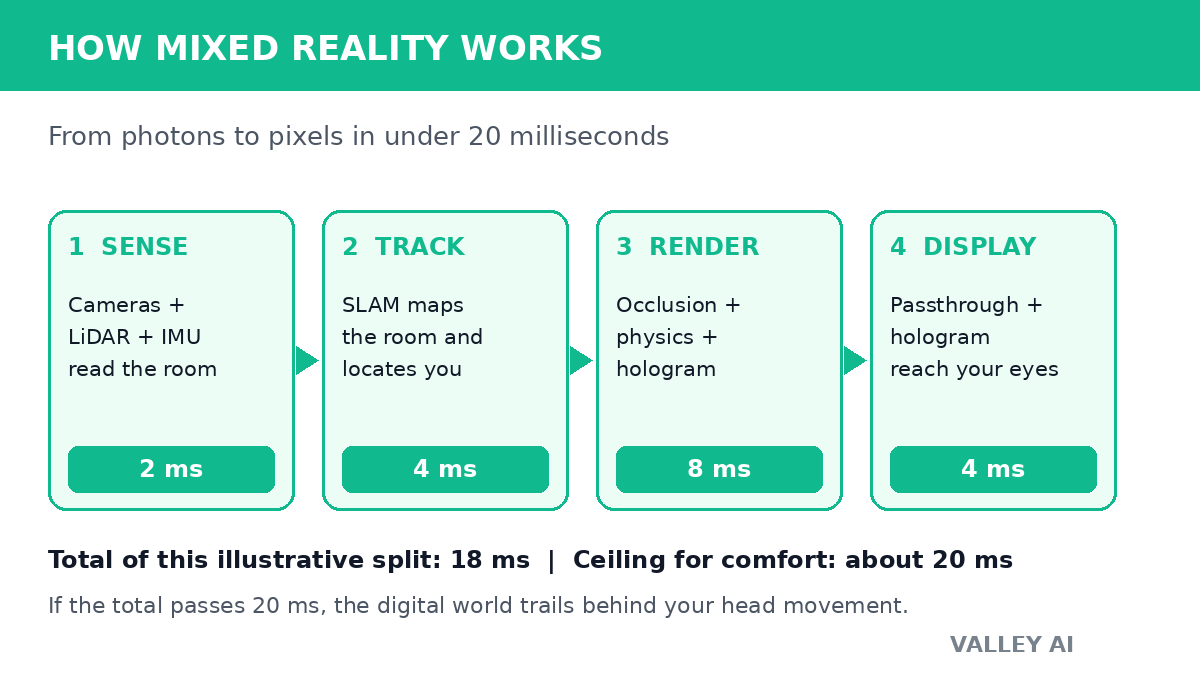
The loop below follows one frame from sensor to screen. The headset reads the room. It works out where it is inside that reading. It draws the hologram in the right place. Then it shows the blend before your head has moved far enough for the trick to fail.
Mixed reality is one applied form of artificial intelligence: its tracking, mapping, and hand recognition are machine learning models running on live camera input.
Mixed reality, augmented reality, and virtual reality: the one test that separates them
Put the three terms on the reality-virtuality continuum that Paul Milgram and Fumio Kishino described in 1994. Real surroundings sit at one end and a fully computer-generated world at the other. Augmented reality stays near the real end: digital labels sit on top of what you see but do not react to the room. Virtual reality sits at the far end: the headset replaces your surroundings entirely. Mixed reality sits between them and passes one test the other two do not. A digital object must be anchored to the room, hidden by real objects in front of it, and open to direct handling. A phone filter fails that test because the sticker slides when the camera moves. A virtual ball that bounces off a real floor passes it. The terms used here, from SLAM to spatial anchor, sit inside the wider vocabulary of AI key concepts.
| What you see | Does it understand the room? | Can you handle the digital object? | |
|---|---|---|---|
| Virtual reality | A generated world that replaces your surroundings | No room understanding needed | You handle generated objects only |
| Augmented reality | Your surroundings plus digital labels on top | Surface detection only, in most phone apps | You tap a screen or a floating label |
| Mixed reality | Your surroundings blended with anchored digital objects | Full room map, depth, and occlusion | You grab, move, and resize objects in place |
1. Environmental Perception: Sensor Fusion
Before an MR device can project a hologram, it must digitize the physical world. It does this through Sensor Fusion combining data from multiple types of sensors to create a reliable truth.
Most modern MR headsets (like the Apple Vision Pro or Meta Quest 3) rely on three specific inputs working in tandem:
- Tracking Cameras (Grayscale/IR): These are often low-resolution black-and-white cameras pointed in different directions. They aren’t looking for pretty pictures; they are looking for high-contrast “feature points” corners of tables, patterns on a rug, or the edge of a doorframe. By tracking how these points move frame-by-frame, the device calculates your head’s velocity and rotation.
- Depth Sensors (LiDAR or Time-of-Flight): Cameras only see 2D images. To understand distance, devices use LiDAR (Light Detection and Ranging) or Time-of-Flight sensors. These emit pulses of invisible infrared light and measure how long it takes for the light to bounce back. This generates a Point Cloud a sparse collection of dots that tells the processor, “There is a solid surface 1.2 meters away.”
- Inertial Measurement Units (IMUs): These are ultra-fast accelerometers and gyroscopes (similar to those in your phone). They detect rotation and movement roughly 1,000 times per second. They fill in the micro-gaps between camera frames to ensure tracking feels instant.
2. The Brain: SLAM and Spatial Anchors
Once the sensors collect the data, the processor executes an algorithm called SLAM (Simultaneous Localization and Mapping).
This is the core engine of Mixed Reality. As you look around a room, the device builds a 3D map of the environment (Mapping) while simultaneously calculating its own coordinates within that map (Localization).
The Coordinate System (0,0,0)
When you turn on an MR headset, it establishes a “world origin” a coordinate of (0,0,0) usually right where you are standing. Every feature point in the room is then assigned a coordinate relative to that origin.
If you place a virtual chessboard on your physical desk, the device doesn’t know what a desk is. Instead, it creates a Spatial Anchor. It locks the chessboard’s coordinates to the feature points of the desk. If you walk to the other side of the room, the device calculates your new position relative to those anchors, keeping the chessboard mathematically pinned to the desk.
3. The Display Method: Passthrough vs. Optical
This is where the technology splits into two distinct approaches. How do you see the mix of real and digital?
Video Passthrough (The Modern Standard)
Used by: Apple Vision Pro, Meta Quest 3/Pro
In this method, you are not looking at the real world. You are looking at opaque screens inside the headset.
- High-resolution cameras on the outside of the headset capture the world.
- The processor takes that video feed and digitally inserts the virtual objects into the frames.
- The combined image is displayed on the screens in front of your eyes.
The Trade-off: This allows for perfect opacity (virtual objects look solid) and complete control over lighting. However, it requires massive processing power to keep latency low. If the video feed lags behind your head movement, your inner ear will disagree with your eyes, causing motion sickness.
Optical See-Through (The Legacy/Enterprise Standard)
Used by: Microsoft HoloLens 2, Magic Leap 2
In this method, you look through transparent glass lenses (waveguides).
- You see the real world naturally with your own eyes.
- Micro-displays project light into the edges of the lenses.
- The lenses bounce that light internally and project the hologram directly into your retina.
The Trade-off: This provides the most natural view of the real world and causes less eye strain. However, light is additive. You cannot project “black” (which is the absence of light). Therefore, holograms in optical devices always look slightly ghost-like or transparent, and they struggle in bright sunlight.
4. Occlusion and Physics: The Realism Layer
Occlusion is what separates a gimmick from a useful tool. This is the ability of a real-world object to hide a digital object.
If you hold your real hand in front of a virtual floating menu, your hand should cover the menu. If the menu floats over your hand, the illusion breaks, and your brain struggles to judge depth.
How Occlusion Works
The device uses its real-time depth map (created by the LiDAR/Depth sensors) to create an invisible “mask.”
- The system recognizes that your hand is 0.5 meters away.
- It knows the virtual menu is placed 1.0 meter away.
- The graphics engine renders the menu but “cuts out” the pixels where your hand is located.
- In Video Passthrough devices, it composites your real hand over the digital layer.
Physics and Mesh Interaction
To make a virtual ball bounce off a real floor, the device wraps your physical room in an invisible Collider Mesh. This is a geometric wireframe that mirrors your furniture. When the digital ball hits the coordinates of the invisible mesh, the physics engine reverses its velocity, making it look like it bounced off your carpet.
How you control it: hands, eyes, and voice
A mixed reality headset has no mouse, so input comes from the body itself. Cameras watch your hands and estimate the joints of each hand from the images, and the pinch of thumb and forefinger has become the standard select gesture, the equivalent of a mouse click. On headsets with eye tracking, the pattern changes: you look at the button and pinch to confirm it, which Microsoft’s Mixed Reality Toolkit calls look-and-pinch. Eye tracking also drives foveated rendering. The headset renders the small patch you are looking at in full detail. It softens the edges of your view. That saves graphics work. Voice commands cover the rest. They open apps and search without any gesture at all. Controllers remain an option where precision matters, such as a design review or a game. Spatial audio completes the input picture from the other direction. A sound tied to a hologram comes from that hologram’s position in the room. A warning behind you sounds behind you.
Hand and eye tracking show why AI and virtual reality work well together. The models read the body. The headset turns that reading into action.
Why do mixed reality menus use a pinch instead of a tap in mid-air? A tap in mid-air has no surface to stop your finger, so the system cannot tell a deliberate tap from a hand passing through a menu. A pinch gives the cameras a clear start and end shape, which is why it survived as the default gesture across headsets.
5. The Latency Threshold (Motion-to-Photon)
The final piece of the puzzle is speed. Mixed Reality requires a Motion-to-Photon latency of under 20 milliseconds.
This means that from the moment you begin to turn your head, the sensors must detect the movement, the SLAM algorithm must update your position, the graphics engine must render the new perspective of the hologram, and the display must light up the pixels all in less than 20ms.
If this loop takes 30ms or 40ms, the digital world will feel like it is “swimming” or trailing behind your movements. This intense requirement for speed is why standalone MR headsets require such powerful mobile processors and generate significant heat.
The budget below is an illustrative split, not a measurement from one device. Sensor read 2 ms, pose update 4 ms, rendering 8 ms, display scan 4 ms: 18 ms in total, inside the 20 ms ceiling. Rendering takes the largest share because it must draw the hologram, cut out the occluded pixels, and warp the passthrough video into the shape your eyes expect. Any stage that slips pushes the total past the ceiling, and the blend starts to swim.
A depth sensor measures distance from light travel time. Distance equals the speed of light multiplied by the round-trip time, divided by two. For a wall 1.2 meters away, the round trip is 2 x 1.2 / 299,792,458, which is about 8.0 nanoseconds. That tiny interval is why depth sensors use infrared pulses and dedicated timing circuits rather than ordinary camera frames.
Why does a virtual object stay put when you leave the room and come back? The headset saved the object’s position against the room’s feature points as a spatial anchor. On return it recognizes the same points, rebuilds the same coordinate frame, and puts the object back where the anchor says it belongs.
Three headsets, three different trade-offs
| Headset | Display route | Per-eye resolution | What it trades away |
|---|---|---|---|
| Apple Vision Pro | Video passthrough, micro-OLED | 3660 x 3200 | Price and weight: the sharpest blend costs the most and needs an external battery |
| Meta Quest 3 | Video passthrough, LCD | 2064 x 2208 | Passthrough sharpness: strong color passthrough at a mid-range price, with softer fine detail than the Vision Pro |
| Microsoft HoloLens 2 | Optical see-through, waveguide | Lower effective resolution, holograms stay translucent | Opacity: the real world looks natural, but bright rooms wash the holograms out |
The pattern matters more than any single row. Passthrough headsets buy solid-looking holograms with processing power and battery life. Optical headsets buy a natural view of the room with translucent holograms. No current headset wins on every row, which is why the choice starts from the job: design review and media favor passthrough sharpness, while long factory-floor shifts favor the lighter optical view.
What still limits mixed reality
Field of view comes first. A headset shows the blend through a window narrower than natural sight. Holograms vanish at the edges of your vision. The room continues past them. Battery life comes second. Two to three hours of mixed use is typical for a standalone headset. That suits a meeting or a training session. It does not suit a full workday. Cost comes third, with the gap between a mid-range Quest 3 and a Vision Pro wider than the gap between their displays. Bright light still defeats optical holograms, because projected light cannot darken a sunlit room. And every headset that maps a room also photographs it. Camera privacy rules now belong in any workplace rollout. The room scan’s viewers, storage, and deletion schedule all need a written rule.
Can a phone do mixed reality? A phone can run augmented reality well, because its camera and screen already show the room with labels on top. It cannot pass the mixed reality test in full. It has no depth map of the room at headset quality. It has no occlusion at the pixel level. It has no hands-free view, since one hand holds the phone.
Related Topics for Further Learning
- LiDAR vs. Time-of-Flight: A deeper comparison of depth sensing technologies.
- Waveguide Optics: How glass lenses channel light in optical see-through devices.
- Spatial Computing Use Cases: How industries are applying SLAM technology beyond gaming.
Conclusion
If you are choosing a first headset, start from the job and work backwards. Pick passthrough for media and design review. Pick optical for long enterprise shifts where the real world must stay fully visible. Check the field of view and battery figures against the session length you run. Then test the three behaviors above before you buy: an anchored object that stays put, a hand that hides a menu, and a blend that never swims.
Frequently Asked Questions About Mixed Reality
Does mixed reality tracking need an internet connection?
No. SLAM, anchors, and occlusion all run on the headset from its own cameras and sensors. A connection is needed only for downloading apps, joining a shared session, or streaming content.
Why does passthrough video look worse than looking with your own eyes?
Passthrough video passes through small cameras, a processor, and a display, and each step loses detail and adds delay. Your eyes skip all three steps, which is why even good passthrough looks slightly softer than direct sight.
Can two people see the same hologram in the same room?
Yes, when both headsets share the same spatial anchors. Each headset maps the room, aligns its coordinate frame to the shared anchors, and draws the hologram at the agreed position, so both wearers point at the same spot.
Does mixed reality work outdoors?
Poorly, in most cases. Bright sunlight floods the tracking cameras and depth sensors, feature points change as shadows move, and there are fewer stable surfaces for anchors. Headsets built for outdoor use add shading or different sensors, but the living room remains the reliable case.
What is the difference between mixed reality and spatial computing?
Spatial computing is the wider field: any system that treats space as an input, from phone AR to robot navigation. Mixed reality is one product of that field, the headset experience where digital objects share your physical space.

Kaleem
Kaleem is a Computer Science graduate (Virtual University of Pakistan) and the founder and editor of Valley AI, where he publishes in-depth, tested guides on computer hardware, artificial intelligence, and how the internet works. Every guide is researched from primary sources, tested hands-on where possible, and updated when the facts change.