

Picking the Right Wireless Tool for the Job
A 3 MB photo takes about 57 seconds to cross NFC at its fastest rate. A tap feels instant because a tap moves almost nothing. The link carries a payment token, a web address, or a Wi-Fi password, and each of those fits in a few hundred bytes. The moment the job grows to megabytes, NFC hands it to a faster radio. That split, tiny jobs on NFC and big jobs elsewhere, explains every design choice in the link.
Five wireless tools share the short-range job, and each one wins on a different measure. The table sorts them by the question that decides the pick: how far, how fast, and what the link is for.
| Tool | Range | Top speed | Best for |
|---|---|---|---|
| NFC | About 4 cm in practice | 424 kbit/s | Paying, opening doors, pairing, reading tags |
| Bluetooth | About 10 m | 2 to 3 Mbit/s | Headphones, speakers, files after pairing |
| RFID (UHF) | Several meters | Low | Warehouse tags, toll tags, inventory |
| QR code | As far as the camera reads | No radio link | Printed links, tickets, menus |
| UWB | About 10 m | Built for location | Finding lost items, car keys |
The pattern is plain. NFC fits jobs where two devices touch, the payload is small, and no setup is wanted. A Bluetooth link fits the jobs that last minutes, like audio. UHF RFID fits the warehouse, where tags answer from meters away. A printed QR code fits paper, where no radio exists at all. UWB fits the search for a lost key, because it measures distance to about 10 cm.
One tap hands the phone the Bluetooth pairing details, and the faster radio takes over from there. The pairing, the profiles, and why connections drop are set out in Bluetooth pairing, profiles, and dropped connections. A camera reads a QR code from across a room, and the finder patterns that make that possible are set out in how a QR code works.
The Tap, Slowed Down: Field, Coil, and Reply
A phone that reads a tag is doing two jobs at once. Its coil carries an alternating current, and that current makes a magnetic field that pulses 13.56 million times a second. A tag held inside that field picks up the pulses through its own coil. The tag has no battery. The field is its power supply.
Two coils act as the two windings of a transformer, with air between them instead of an iron core. Current in the reader’s coil makes the field. The field makes current in the tag’s coil. A rectifier turns that current into the steady voltage the tag’s chip runs on. It wakes up, reads its memory, and answers.
Does the tag send anything back, or does the reader do all the talking? The tag answers without transmitting anything of its own. It switches a resistance across its coil, which changes how much energy it draws from the reader’s field. That change registers as a small rise and fall in the current its antenna draws. The technique is called load modulation, and it is the reason a tag can answer while carrying no power source.
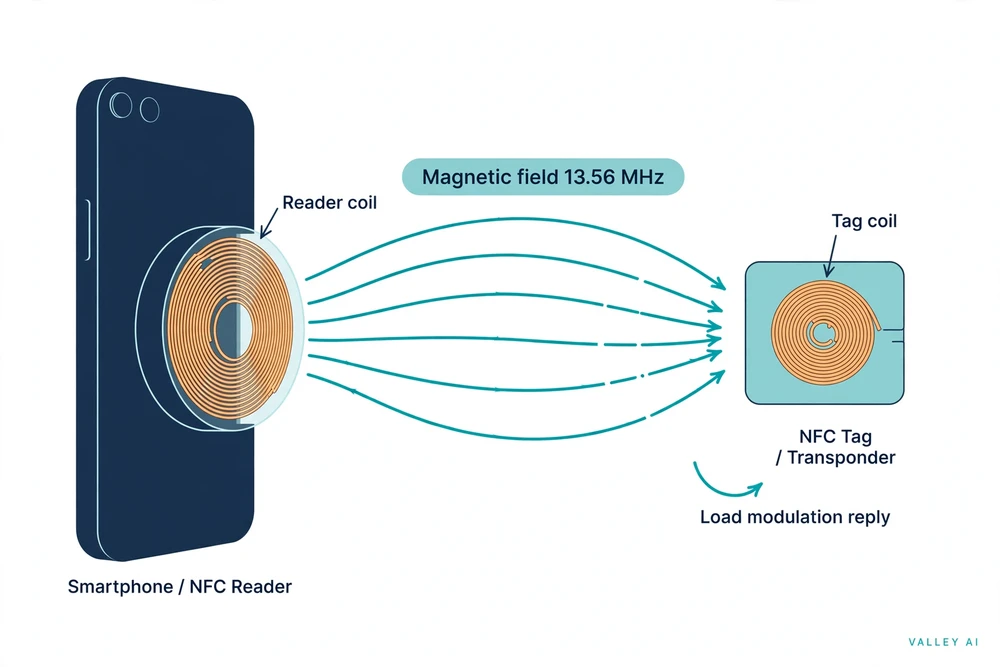
Three steps make up the exchange. The reader polls, sending out its field and listening for a tag. The tag answers with its identifier and the contents of its memory. The reader then reads or writes the records the tag holds. Tens of milliseconds cover the whole exchange, which is why a tap feels instant even though several messages pass back and forth.
Active devices work the same way with one difference: both sides have power, so each side generates its own field in turn and switches it off while listening. Two phones tapping together use this active mode. A phone and a passive tag use passive mode, where the reader supplies all the energy.
Why the Range Stops at a Few Centimeters
The name is literal. Near field means the region close to an antenna where the magnetic part of the field dominates and energy moves by induction rather than by a radiated wave. That boundary sits at the wavelength divided by 2 pi. For NFC the wavelength is 22.11 meters, so the boundary sits 3.52 meters out. A phone’s NFC link lives far inside that boundary, at a few centimeters.
If the near field reaches 3.5 meters, why does a tag stop answering at 10 centimeters? The field is there, but the tag cannot use it. The strength of a magnetic dipole field falls with the cube of the distance, so moving away costs far more than the distance suggests. The on-axis dipole model, calculated 13 November 2026, puts numbers on that fall.
| Distance from 2 cm | Field strength (2 cm = 1.0) |
|---|---|
| 2 cm | 1.00 |
| 3 cm | 0.30 |
| 4 cm | 0.13 |
| 5 cm | 0.06 |
| 10 cm | 0.01 |
At 4 centimeters the field is 8 times weaker than at 2 centimeters. At 10 centimeters it is 125 times weaker. A minimum voltage boots the chip, and once the field drops past that line the tag goes silent. The failure is abrupt: the tag answers, or it does not. There is no fading signal to watch, only a tap that works and a tap that does not.
Antenna size decides how far that line sits. A credit-card sized tag carries a large coil that catches more of the field than a 25 mm sticker, so it reads from further away on the same phone. The phone’s own antenna sits in one fixed spot on the back of the handset, and its position changes between models. A phone held flat on a tag but offset by 3 centimeters fails as reliably as one held 10 centimeters away. Sliding the phone around until the tap lands finds the spot.
How Fast the Link Moves Data
ISO/IEC 18092 defines three data rates: 106, 212, and 424 kilobits per second. Those numbers mean little on their own. The table turns them into times: how long six payloads take to cross the link at each rate, calculated 13 November 2026 from the standard’s defined rates, with no protocol overhead counted. Real transfers run longer, because polling, anti-collision, and record framing all take their share.
| Payload | 106 kbit/s | 212 kbit/s | 424 kbit/s |
|---|---|---|---|
| NTAG213 tag, full (144 bytes) | 0.011 s | 0.005 s | 0.003 s |
| NTAG215 tag, full (504 bytes) | 0.038 s | 0.019 s | 0.010 s |
| NTAG216 tag, full (888 bytes) | 0.067 s | 0.034 s | 0.017 s |
| vCard contact (1 KB, chosen) | 0.077 s | 0.039 s | 0.019 s |
| Photo (3 MB, chosen) | 226.4 s | 113.2 s | 56.6 s |
| Song file (5 MB, chosen) | 377.4 s | 188.7 s | 94.3 s |
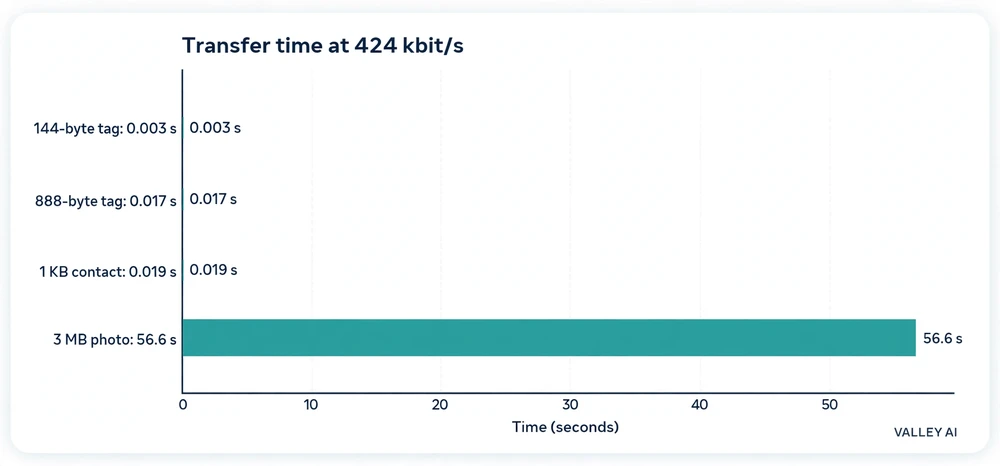
That split is the point. A full tag crosses in a few hundredths of a second at any rate, which is why taps feel instant. A 3 MB photo needs 56.6 seconds at the fastest rate and 226.4 seconds at the slowest. That is why a phone never sends a photo over NFC. It taps to agree, then moves the file over Bluetooth or Wi-Fi.
Those times set the ceiling on what a tag can hold. A tag is not a drive.
Three Modes: Read, Pretend, and Swap
NFC devices relate in three ways. Reader/writer mode is the one most people meet: a powered device reads a passive tag or writes a new record onto it. Scanning a poster, encoding a Wi-Fi password onto a sticker, reading a transit card balance, all of these run in reader/writer mode.
Card emulation mode turns the phone into the card. The phone behaves like a contactless bank card in front of a terminal, or like a key card in front of a door reader. Payment and transit passes run here, and the phone’s secure chip holds the credentials the terminal asks for.
Peer-to-peer mode lets two powered devices exchange data directly. It once carried phone-to-phone file transfer through Android Beam. Google retired Android Beam in Android 10, and file sharing moved to Nearby Share, which taps over NFC and then moves the file over Bluetooth or Wi-Fi Direct. The mode is still in the standard, but no current phone uses it to move files.
Each mode answers a different question. Reader/writer asks what is stored on this tag. Card emulation asks the terminal to treat the phone as a card. Peer-to-peer asks two devices to agree, then gets out of the way.
What Fits on a Tag
Tags in shops and homes come from one chip family, NXP’s NTAG21x. Three part numbers cover the range, and they differ almost only in memory. The table gives the user memory each part offers and the NDEF capacity the tag declares to a reader. The figures come from NXP’s product data sheet for the family.
| Chip | User memory | NDEF capacity | Total EEPROM |
|---|---|---|---|
| NTAG213 | 144 bytes | 144 bytes | 180 bytes |
| NTAG215 | 504 bytes | 496 bytes | 540 bytes |
| NTAG216 | 888 bytes | 872 bytes | 924 bytes |
A record is more than its payload. NDEF wraps each record in a header that says what type it is and how long it runs. A web address record for a short link, https://valleyai.net/internet/how-does-nfc-work, takes 44 bytes in total: 39 bytes for the address itself and 5 bytes of header. That fits the smallest chip with 100 bytes to spare. The middle chip leaves 460 bytes free after the same record.
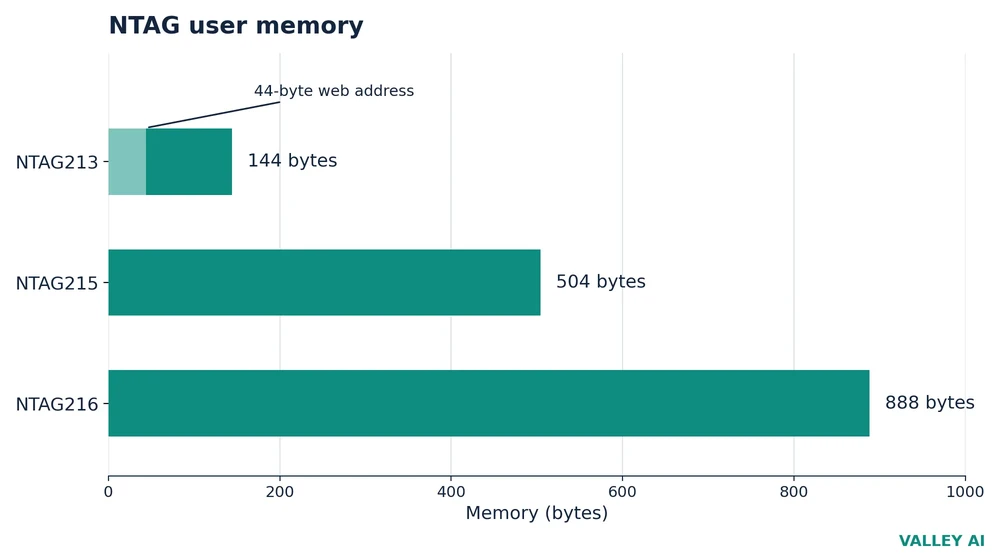
Those numbers decide the purchase. A short link needs the smallest chip. A Wi-Fi login or a contact card fits the middle chip with room to spare. The largest chip earns its price when the payload is long or may grow: a full vCard with several numbers, text in two languages, or several records on one tag. Buying the largest chip for a single short link pays for bytes that stay empty.
One property of tags catches people out. Most tags can be locked permanently, and a locked tag cannot be rewritten by any means. The lock is a software setting with no physical trace, and writing apps often show it as a checkbox beside the write button. A tag locked by accident stays locked.
How a Tap Pays Without Sending Your Card Number
A tap at a till looks simple, and the security sits in what does not travel. When a card is added to Apple Pay, the bank creates a device-specific Device Account Number, a token tied to that phone and that card. Apple encrypts it and stores it in the Secure Element, a certified chip set apart from the rest of the phone. Apple cannot decrypt the number. It is never stored on Apple servers, and it is never backed up to iCloud. Each of those points comes from Apple’s security and privacy overview for Apple Pay.
At the till, the phone sends two things over NFC: the Device Account Number and a dynamic security code made for that one transaction. The bank checks the code to confirm it is unique and tied to the device. The real 16-digit card number never leaves the phone. A stolen tap record cannot pay twice, because the code dies with the transaction.
A plastic contactless card works the same way at the chip level: each tap generates a one-time cryptogram inside the card’s chip, and the terminal routes the token to the card network for approval. The card number printed on the plastic is not the number that travels.
The owner approves the tap first, through a fingerprint or a face scan. The fingerprint half of that check is set out in how a fingerprint sensor reads a print. The same tap can serve as the second factor in two-factor authentication. A tap on a security key proves possession after the password. The codes, keys, and order of checks are set out in how two-factor authentication works. A token and a vault password solve the same problem from opposite sides: the token hides the card number, and the vault hides the passwords. The vault side is set out in how a password manager works.
Where NFC Fails, and Three Checks Before You Trust a Tap
Metal is the first failure. A tag laid flat on a metal surface has its field distorted and its resonance detuned, and it stops working entirely. Tags sold for metal carry a ferrite layer between the antenna and the surface, and they cost more for that reason. An ordinary sticker will not work on a laptop lid, a machine housing, or the back of a phone.
Distance is the second failure. The field weakens far faster than the gap grows, so a tag that reads while touching can go silent a few centimeters out. The third failure is a record that needs more bytes than the chip holds: the write fails, and the tag keeps its old contents.
Can someone skim my card by standing next to me? A skimmer would need to sit within a few centimeters of the card and hold still while the card answers, and the answer would still be a token and a one-time code, not the card number. The real attack is a relay: one device reads the card at close range while a second device replays the signal at a distant terminal. High-security deployments answer relays with transaction time-outs and distance-bounding checks that measure how fast the reply comes back.
Three checks settle the common tap trouble. First, slide the phone across the tag instead of holding it still: the antenna sits in one spot on the back, and a slow slide finds it. Second, test the tag away from metal: a metal plate, like the one in a magnetic car mount, between tag and reader breaks the link. Third, check the tag’s capacity before writing: a record that needs more bytes than the chip holds fails, and the smallest chip holds 144 bytes.
Frequently asked questions
Can I use NFC without an internet connection?
The tap itself needs no connection. The reader’s field powers the tag, and the two devices exchange their records on the spot. What needs a connection is the step after the tap: a payment still travels from the terminal to the bank for approval, and a web address on a tag still needs a browser to open it. Reading a tag, opening a door, or pairing headphones works with the phone offline.
Does NFC drain my phone battery?
Very little. The radio only draws power while it polls for a tag, and the polling costs far less than Wi-Fi or Bluetooth scanning. A passive tag draws nothing at all, since it has no battery and runs on the reader’s field. Leaving NFC switched on through the day makes no visible difference to battery life on a modern phone.
Can I turn NFC off?
On Android, yes: the toggle sits in Settings under Connected devices, and switching it off stops the phone from reading tags or paying by tap. On an iPhone there is no switch. NFC stays on, and the phone only acts on a tap when the owner approves it, so the always-on state costs little and exposes little.
Do all phones have NFC?
Most mid-range and premium phones have carried it for years. The first Android phone with NFC was the Nexus S in 2010, and every iPhone since the iPhone 6 in 2014 has the hardware. The phones that lack it are usually budget models. The spec sheet lists it as NFC, and on Android the Settings search box finds it under Connected devices.
Can I pay with my phone if the battery is dead?
Not for a payment. A tap at a till needs the phone switched on and the owner approved. Transit and access cards set to Express Mode are the exception: on recent iPhones they keep working for some hours after the battery runs out, because the phone reserves a small charge for the NFC chip. The reservation covers gates and doors, not purchases.

Kaleem
Kaleem is a Computer Science graduate (Virtual University of Pakistan) and the founder and editor of Valley AI, where he publishes in-depth, tested guides on computer hardware, artificial intelligence, and how the internet works. Every guide is researched from primary sources, tested hands-on where possible, and updated when the facts change.