

Your room decides the projector
A living room wall can hold a 100 inch picture, but the wall alone does not decide whether a projector fits that room. Distance decides it. A projector throws light across empty air, and the size of the picture grows as that distance grows. Pick the picture size first, measure the room second, and shortlist projectors by the throw range that covers the gap between lens and wall.
Among other output devices, a projector is unusual because its display surface sits far from the machine itself. A monitor shows its picture on its own panel. A projector paints its picture on a wall or a screen across the room, so placement becomes part of the purchase.
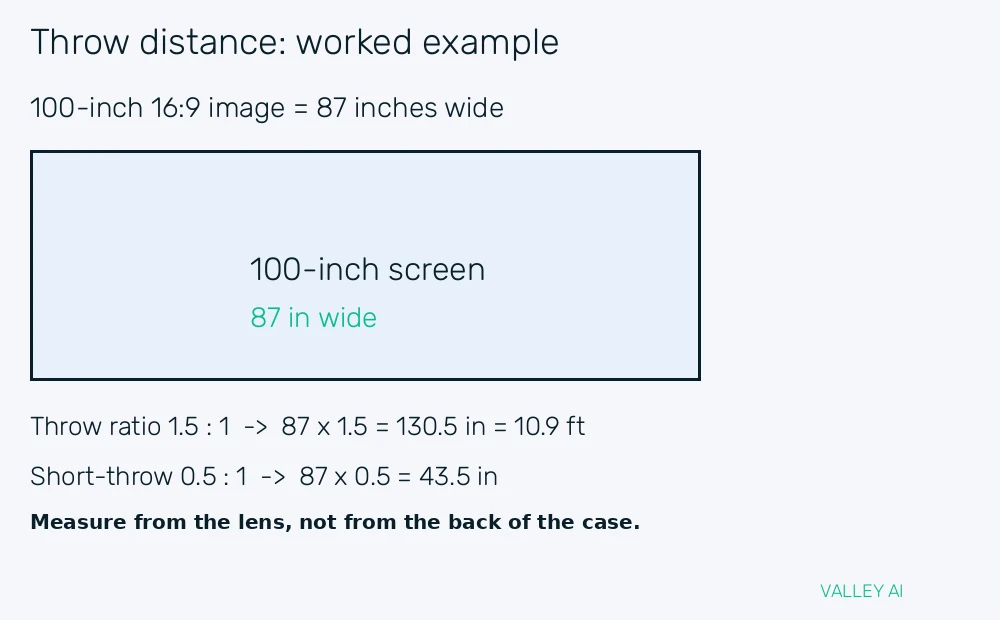
Work through one room before reading any spec sheet. Suppose the plan calls for a 100 inch 16:9 image. That image measures 87 inches wide, which is 2.21 metres. A projector rated at 1.5:1 must sit 87 times 1.5 back from the screen. That is 130.5 inches, or 10.9 feet. A short throw model rated at 0.5:1 sits 87 times 0.5 back, which is 43.5 inches. Tape the 10.9 foot mark on the floor and stand there. That mark shows whether a sofa, a door swing, or a ceiling fan gets in the way.
Every projector runs the same three stages in order. A light source makes bright light. An imaging chip shapes that light into a picture. A lens focuses the picture and sizes it on the wall. The sections below follow that order, because each stage limits what the next stage can deliver.
Light comes first: lamp, LED, and laser
Older home projectors use a high pressure lamp. An electric arc inside a small bulb makes intense white light, and a fan cools the bulb while it runs. Lamp output fades with use, and a lamp typically lasts 3,000 to 5,000 hours before replacement. Replacement lamps cost real money, so lamp life belongs in the running cost of any lamp model.
LED projectors replace the bulb with light emitting diodes. Diodes switch on instantly, run cooler, and hold their output steadier over time. Their peak brightness sits below most lamp and laser models, which makes LED models a better fit for dark rooms and smaller pictures.
Laser projectors split into two designs that buyers often confuse. Laser phosphor models fire a blue laser at a phosphor wheel. The wheel converts part of that light into yellow light that mixes toward white. RGB laser models use separate red, green, and blue lasers with no phosphor wheel at all. Brandligo describes laser phosphor as a laser driven light engine with a phosphor wheel stage, and that distinction matters when comparing spec sheets. Laser names a light source, not an imaging technology. Laser light sources typically last 20,000 hours or more, which removes lamp replacement from the running cost.
Three ways to turn light into a picture
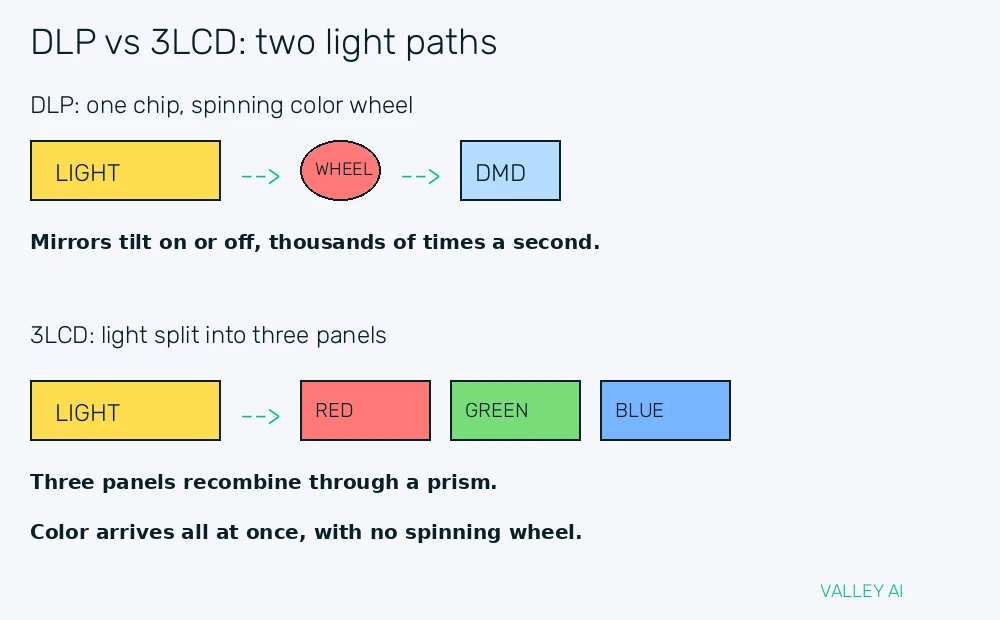
DLP projectors shape light with a digital micromirror device, a chip carrying microscopic mirrors. Each mirror tilts toward the lens for a bright pixel. It tilts away for a dark pixel. Switching runs thousands of times per second. A single chip DLP model adds a spinning color wheel. Its red, green, and blue segments flash in turn. The eye blends them into full color.
Why do fast moving bright objects leave a rainbow trail on some projectors? A single chip DLP shows red, green, and blue one after another, and a quick eye movement can catch one color before the next arrives. Viewers who see that trail catch brief rainbow fringes at bright edges during fast motion. Three chip DLP models avoid the wheel and the trail, but they cost far more and sit outside most home budgets.
3LCD projectors split white light with dichroic mirrors, coated glass that reflects one color band and passes the rest. Each band lands on its own liquid crystal panel, one for red, one for green, and one for blue. A prism recombines the three colored pictures into one full color image. Color arrives all at once, so no spinning wheel and no sequential color trail appear.
LCoS projectors use liquid crystal on silicon panels that reflect light rather than passing it through. Light hits each panel, the liquid crystal layer modulates it pixel by pixel, and the reflected picture travels through the lens. LCoS panels pack pixels tightly and block stray light well, which gives deep blacks and smooth gradients at a premium price.
| Technology | How light is shaped | How color is made | Strength | Weakness |
| DLP | Tilting micromirrors | Spinning color wheel, sequential | Sharp pixels, high contrast | Rainbow trail for some viewers |
| 3LCD | Three transmissive panels | Dichroic split, prism recombine | Bright color, no color trail | Black level below LCoS |
| LCoS | Reflective crystal panels | Three panels, prism recombine | Deep blacks, smooth gradients | Highest price of the three |
Color brightness deserves a check of its own. Some models quote a high white brightness figure. Their color brightness runs far lower. A football pitch or a cartoon can look washed out on such a model. Read the color lumen figure beside the white lumen figure when both appear on the spec sheet.
The lens puts the picture on the wall
Throw ratio gives the placement rule in one number. Divide the distance from lens to screen by the width of the image, and the result is the throw ratio. ProjectorCentral defines throw ratio the same way: distance divided by image width. It publishes throw ranges for each model. Buyers can test a room against a model. A model rated 1.2:1 to 1.6:1 covers lens positions between 1.2 and 1.6 times the image width.
Most projectors take video in over an HDMI connection, so cable length belongs in the placement plan. A projector mounted 10 feet from the screen needs a cable run that reaches the source device, and long runs may need an active cable. Plan the cable path before fixing a mount position.
Zoom changes image size without moving the projector. Optical zoom shifts lens elements to widen or narrow the beam, and it keeps full resolution at every setting. Digital zoom crops the picture and throws pixels away, so optical zoom range is the figure worth comparing.
Why does a projected rectangle turn into a trapezoid when the projector sits low? Light travels farther to the top of the screen than to the bottom when the projector tilts upward, so the top edge stretches wider. Keystone correction reshapes the image digitally to square it up again, but heavy correction softens pixels near the stretched edge. Lens shift moves the whole image up, down, or sideways through the optics, which keeps every pixel intact. A model with generous lens shift forgives an off center shelf.
Run three placement checks with a tape measure before mounting anything. Measure the screen width the wall can hold. Measure the lens to wall distance at the planned mount point. Project a grid test pattern and watch the corners for trapezoid distortion at that position.
Brightness and contrast in a real room
ANSI lumens and ISO lumens describe measured brightness under a test standard. Both standards measure light at points across the image. They average the readings. The figure reflects the whole picture. AWOL Vision explains ANSI lumens as a standardized brightness measurement across the image. That shared standard makes figures from different brands easier to compare.
Ambient light sets the brightness a room truly needs. A dark room lets a modest lumen figure produce a bright picture. A living room with lamps on and curtains open needs far more output. Room light washes over the screen. It lifts the black floor. Judge lumen figures against the room at viewing time, with the lights in their normal state.
Why does the image get dimmer when it gets bigger? The same lumen output spreads over a larger area, so each square inch receives less light. Double the image width and the area grows fourfold, because area scales with width times height. The same output spread over four times the area gives one quarter of the brightness per unit area. Size the projector for the largest picture the room will use.
Contrast ratio compares the brightest white a projector can show with the darkest black it can show. A high ratio gives depth in dark scenes, with shadow detail that stays visible beside bright highlights. Room light hurts contrast first, because stray light adds a gray veil over black areas before it touches bright areas. Control room light before paying for a higher contrast figure.
Resolution, screen, and effects worth checking
Resolution counts the pixels in the picture. A 1080p image holds 1920 by 1080 pixels, and a 4K image holds 3840 by 2160 pixels. Higher pixel counts help most on large screens viewed from close seats, where individual pixels might otherwise show. From a distant sofa, a 1080p picture on a 100 inch screen can look clean, because the eye blends neighboring pixels at distance.
Screen door effect appears when pixel gaps stay visible, like looking through a fine mesh. Older and lower resolution models show it most, especially at close viewing distances. Sit at the planned seat during a demo and look for a faint grid over bright areas. Modern 4K models with tight pixel fill hide the grid well.
The screen surface changes the picture as much as the projector does. A matte white screen spreads light evenly to a wide seating area. A gray screen deepens blacks slightly in rooms with some ambient light. A high gain screen directs more light back toward viewers seated straight ahead, at the cost of a narrower sweet spot. A home theater pairs the image with a speaker placed near the screen. Dialogue then appears to come from the picture.
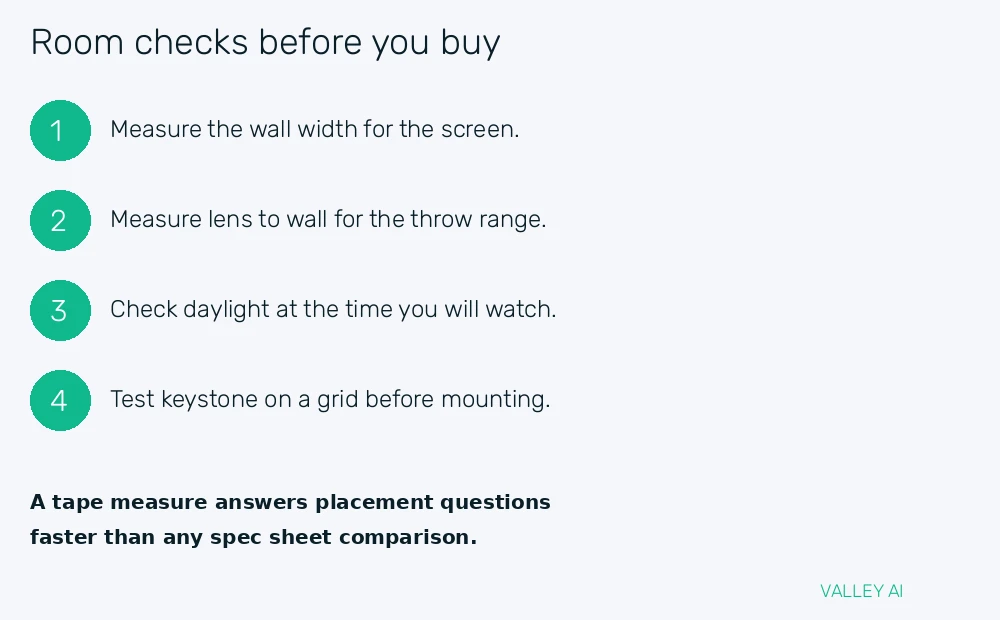
Check the spec sheet for the ANSI or ISO lumen figure, the throw range, and the imaging technology. Those three figures answer most placement questions without a demo.
Conclusion
Measure the wall, mark the lens position on the floor, and shortlist only models whose throw range covers that mark. Then match lumen output to the room at viewing time and pick the imaging technology that suits the viewers in the seats. A projector chosen by room measurements fits the space. It stays bright enough for the light in it. It brings no surprises at install time.
Frequently asked questions
Can a projector replace a television?
A projector can serve as the main display in a room with controlled light and a separate sound system. Most projectors lack a broadcast tuner, so live channels arrive through a streaming stick or set top box connected over HDMI. Viewers who watch mainly in daylight may prefer a television panel, since panels hold contrast under room light far better.
Can a plain white wall serve as a screen?
A smooth matte white wall gives a watchable picture for casual viewing. Wall texture shows through bright scenes, and ordinary paint reflects less evenly than a dedicated screen surface. A fixed screen adds a flat surface and a border that frames the picture, which helps most in a dedicated viewing room.
How far should viewers sit from a 100 inch image?
A seat roughly 10 to 13 feet back suits most viewers for a 100 inch picture. Closer seats reveal pixel structure and force more head movement during fast scenes. Farther seats shrink the sense of immersion that a large picture is meant to deliver.
Do short throw projectors need a special screen?
Standard short throw models work on ordinary screens and walls. Ultra short throw models placed inches from the wall benefit from a Fresnel screen, which rejects ceiling light and keeps brightness even across the surface. Budget for that screen when pricing an ultra short throw setup.
Can a projector stay on all day?
Projectors handle long sessions when airflow stays clear and the room stays ventilated. Blocked vents push internal temperatures up and shorten component life. Give the machine space around its intake and exhaust, and let its fan finish its cool down cycle after switch off.

Kaleem
Kaleem is a Computer Science graduate (Virtual University of Pakistan) and the founder and editor of Valley AI, where he publishes in-depth, tested guides on computer hardware, artificial intelligence, and how the internet works. Every guide is researched from primary sources, tested hands-on where possible, and updated when the facts change.