

A program crashes, and the error report shows a wall of short lines: mov rax, 1, add eax, 42, cmp rcx, rdx. The debugger stops on one of them, and the numbers beside it mean nothing yet. The lines read like broken English, but they are the program itself at its lowest readable level.
Those lines are assembly language. Every program on the computer, written in any language, ends up as instructions like these before the processor runs it. A crash dump, a compiler listing, and a disassembly all speak it, so learning to read it turns noise into a map of what the machine did.
One real program is read line by line, assembled with the GNU assembler, and measured against a C version of the job. By the end you will know what each line does, how the text becomes bytes the processor runs, and when writing assembly is worth the effort.
Assembly is the processor’s own instructions, written in words
Assembly language is a low-level programming language with a very strong correspondence between its instructions and the architecture’s machine code instructions. Each written line stands for one machine instruction. Constants, comments, labels, and assembler directives ride along in the same text, but the instruction lines are the language.
An instruction has two parts: an opcode mnemonic and its operands. The mnemonic is a short name for the operation. MOV moves, ADD adds, JMP jumps, and CMP compares. The operands name the registers or values the operation works on. In add eax, 42, ADD is the mnemonic, eax is the register that holds the running value, and 42 is the number added to it.
Is assembly language the same as machine code? No. Machine code is the binary the processor runs, and nothing else. Assembly is the readable text that stands for that binary, one line per instruction, with names in place of numbers. The processor never sees the text. An assembler reads it and writes the binary.
The mapping shows in the bytes. The line add eax, 42 assembles to three bytes, 83 C0 2A, and mov al, 97 assembles to two bytes, B0 61, where 61 is the hexadecimal form of 97. A machine instruction works like one labeled switch on a control panel. The opcode names the switch, and the operands say which wires it connects.
Those bytes are what the processor’s fetch-execute cycle reads and runs, one instruction after another, and the guide to how a CPU works explains that cycle from the program counter onward.
Assembly is the oldest programming layer still in daily use. The first assembly code appeared in 1947, in Coding for A.R.C. by Andrew Donald Booth and Kathleen Britten, and the word assembler for the translating program dates to Wilkes, Wheeler and Gill in 1951. The tools changed. The idea did not. Names stand in for numbers, so people can write what the machine runs.
One short program, read line by line
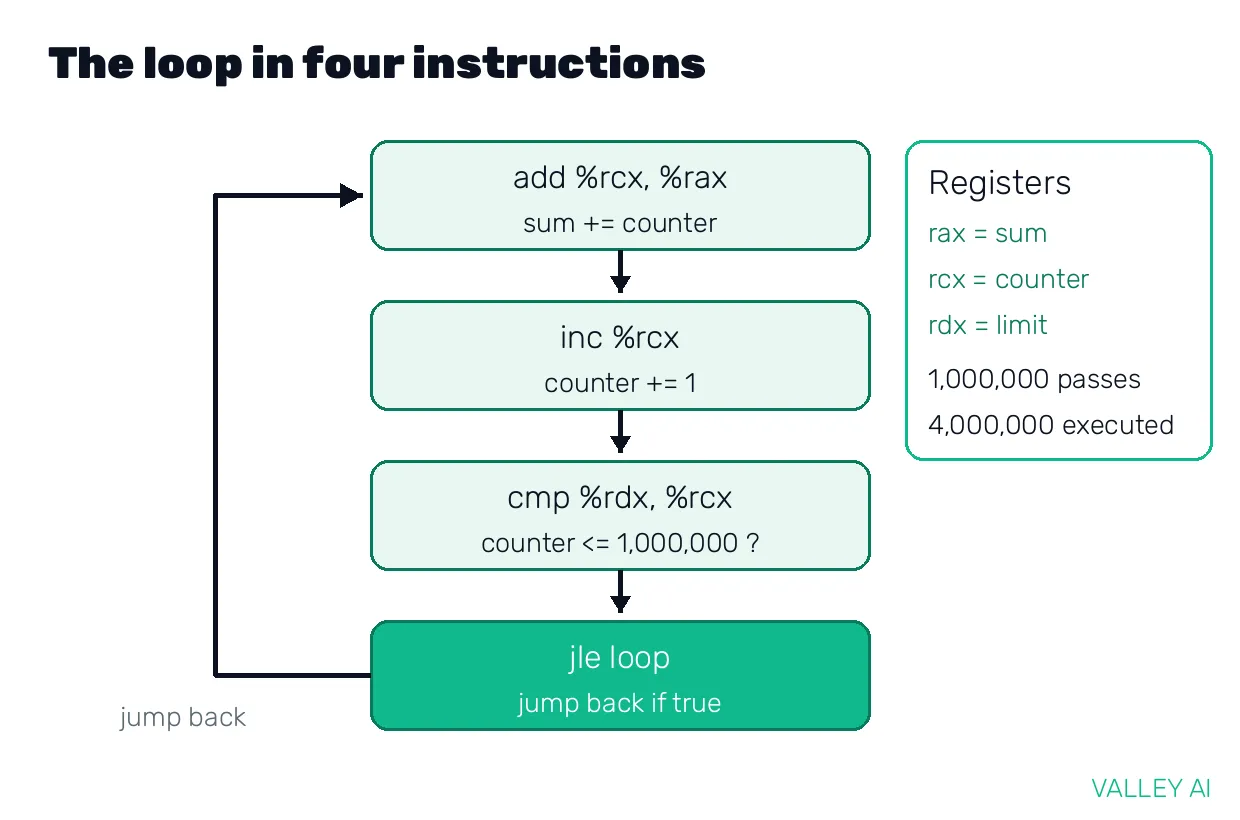
This program adds the numbers from 1 to 1,000,000 and prints the total. Its code section holds 25 instructions. Every line is one instruction, and the loop body is four of them.
    .text
    .globl _start
_start:
    xor %rax, %rax
    mov $1, %rcx
    mov $1000000, %rdx
loop:
    add %rcx, %rax
    inc %rcx
    cmp %rdx, %rcx
    jle loop
    lea buf+20(%rip), %rsi
    movb $10, (%rsi)
    mov $10, %rbx
conv:
    xor %rdx, %rdx
    div %rbx
    add $48, %rdx
    dec %rsi
    mov %dl, (%rsi)
    test %rax, %rax
    jnz conv
    mov $1, %rax
    mov $1, %rdi
    lea buf+21(%rip), %rdx
    sub %rsi, %rdx
    syscall
    mov $60, %rax
    xor %rdi, %rdi
    syscall
    .data
buf:
    .space 32
Three lines set up the job. xor rax, rax clears the register that will hold the sum. mov $1, %rcx puts 1 in the counter register, and mov $1000000, %rdx puts the limit in a third register. The dollar signs mark plain numbers, and the percent signs mark registers. That is the AT&T syntax the GNU tools use by default.
At the top of the body sits the label loop. add %rcx, %rax adds the counter to the sum. inc %rcx raises the counter by one. cmp %rdx, %rcx compares the counter with the limit, and jle loop jumps back while the counter is less than or equal to the limit. When the counter passes 1,000,000, the jump stops firing and the program falls through to the printing code.
Working values live in registers, and rax, rcx, and rdx are three of the registers that hold a program’s working values while the processor works on them.
Printing needs the operating system, because assembly has no print statement. The conversion loop divides the sum by 10, turns each remainder into a character, and stores the characters backwards in a buffer. Then a write system call, number 1, sends the buffer to the screen, and an exit system call, number 60, ends the program. The Linux man-pages list of system calls records both numbers.
How the assembler turns text into bytes
The processor cannot read the program above. An assembler translates it into machine code, and a linker turns that into a file the operating system can run. The GNU assembler reads the text in two passes. The first pass records every label and its address in a symbol table. The second pass writes the bytes, using the table to fill in addresses that were named before they were defined.
Some lines are not instructions at all. Section markers, global labels, and equ definitions are directives: orders to the assembler. The processor never sees them. They vanish from the output. The instruction lines are the only ones that become bytes, and the assembler picks the shortest encoding it can for each one. Writing 1 into the full 64-bit register costs seven bytes, 48 C7 C0 01 00 00 00. Writing the same value into the low 32 bits costs five, B8 01 00 00 00, because writing the low half clears the upper half for free.
Why do two assemblers write the same instruction differently? They use different syntaxes for the same bytes. Intel syntax writes mov rax, 1, destination first. AT&T syntax, the GNU default, writes movq $1, %rax, source first, with a dollar sign on numbers and a percent sign on registers. The bytes that come out are the same. The text is a dialect, and the dialect belongs to the tool.
That split is the difference between an assembler and a compiler. A compiler starts from a language such as C, where one line can become many instructions, and chooses those instructions itself. How a compiler works walks through the stages where that choice happens. The GNU assembler documentation describes the two-pass process and the directive set in full.
The measured run: hand-written assembly against C
In my analysis of the run, GNU as 2.42 turned 25 instructions into 103 bytes of code, and the program printed the expected total on all three runs.
Three runs printed 500000500000 every time. The formula n(n+1)/2 gives that total for n equal to 1,000,000, so the printed number agrees with arithmetic. The loop body ran 1,000,000 times, and the condition was checked 1,000,001 times, once per pass and once more to exit. Four instructions per pass means 4,000,000 loop instructions executed in total.
| Version | Instructions in main code | Loop instructions executed | Median wall time, 5 runs | Result printed |
|---|---|---|---|---|
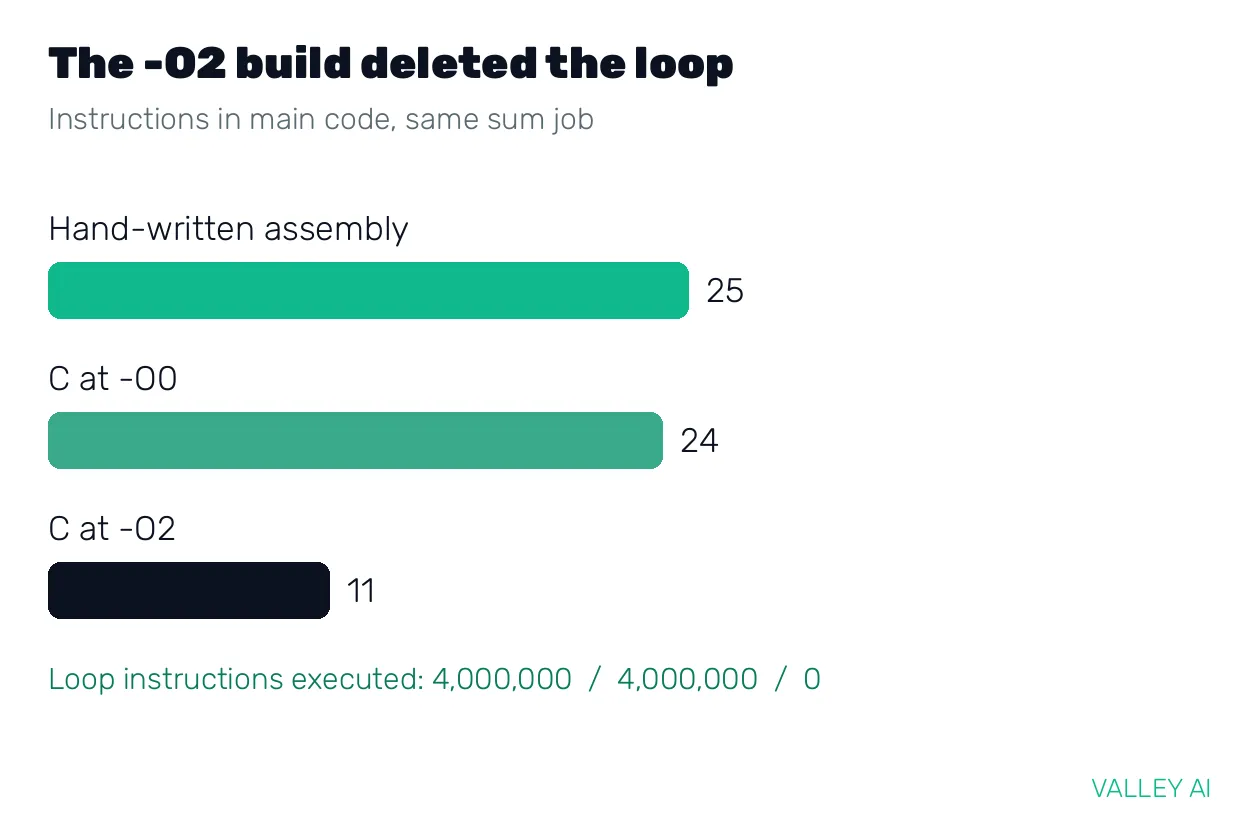
| Hand-written assembly | 25 | 4,000,000 | 1.9 ms | 500000500000 |
| C at -O0 | 24 | 4,000,000 | 2.8 ms | 500000500000 |
| C at -O2 | 11 | 0 | 1.9 ms | 500000500000 |
At -O0, the C version keeps the loop and runs it from memory, loading the counter and the sum from the stack on every pass. That costs 24 instructions in main and a median of 2.8 milliseconds across five runs. The hand-written version keeps both values in registers, and it finished in a median of 1.9 milliseconds. The gap is small, because both times are dominated by starting the process. The loop itself takes a fraction of either total.
The result that changed my plan was the -O2 build. It has 11 instructions in main and no loop at all. The compiler saw that the count and the limit were fixed, computed the total while compiling, and stored it as the constant 0x746A5A2920, which is 500000500000 in hexadecimal. The hand-written loop ran four million instructions to produce a number the compiler already knew. The compiler beat the hand-written assembly by deleting the work.
One run on one machine proves a narrow point, and the numbers say so. The count of 1,000,000 is a chosen input for this test, and the wall times move by a few tenths of a millisecond between processes. What does not move is the instruction count. The -O2 listing has no loop in it, and no rerun will put one back. The lesson is in the listing. The stopwatch only measures startup here.
The loop body runs once per pass, and the passes add up the way the iteration guide counts them, one complete run through the body at a time.
Where assembly still earns its keep
Assembly survives where C cannot reach or where every byte is chosen by hand. The code that starts the processor, handles interrupts, and switches between programs is partly written in assembly. Device drivers use it where a register must be touched in a precise order. Video decoders such as dav1d and media tools such as FFmpeg keep hand-written assembly in their busiest loops. Very small chips, with a few kilobytes of memory, sometimes need code where every byte is chosen. Security analysts read disassembly to study programs without their source code.
The kernel share settles the size question for me. Just under 2% of Linux kernel version 4.9 is written in assembly, and more than 97% is written in C, according to Wikipedia. The kernel keeps assembly for the parts that must touch the processor directly and writes the rest in C.
| Job | Write assembly | Write C |
|---|---|---|
| Processor startup and interrupt handling | Yes | No |
| Driver code touching registers in a fixed order | The short path only | The rest |
| Inner loop of a video decoder | After measuring | First |
| A general application | No | Yes |
| Checking a slow loop | Read it with gcc -S | Keep it |
Should I learn assembly before my first programming language? No. Learn a first language first, then assembly shows what that language hides: the registers, the loop body, and the call the compiler made for you. A few dozen instructions cover most of what a beginner needs, and a 25-instruction program like the one above is a full first project.
The next time a loop feels slow, compile with -O2 and read the listing before rewriting anything by hand. If the listing shows the loop is gone, the work is done. If it shows the loop intact, the four-instruction body above is the pattern to beat, and the stopwatch decides whether beating it is worth the effort.
Frequently asked questions about assembly language
Which assembler should a beginner start with?
Start with the assembler that matches the system and the tutorials in front of you. On Linux, the GNU assembler ships with gcc, so nothing extra needs installing. NASM is the usual pick for tutorials written in Intel syntax. MASM belongs to Windows. The ideas transfer between them: registers, labels, and the one-line-per-instruction rule stay the same, and only the spelling changes.
What file extensions do assembly programs use?
Assembly source files usually end in .asm or .s. A capital .S marks a file the C preprocessor runs over first, which lets it use #include and #define lines. Shared fragments that several source files pull in often end in .inc. The extension is a convention for the tools, and the assembler cares about the contents, not the letters after the dot.
What is inline assembly?
Inline assembly is a block of assembly code written inside a C or C++ program, usually through an asm statement. It exists for single instructions the language cannot express, such as reading a special processor register or issuing a barrier. The compiler still schedules the surrounding code and allocates registers around the block, so the assembly inside it must declare what it reads and writes.
What is a macro in assembly?
A macro is a named block of assembly text that the assembler copies wherever the name appears. It saves retyping a short sequence, such as saving registers at the start of a routine. A macro is text substitution at assembly time. It creates no function and no call, and each use expands into its own copy of the instructions.
How do you debug an assembly program?
Use a debugger that steps one instruction at a time. In gdb, stepi runs the next instruction and info registers shows every register after it, so a wrong value is caught at the line that produced it. A disassembly listing from objdump shows the bytes each line became, which settles arguments about encodings. Breakpoints on labels work the same way they work in a high-level language.

Kaleem
Kaleem is a Computer Science graduate (Virtual University of Pakistan) and the founder and editor of Valley AI, where he publishes in-depth, tested guides on computer hardware, artificial intelligence, and how the internet works. Every guide is researched from primary sources, tested hands-on where possible, and updated when the facts change.