

A smart plug is a switch that listens. Inside a housing the size of a matchbox sit a relay, a microcontroller, and a radio. The relay opens and closes the circuit. The microcontroller decides when. The radio carries the command from your phone.
Some plugs add a fourth part. A metering chip measures the current passing through and reports watts and kilowatt-hours to the app. That chip turns a remote switch into a meter. The plug then tells you what the appliance draws, and the app turns those readings into daily and monthly totals.
Three jobs share one housing, and the housing carries two costs of its own. The electronics draw power around the clock. The rating printed on the side is a ceiling, and some loads break it at the moment they start. The relay comes first, then the running cost, the radio, the pairing, the meter, and the loads to keep away.
The relay: the switch that does the work
The relay is the only part that touches mains power. It is a switch that a small magnet flips in place of a finger. A coil of wire, given current, pulls a lever called an armature. The armature closes two metal contacts. Current flows. Cut the coil current and a spring pulls the contacts apart.
Two kinds of relay sit in smart plugs. An electromechanical relay uses the coil and the contacts above. It clicks when it switches, and that click is a useful check: press the button and listen. A solid-state relay has no moving parts. It switches with semiconductor electronics, usually a triac or a MOSFET. It switches faster and never clicks. Heat limits it, and the small sealed housing gives heat nowhere to go.
Some designs pair both kinds. A fast semiconductor switch takes the load for an instant, then a mechanical relay carries it. The pair splits the work: speed from one side, cool running from the other. The hybrid costs more, so it appears in plugs rated for heavy loads.
Contacts wear a little with every switch. A typical electromechanical relay is rated for about 100,000 cycles. That number sounds small until the maths runs. Two switches a day stretch it to 137 years. Ten switches a day still leave 27 years. The relay outlives the plug in most homes. Heat and overload kill plugs long before the cycle count runs out.
The chip beside the relay is a microcontroller, the same class of chip that runs a smartwatch. It holds the firmware and the schedule, and drives the coil. It wakes the radio when a command arrives and sleeps between commands. The whole computer draws less than a watt while it waits.
What the plug itself costs to run
I worked the numbers out with a simulation of my own, at the United States average residential rate of 18.34 cents per kilowatt-hour, the figure the Energy Information Administration publishes.
One watt, left running all year, uses 8.76 kilowatt-hours. At 18.34 cents, that costs $1.61 a year. A Wi-Fi plug draws between 0.3 and 2 watts while it waits, so its own bill runs from $0.48 to $3.21 a year. Zigbee and Thread plugs draw less, under half a watt, because their radios sip power between messages.
| Device standby | Costs a year | Net saving with a 1 W plug | $13 plug pays back in |
|---|---|---|---|
| 0.5 W | $0.80 | -$0.80 | Never |
| 2 W | $3.21 | $1.61 | 97 months |
| 5 W | $8.03 | $6.43 | 24 months |
| 10 W | $16.07 | $14.46 | 11 months |
| 15 W | $24.10 | $22.49 | 7 months |
| 25 W | $40.16 | $38.56 | 4 months |
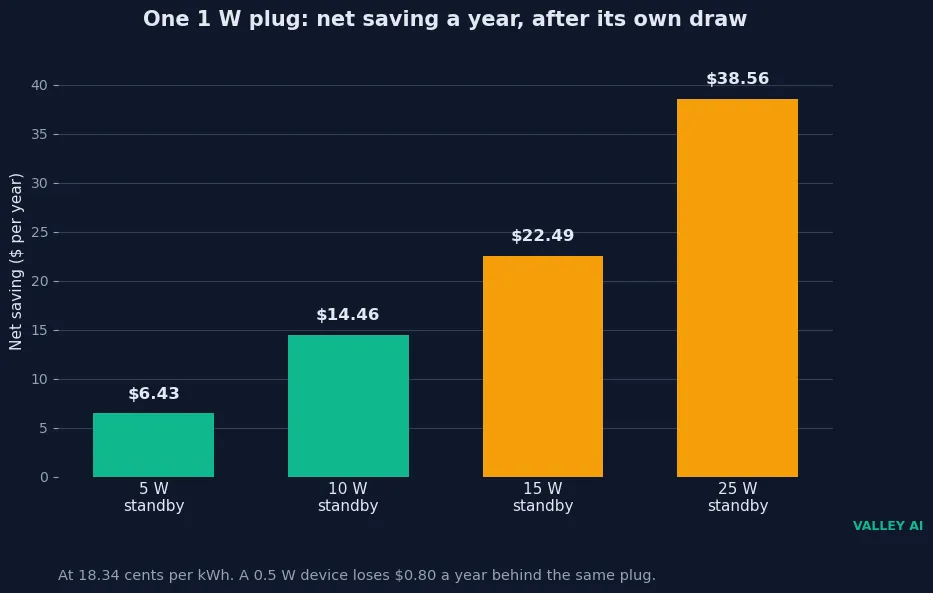
The rule is plain. A plug saves money only when the device it switches wastes more than the plug draws. A phone charger idling at half a watt costs $0.80 a year. Metering it with a plug that draws a watt adds $0.80 a year to the bill. A television cluster idling at 15 watts costs $24.10 a year. One plug on the strip that feeds it saves $22.49 a year, and the $13 plug pays for itself in seven months.
Does a smart plug save electricity? Only when the device it controls wastes more than the plug draws. A single charger or LED lamp sits below that line. A desk or an entertainment cluster sits far above it. Put one metering plug on the strip that feeds the cluster, and a week of readings settles the question for that room.
The model runs on chosen values: a 1 watt plug, a $13 plug price, and the national average rate. No physical plug sat in this session. The rate is a national average. Any reader’s bill will differ. Real plugs vary by model, and real rates vary by utility. The model proves the rule, that the saving sits in the device standby minus the plug’s own draw, and it does not prove any one home’s exact bill.
How the plug hears the command
A command reaches the plug by one of four routes. Wi-Fi plugs join a router directly. Zigbee and Z-Wave plugs talk to a hub, which talks to the router. Matter plugs use Thread, a low-power mesh, or Wi-Fi, and speak to every major platform through one standard. The radio decides the hub, the range, and the idle draw.
| Protocol | Hub needed | Range | Idle draw | Best for |
|---|---|---|---|---|
| Wi-Fi (2.4 GHz) | No, joins the router | Up to 150 ft indoors | 1 to 2 W | Simple setups with a few plugs |
| Zigbee | Yes, a Zigbee hub | 30 to 60 ft per hop, mesh extends it | Under 0.5 W | Homes with many devices on a mesh |
| Z-Wave | Yes, a Z-Wave hub | 30 to 100 ft per hop, mesh extends it | Under 0.5 W | Large setups that need reliability |
| Matter over Thread | Thread border router | 30 to 60 ft per hop, mesh extends it | Under 0.5 W | Cross-platform homes, local control |
The route shapes what still works when the internet drops. A Matter plug talks to the home controller over the home Wi-Fi, so on and off keep working at home. A Wi-Fi plug that routes through the maker’s cloud loses remote control and voice control, while its button still switches the relay. Zigbee and Z-Wave plugs keep working through their hub. Voice control runs through a smart speaker or a voice assistant, which passes the command to the plug. Away-from-home control always needs an internet-connected controller, whatever the radio.
Can a smart plug work without Wi-Fi? A Zigbee or Z-Wave plug can, because it talks to its hub on its own radio. A Wi-Fi plug still answers its button, and the button switches the relay with no network at all. App control and voice control need the network back.
Pairing without a screen
A new plug faces a small puzzle. It has no screen and no keyboard, yet it needs the Wi-Fi password before it can join the network. Pairing solves that puzzle in one of two ways, and Matter adds a third.
- Hold the button until the indicator light flashes. The plug enters pairing mode.
- SoftAP: the plug becomes its own temporary Wi-Fi network, named something like SmartLife-XXXX. The phone joins it, and the app hands over the home network credentials.
- SmartConfig: the phone broadcasts the credentials in encoded form over the home Wi-Fi. The plug listens, reads them, and joins directly, with no temporary network.
- Matter: scan the QR code on the plug. Bluetooth pairing passes a setup code to the plug, and the plug joins Wi-Fi or the Thread mesh.
- Name the plug after the room and the appliance, then test the switch from the app before moving on.
Most consumer plugs use the 2.4 gigahertz band only. That band travels further through walls than 5 gigahertz, which suits a small device with no antenna to spare. It trips up pairing when the router merges both bands under one network name. The router steers the phone onto 5 gigahertz during setup, and the plug waits on a band it cannot reach. Splitting the bands into two names for the few minutes pairing takes fixes it.
Check the pairing result at the socket. A plug that pairs beside the router can still lose the signal behind a bookcase or in a far corner. Move it to its final socket, switch it from the app, and watch the appliance answer.
How a metering plug measures watts
A metering plug measures real power, not a guess. Watts equal volts multiplied by current. The plug measures both, many times a second, and does the multiplication itself. Two sensor designs do the measuring.
One design uses a shunt resistor, a resistor of precisely known value placed in the current’s path. Current through it creates a small voltage drop. The metering chip reads that drop and the line voltage, then calculates the power. Documented plugs use shunt values as small as 0.001 ohms, paired with metering chips such as the HLW8012 or BL0937. At 10 amps, a 0.001 ohm shunt drops 10 millivolts and burns 0.1 watts as heat.
The other design uses a Hall-effect sensor, such as the ACS712 chip. It reads the magnetic field the current creates in a conductor and turns that field into a small voltage. No resistor sits in the current’s path, so nothing burns power in the sensor itself. Either design gives a real reading. The maker picks one by cost and by the accuracy it targets.
A pulsing load exposes where a reading bends. I modelled a heater that draws 1,500 watts for 20 seconds, then nothing for 40 seconds. Its true mean is 500 watts. A plug sampling every 3 seconds reports 450 watts at one phase and 525 watts at another, an error of 10 percent low to 5 percent high, with a mean absolute error of 6.7 percent. A steady 500 watt load reads 500 watts at every phase. The error needs a changing load.
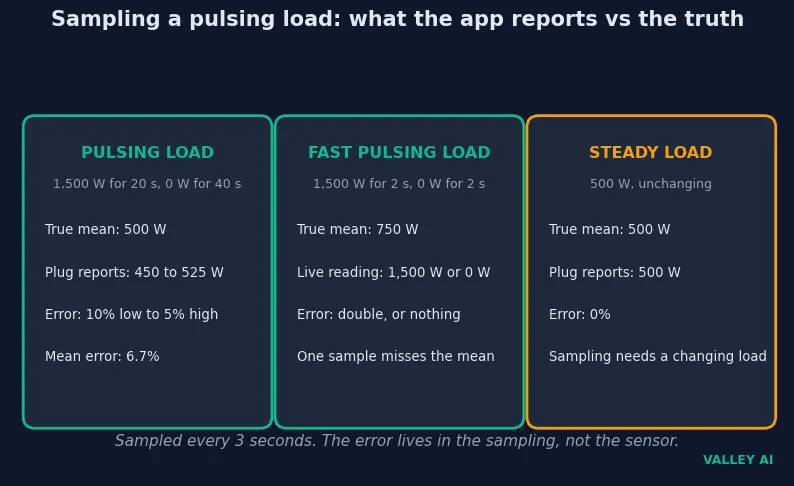
Faster pulsing breaks the live number completely. A load that draws 1,500 watts for 2 seconds and nothing for 2 seconds has a true mean of 750 watts. One sample reads 1,500 watts or zero, depending on when it lands. The app displays double the true mean or nothing at all. A 2023 peer-reviewed study of five smart plug brands found the same shape in hardware: Belkin held its maximum error under 1.7 percent, while the other four brands ran 54 to 100 percent error on variable loads, with reporting delays of 3 to 6 seconds, sometimes 20.
Treat those numbers as a guide for spotting patterns, and they serve well. It tells you which device draws power while idle, whether something stayed on overnight, and how usage trends across a week. Treat it as a billing instrument, and it misleads. The live number lags by seconds and lands far from the real reading on dimmed lights, pulsing electronics, and variable-speed motors.
What a plug must never switch
Every plug carries a printed current rating, and the rating is a ceiling. Read it before plugging anything in. The numbers below are the usual ratings by region, and the label on the plug always wins over any table.
| Region | Rated current | Maximum load | Continuous load (80%) |
|---|---|---|---|
| North America, 120 V | 15 A | 1,800 W | 1,440 W |
| United Kingdom, 230 V | 13 A | About 3,000 W | 2,400 W |
| Continental Europe, 230 V | 10 to 16 A | 2,300 to 3,680 W | 1,840 to 2,944 W |
| Compact mini plugs | Often 10 A or less | Check the label | 960 W at 10 A |
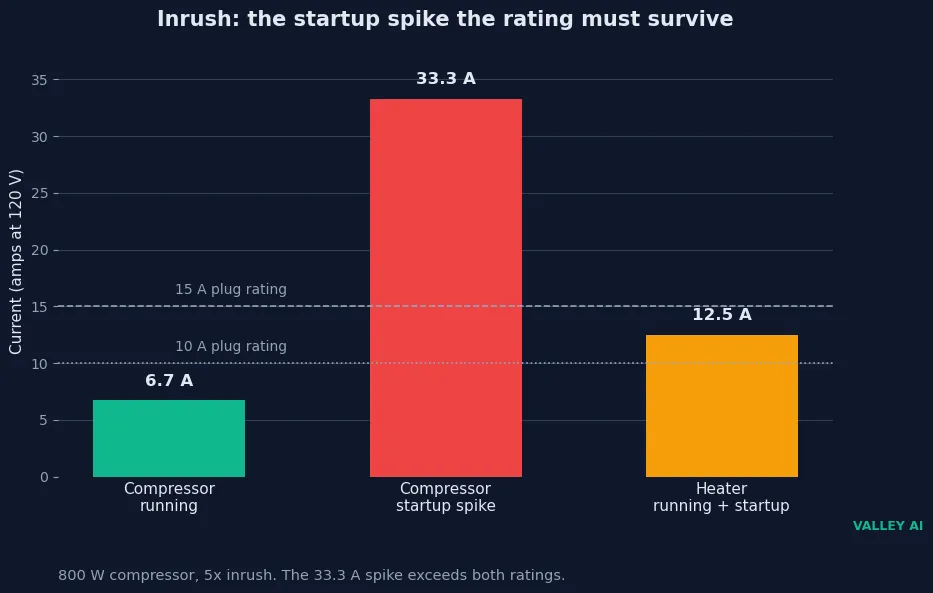
Running watts hide the harder number. Motors and compressors draw several times their running current for an instant at startup. I used five times the running current, a common rule of thumb, and worked an 800 watt compressor through it. Running, it draws 6.7 amps at 120 volts. At startup it draws 33.3 amps. That spike exceeds a 15 amp plug and a 10 amp plug alike. A resistive heater behaves differently: a 1,500 watt heater draws 12.5 amps at startup and while running, so it fits a 15 amp plug and exceeds a 10 amp plug.
Power return is the last check. After an outage, the plug may stay off, turn on, or restore its last state, as its setting says. The appliance has its own restart behaviour, separate from the plug. A lamp with a mechanical switch resumes. A television with a soft button stays off until someone presses the remote. The same split between plug and appliance repeats across the house: a video doorbell has its own restart behaviour apart from the power the socket gives it. Test the pair: cut the power at the breaker, restore it, and watch what comes back.
Does a smart plug work with any appliance? No. The appliance must resume on its own when power returns, and its instructions must allow unattended switching. Lamps, fans, and chargers with mechanical switches qualify. Televisions, computers, and anything with a soft power button stay off. Heaters, cookers, and pumps need explicit approval in their instructions, because a schedule can switch them on with nobody home.
The plug to buy for the socket you have
For a lamp, buy the simplest Wi-Fi plug on the shelf. No metering chip is needed to switch a light on at dusk. Pick a model whose button you can find in the dark.
One metering plug belongs on the strip that feeds the desk or the entertainment cluster. It switches 10 to 25 watts of standby at once, and a week of readings puts a number on what the cluster wastes. That single plug pays back in four to eleven months.
A heater or a motor load needs the 15 amp plug, never the 10 amp mini. Check the inrush against the rating, and check the appliance instructions for unattended use. When the load exceeds the rating, or the instructions stay silent, no plug belongs in that socket.
Buy one metering plug first and move it around the house for a week. The readings point at the sockets where a plug earns its place. Add plugs only where the standby is high enough standby to repay one, or where a schedule does real work.
Frequently asked questions
Can I plug a smart plug into another smart plug?
Do not plug one smart plug into another. Stacking adds a second relay and a second radio in series, and the inner plug’s rating still caps the load. The outer plug also loses its grip on the wall, which loosens the connection and builds heat. Plug one smart plug straight into the wall outlet, then plug the appliance into it.
Can I use a smart plug outside?
Only a model rated for outdoor use, usually IP44 or higher, belongs outside. An indoor plug has no sealing against rain or dust, and moisture across its terminals can short the circuit. Mount an outdoor plug with its socket facing down so water runs off instead of pooling around the pins.
How many smart plugs can one router handle?
Most basic home routers start to struggle past 20 to 30 connected devices in total, and every Wi-Fi plug counts as one device. A mesh system or a router built for smart homes usually handles 50 to 100 without trouble. Zigbee and Z-Wave plugs do not count against the Wi-Fi limit, because they run on their own mesh through a hub.
What happens to the schedule when the internet goes down?
It depends on where the schedule lives. A schedule stored on the plug itself, or in a local hub, keeps running with no internet at all. A schedule stored in the maker’s cloud stops until the connection returns. Check the model’s manual for where its schedules are stored before relying on one while travelling.
What is the difference between a smart plug and a smart switch?
A smart plug sits in a socket and controls one outlet, with no wiring to touch. A smart switch replaces the wall switch and controls the whole circuit behind it, so it switches every bulb on that circuit at once. The plug suits a lamp or a single appliance; the switch suits ceiling lights and rooms with several bulbs on one circuit.
Why does a smart plug keep going offline?
A weak signal is the usual cause. Technowifi’s troubleshooting guide puts the floor at -70 dBm: anything below that drops in and out. Moving the router closer, adding a mesh node nearby, or giving the plug a fixed address on the router often steadies it. If the signal reads strong, check for a firmware update, then check whether the maker’s cloud service is down.

Kaleem
Kaleem is a Computer Science graduate (Virtual University of Pakistan) and the founder and editor of Valley AI, where he publishes in-depth, tested guides on computer hardware, artificial intelligence, and how the internet works. Every guide is researched from primary sources, tested hands-on where possible, and updated when the facts change.