

A 64 GB card in a 1080p dash cam holds about 9 hours of driving. After that, the camera starts recording over the oldest clip. I worked that number out with a simulation of my own. The rule behind it is simple: the hours a card keeps equal its usable capacity divided by the recording bitrate.
The camera that holds the footage is a small computer behind the windshield. It turns light into video, video into files, and files into a loop that never stops while the car has power. Three mechanisms decide what survives: loop recording, the G-sensor, and parking mode.
From Windshield to Memory Card: the Recording Chain
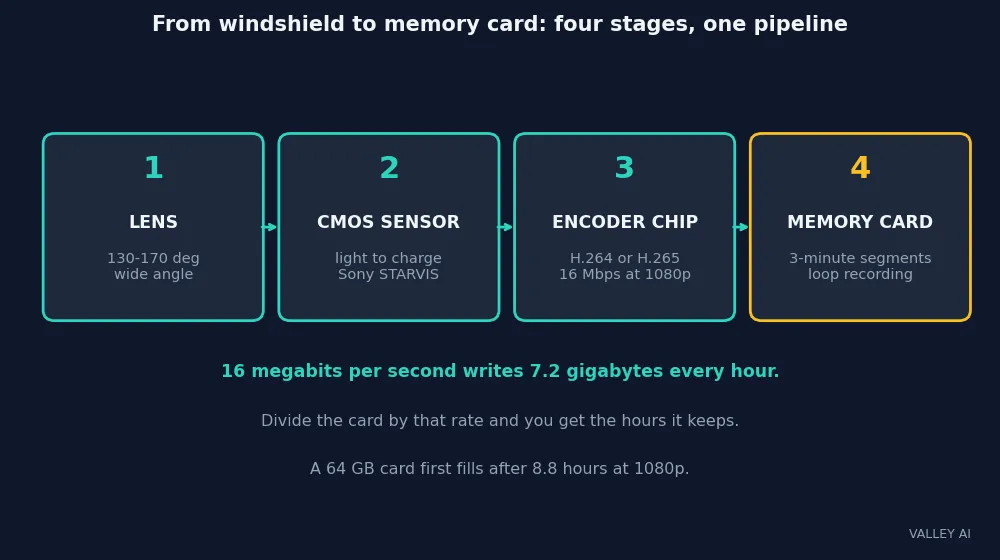
Light comes first. A wide-angle lens, usually 130 to 170 degrees, bends the road scene onto a CMOS image sensor. The sensor turns light into an electrical charge at each pixel, then into digital numbers. A common sensor family in dash cams is Sony STARVIS, built for low light.
The sensor is the same kind of CMOS unit a webcam uses, with a wider lens and a tougher housing. The same combination of camera, sensor, and encoder flies in a drone. The dash cam version adds one demand the others lack: it must keep recording for hours in a hot car without stopping.
Those numbers then go to a system-on-chip. It runs the image signal processor, which sets exposure, white balance, and noise reduction, and the video encoder, which squeezes the frames into H.264 or H.265. H.265 keeps the same quality at about half the bitrate of H.264, so it stretches a card further. The same two codecs squeeze video through a network in video streaming.
Bitrate is the number that decides storage. A 1080p camera recording at 16 megabits per second writes 7.2 gigabytes every hour. Divide the card by that rate and you get the hours it keeps. A 64 GB card at that rate first fills after 8.8 hours.
Three checks tell you the chain works. Read the bitrate off the camera’s own settings screen before buying a card. Watch a night clip for plates under streetlights: a good sensor keeps the letters readable, and a weak one smears them. Look at the file list after a week of driving. The timestamps should run without gaps.
Loop Recording, Worked With Real Numbers
Loop recording is the mechanism that lets a camera run forever on a finite card. The camera saves video in short segments, usually 1 to 3 minutes long. When the card fills, the camera deletes the oldest ordinary segment and writes a new one in its place. The loop never stops while the car has power.
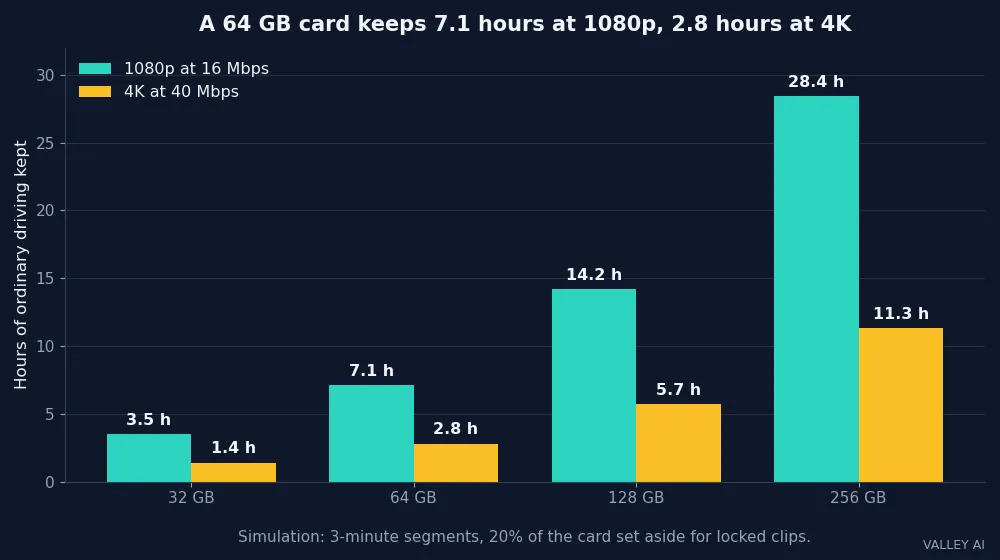
The rule fits on one line. Hours kept equal usable capacity divided by bitrate. When I simulated the loop, the inputs were a 64 GB card, 3-minute segments, 16 megabits per second, and a locked partition of 20 percent.
| Card | 1080p at 16 Mbps, hours kept | 4K at 40 Mbps, hours kept |
|---|---|---|
| 32 GB | 3.5 | 1.4 |
| 64 GB | 7.1 | 2.8 |
| 128 GB | 14.2 | 5.7 |
| 256 GB | 28.4 | 11.3 |
Each segment at 1080p holds 360 megabytes, and at 4K it holds 900. A 64 GB card keeps 142 ordinary segments at 1080p before the loop turns over. The locked partition takes its share first: 20 percent of the card sits aside for event clips, so the loop runs on the other 80 percent. Without that partition, the card would keep 8.8 hours.
Read the model for what it is. The bitrate, the segment length, and the locked share are chosen inputs. They are not readings from one camera. Real cameras vary bitrate with the scene, so a quiet country road compresses smaller than a busy city street at night. The simulation proves the retention rule and the overwrite timing. It says nothing about any one camera’s exact retention.
The numbers land close to the figures makers publish. Yuaoheng lists about 6 gigabytes per hour for 1080p, which is 13.3 megabits per second, and says a 64 GB card holds roughly 10 hours. At 13.3 megabits per second the simulation gives a first fill after 10.7 hours, and 8.6 hours of ordinary footage with the locked share set aside. The two figures agree once the bitrate is named.
How long before the camera records over an old clip? About 7.1 hours once the card is full and looping. On an empty 64 GB card the first overwrite comes after about 9 hours. Either way, a clip from the morning drive is gone by the evening commute. Copy it the same day.
Flash memory carries a wear budget of its own. The same budget shapes a USB flash drive, which is why a high-endurance card matters for a camera that writes all day.
The G-Sensor: How the Camera Knows an Impact Happened
The G-sensor is a 3-axis MEMS accelerometer, the same kind of sensor that counts steps in a smartwatch. It measures acceleration forward and back, side to side, and up and down. Under normal driving it reads close to 1g downward, which is gravity, with small deviations as the car accelerates, brakes, and turns.
When the reading jumps past the set threshold, the camera locks the current segment and the ones beside it. Locked files sit in a partition the loop cannot touch, typically 10 to 30 percent of the card. They stay there until deleted by hand, or until the locked partition itself fills and the oldest locked file gives way.
| Setting | What it locks | What it misses |
|---|---|---|
| Low | Hard impacts only | A low-speed bump can pass unnoticed |
| Medium | Most collisions, at about 2G | Some potholes on rough roads |
| High | Every jolt | Nothing, and the locked partition fills fast |
The locked window runs wider than the impact. Most cameras save about 10 seconds before the trigger and up to a minute after, so the clip shows what led into the event. The exact window varies by model.
Sensitivity is a setting you choose, and the right value depends on the roads you drive. Start on medium. If a week of driving locks more than a few clips, drop it a notch. If a bump you felt never locked a clip, raise it. The right setting is the one that locks real events and almost nothing else.
Count the locked files after a week of normal driving. Two or three means the setting fits the roads. Twenty means it is too high, and the locked partition is eating the card.
Parking Mode: Watching the Car While the Engine Is Off
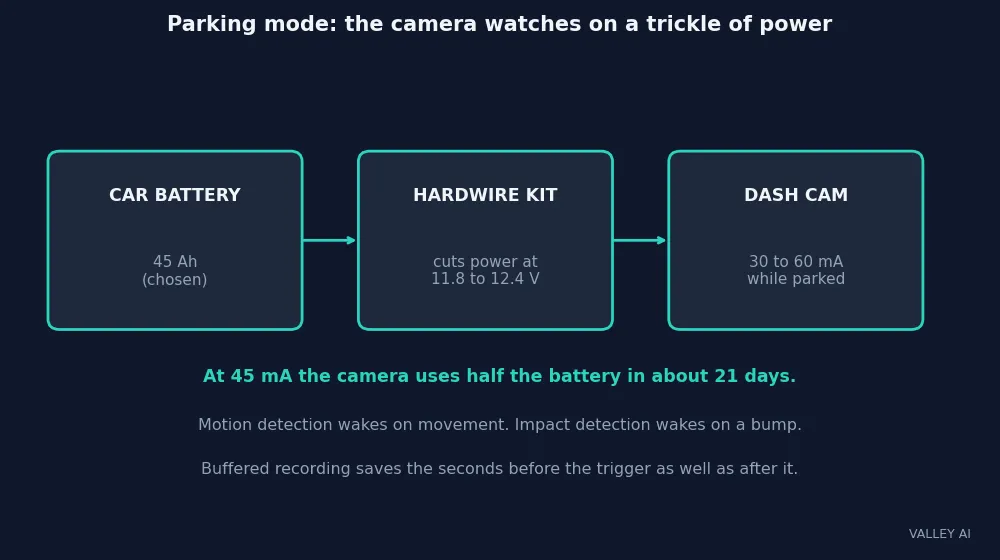
Parking mode keeps the camera watching after the ignition cuts. Two designs exist. Motion detection wakes the camera when the image changes, a person walking past or a car pulling in. Impact detection waits for the G-sensor and wakes on a bump. Motion catches more events and burns more power, because the sensor and processor stay partly awake. Impact uses less power and catches fewer events.
Buffered recording is the better version. The camera keeps a rolling buffer of the last few seconds and, when an event fires, saves the seconds before the trigger as well as after it. A basic system starts saving only after the trigger, so it misses the approach. If parking protection is the reason for the purchase, buffered recording is the feature to seek.
Power comes from a hardwire kit. It taps the fuse box on a constant-power circuit and a switched circuit, so the camera knows the engine stopped. The kit watches the battery voltage and cuts power when it falls below the set threshold, typically 11.8 to 12.4 volts, so the car still starts in the morning.
| Parking draw | Days before half the battery is used |
|---|---|
| 30 mA | 31 days |
| 45 mA | 21 days |
| 60 mA | 16 days |
The table is arithmetic on chosen inputs: a 45-amp-hour battery with half its charge usable, and the 30 to 60 milliamp draw makers report. A parked car rarely sits long enough for the drain to matter, and the voltage cutoff steps in first.
Will parking mode drain the car battery? Slowly, and the cutoff stops it before the car fails to start. A camera drawing 45 milliamps takes about three weeks to use half a 45-amp-hour battery. A car parked for a weekend loses a small fraction of its charge. A car left for a month needs the cutoff set high, or the camera unplugged.
What the Footage Can and Cannot Prove
Resolution is one number among several. A 4K camera with a weak sensor can record worse usable footage than a good 1080p camera with a large-pixel sensor. Sensor quality, lens quality, bitrate, and dynamic range decide whether a plate reads. Judge a camera by night sample footage. The resolution on the box comes second.
Night is the hard test. A dash cam carries no light of its own for the road ahead. It relies on headlights, streetlights, and ambient light. Wide dynamic range processing keeps detail in the bright headlights and the dark road at once. Infrared helps only for interior cameras, where it lights the cabin. Through the windshield it is no substitute for a good sensor.
Heat is the second test. A camera behind the windshield lives through wide temperature swings, and most units are rated for about -10 to 60 degrees Celsius. A supercapacitor holds enough charge to close the current file when power cuts, and it tolerates heat better than a lithium cell. A lithium backup battery degrades faster in a hot cabin. In hot climates the capacitor design is the safer pick.
Timestamps drift. The internal clock loses accuracy without a GPS fix, so the time on a clip can sit minutes off after weeks without a satellite lock. Time, speed, and location come from GPS, which adds them to each clip, and the speed stamp can be turned off where the camera allows it.
Wi-Fi on a dash cam usually means a local link to a phone app. It does not mean internet access. The driver opens the app, connects to the camera, and downloads a clip without removing the card. Cloud upload needs a cellular connection or a hotspot, and a subscription on most models. A driver who wants only accident evidence has little need for a monthly cloud plan.
Can a dash cam prove what happened in a crash? It records evidence. A clip can show the other driver ran the light, and it can show the owner speeding or following too close. The footage helps whoever the facts help. What it proves depends on what is in it.
Pick the Dash Cam That Matches Your Driving
Buy for the job the camera will do. A daily commuter needs a reliable front camera with a good sensor and a 128 GB high-endurance card, which keeps about 14 hours of 1080p driving. A driver who parks on the street needs buffered parking mode and a hardwire kit with a voltage cutoff.
Set the G-sensor to medium and check the footage after the first week. A camera that was not recording when something happened helps no one. A five-minute check every few months catches a dead card before an accident does.
Start with a 128 GB high-endurance card and a camera with buffered parking mode, and pick a supercapacitor design if the car sits in the sun. Those choices cover the failures that matter: a full card, a missed event, and a hot cabin.
Frequently asked questions
Do I need a rear camera too?
A front camera covers most incidents, since most collisions happen ahead. A rear camera adds a record of rear-end collisions and parking incidents at the back of the car. Taxi, rideshare, and fleet drivers gain the most from rear coverage. A private driver who parks on the street gains from it too. A front-only camera is enough for a driver who wants a record of the road ahead.
Can I use a normal microSD card instead of a high-endurance one?
It will work at first and fail sooner. A dash cam writes, erases, and rewrites video all day, which is a far heavier workload than storing photos. A standard card wears out in months under that load. A high-endurance card uses tougher NAND and better wear-levelling, so it lasts years in the same camera. The price gap is small against the cost of a card that dies unnoticed.
How often should I format the memory card?
Every few months, inside the camera itself. Formatting resets the file system cleanly and clears the fragmentation that builds up from constant overwriting. Format in the camera, so the camera lays out the file system the way its firmware expects. Back up any locked clips first, since formatting erases them too.
Do dash cams record audio?
Most do, through a small built-in microphone, and most let you switch it off in the settings. Audio of conversations inside the car is treated differently from video of a public road in many places, and consent rules vary. Switch audio off if you carry passengers regularly and do not want their conversations recorded.
Will a dash cam void my car warranty?
A camera plugged into the 12-volt outlet leaves the car untouched, so it changes nothing about the warranty. A hardwired install taps a fuse circuit, and a sloppy tap can cause problems of its own. Use a proper hardwire kit, or have the install done by a professional, and keep the receipt.

Kaleem
Kaleem is a Computer Science graduate (Virtual University of Pakistan) and the founder and editor of Valley AI, where he publishes in-depth, tested guides on computer hardware, artificial intelligence, and how the internet works. Every guide is researched from primary sources, tested hands-on where possible, and updated when the facts change.