
DNS Spoofing (and its primary delivery mechanism, Cache Poisoning) remains one of the most persistent threats to internet infrastructure. While most guides offer generic advice like use a VPN, this article targets network administrators and power users requiring concrete configuration strategies.
We move beyond definitions to implementation: hardening BIND9 and Windows Server, enabling DNSSEC, and configuring DNS over HTTPS (DoH) at the endpoint level.
Definition: DNS Spoofing vs. Cache Poisoning
While often used interchangeably, precise terminology is required for effective defense.
- DNS Spoofing: The broad category of attacks where a bad actor introduces forged DNS data into a resolver’s cache, causing the server to return an incorrect IP address for a domain.
- DNS Cache Poisoning: The specific mechanism used to achieve spoofing. Attackers exploit race conditions to insert a fake record into the recursive resolver’s cache before the legitimate authoritative server responds.
The Threat: Once poisoned, a recursive resolver will serve the malicious IP to every client that queries it until the Time-To-Live (TTL) expires. This creates a “man-in-the-middle” scenario where users believe they are on a banking site (because the URL is correct) but are actually sending credentials to a server controlled by the attacker.
The Mechanics: How the Attack Works
To prevent it, you must understand the mathematics behind the vulnerability.
The Birthday Paradox & UDP
DNS primarily relies on UDP port 53. It is connectionless and trusts that the response comes from the server the query was sent to. To validate a response, the resolver checks two main things:
- Source Port: Where the query originated.
- Transaction ID (TXID): A 16-bit number (0-65535) assigned to the query.
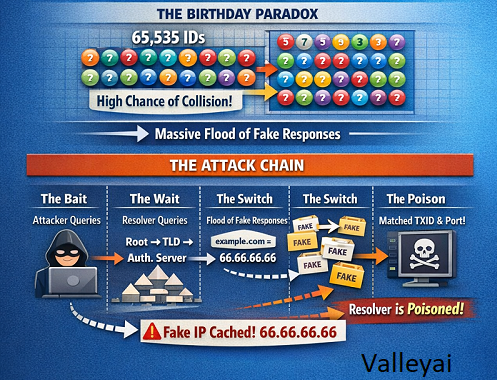
In a classic attack, the hacker floods the resolver with fake responses, guessing the TXID. Because the pool of IDs is relatively small (65,535), the birthday paradox dictates that the probability of a collision (a match) increases significantly with a high volume of guesses, specifically if the source port is static.
The Attack Chain
- The Bait: Attacker queries the victim resolver for
example.com. - The Wait: The resolver (not having it cached) queries the Root -> TLD -> Authoritative Nameserver.
- The Switch: While the resolver waits, the attacker floods it with thousands of forged responses claiming
example.comis at66.66.66.66(the attacker’s IP). - The Poison: If a forged packet matches the TXID and Port before the real response arrives, the resolver caches the lie.
Best Practices: Prevention Techniques & Configuration
This section provides the “How-To” configurations missing from standard overviews. We divide this into Network Administrators (Server-side) and End-Users (Client-side).
A. For Network Administrators (Server Hardening)
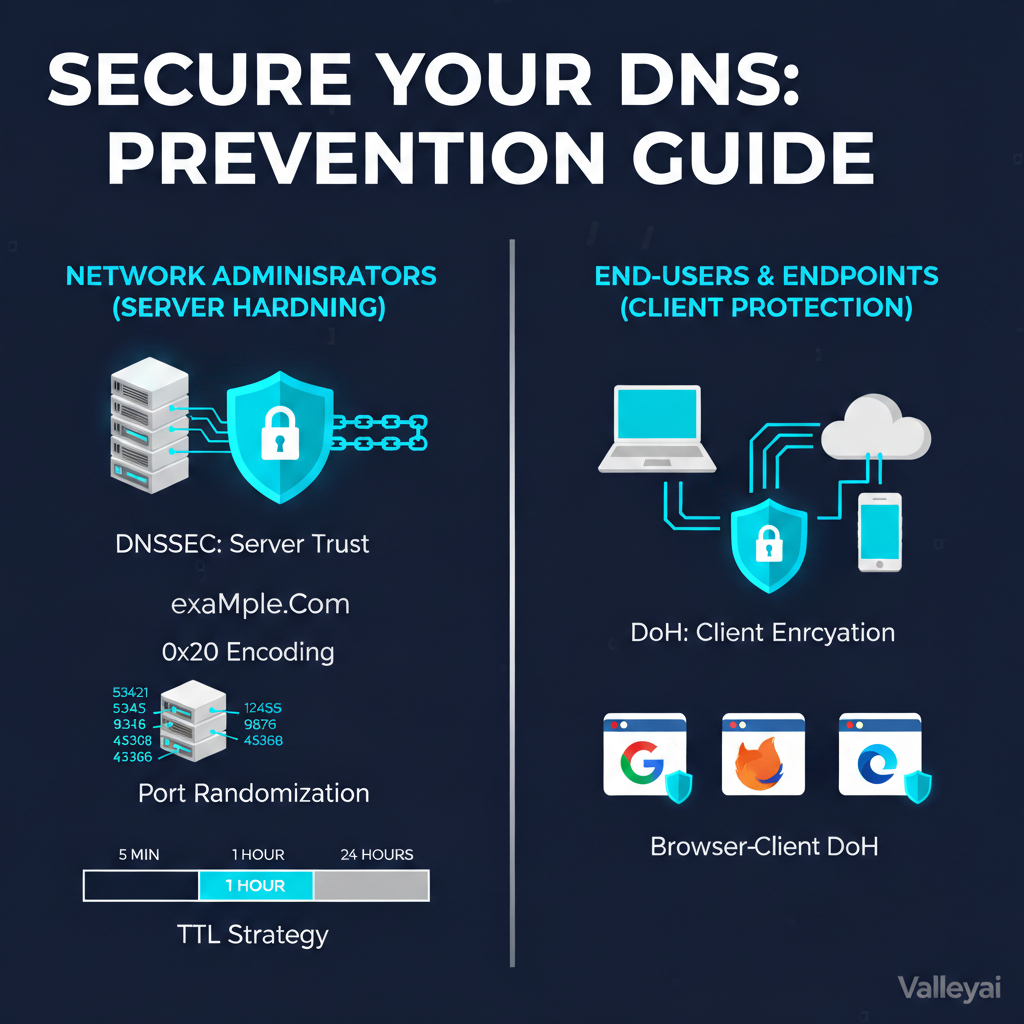
1. Implement DNSSEC (The Gold Standard)
DNS Security Extensions (DNSSEC) solve the trust issue by adding cryptographic signatures to DNS records. It prevents spoofing by validating the chain of trust from the root zone down to the domain.
Configuration for BIND9 (Linux)
Target: /etc/bind/named.conf.options
Modern BIND versions (9.16+) have streamlined this, but you must ensure validation is enforced.
options {
    directory "/var/cache/bind";

    // ENFORCE VALIDATION
    dnssec-validation auto;

    // RANDOMIZE PORTS (Critical for mitigation)
    // Prevents attackers from guessing the source port easily
    random-device "/dev/urandom";

    // LIMIT RECURSION
    // Only allow your internal network to query
    allow-recursion { 192.168.1.0/24; localhost; };

    // HIDE VERSION
    // Security by obscurity, but prevents targeted exploits
    version "unknown";
};
Configuration for Windows Server (PowerShell)
For Active Directory integrated DNS, use PowerShell to tighten cache security.
# 1. Enable Cache Locking
# Prevents overwriting cached records for 90% of their TTL
Set-DnsServerCache -LockingPercent 90

# 2. Randomize Socket Pool (UDP Port Randomization)
# Ensures the server uses a pool of 2500 ports instead of a predictable few
dnscmd /Config /SocketPoolSize 2500

# 3. Check for DNSSEC Readiness
Get-DnsServerDnsSecZoneSetting -ZoneName "yourdomain.local"
2. Configure 0x20 Encoding (Case Randomization)
This technique mixes upper and lower case letters in the query (e.g., WwW.ExAmPlE.cOm). If the response comes back all lowercase, it is likely forged.
- Unbound/CoreDNS: Often enabled by default or via
use-caps-for-id: yes. - Windows Server: Supported in newer versions via “Randomize Query Case”.
3. TTL Strategy
- Short TTLs (300s): Good for agility, but increases load and gives attackers more windows of opportunity to race the resolver.
- Long TTLs (86400s): Reduces load, but if you are poisoned, the bad data sticks for 24 hours.
- Recommendation: Use modest TTLs (1 hour / 3600s) for critical infrastructure records to balance load and recovery time.
B. For End-Users & Endpoints (Client Protection)
If the upstream network is compromised, endpoints must protect themselves by encrypting DNS traffic so it cannot be manipulated in transit.
1. Enable DNS over HTTPS (DoH) on Windows 11
DoH wraps DNS queries in HTTPS (Port 443) encryption. This bypasses local spoofing attempts on public Wi-Fi.
Step-by-Step:
- Go to Settings > Network & internet > Wi-Fi (or Ethernet).
- Select Hardware properties.
- Next to “DNS server assignment,” click Edit.
- Select Manual.
- Turn on IPv4.
- Enter a DoH-compatible provider (e.g., Cloudflare
1.1.1.1or Quad99.9.9.9). - Under Preferred DNS encryption, select Encrypted only (DNS over HTTPS).
2. Browser-Level Protection
Even if the OS isn’t configured, Chrome and Firefox can force DoH.
- Chrome: Settings > Privacy and security > Security > Use Secure DNS > Select “Cloudflare” or “Google (Public DNS)”.
Product Comparison: Commercial vs. Open Source
Is it better to buy a solution or configure it yourself?
| Feature | Open Source (BIND/Unbound) | Windows Server DNS | Managed Security (Cloudflare/Cisco Umbrella) |
|---|---|---|---|
| Cost | Free (Time-intensive) | Included in License | Subscription / High |
| Spoofing Defense | Requires manual config (DNSSEC, ACLs) | Moderate (Cache Locking, Socket Pools) | Highest (Anycast, AI-driven filtering) |
| Ease of Use | Low (CLI knowledge required) | Medium (GUI/PowerShell) | High (Dashboard based) |
| Best For | ISPs, Linux-heavy Infra | Active Directory Shops | Distributed Enterprises, Remote Workforce |
| DNSSEC Handling | Manual Key Signing/Rollover | Automated in AD | Fully Automated |
Architect’s Note: For enterprise edge protection, Managed Security (like Cisco Umbrella or Cloudflare Gateway) is superior because they filter threats before they reach your network. However, for internal Active Directory resolution, hardened Windows Server/BIND is mandatory.
Admin Checklist: Hardening Your Infrastructure
If you are responsible for a network, use this checklist to audit your current security posture against RFC 4033 and CIS Benchmarks.
Phase 1: Immediate Actions
- Verify Recursion Settings: Ensure your external-facing DNS servers do not allow recursion for the public internet (prevents amplification attacks and cache poisoning).
- Enable UDP Port Randomization: Verify your server is using a wide pool of source ports.
- Patch Management: Update BIND/Windows Server to the latest stable release to patch known CVEs.
Phase 2: Configuration & Encryption
- Deploy DNSSEC:
- Sign your authoritative zones.
- Enable validation on your recursive resolvers.
- Enable Cache Locking: (Windows) set to 90% or higher.
- Implement DNS over TLS (DoT) / DoH: Configure forwarders to use encrypted paths to upstream resolvers (e.g., sending traffic from your BIND server to Cloudflare via TLS).
Phase 3: Monitoring & Response
- Log Monitoring: Ingest DNS logs into your SIEM. Look for spikes in
NXDOMAINresponses or massive query volumes from single IPs (indicators of birthday attacks). - Incident Plan: Create a playbook for flushing the DNS cache.
- BIND:
rndc flush - Windows:
Clear-DnsServerCache
- BIND:
Conclusion
Preventing DNS spoofing, poisoning and hijacking is no longer about simply trusting the network. It requires a shift toward Zero Trust Architecture. By enforcing DNSSEC to validate the data’s origin and utilizing DoH/DoT to encrypt the transport, administrators can render traditional cache poisoning attacks mathematically impossible.
Start by auditing your authoritative nameservers for DNSSEC compliance today. A secure DNS infrastructure is the silent foundation of a secure enterprise.
References & Further Reading
- IETF RFC 4033: DNS Security Introduction and Requirements
- NIST SP 800-81-2: Secure Domain Name System (DNS) Deployment Guide
- ICANN: DNSSEC Guide for Registrants

Kaleem
My name is Kaleem and i am a computer science graduate with 5+ years of experience in Computer science, AI, tech, and web innovation. I founded ValleyAI.net to simplify AI, internet, and computer topics also focus on building useful utility tools. My clear, hands-on content is trusted by 5K+ monthly readers worldwide.