
To understand how bypass methods function, one must first understand the architecture of the restriction. GoGuardian is not a singular firewall; it is a sophisticated Unified Endpoint Management (UEM) tool that operates primarily through chrome extensions pushed via the Google admin console.
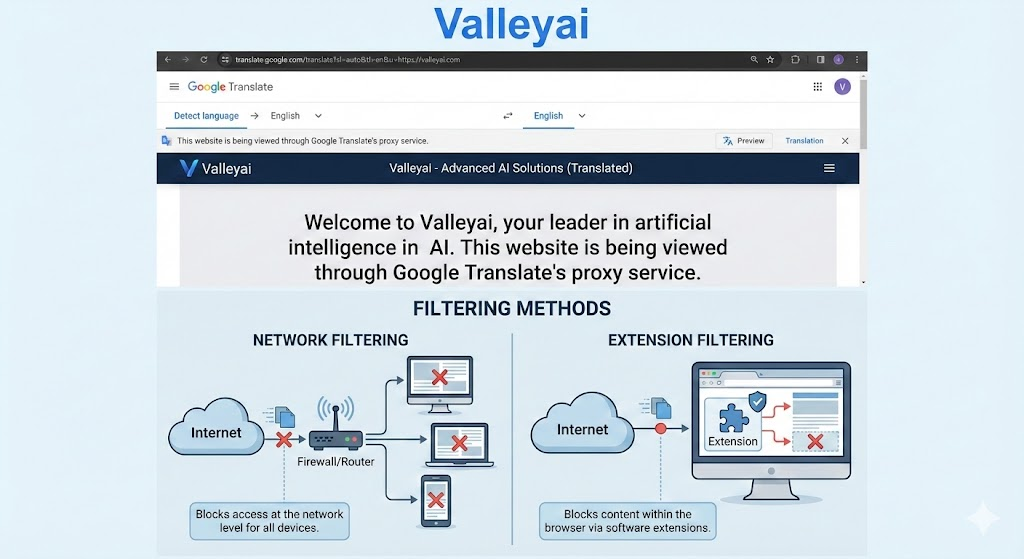
Unlike traditional network filters that block traffic at the router level, GoGuardian sits on the device itself (Client-Side). It relies on two primary components:
- The Extension Pair: Two extensions usually run in tandem. One handles the UI and user identification, while the other monitors active tabs, captures screen contents, and cross-references URLs against a blocklist.
- Point of Enrollment: When a Chromebook is first set up, it undergoes enterprise enrollment. This locks the devices serial number to the schools domain, granting the administrator root-level control over which extensions are forced-installed and which are blocked.
Why Standard Methods Fail
Many students attempt to use standard VPNs or Incognito mode. These fail because:
- Force-Installed Extensions: GoGuardian runs in the background regardless of user mode.
- Deep Packet Inspection (DPI): School networks often block VPN protocols (OpenVPN, WireGuard) at the firewall level.
While software restrictions are robust, they rely on the device routing traffic through the school’s managed Wi-Fi access points. GoGuardian filtering is most aggressive when combined with the schools firewall. Connecting the Chromebook to a personal Mobile Hotspot (via a smartphone) bypasses the schools firewall entirely. While the extension itself may still block specific URLs based on a locally stored blocklist, it removes the network-level Deep Packet Inspection (DPI) that blocks VPN connections, often allowing obfuscated traffic to pass through.
Read a detail guide: how to setup a vpn on a school computer
How To Bypass Goguardian?
To bypass GoGuardian restrictions, students typically use three methods:
- JavaScript Bookmarklets (like LTBEEF) that disable the Chrome extension specifically;
- Web Proxies (like Ultraviolet) that render content via a secondary server; or
- Google Translate, which routes blocked traffic through Google’s own unblocked domains.
1. Technical Breakdown of Bypass Vectors
Current bypass GoGuardian methods fall into three technical categories: Network tunneling, DOM Manipulation (Bookmarklets), and Enrollment Escapes. Below is a technical analysis of how these exploits function and their current compatibility status.
Network-Level: Web Proxies and DNS Changes
This is the oldest method, yet it remains relevant due to the difficulty of blocking every proxy on the internet.
- How it Works: Instead of connecting directly to
blocked-site.com, the client connects toproxy-site.com. The proxy server fetches the content and renders it within its own window. - The Technical Shift: Modern proxies (like Ultraviolet or Rammerhead) use Service Workers to intercept HTTP requests and rewrite headers. This prevents the GoGuardian extension from seeing the actual URL in the address bar because the browser technically remains on the proxy’s domain.
- DNS-Over-HTTPS (DoH): GoGuardian often relies on DNS filtering. By configuring a browser to use DoH (e.g., via Cloudflare
1.1.1.1), the DNS lookup is encrypted inside an HTTPS packet, preventing the local network from seeing which domain is being requested.
The Google Translate Vector
One of the most persistent glitch methods involves abusing legitimate Google tools. By navigating to Google Translate and pasting a blocked URL (e.g., valleyai.net) into the input box, the service generates a translated link. When clicked, this link loads the target website within a frame hosted on translate.googleusercontent.com. Since Google own domains are rarely blocked by educational allowlists, this often bypasses the URL filter entirely, although interactive elements (videos, logins) may break.
Browser-Level: JavaScript Bookmarklets (LTBEEF)
The most prominent vector in 2026 is the use of JavaScript Bookmarklets. The most famous iteration of this is technically referred to in security circles as LTBEEF (or similar variants involving the Ingram exploit).
- The Mechanism: Chrome extensions operate with specific permissions. However, the browsers bookmark bar allows users to execute JavaScript code within the context of the current page (or a special internal page).
- The Exploit: LTBEEF targets the Chrome Extension Management page. By injecting a script, it forces the browser to toggle the GoGuardian extension off.
- The user navigates to a specific
chrome://URL or a seemingly benign webpage. - A bookmarklet is clicked, executing a script payload.
- The payload utilizes a race condition or a UI manipulation to flip the “Enabled” switch on the managed extension, effectively killing the filter until the device creates a new policy sync.
- The user navigates to a specific
- Status: Google actively patches these UI vulnerabilities. While highly effective on ChromeOS versions 110-118, newer updates (v120+) have hardened the
chrome://extensionspage against script injection.
Note on Execution: To run these bookmarklets on restricted devices, users typically drag a javascript: code snippet to their bookmark bar. When a blocked page loads, clicking this bookmark executes the payload immediately. Modern variations like the Ingram build specifically target the chrome://extensions toggle switch, automating the off click before the managed policy can force it back on.
OS-Level: The SH1MMER and Mercury Era
SH1MMER (Shady Hacking 1nstrument Makes Machine Enrollment Retreat) was a landmark exploit discovered by the Mercury Workshop team.
- How it Worked: It utilized a modified RMA Shim a factory tool used by repair technicians to reset Chromebooks. By booting from a USB drive containing this modified shim, a user could manipulate the “stateful partition” of the drive.
- The Result: Users could unenroll the device entirely or inject a script that prevents the enterprise policy from re-applying after a wipe. This effectively turned a school-managed Chromebook into a personal device.
- The Patch: Google patched this by updating the BIOS/Firmware to reject older, unverified shims. On devices updated past version 112 (roughly), the “Point of Enrollment” verification was moved earlier in the boot chain, rendering standard SH1MMER payloads ineffective.
2. Comparative Analysis: Efficacy vs. Detection
Not all methods are created equal. The following table compares technical efficacy against the risk of administrative detection.
| Method | Technical Difficulty | Success Rate (2024) | Detection Risk | Stability |
|---|---|---|---|---|
| Web Proxies | Low | Low (URL Blocking) | High (Traffic Logs) | Unstable |
| Bookmarklets (Ingram/LTBEEF) | Medium | High (Version Dependent) | Medium (Policy Checks) | High |
| SH1MMER (RMA Shim) | High | Very Low (Patched) | High (Enrollment Logs) | Permanent |
| Task Manager Kill | Low | 0% (Patched) | N/A | None |
| Linux (Crostini) Container | High | Medium | Low | High |
The Task Manager Kill Fallacy
A common search query involves opening the Chrome Task Manager (Search + Esc) and ending process on GoGuardian.
- Why it fails: In the Google Admin Console, administrators check a box labeled Prevent users from ending processes. If this policy is active, the “End Process” button is greyed out for managed extensions.
3. Security Risks & Ethical Warning
While the technical mechanics of bypassing filters are fascinating from a cybersecurity perspective, the practical application carries significant risk.
The Script Kiddie Danger
Many students run unblocker scripts found on repositories like GitHub or Discord without code auditing.
- The Risk: A script promising to disable GoGuardian may also inject a keylogger or token grabber. You are essentially giving an unverified script
rootorextension-levelpermissions on a device logged into your personal and school accounts.
Administrative Visibility
Admins using GoGuardian Admin or the Google Admin Console have granular visibility.
- Traffic Anomalies: If a student uses a proxy, the admin sees a massive block of traffic going to a single, unrecognized IP address rather than distinct websites. This is a red flag.
- Extension Status: If an exploit like LTBEEF successfully disables the extension, the Admin Console reports the device as “Offline” or “Last Sync: [Date],” flagging the device for physical inspection.
Policy Violations
Bypassing security controls is not just a rule violation; it is a breach of the Acceptable Use Policy (AUP). In many jurisdictions, unauthorized modification of school hardware (like the SH1MMER exploit) can be classified as destruction of property or unauthorized access to a protected network (CFAA considerations in the US).
Conclusion
The battle between content filtering (GoGuardian) and bypass methods (LTBEEF, Proxies) is an ongoing cycle of patch management. As ChromeOS moves toward LaCrOS (decoupling the browser from the OS) and stricter Verified Boot processes, client-side exploits are becoming rarer, forcing users toward network-level solutions that are easily tracked.
For secure, unrestricted browsing, the only 100% effective and safe method is the use of a personal, unmanaged device on a non-school network.
Frequently Asked Questions
Does a VPN work on GoGuardian?
Most standard VPNs are blocked by Deep Packet Inspection (DPI) on school networks, but obfuscated servers or browser-based VPN extensions installed via side-loading may occasionally bypass restrictions.
Can I use Google Translate to unblock websites?
Yes, pasting a URL into Google Translate creates a proxied link routed through Google servers, often allowing you to view blocked content inside the translation frame.
Disclaimer: The following article is a technical analysis of network security and ChromeOS vulnerabilities. It is intended for educational purposes, system administrators, and cybersecurity researchers. Attempting to bypass school security protocols violates Acceptable Use Policies (AUP) and can lead to academic disciplinary action or loss of technology privileges.

Kaleem
My name is Kaleem and i am a computer science graduate with 5+ years of experience in Computer science, AI, tech, and web innovation. I founded ValleyAI.net to simplify AI, internet, and computer topics also focus on building useful utility tools. My clear, hands-on content is trusted by 5K+ monthly readers worldwide.