
Change happens all the time, and in recent years, there have been a lot of changes in how videos are made. With many new tools and technologies out there, video agencies now do things differently than they did in the past.
Let’s take a look at how things used to be and how they are now, focusing on a tool that makes a big difference: the AI storyboard generator.
The decision rule is simple. Use an AI board when the script is locked and the client must approve shots before money is spent on a shoot. Keep hand-drawn boards when the board itself is the finished artwork a client is buying. The same applies when a scene depends on a look no model can hold steady across panels.
Then: Traditional Video Production Process
Pre-production Phase
Conceptualization of Video Ideas
In the traditional video production process, the journey kicks off with a good old brainstorming session. This entails the team jotting down ideas on paper, sticking colorful notes, or sketching concepts on a whiteboard. The aim is to collectively think about the message, style, and overall concept that the video will convey to its audience, merging all these ideas from the team into a cohesive vision.
Scriptwriting and Planning
Once the ideas are solidified, the next step is to create a script, traditionally written on paper or typed out using a typewriter. This script serves as the blueprint for the video, outlining the dialogue, scenes, and essential details. Planning extends beyond the creative aspects to organizing logistics, such as locations, props, and the overall schedule for shooting.
Storyboarding Process
Manual creation of storyboards
Storyboards act as a visual roadmap for the video. Traditionally, these storyboards are created by hand, with artists sketching out each scene using simple tools like pen and paper. These sketches provide a sequential representation of how the video will unfold, helping everyone involved in production understand the director’s vision.
Collaboration among team members in visualizing the narrative
The creation of storyboards is a collaborative effort. Team members, including directors, cinematographers, and producers, work together to visualize the narrative. This collaborative process ensures that everyone is on the same page regarding how the video will look and feel, promoting a unified vision.
Challenges in Traditional Storyboarding
- Time-Consuming Nature of Manual Storyboarding
One significant challenge in traditional storyboarding lies in its time-consuming nature. Creating storyboards manually requires artists to meticulously sketch out each frame, which can be a slow and labor-intensive process. As a result, this can extend the overall timeline of the video production, delaying the project’s completion.
- Resource-Intensive Processes and Associated Costs
Traditional storyboarding methods often demand a considerable amount of resources, both in terms of skilled personnel and physical materials. Hiring skilled artists to manually create storyboards can be costly, and the need for materials such as paper, pens, and drawing tools contributes to additional expenses. These resource-intensive processes can strain a project’s budget.
- Potential for Creative Limitations Due to the Manual Nature of the Process
The manual nature of traditional storyboarding might introduce limitations to the creative process. Artists are bound by the constraints of their tools, and revisions or modifications to the storyboard can be cumbersome. This limitation may hinder the exploration of alternative creative ideas, potentially leading to a less dynamic or innovative final product.
Now: Transition to AI Storyboard Generators
In today’s fast-paced video production industry, agencies face constant change and high expectations. The industry’s dynamic nature means trends and preferences shift swiftly, requiring adaptability. With clients seeking speedy deliveries without compromising quality, agencies feel the increasing demand for quicker turnarounds. To stay competitive, embracing technological advancements becomes a necessity.
This is not just about keeping up but about thriving in an environment where staying ahead means meeting the twin demands of speed and quality, making technological evolution an essential aspect of agency survival and success.
With this, many video agencies are adapting to the AI world by utilizing various AI tools, especially AI storyboard generators. Here’s why:
Benefits of AI Storyboard Generators
- Efficiency Boost: AI speeds up making storyboards, saving time. For example, an AI storyboard generator can quickly analyze video ideas and create visuals. This helps video agencies meet deadlines and have more time for other important parts of the project.
- Cost-Effectiveness: AI storyboard generators cut down on manual work, saving money for agencies. An agency that usually hires artists to draw boards pays for drawing time on every panel. With AI, that drawing time becomes review time, and the saved budget can go to better equipment or to other roles on the job.
- Enhanced Creativity: AI brings new ideas, making storyboarding more creative. A generator fed with a client brief returns several visual directions for the same scene, including angles a team working from one sketch might not try. This teamwork boosts creativity, giving different viewpoints that may not come up with only manual work.
- Consistency: AI ensures that all storyboards maintain a uniform look. For instance, when an AI storyboard generator is utilized for a series of videos, it ensures that everything looks similar, especially characters in every frame. This aids in brand consistency, making all the videos easily recognizable. It strengthens the videos and builds a clear brand image.
Limitations of AI Storyboard Generators
- Dependence on Data Quality: The quality of AI-generated storyboards relies on the information it gets. If the input data isn’t good, the AI might not create the best storyboards. For example, if the details provided are unclear, the generated storyboards may not accurately represent the intended vision.
- Balancing Automation: Finding the right mix between letting AI do its job and keeping a touch of human creativity can be tricky. A board left fully to automation can miss the personal touch and specific ideas humans bring. Striking the right balance ensures the final product is both efficient and creatively rich.
- Initial Learning Curve: Getting used to using AI tools might take some time for agencies. For instance, when a video agency starts using AI storyboard generators, there could be a learning curve. Teams may need time to figure out how to make the most of the tool and integrate it effectively into their workflow. This initial phase of learning is essential for long-term success.
5 Tips for a Smooth Transition from Traditional to AI Storyboarding
- Invest in Training
Make sure your team is familiar with AI tools and workflows by providing hands-on training. Invest in workshops to train your artists on using an AI storyboard generator in their creative process.
- Combine AI with Human Input
Encourage collaboration between AI-generated storyboards and your team’s creative ideas to maintain a human touch. In practical terms, your video director might work with an AI storyboard generator to create the initial draft, and the creative team add personal touches to align with the brand’s style and the director’s vision.
- Quality Data Input
Ensure the data provided for AI storyboarding is clear and accurate, as better input results in improved outcomes. Gather detailed briefs from clients before using an AI storyboard generator. This provides clear information on desired scenes, moods, and styles for more accurate storyboards.
- Gradual Implementation
Start with small projects to gradually integrate AI into your workflow, allowing your team to adapt to the tool. For example, your video production team might introduce an AI storyboard generator on a short promotional video project, helping the team understand the tool’s dynamics without overwhelming them with a complex production.
- Feedback Loop
Establish a system for continuous improvement by gathering feedback on AI-generated storyboards and using it to enhance future projects. After using an AI storyboard generator for a series of videos, the team can gather feedback from directors and producers, using it to fine-tune the AI’s output for ongoing improvement and adaptation.
How a generator turns a script into panels
A generator does four jobs in order. It reads the script and cuts it into scenes at story beats or topic shifts. It writes a panel prompt for each scene: the shot, the camera angle, the action, and the style. A text-to-image model renders one panel per prompt. The panels are assembled in order with the shot list beside them, ready for review.
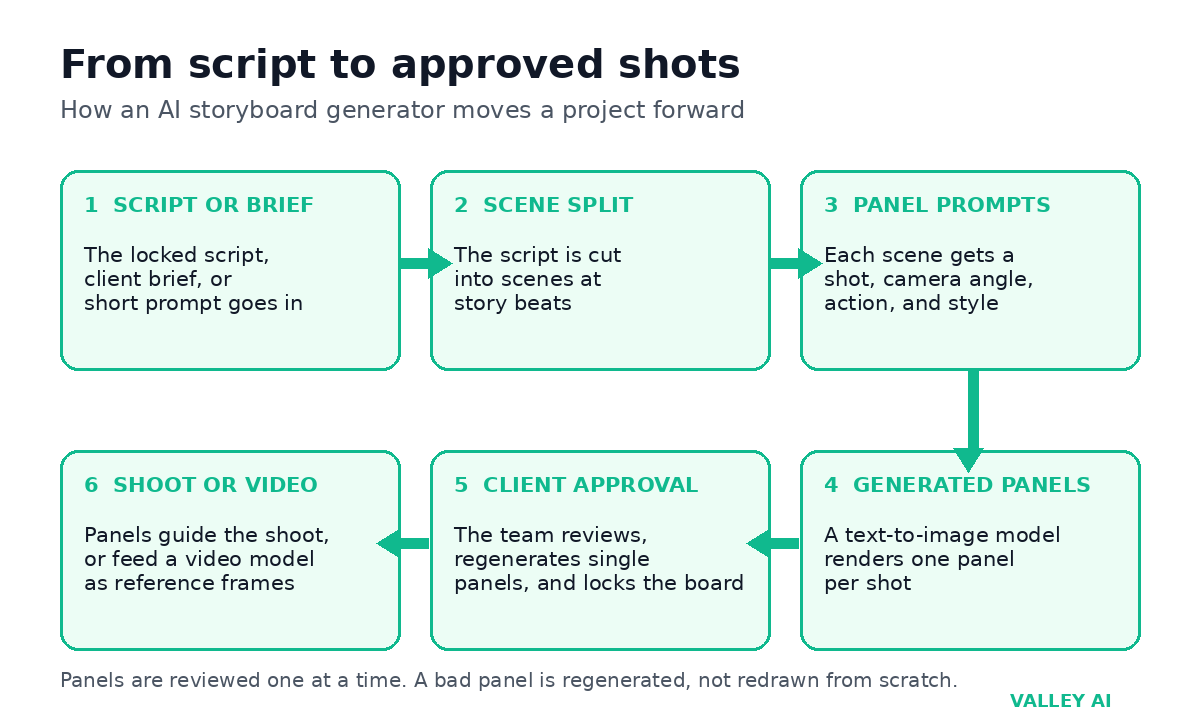
The models behind a generator are text-to-image systems, a branch of AI systems that turn text into images. Guides from Biteable and OpenArt describe the same sequence: script analysis, scene split, visual mapping, then an editable timeline where panels can be reordered and retimed.
Two locks decide whether a board holds together. A style lock fixes one visual style before the full board is generated, so panels do not drift from sketch to photograph halfway through. A character reference saves one face and identity and reuses it in every panel. Test both before committing to a full board: generate the same character in three different panels and compare the face, clothing, and setting. Drift in that small test predicts drift across a 24-panel board.
What does the generator actually generate? It generates still panels. Each panel is a framed shot with a camera angle and an action note. Motion comes later, either on a shoot that follows the board or from a video model that animates an approved panel.
Which kind of tool fits which job
Tools split into four jobs. Pick by the handoff you need after generation. Sample panels flatter every tool.
| Tool type | Starts from | Handoff | Tradeoff |
|---|---|---|---|
| Script-to-board generator | Script or brief | Numbered panels, shot list | Character drift on long boards without references |
| Board plus client approval | Script, brief, or blank board | PDF, slides, or animatic with frame comments | Generation is only part of the job; the approval workflow is the product |
| Board-to-video suite | Concept or script | Animatic, then video clips from approved panels | Video quality still depends on panel quality |
| General image model, prompted panel by panel | One prompt per shot | Single images to assemble by hand | Full control, but no sequence logic or shared references |
A 24-panel board, counted in hours
Take a 24-panel board for a short promotional video. Counted by hand, one illustrator drawing each panel at 45 minutes per panel needs 18 hours of drawing time. That figure excludes revisions: every changed shot goes back to the same illustrator.
Counted with a generator, the same board needs about 30 minutes to draft all 24 panels, 2 hours of review at 5 minutes per panel, and 1 hour to regenerate 6 panels that missed the brief at 10 minutes each. Total team time comes to about 3.5 hours. The saving is real, but it moves work rather than removing it: drawing hours become review hours, and review hours grow with panel count.
Does a faster board mean a cheaper video? No. The board is pre-production only. Shoot days, talent, locations, and editing still cost what they cost. A faster board saves pre-production time and prevents reshoots caused by unapproved shots; it does not shrink the production budget itself.
Where AI boards break
Character drift is the first break. Without a saved character reference, the same person returns with a different face, different clothing, or a different age in later panels. Long boards expose it worst, because each panel is generated on its own and nothing in a bare prompt remembers the panel before it.
Panel text is the second break. Words inside a panel, on signs, screens, or labels, often arrive misspelled or garbled. Check every word in a panel before it reaches a client, and keep on-screen text in the shot list rather than baked into the image where a fix means regenerating the panel.
Training provenance is the third break, and it is a question to put to the vendor before client work. Ask what the model was trained on and whether its output is cleared for commercial use. Tools trained on licensed or public-domain material answer that question directly; tools that cannot answer it leave the agency carrying the risk on a client brand.
Why do characters change face between panels? Because each panel is generated separately from its own prompt. Nothing carries the face forward unless the tool stores a character reference and applies it to every panel. Lock the reference before generating the board, and recheck it whenever a new character enters the story.
Video Creation Process with AI Storyboard Generator
Incorporating an AI storyboard generator into the video creation process changes where the work goes: drawing time becomes review time, while traditional methods get faster. The steps below show how the process unfolds with a generator in it:
- Gathering Project Information
Before you get creative, gather all the info about the project, whether it’s in-house or for a client. This sets the foundation, making sure everyone understands the project’s goals, audience, and message.
- Idea and Conceptualization
Team up for brainstorming and concept development. Generators can suggest concepts based on the project brief, giving the team starting directions to react to rather than a blank page.
- Scriptwriting and Planning
The writer takes charge of putting ideas into words. AI can also help by suggesting or assisting in writing initial scripts. It’s a team effort, making sure the script matches the visual concepts with a mix of human creativity and AI support.
- AI Storyboard Generation
At generation time, the model renders panels from the panel prompts, cutting down on manual effort. Panels can be regenerated one at a time until the board matches the shot list.
- Collaboration and Creative Enhancement
The team discusses the AI-generated storyboards. This teamwork allows for tweaks and changes, bringing in human creativity to make the visuals even better. It’s about refining the storyboards to match the team’s vision.
- Iterative Refinement
Keep making things better based on team feedback. It’s a loop of giving input and making adjustments to ensure the visuals match the creative vision for the video.
- Finalization
Before guiding the rest of the video production, the storyboards go through a finalization phase. Teams ensure everything fits together well, creating a guide for shooting, editing, and other production steps. This final touch guarantees consistency and efficiency throughout the video creation process.
Conclusion
Start with one short project. A full campaign can wait until the workflow proves itself on the small job. Run the script through a generator, lock one visual style and one character reference first, and put the board in front of the client before any shoot is booked. If the board survives that review with only single-panel fixes, the workflow has earned a larger job.
The same shift is playing out across how AI changes content creation: scripts and briefs become the raw material, and the human job moves from producing every frame to directing and approving them. Measure the next board the same way, and keep the tool only while review stays shorter than drawing would have been.
Frequently asked questions
Can an AI board replace a storyboard artist on a client job?
For approval boards and pre-visualization, yes in most agency jobs: the artist’s role moves to directing, locking style and character references, and fixing panels. For boards sold as finished illustration, no: the client is buying the artist’s hand, and a generated panel is not that product.
Who owns the panels a generator produces?
Ownership depends on the tool’s terms and on the law where the work is used, so read the tool’s terms before client work. As a working rule, treat generated panels as agency production material covered by the client contract, and keep the prompts, references, and approval record with the project file.
Do AI boards work for live-action shoots, or only for AI video?
They work for both. On a live-action shoot the board is the shot plan the crew follows. In an AI video pipeline the approved panel becomes the reference frame the video model animates. The difference is what happens after approval, not how the board is made.
What file should a client approve?
Approve a numbered PDF or an animatic with the shot list beside each panel. A folder of loose images gives the client no single frame to point at per comment, while the shot list records the camera angle and action each panel promises.
How many panels does a 60-second ad need?
Count shots. A 60-second ad with one shot per scene change usually needs 12 to 20 panels. A fast-cut ad with a new shot every 2 seconds needs closer to 30. Write the shot list first; the panel count follows from it.

Kaleem
Kaleem is a Computer Science graduate (Virtual University of Pakistan) and the founder and editor of Valley AI, where he publishes in-depth, tested guides on computer hardware, artificial intelligence, and how the internet works. Every guide is researched from primary sources, tested hands-on where possible, and updated when the facts change.