
If your mouse has stopped working, or you are looking to optimize your workflow by keeping your hands on the home row, you might be asking: “How do I trigger RMB on a keyboard?”
In technical documentation and gaming settings, RMB stands for Right Mouse Button. While this is a mouse function, operating systems like Windows and macOS allow you to trigger this context menu entirely through hardware keys and shortcuts.
This guide moves beyond generic forum answers. We will cover how to find the physical Menu key across different layouts (including 60% mechanical boards), how to simulate RMB on Mac, and how gamers can remap this function if their mouse hardware fails.
1. What Does RMB Mean in a Keyboard Context?
RMB is the standard acronym for the Right Mouse Button.
When you click the right button on a mouse, it generates a signal that the operating system interprets as a request to open a Context Menu (a dropdown list of options like Copy, Paste, Properties, or Inspect).
However, under the HID (Human Interface Device) protocol, keyboards can send this exact same signal. This is done via two primary methods:
- The Physical Menu Key: A dedicated key hard-coded (Scan Code
0x5D) to send the context menu signal. - Keyboard Shortcuts: Combinations like
Shift + F10that software interprets as a right-click command.
2. Hardware Mapping: Locating the Context Menu Key
Many users have a dedicated RMB key but don’t recognize it because the icon varies by manufacturer. The key is formally known as the Application Key or Menu Key.
The Full-Size Layout (ANSI & ISO)
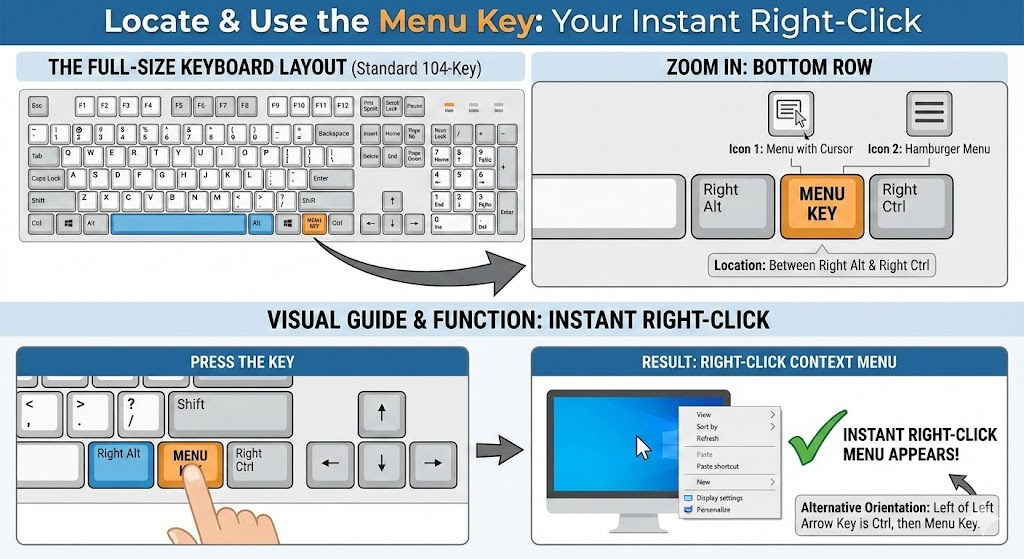
On a standard 104-key keyboard (like Logitech or Dell basics), the Menu key is located on the bottom row, to the right of the Spacebar.
- Location: Between the Right Alt and Right Ctrl keys.
- The Icon: It typically looks like a rectangular menu with a mouse cursor hovering over it, or sometimes just three horizontal lines (the “hamburger” menu icon).
Visual Guide:
Imagine looking at your arrow keys. Immediately to the left of the Left Arrow is usuallyCtrl. To the left of that is theMenu Key. Pressing this once creates an instant right-click at your current cursor location.
Laptop Layouts (The Missing Key)
To save space, many modern laptops (including Dell XPS and HP Spectre) omit the dedicated Menu key.
- Where is it? It is often merged with the Right Ctrl key. You may need to press
Fn + Right Ctrl. - The Alternative: If your laptop lacks the key entirely, you must rely on the
Shift + F10shortcut (detailed below).
60% and Mechanical Keyboards
On enthusiast mechanical keyboards (60%, 65%, or TKL) used for gaming, the Menu key is often the first to be sacrificed or buried in a “layer.”
- Default Layering: Often triggered by holding the
Fnkey + a letter key (check your manual, butFn + M,Fn + Right Ctrl, orFn + /are common). - Programmable Firmware: If you use a keyboard running QMK/VIA Firmware, you can assign the Menu key to any physical switch you want using the VIA configurator software.
3. How-to Guide: Triggering RMB (Windows & Mac)
If you do not have a dedicated Menu key, or if you are on a Mac, you must use shortcuts.
Method A: The Universal Windows Shortcut (Shift + F10)
This is the gold standard for Microsoft Windows 10 and 11. It works in almost every application, including Excel, Word, and File Explorer.
- Highlight the item (file, cell, or folder) you want to right-click.
- Hold down Shift.
- Press F10.
- The context menu will appear at the top-left corner of your selection.
Tech Tip: On some laptops where the F-keys act as media keys (volume/brightness) by default, you may need to press
Shift + Fn + F10.
Method B: The macOS Solution
Apple keyboards do not have a Menu key or a Context Menu key. macOS relies on “Secondary Click” protocols.
1. Keyboard Only (Accessibility Feature)
You can enable Mouse Keys to use the numeric keypad as a mouse, but for a quick shortcut:
- Control + Click: Hold the
Controlkey (not Command) and click the primary mouse button (or trackpad). This is the hard-coded Mac equivalent of RMB.
2. Trackpad Alternatives (MacBook)
If your physical click mechanism is broken, enable Two-Finger Tap:
- Go to System Settings > Trackpad.
- Check Secondary Click.
- Set it to Click or Tap with Two Fingers.
Summary Table: RMB Shortcuts by OS
| Operating System | Primary Hardware Key | Universal Shortcut | Laptop Variation |
|---|---|---|---|
| Windows 11 | Menu Key (bottom right) | Shift + F10 | Shift + Fn + F10 |
| macOS | None | Control + Left Click | Two-finger Tap |
| Linux (Ubuntu/KDE) | Menu Key | Shift + F10 | Shift + F10 |
| Chromebook | None | Alt + Click | Two-finger Tap |
4. Contextual Usage: Gaming with a Broken Mouse
A common reason users search for RMB on keyboard is a hardware failure during gaming. If your mouse right-click breaks mid-game, you cannot aim down sights (ADS) or access inventory menus in RTS games.
Here is how to remap RMB to a keyboard key for gaming purposes.
Option 1: In-Game Remapping (Easiest)
Most modern FPS and RPG games allow you to bind Secondary Fire or Aim to a keyboard key.
- Go to: Settings > Key Bindings / Controls.
- Locate: Aim, Zoom, or Secondary Fire.
- Change to: A thumb-accessible key, such as
Left Alt,Spacebar(if jump is moved), orC.
Option 2: AutoHotkey (For Games Without Remapping)
If a game hard-codes the right-click and doesn’t let you change it, you can use AutoHotkey, a free scripting tool for Windows, to trick the computer into thinking a keyboard key is the mouse button.
The Script:
- Install AutoHotkey.
- Right-click your desktop > New > AutoHotkey Script.
- Paste the following code to turn your Left Alt key into a Right Mouse Button:
LAlt::RButton- Save and Run the script. Now, pressing Left Alt sends a “Right Click” signal to the game.
5. Troubleshooting: Why Won’t the Menu Key Work?
If you are pressing the Menu key or Shift + F10 and nothing happens, check these technical blockers.
1. The Fn Lock is Active
On laptops, F10 might currently be set to Increase Brightness.
- Fix: Look for an
Fn Lockkey (usuallyEsc) and pressFn + Escto toggle standard Function keys back on.
2. Focus Issues
The keyboard simulates a right-click at the location of the cursor/selection, not the location of the mouse pointer.
- Fix: Ensure you have actually selected a file or cell using the arrow keys before pressing the shortcut. If nothing is selected, the operating system doesn’t know what to right-click.
3. Driver Conflicts (HID)
Occasionally, gaming keyboard software (like Logitech G-Hub or Razer Synapse) can overwrite the Menu key functionality to “Game Mode” (which disables the Windows key and Menu key to prevent accidental tab-outs).
- Fix: Open your keyboard software and ensure Game Mode or Win Lock is turned OFF.
4. Application Limitations
Some web apps (like Google Sheets) override browser context menus with their own.
- Fix: In environments like Google Sheets,
Shift + F10might open the browser menu, while the dedicated Menu Key opens the Sheets menu. Try both methods.
Key Takeaways
- RMB = Right Mouse Button.
- The Key: Look between Right Alt and Ctrl for the “Menu” icon.
- The Shortcut:
Shift + F10works on 99% of Windows machines. - The Mac: Use
Control + Click. - The Gamer Fix: Use AutoHotkey to remap
LAlt::RButtonif your mouse switch fails.
Read also: LMB on keyboard
Disclaimer: This article references the HID usage tables defined by USB-IF and standard accessibility guidelines (WCAG 2.1). Hardware implementations may vary slightly by manufacturer.

Kaleem
My name is Kaleem and i am a computer science graduate with 5+ years of experience in Computer science, AI, tech, and web innovation. I founded ValleyAI.net to simplify AI, internet, and computer topics also focus on building useful utility tools. My clear, hands-on content is trusted by 5K+ monthly readers worldwide.