
HTTPS is the technology that provides secure access to a website. When a browser opens a site over HTTPS, the connection is encrypted with TLS. The site proves it holds the certificate for the domain in the address bar. Any change to the data in transit breaks the connection.
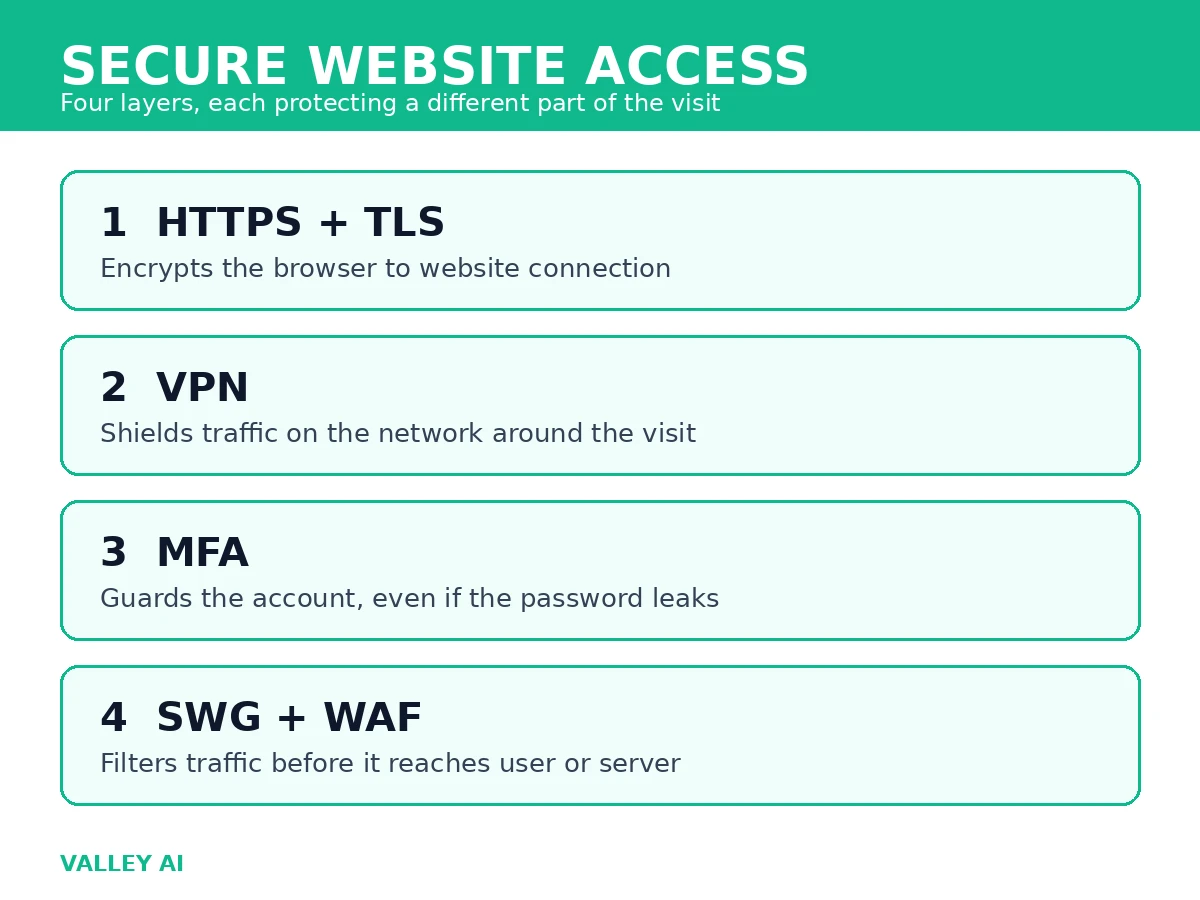
That one connection does not cover everything around it. A VPN protects the network path between a device and the internet. Multi-factor authentication protects the account after the connection is made. A secure web gateway and a web application firewall filter traffic before it reaches a user or a server. The rule for a reader is simple: HTTPS secures the website visit, and each other layer secures a different part of the trip.
What provides secure access to websites?
A website visit passes through four layers, plus a rule that keeps the first layer on. The table below names each layer, what it protects, and where its protection stops. The layers below cover the main types of technology used for secure access, and every later part of the article explains one row.
| Technology | What it protects | Where it stops |
|---|---|---|
| HTTPS with TLS | Data between browser and website, plus proof the server matches the domain | Data after it reaches the server; whether the site itself can be trusted |
| VPN | All traffic leaving a device, from the local network and the internet provider | The connection between the VPN server and the website still needs HTTPS |
| Multi-factor authentication | An account, even when its password leaks | A device already signed in, or a session token stolen after login |
| Secure web gateway and web application firewall | Traffic filtered against threat lists and attack patterns | A user willingly handing over credentials on a convincing fake page |
| HSTS | Future visits to a domain, forced onto HTTPS | The very first visit before the browser has seen the rule, unless the domain is preloaded |
How HTTPS and TLS protect a visit
HTTPS is HTTP carried inside TLS. TLS is the current encryption protocol for the web. Its live versions are TLS 1.2 and TLS 1.3. SSL was the predecessor of TLS. It is retired. Browsers no longer accept it. A site that still offers only SSL will fail to load securely. The difference between HTTP and HTTPS comes down to that TLS layer and everything it adds.
A TLS connection does three jobs at once. It keeps the contents private so nobody on the path can read passwords or card numbers. It detects tampering, so an altered page fails instead of loading changed. It checks identity. The server presents a certificate for the domain, issued by a certificate authority browsers trust. The browser verifies the certificate matches the domain and has not expired.
The handshake that sets this up takes a fraction of a second. The browser and server agree on a TLS version and a cipher. The server proves it holds the private key matching its certificate. Both sides derive session keys for the visit. From that point on, the traffic between them is encrypted with those session keys.
A certificate has a short life. Public certificates issued today last about a year at most, and many hosts renew automatically every 90 days through services such as Let’s Encrypt. An expired certificate produces a full-page browser warning, and the safe response is to stop and check the domain spelling before going further.
Check a site yourself in 30 seconds
Four checks settle whether a site visit is encrypted. First, the address starts with https:// and the browser shows a padlock beside it. Second, the domain spells the name you expect, character for character, since a certificate for a lookalike domain still shows a padlock. Third, opening the padlock or certificate details shows the issuing authority and the expiry date. Fourth, the page loads its scripts and images over HTTPS too. A page that mixes secure and plain HTTP content warns the browser and weakens the protection.
Does the padlock mean a site is trustworthy?
The padlock means the connection to that domain is encrypted and the certificate matches the domain. A scam site can hold a valid certificate for its own domain. The padlock says nothing about whether the people running the site can be trusted.
Do I need a VPN to visit an HTTPS site?
Visiting an HTTPS site is encrypted with or without a VPN. A VPN adds protection for the network around the visit. That matters on public Wi-Fi. It also matters for traffic from apps that do not encrypt on their own.
What a VPN adds, and what it does not
A VPN encrypts all traffic leaving a device and sends it through a VPN server before it reaches the wider internet. Anyone watching the local network sees encrypted traffic heading to the VPN server. That watcher may be the operator of a public Wi-Fi hotspot or the internet provider. Neither sees anything about the sites behind it. The VPN server assigns its own address to the traffic, so the destination sees the VPN server address rather than the device address. The complete guide to virtual private networks covers the architectures and protocols behind that tunnel in full.
Two limits matter. The VPN provider takes the place of the local network. It becomes the party that can see which sites are visited. Choosing a provider means trusting its logging policy. And the leg from the VPN server to the website still needs HTTPS: a VPN never turns a plain HTTP site into an encrypted one. VPN services differ most on that logging policy and on whether their apps include a kill switch.
Settings decide how much protection a VPN gives in practice. A kill switch stops all traffic if the VPN connection drops, so a device never silently falls back to an unprotected connection. The protocol matters too: modern protocols such as WireGuard and OpenVPN are the common choices, and older protocols with known weaknesses should be left off.
Does a VPN make an unsafe site safe?
A VPN hides the visit from the local network, and it cannot fix a site that mishandles data after it arrives. The site connection still needs HTTPS, and the account on it still needs a strong password plus a second factor.
Multi-factor authentication: the account layer
Multi-factor authentication asks for a second proof beyond the password before an account opens. The second proof usually comes from something the account holder has or is. It may be a code from an authenticator app, a prompt on a registered phone, a hardware security key, a fingerprint, or a passkey stored on the device. A leaked password alone then opens nothing, since the attacker still lacks the second proof.
Authenticator app codes and hardware keys resist phishing better than codes sent by text message. A text code can be intercepted or talked out of a holder. An app code lives only on the registered device. A hardware key checks the real domain before it responds. Passkeys go further. They replace the password with a cryptographic key pair tied to the device and the site. No password remains to leak.
The practical step is to turn the second factor on for email first. Email resets most other accounts, so an email account protected by a single password leaves every account behind it exposed.
Secure web gateways and web application firewalls
A secure web gateway sits between users and the web and filters traffic against policy and threat lists. It blocks known malicious domains, scans downloads, and enforces rules about which categories of sites a network allows. Companies use gateways to apply one set of rules to every device on the network, including devices whose owners would never configure filtering themselves. Filtering takes other forms too: search engines offer SafeSearch filtering for search results.
The web application firewall guards the other end: the server. It inspects requests arriving at a web application. It blocks patterns used in injection attacks and cross-site scripting. In those attacks, crafted input tries to run code or steal data through the application itself. A gateway filters what users reach; a firewall filters what reaches the application. The two are complementary, and neither replaces HTTPS or account protection.
DNS over HTTPS belongs in the same filtering picture. It encrypts DNS lookups, so the list of domains a device asks for is no longer readable on the local network. It hides the lookup, and it does not encrypt the website traffic itself, which still depends on HTTPS. What DNS does for every visit is resolve the domain name before any of these layers can act.
HSTS: the rule that keeps HTTPS on
HTTP Strict Transport Security is a header a site sends telling the browser to use HTTPS for that domain for a set period. After a browser has seen the header once, it upgrades any plain HTTP request to that domain before sending anything. That closes the gap where an attacker could intercept the first unencrypted request and downgrade the connection.
The header carries a lifetime in seconds. Sites raise it in stages: minutes while testing, then days, then a year once every subdomain is confirmed working over HTTPS. A domain can also join browser preload lists, which apply the rule from the very first visit. Preload is hard to reverse, so it belongs only on domains where every subdomain serves HTTPS.
Challenges in securing website access
Attackers change tactics as defenses improve. Phishing pages now carry valid certificates, so the padlock alone no longer separates a real login page from a copy. Credential stuffing replays passwords leaked from one breach against other sites. A unique password per site matters as much as any second factor. Application flaws keep appearing in the code behind sites, which is why gateways and firewalls filter traffic rather than trusting applications to be flawless. Knowing how to recognise a data breach matters here, since a breach is often the first sign that a reused password needs changing everywhere.
Older defenses also have limits a reader should know. A VPN cannot see inside HTTPS traffic to judge a site, and a gateway cannot judge a site a user reaches willingly with valid credentials. Security for a website visit is therefore layered: no single technology covers the connection, the network, the account, and the application at once. Internet safety habits sit on top of these layers, covering passwords, updates, and phishing awareness that no connection technology can supply.
Conclusion
For the next site you log in to, run the 30-second check. Confirm the second factor is on for the email account behind it. Leave the VPN for the networks you do not control. That order follows the layers in the table: the visit first, the account second, the network third.
Frequently Asked Questions
Can a website be secure without HTTPS?
A site without HTTPS sends everything readable on the network path, so logins and form entries on it are exposed regardless of any other protection the owner claims.
Why does a browser warn about a site with an expired certificate?
The warning means the browser cannot confirm the server still holds a current credential for the domain. The visit may be to the right server with a lapsed renewal, or to an impersonator, and the browser cannot tell the difference, so it stops.
Does a VPN hide browsing from the internet provider completely?
The provider sees encrypted traffic to the VPN server and not the sites behind it. The VPN provider itself can see the destinations, which is why its logging policy is part of the choice.
What should I do first if a site I use reports a breach?
Change that password, check whether the same password was reused anywhere else and change those too, and turn on a second factor on the affected account before signing in again.

Kaleem
Kaleem is a Computer Science graduate (Virtual University of Pakistan) and the founder and editor of Valley AI, where he publishes in-depth, tested guides on computer hardware, artificial intelligence, and how the internet works. Every guide is researched from primary sources, tested hands-on where possible, and updated when the facts change.